nraygun
Members
-
Joined
-
Last visited
Everything posted by nraygun
-
Anyone else having any problems with this BOINC container? I think the container updated a couple of days ago. I wondered into the WebUI today and all I see is a black screen. I usually get a BOINC manager screen. I see that Openbox is running and a right mouse click gives me a menu. I checked the processes with "ps -aux" and don't see boinc running. I tried running boincmgr manually and get an error (see attachment). Any ideas?

-
Thanks! I'm not all that familiar with Docker management, but I'm learning. Given the latest news on needing log4j 2.17, are we still good with Minecraft 1.18.1? I haven't seen any updates on the official Minecraft site - it still says go to 1.18.1.
-
One more thing. In looking into the container with a scanning service, it appears there are many old components with security issues. Some are rated quite high (8+). Any chance of getting this container updated to mitigate some of the other security problems? I don't think it has log4j. I ran it through a service called Trivy and here are the results: https://try.trivy.dev/results/WWb1fHWnSYWfGeMvSHPXV3RE
-
Does this Tonido container use the log4j component that is causing a big stir these days?
-
Is the coast clear on the components involved in this monitoring dashboard setup in unRaid as it relates to the recent log4j/log4shell vulnerability? Are Influxdb/Grafana/Telegraf all good, ie, no java or use of log4j? I found at least this for Grafana: https://www.reddit.com/r/homelab/comments/recvfp/list_of_known_common_homelab_apps_with_log4j_bad/?utm_source=share&utm_medium=web2x&context=3 Granted, my setup is not exposed/accessible to the external internet, but still. PS - I searched for log4j* in each docker at the console for each of these containers and didn't find anything. But I don't think that's a complete enough test.
-
For those looking for version info to confirm this container is running the fixed version(according to this: https://www.minecraft.net/en-us/article/important-message--security-vulnerability-java-edition): I couldn't find the version in the log for this docker container. However, I went to the shell for the container and navigated to /config/minecraft/logs and found a file called latest.log And in this file, near the top, I see this: [15:41:33] [Server thread/INFO]: Starting minecraft server version 1.18.1 So I think I'm good to go.
-
Oh, I see. I think I was reading things wrong. I now see that the warning is because I turned it off as you noted. And I think the popup appeared prior to me updating the Dockers. I just ran FCP again and it came back with no warning this time (probably because the Dockers are now current). I think I might be good.
-
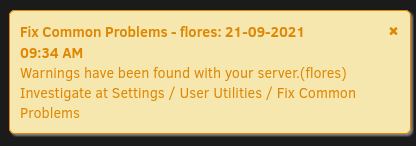
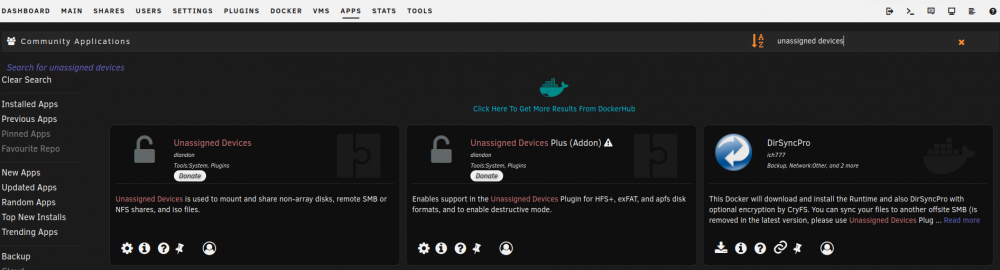
Thanks for the quick response. Diags attached. I don't think I need the functionality of UD+. I just don't like the Fix Common Problems to be in a warning state. Also, screen shots attached. flores-diagnostics-20210921-1721.zip

-
Power went out today and my server shutdown after the UPS turned on. Upon reboot, I see that "Fix Common Problems" is reporting "Unassigned Devices Plus not installed". When I go to try to install "Unassigned Devices Plus", there is no install icon. I already have regular "Unassigned Devices" installed. Is there something wrong going on with my server? Should I just ignore this message from "Fix Common Problems"?
-
Can someone spot check me on the following? If the influxdb is stored in appdata, my appdata is on an SSD cache drive so I don't want it to get too big. 1. Influxdb data is stored in appdata by default. 2. How can I limit the amount of data stored in the database? I saw a reference to something in this thread, but not much detail. Here's how I think this should be done: a. The default retention policy is called "autogen" and defaults to an infinite retention. # influx Connected to http://localhost:8086 version 1.8.4 InfluxDB shell version: 1.8.4 > SHOW RETENTION POLICIES ON telegraf name duration shardGroupDuration replicaN default ---- -------- ------------------ -------- ------- autogen 0s 168h0m0s 1 true > To change this, issue this command to set it to, say, 4 weeks: ALTER RETENTION POLICY "autogen" ON "telegraf" DURATION 4w DEFAULT Other lengths of time are specified by a "duration literal" and are defined here: https://docs.influxdata.com/influxdb/v1.8/query_language/spec/#durations (minimum retention is 1h)
-
Need some help with Macinabox and High Sierra. I tried Googling around and couldn't find anything. 1. What do I need to do with OpenCore Configurator in High Sierra? It seems different than the Big Sur example in the video. I also can't see the main drive to mount to copy EFI and Nvars to the main disk. 2. If I have to hit enter when it boots up, how can I pass a graphics card to use something other than VNC? With a graphics card passed through, I can't press enter for it to continue. 3. How do I pass through a DVD drive from the server in High Sierra? 4. Is there any reason to keep the macinabox docker running after the creation of the VM?
-
Quick question: Does Macinabox Catalina sound only work with an AMD GPU?
-
I can't seem to install Xcode in my VM because it says there isn't enough drive space. I have about 39GB available on a drive called "Catalina" and 2GB free on a drive called "macOS Base System". Is it trying to install Xcode to the smaller drive?
-
Generally speaking, agreed, but in this specific case a description of the simple use case versus a more involved one is relevant I believe.
-
Any further updates on this issue? I'm about to post a related issue. I can't believe this is a problem for my fairly simple setup. Right now I'm using fstab and SMBv1.
-
I only started having this "stale file handle" problem when I switched to using mounts in /etc/fstab. Prior to that I was just using shortcuts in Thunar. I think this method uses gvfs. I noticed that the shares were faster when I specified them in /etc/fstab and browsing to my /mnt directory in the file system. Other than specifying SMB1 in /etc/fstab, has anyone found a better solution that uses SMB3?
-
Thanks! Got it! For those newbies like me, stop the container, go to Edit, turn on Advanced View, then add "--hostname server" to the "Extra Parameters" field where "server" is your new hostname. Start up the container and you're good to go.
-
How can I change the hostname of this docker? I think I need to edit /etc/hostname and maybe /etc/hosts, but there doesn't seem to be an editor included in the docker container (vi and nano are not found). I just want my system name to be something readable when I access the Rosetta site. Also, the string displayed when I run hostname in the console is different than the Domain name in the Rosetta site. Is there a different way to change it?
-
Thinking about this more - if Nextcloud updating is a manual process, what gets updated when the docker gets updated? I just noticed an update to the container (along with DuckDNS and Letsencrypt) but it's still at the same version(18.03) and not the latest(18.04).
-
Thanks, I think I see it. Some text was black and hard to read in my browser, but it looks like doing it through the Web UI is OK. Although, the last time didn't go so well, so maybe next time I'll try the manual method. "For upgrading the Nextcloud version, please see this guide here. Alternatively, you can update via the Nextcloud webui."
-
Do I need to regularly update Nextcloud from within Nextcloud or do the Docker updates keep Nextcloud up to date?
-
I got it! I restored an old version of Nextcloud from /data/updater-"instanceID"/backups and ran a manual update and it worked!
-
My instance of Nextcloud is also stuck. I edited the config.php file as you recommended and now it just says "Update in process". Before it said it was on step 6. Has anyone else gotten their Nextcloud back up and running after trying to upgrade to 18.03? Mine is dead in the water right now!
-
Ugh. After some experimenting, I found the culprit - MyEtherWallet Chrome Extension. Toggling it makes the issue appear/disappear. Removing it. Not even sure why that extension would even mess with web pages. I cleared a bunch of stuff in my system too. Lesson learned - next time start with extensions.
-
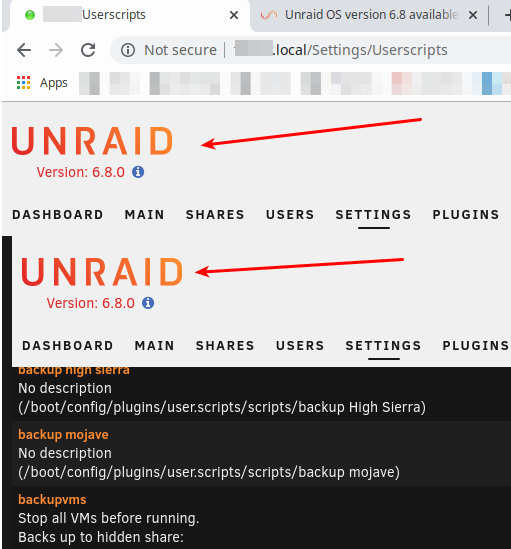
Upgraded from 6.7.2 and it went fast and smooth. However, I get a double header in my user scripts page using Chrome. If I use Incognito mode in Chrome, it works as does Firefox. I cleared my cache of everything except passwords. There's also a "Waiting for..." message at the bottom left of the screen on this page. I suppose I could use Incognito mode, but I'd rather not. Any ideas?