





nraygun
Members
-
Joined
-
Last visited
Everything posted by nraygun
-
Recently upgraded to 7.1.4 and looking through the syslog I see multiple entries like this every once in a while: Aug 12 13:30:46 flores flash_backup: adding task: /usr/local/emhttp/plugins/dynamix.my.servers/scripts/UpdateFlashBackup update Aug 12 14:00:46 flores flash_backup: adding task: /usr/local/emhttp/plugins/dynamix.my.servers/scripts/UpdateFlashBackup update Aug 12 14:30:46 flores flash_backup: adding task: /usr/local/emhttp/plugins/dynamix.my.servers/scripts/UpdateFlashBackup update Aug 12 15:00:46 flores flash_backup: adding task: /usr/local/emhttp/plugins/dynamix.my.servers/scripts/UpdateFlashBackup update Aug 12 15:30:46 flores flash_backup: adding task: /usr/local/emhttp/plugins/dynamix.my.servers/scripts/UpdateFlashBackup update Aug 12 16:00:46 flores flash_backup: adding task: /usr/local/emhttp/plugins/dynamix.my.servers/scripts/UpdateFlashBackup update Aug 12 16:30:46 flores flash_backup: adding task: /usr/local/emhttp/plugins/dynamix.my.servers/scripts/UpdateFlashBackup update Looks like it added a backup task every 30 minutes. Here it did it 7 times in a row. Earlier it did it 6 times, then before that, 19 times. There are few other things with the upgrade, but I'll tackle them one at a time. Why is it doing this? server-diagnostics-20250812-1804.zip
-
OK, thanks! I'm in a holding pattern for 7.1.4. Probably next month.
-
Was poking around in my syslogs and see that I started getting these types of errors right around when I went to 7.0.1 in March 2025: Mar 19 19:19:19 server smbd[941291]: [2025/03/19 19:19:19.657930, 0] ../../source3/smbd/msdfs.c:120(parse_dfs_path_strict) Mar 19 19:19:19 server smbd[941291]: parse_dfs_path_strict: Hostname #007SERVER is not ours.I checked the identity area and see that my server is named "server" (lowercase). Googling around says it's a smb.conf issue, but I see no mention of SERVER in the config and testparm -s looks OK. I think everything seems to work. What gives?
-
And what is the command? shutdown?
-
That's what I did but it shutdown pretty fast. Just worried the rug got pulled out from under it. Does "shutdown" perform a graceful shutdown? Stop containers, stop parity check if running, and such.
-
I'm having all kinds of fun these days with Unraid. Locked myself out of the GUI due to a bad wireless keyboard. I found the info on how to reset the root password but it says to shutdown the server to edit the shadows file. Since I couldn't get to the GUI to initiate the shutdown, I SSH'd into the server. Kinda surprised that worked. When I entered powerdown, it said the command has been deprecated. So I did a shutdown and it shut down pretty quickly. I was running a parity check at the time. Did the shutdown command shut the server down gracefully? If the powerdown command is deprecated, what do I use instead? As long as I'm asking, how do I also stop a parity check via CLI? I see there's a pause and resume, but no stop with the "/usr/local/emhttp/webGui/scripts/parity_control" command.
-
Wound up using the manual method with the backup from the Unraid Connect site. I added the passwords back for the users. I think I'm all set. @JorgeB and @trurl - Thanks for the help! PS - My backup drive died too! It was unreadable on two systems. Bought a pair of new WD Red Plus drives from Amazon and backing up now.
-
I tried to proceed with the backup from the Unraid Connect service and the Windows tools seemed to think this was a new install. It asked for the server name, IP, netmask, etc. When it was done, there was no config folder on the drive. Trying the manual method with the back from Appdata...
-
@JorgeB In preparation for the new USB drive, I see this in the dox: "Important: Backups from the flash device do not include the config/shadow or config/smbpasswd files. User accounts are preserved, but their passwords are not." And also, "This service is intended to store configuration files that will allow you to get back up and running quickly, it is not a 1:1 backup of the contents of your flash drive." I was expecting to restore from a backup and be back up and running like it was before. Not sure I can use the back up from Unraid Connect to get there. Luckily, I was running AppData Backup and I have a backup in the array from a week ago that I can get to from a Linux distro on my Ventoy drive. I see it has the config/shadow or config/smbpasswd files. Will the Windows Flash Creator tool work with the backup from Appdata Backup?
-
Tried to repair the USB in Windows. That might have been the final nail in the coffin. I see a bunch of these in the syslog: May 16 17:03:32 server kernel: Buffer I/O error on dev sda1, logical block 2358, lost async page write and then this: May 16 17:05:00 server emhttpd: offline: SanDisk_Cruzer_Fit_XXXXXXXXXXXXXXXXXXXX-0:0 (sda) 512 31266816 May 16 17:05:00 server emhttpd: Unregistered Flash device error (ENOFLASH3) Waiting for new USB drive to get delivered...
-
How will I get the GUID off of the new drive? Also, in preparation for the transfer, I tried the Linux version of the creator tool and it's asking for all sorts of libraries: Selecting previously unselected package unraid-usb-creator. (Reading database ... 393924 files and directories currently installed.) Preparing to unpack unraid-usb-creator-1.0.1.deb ... Unpacking unraid-usb-creator (1.0) ... dpkg: dependency problems prevent configuration of unraid-usb-creator: unraid-usb-creator depends on libarchive13t64 (>= 3.0.4); however: Package libarchive13t64 is not installed. unraid-usb-creator depends on libcurl3t64-gnutls (>= 7.16.2); however: Package libcurl3t64-gnutls is not installed. unraid-usb-creator depends on libgnutls30t64 (>= 3.7.0); however: Package libgnutls30t64 is not installed. unraid-usb-creator depends on libqt5core5t64 (>= 5.15.1); however: Package libqt5core5t64 is not installed. unraid-usb-creator depends on libqt5dbus5t64 (>= 5.14.1); however: Package libqt5dbus5t64 is not installed. unraid-usb-creator depends on libqt5gui5t64 (>= 5.10.0) | libqt5gui5-gles (>= 5.10.0); however: Package libqt5gui5t64 is not installed. Package libqt5gui5-gles is not installed. unraid-usb-creator depends on libqt5network5t64 (>= 5.12.2); however: Package libqt5network5t64 is not installed. unraid-usb-creator depends on libqt5widgets5t64 (>= 5.0.2); however: Package libqt5widgets5t64 is not installed. unraid-usb-creator depends on libstdc++6 (>= 13.1); however: Version of libstdc++6:amd64 on system is 12.2.0-14. dpkg: error processing package unraid-usb-creator (--install): dependency problems - leaving unconfigured Processing triggers for gnome-menus (3.36.0-1.1) ... Processing triggers for mailcap (3.70+nmu1) ... Processing triggers for desktop-file-utils (0.26-1) ... Processing triggers for hicolor-icon-theme (0.17-2) ... Processing triggers for man-db (2.11.2-2) ... Errors were encountered while processing: unraid-usb-creator
-
@trurl - Yes, I had done a transfer 6 months ago. Drives were funky then too. @JorgeB - Ticket submitted for advice on how to proceed. I don't have a replacement thumb drive yet.
-
Thanks @trurl The USB is acting really wonky. I have a Sandisk MobileMate and an industrial SD card but it too is acting wonky(have to push hard for it to be recognized on server and on my desktop). At this point, I think I'm done with Sandisk. Plus the they are not recommended from the blacklist info posted around here somewhere. I'll get a new drive(recommendations?) and reinstall from the backup. The only problem is that I had to restore from a backup less than 6 months ago so I think I have to contact Lime Tech to transfer the license. Clicking the link in the Docs shows a few ways to contact them. The Discord link is invalid, there's no option to send a message in Facebook, I don't have X, not sure how fast Reddit would be. @JorgeB Is this something you can help me with?
-
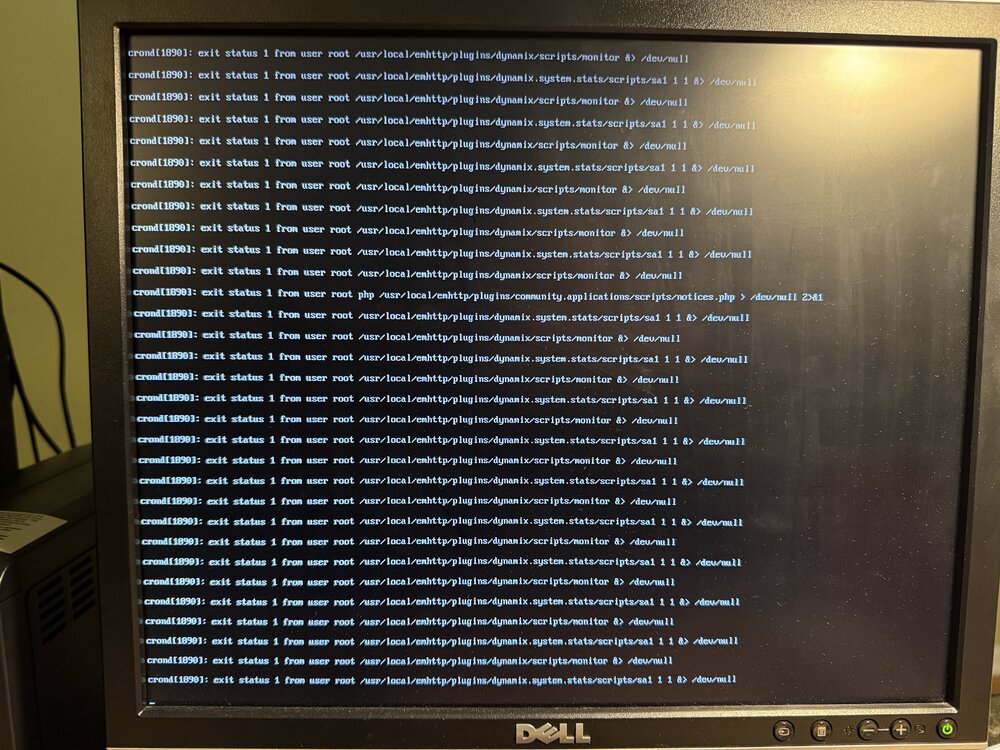
It crashed again. Some containers are running like Qbittorrent. The console of the server shows "unraid exit status 1 from user root /usr/local/emhttp/plugins/dynamix/scripts/monitor &> /dev/null" and "unraid exit status 1 from user root /usr/local/emhttp/plugins/dynamix.system.stats/scripts/sa1 1 1 &> /dev/null. I see that dynamix.unraid.net.plg was updated last Saturday. Powering off and will try to remove the system stats plugin.
-
Hmmm. It might be the USB header I have installed on the motherboard. In the syslog I see a bunch of entries that suggest the drive disconnected or died. May 15 09:25:48 server kernel: usb 1-6.1: USB disconnect, device number 7 May 15 09:25:48 server kernel: device offline error, dev sda, sector 3633768 op 0x0:(READ) flags 0x0 phys_seg 1 prio class 2 May 15 09:25:48 server kernel: sda: detected capacity change from 31266816 to 0 Then a bunch of SQUASHFS errors. Either the USB drive is bad or the USB header is wonky. Not convinced the drive is bad since I had created it from a backup in the last 6 months. I booted my Ventoy drive and went into Linux. There was no Unraid drive detected. I then removed the drive from the header on the motherboard and plugged it into the front USB. It was detected. In the event I need to replace the thumbdrive, I checked a Sandisk MobileMate SD reader I have. To make it work consistently, I have to push on it. I bought this in December of 2024 as part of my server update but never got around to using it. I have a ticket open with Sandisk on this. I now have the original drive plugged into the back of the server instead of the header. It's running a parity check again(of course).
-
Now it doesn't see the thumb drive again,
-
Well wait. I tried to shut down the server and it's now stuck and displaying these messages: crond[1890]: exit status 1 from user root /usr/local/emhttp/plugins/dynamix/scripts/monitor &> /dev/null crond[1890]: exit status 1 from user root /usr/local/emhttp/plugins/dynamix.system.stats/scripts/sa1 1 1 &> /dev/null I'll try a hard power off then try to disable the plugin it appears to refer to.
-
It got stuck again. I can't open the dashboard nor SSH into it. Also, the shares are not available. The display I have connected to it doesn't show any error. Containers seem to be running. I think I'll restore a backup of the flash to a new drive. But I just moved to a new flash drive at the end of 2024. I think I would have to request the transfer to the new drive but I don't know how to get the GUID. I'll try contacting Unraid support.
-
Well, for a minute there, another USB wouldn't boot properly(Linux off of a Ventoy drive). Then when it did, it was funky - Thunar didn't load properly and other weirdness. I did a few things. I put one of the backup drives back. I also connected the second power supply port on the motherboard to the PSU. The manual for this second ATX12V2 port says it's optional. It had been running since late 2024 without this second power supply. I then booted Ventoy and into a Linux distro a few times off of the front USB ports and the internal port. I also updated BIOS to the latest for the board. Now it's doing a parity check.
-
Thanks for the quick reply @JorgeB Maybe the USB drive? This morning the dashboard would not load nor could I get to it from SSH. I had to reboot it but then the USB was not recognized. I checked cabling and then turned off the PSU using its switch. I switched the PSU back on and it booted. It then found the USB drive again. Is there a diagnostic I can run on the USB drive?
-
Well hell! Was on the road this weekend accessing my server via Tailscale. All of a sudden it prompted for a password as if it were freshly installed! When I got home, it was in the same state. I had a hard time getting it to boot off of USB drives. A distro on a Ventoy drive was even acting a little funny. At first I thought the USB drive died so I looked for a backup on Unraid Connect. There wasn't one there! I guess when I upgraded to 7.0.1 the online backup must have gotten turned off. I then decided to simplify the system and removed two backup drives I have in removable bays in the case. Thankfully, it booted up! WHEW! It's doing a parity check right now. I plan on putting back my main backup drive when the parity completes tomorrow. Is this an indication of a bad PSU or something else? I have a Corsair RM750x and right now it has only 3 spinning drives, an SSD, and the boot USB. Motherboard is an ASRock Z790 PRO RS WiFi Intel. server-diagnostics-20250511-2147.zip
-
Not sure why my search didn't show the other threads on this topic. Maybe I didn't have the proper search scopt. Anywho, I see there's work in motion in the thread below. I'll follow that one. Perhaps my thread on this topic should be deleted?
-
Booting in safe mode doesn't show the /tmp/inline.sh error. How can I determine which plugin is the problem? Is there a way to disable them one at a time?
-
While trying to diagnose another error in the syslog, I rebooted and saw the error in the title. I think the other issue I'm having is plugin related too. Any ideas? server-diagnostics-20250223-1413.zip
-
I removed the FolderView plugin and I still get the error.


