





nowhere99
Members
-
Joined
-
It's just bugging me out that I have files in this ONE encfs folder, physically on the array, with no signs of it on the cache but it only is visible in /mnt/user, You cannot see it in /mnt/user0. Encfs must somehow be hiding it by not allowing it to be visible in whatever replication scheme unraid is using to have a /mnt/user0...
-
This was a good suggestion and originally that was the case. The folders in question had been created with a mv command from a share on cache to a share on array. Linux just decided it will work to just rename the file instead of actually moving anything. And normally it does except with Unraid, that renames the file name but not the path since it's physically on the same drive space. Results in a folder that's physically on a cache drive even tho Unraid share is set to array only. But it doesn't account for new files being generated and not visible on user0 even tho they are physically on the array and not cache.
-
Thanks all. I know you're probably used to all the "what's the diff between user and user0" questions but that's not really my question. My question is about a newly created file, created long after the share was set to primary Array, secondary nothing. Whenever ANY FILE or FOLDER is created by any means in the decrypted folder while encfs is running in the docker, that file or folder is visible in /mnt/user but NOT visible in /mnt/user0 (incidentally, it also not visible in /mnt/cache either). So this is a case where a file is orphaned to show ONLY in the /mnt/user tree and not the other two. A side note: If I shut down encfs, and then create a file in that exact same folder, it IS visible in /mnt/user0 (but still not /mnt/cache because it's not supposed to be). My SUSPICION is that since user0 is deprecated, devs aren't spending any time on it (rightly so) and in this encfs case, that clearly can contol what is visible in a folder by some magic I don't know, just hasn't been accounted for in whatever code would normally make a file visible in user0. Again, I AM curious why, BUT the real question is do I care that a newly create file on a long time set ARRAY only share can for whatever reason show in /mnt/user but NOT show in /mnt/user0. And accept my gratitude for all the work you all spend on developing and entertaining our questions here!
-
Hi, I read that user0 implementation is deprecated but I want to check if something I am doing has unknown consequences. I have a test share "test", which is set to Array Only. I have a manually spun up docker container that has a barebone ubuntu image with encfs installed. I run it from the command line and run the encfs command via docker exec to prevent an encryption password being stored in a config somewhere. I have the permissions and bind-mount propagation set to what I believe is the proper settings. the /mnt/user/test/enc and dec folders are synced properly inside and outside the docker. If I peek in /mnt/user0/test, both enc and dec folders are there, all the enc files are there BUT the dec folder is empty. I suspect this is related to encfs somehow but I don't even know what /user0 is doing to be a "mirror" of /user but without cache files. Anyway, since user0 is deprecated, do I really even care? Can anyone point out a blind spot I have on this before I try to utilize this encrypted folder? THANKS!
-
I think I've solved it. I had already added --cap-add SYS_ADMIN and --devices /dev/fuse to the run command but I also added --security-opt apparmor=unconfined and made sure the volume lines ended in :shared and now it works. The real fix was the unconfining apparmor tho. Fun stuff! Thanks itimpi! UPDATE: I'm still testing. the mounts are located in a share "test", set to ARRAY only. I have /mnt/user/test/enc and /mnt/user/test/dec set as bind mounts with my solution above in the docker run and image creation, they are bound to /enc and /dec in the docker. Almost everything works GREAT. Creating files in /mnt/user/test/dec automatically creates the encrypted version in /mnt/user/test/enc. BUT if I look in /mnt/user0/test/dec, I don't see any of the files I create in /mnt/user/test/dec. However, I DO see the encrypted versions in the enc folder on both user and user0. So, I THINK something is still wrong with "propagation" but I don't think it's in the same terms as "docker bind propagation". Bind propagation seems to deal with sub mounts, not visibility of files in hard links of the decrypted folder. Is this getting interesting to anyone yet?
-
I think I've solved it. I had already added --cap-add SYS_ADMIN and --devices /dev/fuse to the run command but I also added --security-opt apparmor=unconfined and made sure the volume lines ended in :shared and now it works. The real fix was the unconfining apparmor tho. Fun stuff! Thanks itimpi!
-
I ran a test on a linux mint bare metal machine where I created an ubuntu docker image and installed encfs on it. If I map the encrypted folder and decrypted folder volumes, then any file I put in decrypted folder was encrypted into the encrypted folder and the docker and host sides were perfectly synced. Now I try to repeat on my Unraid machine. While in the docker image, a file placed in decrypted folder is encrypted just fine and shows up in the encrypted folder properly. If I look in the encrypted folder on the host, I see the encrypted file. If I look in the decrypted folder on the host, it's empty. If I create a file in decrypted folder on the host, it is NOT visible in the mapped folder inside the docker. When I unmount encfs inside the docker, now the file I created on the host is visible inside the docker. In fact, while encfs is not mounted, syncing in and out of the docker is fine. Since it's only the decrypted folder that not visible outside the docker, it has to have something to do some kind of encfs visibility permissions. I did try to encfs mount with -o allow_root and allow_user but it didn't help. What's going on? Thanks! UPDATE: I just tried the same scenario using a linux mint VM with the exact same results.
-
Hey! Anyone still following this forum topic? It's been a while. Just found and installed it but not sure I like what I have to do to get android scrobbling working. The apps all require some crazy permissions. If anyone is here, I'll post a specific question... Thanks!
-
This doesn't work for the 870 EVO. The fumagician script just complains about the required files not being located in the correct path. ERROR (7) Firmware Files Required For the Firmware Update Process are Not Located in the Correct Path!!!
-
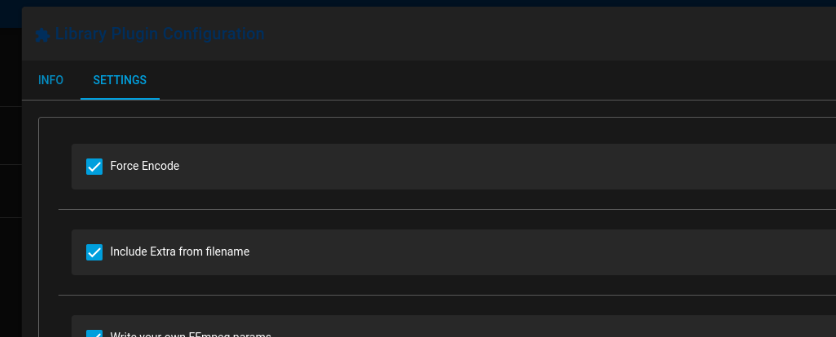
Hey Josh, I'm actually really enjoying this project. Once I got a handle on the plug-in system it was pretty simple to start modifying. If you recall I had a specific case where I wanted Unmanic to watch a folder and re-encode anything that showed there and the current h265 plug-ins would ignore any h265 files that were dropped in that folder. I modded the h265 cpu plug-in to add a force encode flag as well as a flag to signify that the plug-in should accept some ffmpeg options included in the filename of the file dropped into watch folder (i.e. -ss or -to to trim the file). I may touch base with you to see if there's a better way you envision to do file specific processing like this but for my specific case, it's working right now. But since it's totally specific to my case, I haven't tried to push a new plug-in but I'm willing to work to that end. Great project Josh! I'm loving it! Eric
-
AH! Just use the post processor plugin?
-
Oof. Deal breaker. Too bad. Wasted a ton of time getting it all set up, testing how custom ffmpeg commands are sent.
-
I'm assuming there's no way for me to decide when the runner asks to encode a file? I have a large library of ridiculously large h265 files that I wanted to re-encode with my own setting back to h265 but unmanic decides they are already h265 so does nothing to them. Can I change this anywhere?
-
Hey team. Intermittently, this container pegs 100% of the cores at 100% utilization. I haven't been able to nail down why but I get notified my SSD temp is high (46C) and it's because the cores are pegged. So however many cores the container is allowed to use get pegged to 100%. I limited the cores to only 4 e-cores for the time being. This phenom is happened on the Sonarr container a couple times also. I don't see anything interesting in the logs. Any ideas? What do you need from me to help troubleshoot? Edit: Oh yeah, just restarting the container stops it and gives me another few days or so before it happens again.
-
Thanks for the update!

