





PitRejection2359
Members
-
Joined
-
Last visited
-
Hi, I recently got a UPS and it's working great with the NUT plugin, apart from 1 thing: when the power goes out, I don't get an email notification saying its gone to battery, or a notification saying its gone back to mains. I get the warnings in the unraid GUI, and all other notifications from unraid are sent correctly via email, just nothing from NUT. I can't see any specific setting for email notification in the plugin, so what am i doing wrong?!
-
Hey, just to add that there's a feature request here that asks to add this to core Unraid - worth adding a vote for it.
-
Thank you for all your work. 👍💪
-
Thanks - I'll give it a go and see if I can work it out. Thanks - that's useful to know.
-
I think that I might need to set the drives to the ones I want to use, and then use the split level feature and set it to manual, and manually create the folders on the right drives? But I'm not 100% sure that is going to work correctly?!
-
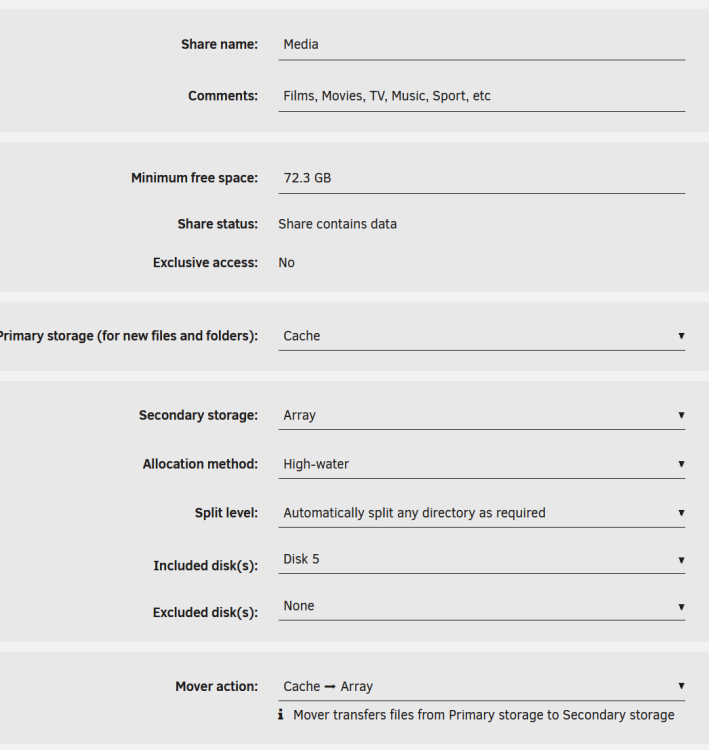
Thanks for the swift reply. Yeah, I'm aware that this is limited to disk 5 as it is currently set. If i remove this (or add the other disk that I want to use for media), how do i ensure that each of the sub folders only use the disk I want the sub-folder to be on? For example, I want the "Movies" sub-folder on disk 5, and "tv shows" sub-folder on disk 4, but both shared under the "media" share. They are both currently on disk 5 and are sub-folders in the single share called "media".
-
Hi, I have a share called Media, with sub-folders for movies, music, TV, photos, etc. Is it possible for me to place these different sub-folders on different drives in my array, and still appear in the same "Media" share? I'm also not sure how I make sure any new media added to to the folder goes to the right drive, as i can only see how to specify disks for the whole share, not each sub-folder. Thanks in advance!
-
reboot fixed it - thanks very much - I was starting to get worried!
-
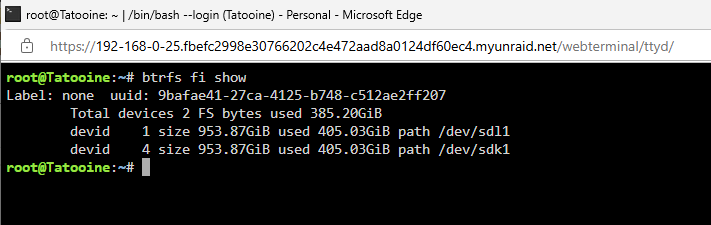
thanks. output and full diagnostics attached tatooine-diagnostics-20250412-1326.zip
-
Hi @JorgeB, I think I did everything as per the above steps, but after creating the new pool and adding the 2 1TB SSDs, then restarting the array, I get the error that: "Unmountable: unsupported or no file system". I tried swapping the 2 cahce drive into position 1 and 2 to see if that helped, but got the same result. I've attached the syslog here as well.
-
thank you so much - I've no idea how I managed to change that!
-
192.168.0.3
-
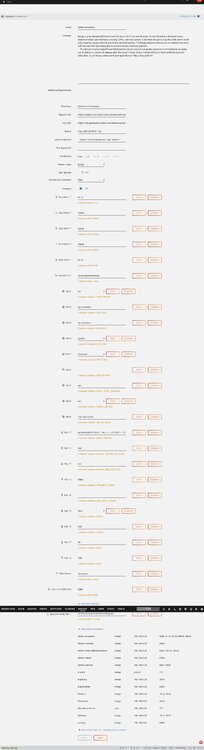
Hi @binhex, I have recently had my VPN go wibble; I was using an openvpn config file that worked fine for ages but just started getting errors about AES-256-CBC cipher. I've had this before and managed to fix it with a new config file, but thought it would be a good time to switch to Wireguard. So I created the new wireguard config file, changed the config in unraid, uploaded my config file, and rebooted the Deluge docker follwinf the instructions at Q21 here. The logs see to show the wireguard connects fine and it loads the GUI according to the logs (attached below). However, I can't access the GUI from my within my network - it just times out. I suspect I need to change a variable in the unraid docler config, but I'm not sure which. Screengrab of me setup attached too. Any help much appreciated! Unraid Binhex Deluge Load Log.txt
-
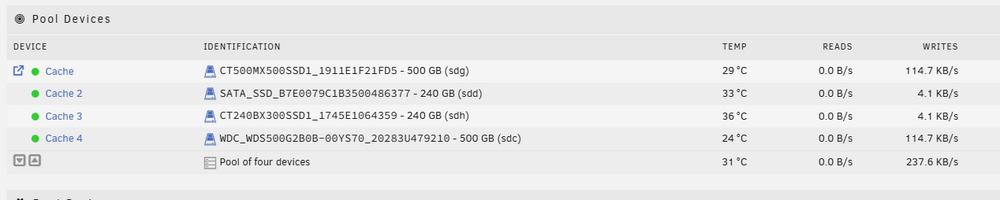
Hi @JorgeB, So I've been away from my server for a few weeks, and now back and ready to proceed, albeit a little nervous! I think I've mapped out all the steps needed, in sequence, using the drive info for my cache as set up in the image below: Steps to Follow (combination of your instructions above and the linked Docs): Turn off Docker & VMs Replace the first disk (sdd / Cache 2) Stop the array. (optional) Physically detach the disk from your system you wish to remove. Attach the replacement disk (must be equal to or larger than the disk being replaced). Refresh the Unraid WebGUI when under the Main tab. Select the pool slot that previously was set to the old disk and assign the new disk to the slot. Start the array. Device replacement will start automatically. Turn off Docker & VMs Replace second disk (sdh / Cache 3) Stop the array. (optional) Physically detach the disk from your system you wish to remove. Attach the replacement disk (must be equal to or larger than the disk being replaced). Refresh the Unraid WebGUI when under the Main tab. Select the pool slot that previously was set to the old disk and assign the new disk to the slot. Start the array. Device replacement will start automatically. Remove unnecessary disk 1 (sdg / Cache) With the array running type on the console: btrfs device remove /dev/sdg1 /mnt/cache Remove unnecessary disk 2 (sdc / Cache 4) With the array running type on the console: btrfs device remove /dev/sdc1 /mnt/cache Turn off Docker & VMs Import the 2 remaining new disks into the pool on main click on the first device for that pool and then "remove pool" back on main, create a new pool with the same name and two slots assign the pool devices, leave the filesystem set to auto start the array to import the pool Hopefully that's right and has everything I need to do...! Many thanks.
-
OK, thanks - I'll give that a go then. Cheers!




