





loady
Members
-
Joined
-
Last visited
Everything posted by loady
-
i have my appdata folder set to cache only
-
Didnt work for me, i changed the path and and created a new world and i can see that the server is created in /mnt/user/appdata/minecraftos/server, i can also see previous servers that were created, alas, upon reboot the servers dissapear from the GUI...might be worth a reinstall ? im not holding my breath.
-
sorry to hear that, hope you are better. Im just wondering do i have template setup correctly, /var/games/minecraft /mnt/appdata/minecraftos/ i can see servers previously created in /mnt/cache/appdata/minecraftos/servers I used winSCP to do exactly what you did, is there a way to check that it actually got done ?
-
is this working or not ?..is it actually being supported in anyway ?
-
Now I have this working, I'm not wholly convinced its any better than CP, I have found that media management is somewhat scratchy, I can browse to my films folder but it doesn't show all the films in my library, I thought maybe it is not seeing into the subdirectories, its seems to sit on updating library for a long time, it only ever shows 69 records. If I just add the movies folder as my media it sees the subdirectories folders as films and tries to match them, I have also tried adding each sub directories one by one but it seems to only see into one folder at any time, hence only picking up a few records.
-
Yes I totally did, it took all my hair...let me give something back..... basically in the docker template, where it asks for the path to media or data, put in the path to your movies, for me it is /mnt/user/movies, I also added a category in sabnzbd called movies so that they get put into that folder within /mnt/user/movies so I know that was scraped via radar. So in docker template on CP, it says /movies and I have the path set as /mnt/user/movies (for me) and in radar docker template it says /media and I have that mapped to the same location /mnt/user/movies
-
im now bulk importing movies, my movies share has different folders for different categories, ie, family, my movies, couch potato etc..do i need to add each folder ?...i have about 300 movies within these folders collectively, does this take a long time ? will it laso search sub directories
-
Im sure you are all fed up with my not understanding. i found i a video guide that showed me what to do and now i can see where i wasnt understanding.
-
doing this makes a new sabnzb folder in mnt/user/downloads, before it messed it all up my sab docker was at mnt/user/appdata and appdata folder was set to cache only, downloads were set in sab to goto mnt/user/downloads/incomplete and moved to mnt/downloads/completed. Now I cant get it back to how was
-
I did, now all its done is set up the sabnzb config files into mnt/user/downloads and sab starts as if it is a new install..thats not right. doing this means I cant have the sab app folder into appdata folder with all my other dockers. Your saying I need to change where the /config folder resides, doing this makes a new sab folder, so basically I cant have sab in /mnt/cache/appdata/sabnzbd if I change config to /mnt/cache/downloads, changing /downloads to /mnt/cache/downloads is not possible as I am stuck in /config which is mapped to /mnt/cache/appdata/sabnzbd
-
hmmmm...see I never changed it prior to using radarr, sab Docker was /mnt/user as op suggested. It worked fine with sab and cp..think this is where all the confusion started when I started using radarr
-
right...so I can change it from config ??
-
this is how I had sab setup before I added radarr to the mix...worked fine with cp and sonar yes that's what I wanted but wasn't seeing it.
-
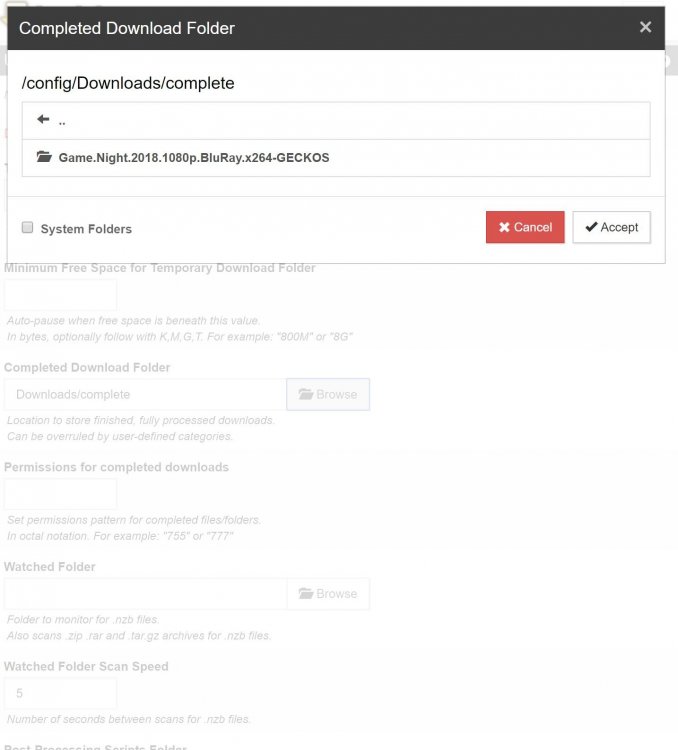
so i have set the paths the same...sab is putting the downloads in /config/Downloads, i can see them there via ftp but radarr not
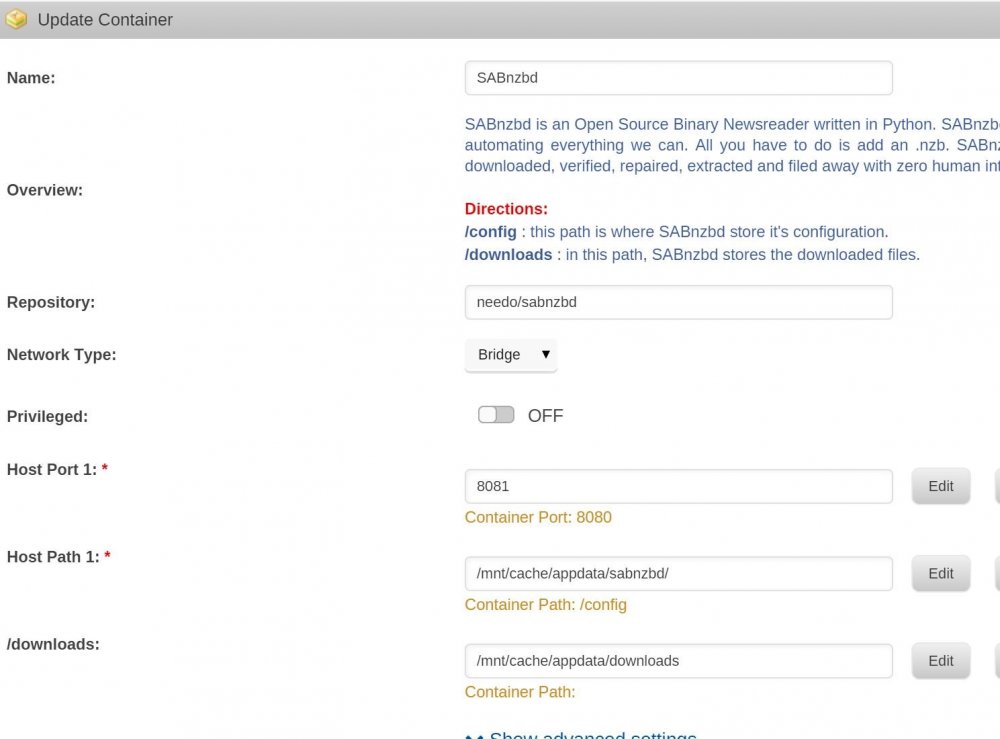
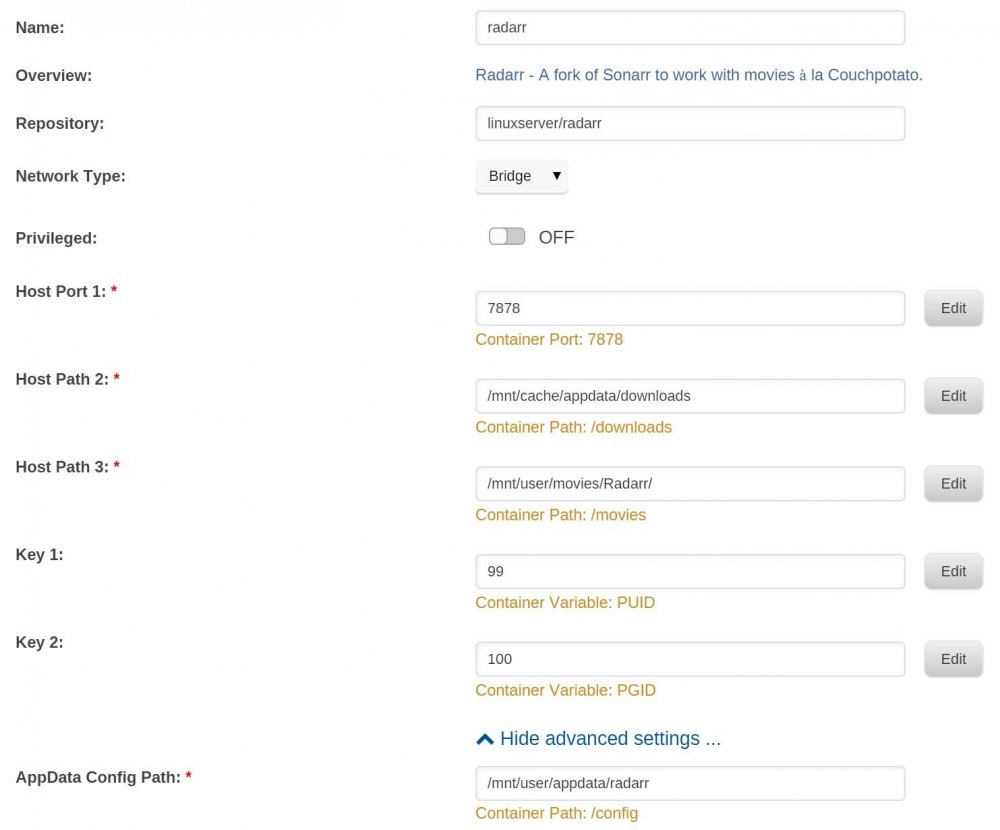
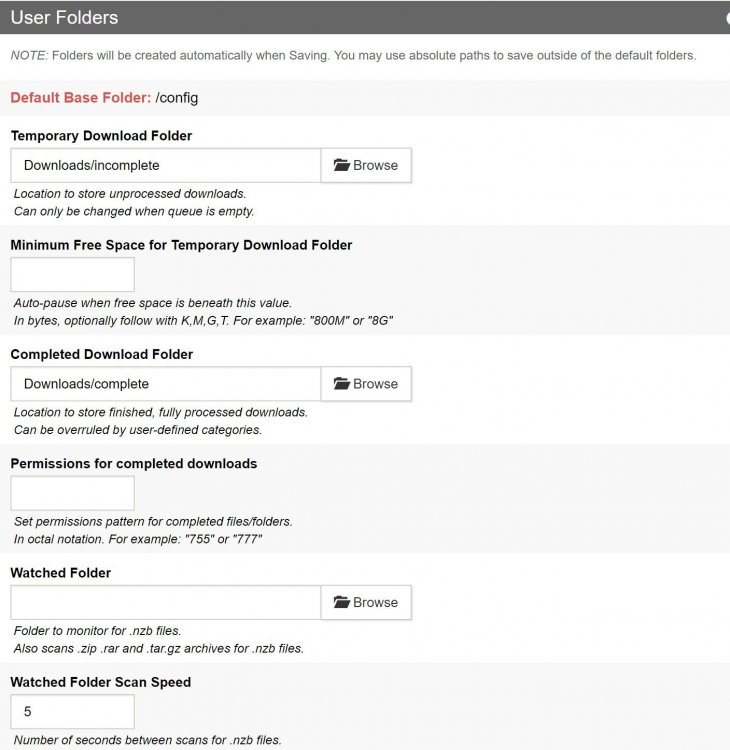
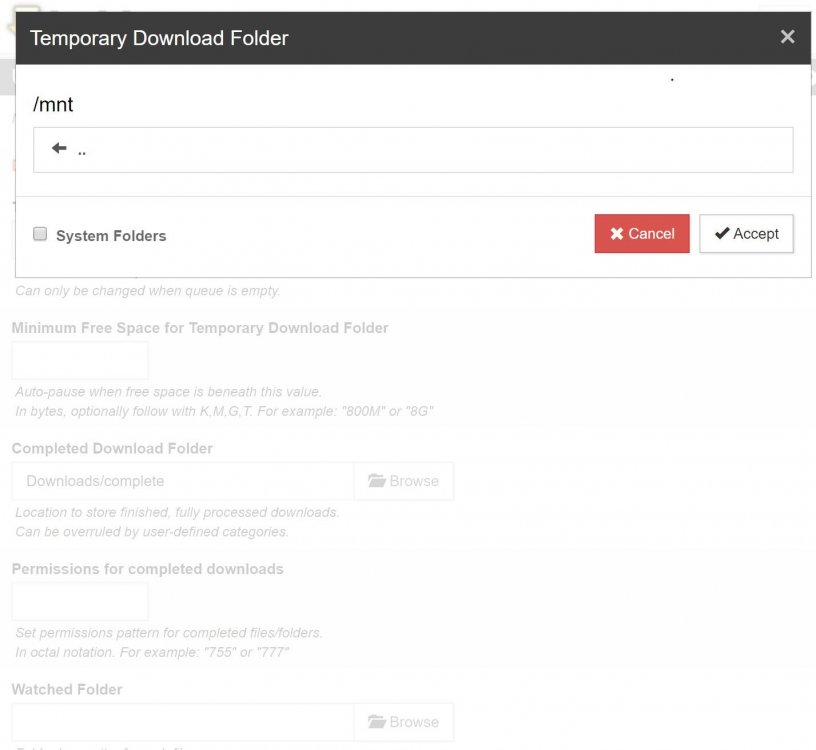
-
now its completly fucked up...set a film to download in radarr and sab has downloaded...saying it is at Path /config/Downloads/complete/Game.Night.2018.1080p.BluRay.x264-GECKOS/d1022548832541d9af475869a0a21f0a.mkv can find it...i never told it to put there ffs EDIT: found it...its now in /mnt/cache/appdata/sabnzbd/Downloads/complete i made a fiolder in /mnt/cache/appdata/downloads and its not gone there. I want mt download folder to be /mnt/cache/downloads (for whilst downloading) and /mnt/cache/downloads/complete (for when sab has finished unpacking etc....then i want radarr to see it and move it to /mnt/user/movies/radarr why is it so bloody cryptic !!!
-
still not getting this...so i wanted to set sab to move movies downloaded via radarr to /movies/radarr so in docker template i set another host /mnt/user/movies/radarr and then i went to catagories to set path but i cant browse to it
-
i think im getting there....so if in sab docker template i set a host for downloads and call it /kissmyballs, then this folder will appear as a folder in sab for me to browse to for the downloads
-
right...im going to build from the ground up.... Proper way to set up the mappings: App Name Container Volume Host Volume nzbGet /config /mnt/cache/appdata/nzbget /downloads /mnt/cache/appdata/downloads sonarr /config /mnt/cache/appdata/sonarr /downloads /mnt/cache/appdata/downloads Tell nzbget to store the files in /downloads/completed, and sonarr will be able to find and import the files because both the host and container volume paths match. TLDR: Trust me the above works. Using the above, just a quick question, i dont physically write /cache/ part of my mappings, this appdata was originally written as /mnt/user/appdata and then set to cache only, if i were to write it as /mnt/cache/appdata, would i get to the same place ? essentially is /mnt/user/appdata (set to cache only) the same as /mnt/cache/appdata. Thinking about it, i think this is where my confusion is emanating from.
-
ill be having another bash later. My sonarr works, why not radarr with same mappings
-
yes. With sab docker template, I had it set to /mnt/user and within the sab gui it let me set downloads/incomplete and /downloads/completed by browsing to them...it worked. Radarr doesn't have a way to do this.
-
the plot thickens. I'll try again but I really need to have it working so I can see and understand
-
I'm lost
-
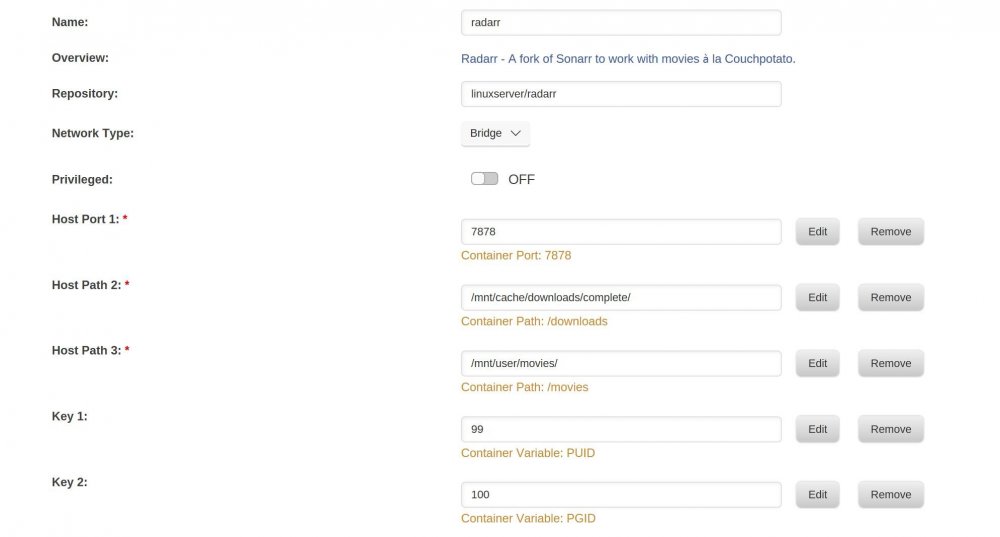
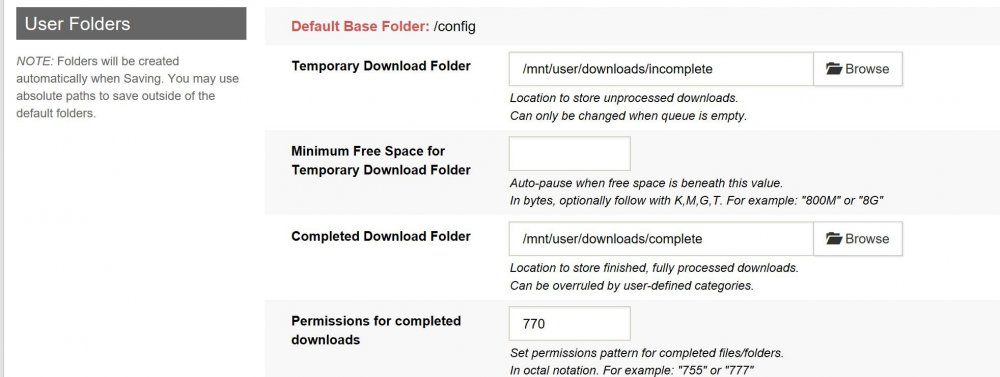
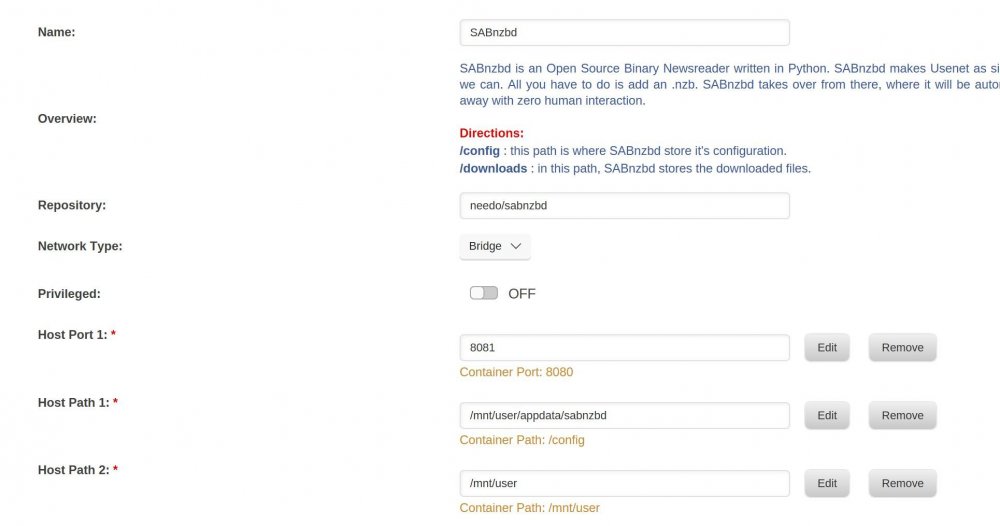
am I missing something here?.... I attached snippets of settings. Sab is being instructed to move finished downloads to /downloads/completed and radar downloads is pointing to downloads/completed.
-
ok, but isn't that going to upset my cp and sonarr ?
-
Ok, so it sounds like i need it like this ? sabnzbd /config /mnt/cache/appdata/sabnzbd Radarr /config /mnt/cache/appdata/radarr /downloads /mnt/cache/appdata/downloads/completed/ My appdata folder resides on cache drive and set to cache only and so is my /downloads folder,. Within sabnzb it is set to download to /downloads/incomplete and when finished, move it to downloads/complete. is this correct ?


