





nickctn
Members
-
Joined
-
Last visited
Everything posted by nickctn
-
Have you managed to figure this out? I'm getting the same response when running those 2 commands from my main unraid server which has the plugin, but no issues when running them on my backup unraid server which doesn't have the plugin installed.
-
So I just realized that my tailscale plugin hasn't been able to connect for a couple of months now. I have tried uninstalling it, and reinstalling but then it won't let me login. When I press the login button it doesn't do much and then opens a blank page. Any ideas? I have uploaded my plugin diagnostics ID: 48157fdd7a483240c3163f8d2005f2fc
-
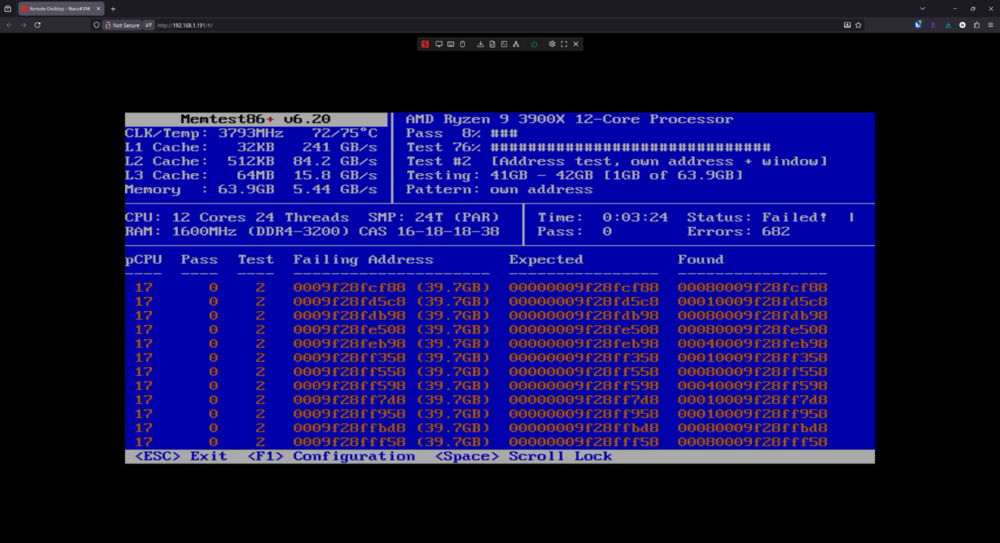
So I swapped out my ram from my desktop and put those into my unraid server. It passed the memtest and everything seems stable up to now. Tested the old ram in a different system and it failed again. Luckily they are still under warranty so might be able to get them replaced.
-
Just started it and this is what I'm seeing. Would it be worth it to try re-seating the ram given that I haven't touched it in the past 4-5 years? And that these problems started more recently.
-
Thanks, I'll get started to running the memtest. Not the best time to be getting new ram if that's really the case...
-
Hi, I've been having issues with my unraid server recently. The most recent was that my dockers would become unresponsive, and I couldn't access the unraid gui anymore. I was able to still ssh into it to generate a diagnostic which i have attached. Thanks, ctn-tower-diagnostics-20260222-1200.zip
-
Have you ever figured this out? I'm having the same issues with some of my files.
-
Did you ever figure this out? I just started getting the same thing. Edit: So in order to solve this on my side, here I steps I took. 1. Stopped grocy 2. Renamed my grocy appdata folder 3. Started grocy, then stopped it again after a minute 4. copied data/storage , data/config.php and data/grocy.db from my old appdata folder over to the new grocy appdata floder 5. Restarted grocy and everything worked!
-
Mind sharing your reverse proxy configuration? I can't seem to get mine to work.

