





David Bott
Members
-
Joined
-
Last visited
Everything posted by David Bott
-
Greetings....Been thus this for a long time, so thanks! I did receive my first error ever last night where none of my dockers restarted. I can not seem to find the local degug log, looked and looked and can just find the backup log which tells me to look in the debug log. (I can find no TMP directory anywhere.) But it seems I can share it with the developer for help...So...HELP! If I reboot the server, all dockers come back started. If I try running a backup, they fail again to restart. (I am not out of drive space anywhere.) 9b514ef6-4d0c-45be-8da9-6c709178a192 Looking forward to a response. Thank you. UPDATE: So I restarted the server again and tried a manual backup again and it seemed to work without issue. Still would like to know what the degug log reported as to an issue. Pondering. David
-
Also the same on 6.12.15. Thanks
-
Agreed...Or even just a notice. It kind of freaked me out when I upgraded to 6.12.15 and got an "Error Notice" sent to me. I am not 100% sure I want something auto pushed to me for an update seeing it can open up a door as mentioned. Not that you have not done all you can to secure the process...Kudos for making it as I can see how it could be important especially for a major security thing. And I like patches vs complete new versions when it calls for it. But for these patches, even notices are useable suggesting an update vs doing an auto push. And yes, I get it that it will not kick in until reboot...So if that is the case, it could be a notice to install and reboot and not just auto downloaded. Just in case I reboot for some reason, and I did not want the the patch, the patch would be applied if I had forgotten it was downloaded. I know I can go in and remove the patch, but it would then just auto download again, I think.) Oh, as I was typing a new post came in... "To remove the patches and get back to stock, uninstall the plugin and reboot." ... But then I will get a ERROR Notice again. Thank you.
-
Well it did for me. Not 100% on your issue or hardware. I had the issue with Samsung 980 Pro 1TB NVME drives.
-
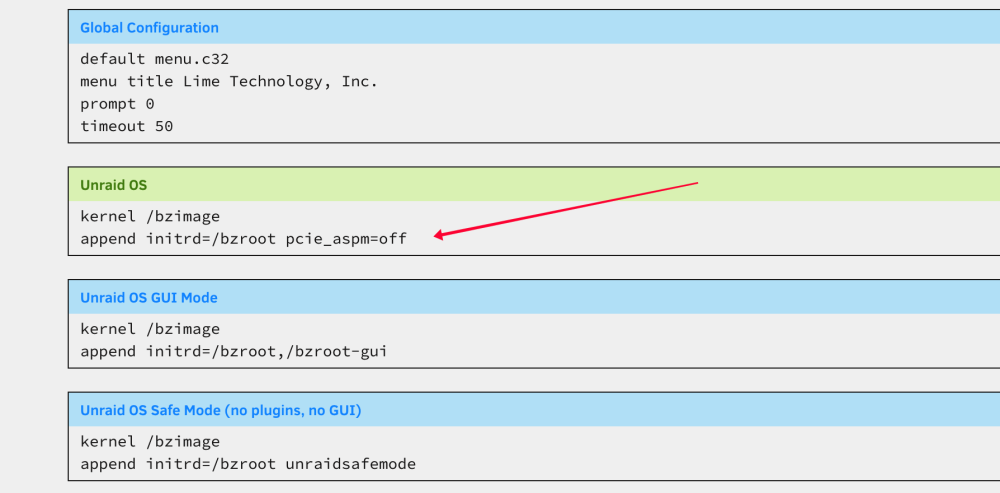
Hi... I added... append initrd=/bzroot pcie_aspm=off ...to the UnRAID OS config area. (Click on Flash Drive to get to the right area.) Add it in as a new line, save and reboot.
-
Thanks...Ok, did that...Bummer, even after a restart and a rescan, no changes, Still can not see the fans. System temp readings seems to the be the same and the only items I can see.

-
Greetings.... iPERF3 would be nice. (Unless I totally missed it.)
-
Might I ask how you installed those drivers so your temp and fans could be seen? Thanks
-
Sorry, has to be said...Don't you mean "I am not a "FAN" of some the dev.... LOL...At least in my head it was funny. Carry on.
-
RIGHT on all of the above!!! SOME have been moved to unRAID directly, but where? One of the BIG ONES, one the most people are looking for, are the FAN control which requires being able to read various temp sensors for one, which is missing or not well done or not kept up with the drivers, but then being able to control the fan outputs based on the temps. Heck, I can't even see my fan speeds any more. i can see the temp...But even though I can see the temps, I can't do anything with them. A BIG THING when it comes to running a NAS with many drives. Sorry... I have been an unraid users and promoter from when it 1st started....David Bott - Founder of AVSFroum.com But now I am looking to many to have to move as I get concerns over hardware failures when I can not monitor critical items.
-
Why has no one realized that this development has just gone away? unRAID, as good as it is, is also only as good as the supporting plugins. In this case, Dynamix was one of the best. Now it seems to be hardly supported. Ugh!
-
Don't count on much when it comes to a number of Dynamix plugins as it seems development has just dropped off for most of the items. Such a great product at one time.
-
Totally agree on AER setting ,as I mentioned that before to others who mentioned using it. I sure do not want to suppress all PCI errors just to hide this one that was an actual error, even though it was being corrected, it should not need to be. But hiding all the errors is not not a good idea. I have been looking for weeks and never came across that setting as I had no clue it was a power issue. (Power as in a power saving feature...which like you, surely us not needed in this case. Especially for Cache which is always doing something with Dockers. One setting I did try was the sleep timer setting, set to 5500 or something. It seemed to help, but not fully. I have had no other errors as of yet and my system also just did a fully parity check that runs at the 1st of each month. Though it took 1 day, 5 hours, 21 minute to complete. (I have an 18TB Parity Drive for future upgrades to storage. The four data drives are all 8TB currently....But man, it takes a long time to verify 8TB and then it still continues to scan the Parity drive which is another 10TB above that. Not sure why it does that...but oh well. May need to look to using another method or drive format.) This is all do to my upgrading my Motherboard, processor, and adding two NVMe's for cache (RAID) then the error showed up. I so want to thank you again for your research. So...THANKS!!!! Kudos!!!! Yippee!!! Etc.
-
Morning...And a good one it is! No errors in the log using pcie_aspm=off Might I ask where you came up with that being likely the issue? Thanks
-
Hi...Thanks for the idea. I just added it to my Sys Config so it now looks like this... kernel /bzimage append initrd=/bzroot pcie_aspm=off ...saved and rebooted. I will check the log tomorrow morning and see if I have the errors still and report back.
-
It seems I am on the current FW release... 5B2QGXA7 ... So bummer on that. The good news is that the error shows it is "Corrected", the bad news it has an error at that it needs to correct at all.
-
Well that did not take long. Sorry to say even with the new Kernel (in the 6.11.0-RC4) still have the error. So I went back to 6.10.3 Aug 31 10:53:52 Server kernel: pcieport 0000:00:1a.0: AER: Corrected error received: 0000:03:00.0 Aug 31 10:53:52 Server kernel: nvme 0000:03:00.0: PCIe Bus Error: severity=Corrected, type=Physical Layer, (Receiver ID) Aug 31 10:53:52 Server kernel: nvme 0000:03:00.0: device [144d:a80a] error status/mask=00000001/0000e000 Looks like I may have to try a firmware update on the NVMe's. I did find this FWUPDMGR Linux thing that it seems I might be able to run to upgrade the drives. Otherwise, it seems Samsung only support Windows with their software and that would be a pain as I would need to remove the drives and find a Windows machine. UPDATE: It seems that fwupdmgr will not work as it is only for supported products... https://fwupd.org/lvfs/devices/
-
I just now installed Version: 6.11.0-rc4 and will let it run. As you may have seen by my log times, it is not all the time, so I need to give a number of hours. I will report back. Hi...Do you mean Firmware for the Samsung 980 drive itself? If that is what you mean, no, I have not. I will need to look into a current version and how yo even upgrade it. Removing them from my setup is easy for one and hard for the other. So I hope I could do it in the setup. (Hoping it is a bootable flash or something.) Thanks for the thought as never considered updating the firmware on the drive.
-
Well I guess that might be worth a shot. The error is just bugging me and I can not tell if it is hardware or software related. And just using one setting that suppresses all the PCI errors just makes no sense for you want to know if there is an error afterall. I have, as mentioned, even replaced one of the Samsung drives as it seemed the follow the drive. Thank you again. David
-
Hi...So...Hummm...Where do we find this updated plugin? I ask for doing a search for Network Stats only shows munin-server. I had thought it was part of the dynamix ecosystem as it showed up under STATS and is now gone once I removed the depreciated plugin. STATS is the Dynamix System Statistics page where network showed...Thus thought it was dynamix. Thank you for your efforts.
-
Hi... (1st, Sorry for the delay...I have been trying other things like changing timing and NVMe drive.) Thank you kindly for the reply. I have the latest BIOS as mentioned. This is happening in the NVMe channel. My motherboard has two NVMe slots and one on one board. One channel goes though PCIe and the other goes though the CPU it seems. I have tried swapping the two NVMe's using used as a RAID 1 cache and the error "seemed" to follow the drive. So I replaced that drive just for fun and yet the problem still shows. It surely could be a kernel issue, but not sure how to deal with that in unRAID as they supply that with there OS. Here is the error repeated on the new NVMe (Note they are Samsun 980 Pro drives). (I had the GUI only show me errors in the log.) Aug 19 23:01:47 Server kernel: pcieport 0000:00:1a.0: AER: Corrected error received: 0000:03:00.0 Aug 19 23:01:47 Server kernel: nvme 0000:03:00.0: PCIe Bus Error: severity=Corrected, type=Physical Layer, (Receiver ID) Aug 19 23:01:47 Server kernel: nvme 0000:03:00.0: device [144d:a80a] error status/mask=00000001/0000e000 Aug 20 00:26:42 Server kernel: pcieport 0000:00:1a.0: AER: Corrected error received: 0000:03:00.0 Aug 20 00:26:42 Server kernel: nvme 0000:03:00.0: PCIe Bus Error: severity=Corrected, type=Physical Layer, (Receiver ID) Aug 20 00:26:42 Server kernel: nvme 0000:03:00.0: device [144d:a80a] error status/mask=00000001/0000e000 Aug 20 18:29:22 Server kernel: pcieport 0000:00:1a.0: AER: Corrected error received: 0000:03:00.0 Aug 20 18:29:22 Server kernel: nvme 0000:03:00.0: PCIe Bus Error: severity=Corrected, type=Physical Layer, (Receiver ID) Aug 20 18:29:22 Server kernel: nvme 0000:03:00.0: device [144d:a80a] error status/mask=00000001/0000e000 Aug 22 17:26:33 Server kernel: pcieport 0000:00:1a.0: AER: Corrected error received: 0000:03:00.0 Aug 22 17:26:33 Server kernel: nvme 0000:03:00.0: PCIe Bus Error: severity=Corrected, type=Physical Layer, (Receiver ID) Aug 22 17:26:33 Server kernel: nvme 0000:03:00.0: device [144d:a80a] error status/mask=00000001/0000e000 Aug 23 04:06:23 Server kernel: pcieport 0000:00:1a.0: AER: Corrected error received: 0000:03:00.0 Aug 23 04:06:23 Server kernel: nvme 0000:03:00.0: PCIe Bus Error: severity=Corrected, type=Physical Layer, (Receiver ID) Aug 23 04:06:23 Server kernel: nvme 0000:03:00.0: device [144d:a80a] error status/mask=00000001/0000e000 Aug 23 11:17:45 Server kernel: pcieport 0000:00:1a.0: AER: Corrected error received: 0000:03:00.0 Aug 23 11:17:45 Server kernel: nvme 0000:03:00.0: PCIe Bus Error: severity=Corrected, type=Physical Layer, (Receiver ID) Aug 23 11:17:45 Server kernel: nvme 0000:03:00.0: device [144d:a80a] error status/mask=00000001/0000e000 Aug 24 03:53:45 Server kernel: pcieport 0000:00:1a.0: AER: Corrected error received: 0000:03:00.0 Aug 24 03:53:45 Server kernel: nvme 0000:03:00.0: PCIe Bus Error: severity=Corrected, type=Physical Layer, (Receiver ID) Aug 24 03:53:45 Server kernel: nvme 0000:03:00.0: device [144d:a80a] error status/mask=00000001/0000e000 Aug 24 13:18:54 Server kernel: pcieport 0000:00:1a.0: AER: Corrected error received: 0000:03:00.0 Aug 24 13:18:54 Server kernel: nvme 0000:03:00.0: PCIe Bus Error: severity=Corrected, type=Physical Layer, (Receiver ID) Aug 24 13:18:54 Server kernel: nvme 0000:03:00.0: device [144d:a80a] error status/mask=00000001/0000e000
-
Thanks for the replies. In regards to the temp and fan controls. Understood...But there not many chips that do this. Funny you mention that seeing it just was REMOVED as depreciated. I had shown a screen grab of the broken images that used to be the network stats which only occured after moving to the current version on unRAID. Thank you again for the replies.
-
So sad to see so many Dynamix going away for non-development. I had mentioned this issue some time back in the Dynamix thread with no reply. Same with the TEMP and FAN control plugins. Which is MUCH NEEDED and SHOULD BE already part of the unRAID system. Yet...Nope. Just another dead plugin(s). I am not even sure unRAID is being looked after these days. (IMHO)
-
Yes, I have posted an issue with the TEMP and FAN control where can not even detect the fans and one even on the NETWORK STATS all being broken images from upgrading to the current version of unRAID. No replies on either. I miss them...and I do understand they did these for free. But it so hurts when they just "go away". I also agree that at this point, unRAID should be more mature product in such things as dealing with fans etc that the plugin were doing. Sadly, even unRAID seems to be underdeveloped to some degree. (IMHO...Even though it is good and I have used it for...gosh...from when they came out.)
-
Ok, it seems to me...Sorry to say...That this ONE thread for ALL DYNAMIX - V6 PLUGINS is just a poor idea. To me it seems that DYNAMIX - V6 PLUGINS has more or less lost it's developers and thus is now lacking in support. I have read that it seems ONE person is working, when he can, on things, but that is it. Thus an issue for sure. Heck I can't even get a single reply to issues I have reported. So just wanted to say that DYNAMIX was a great plugin at one point and was a MUST HAVE...Now is sadly lacking due to developers. They do not get paid, so I get it. But now Plugins we have come to use and rely on are, well, just lacking.



