David Bott
Members
-
Joined
-
Last visited
Everything posted by David Bott
-
Ok, here you go. One showing my sever is running with no issue and then the one of the plug-in. The attachment limit here is so bad. (320k) So here they are in my drop box. https://www.dropbox.com/s/3yxomh54vx0ncr4/screenshot_1392.png?dl=0 https://www.dropbox.com/s/tkig565168twl7a/screenshot_1393.png?dl=0
-
Recently I replaced the Parity drive with a larger one and then replaced drive 5 with a larger drive. But that is it array wise.
-
Nope...Sorry...Surely NOT stopped. In fact I ran a test backup to see if it all still ran and it did.
-
Oh no, I have apps! That is why this plug-in is so outstanding! It is/was greatly needed to protect these files vs rebuilding.
-
Hi... I just updated the plugin to ver 2016.12.05 and when I go into it at the top is the following error... Warning: array_diff(): Argument #2 is not an array in /usr/local/emhttp/plugins/dynamix/include/DefaultPageLayout.php(292) : eval()'d code on line 103 Warning: natsort() expects parameter 1 to be array, null given in /usr/local/emhttp/plugins/dynamix/include/DefaultPageLayout.php(292) : eval()'d code on line 104 Warning: Invalid argument supplied for foreach() in /usr/local/emhttp/plugins/dynamix/include/DefaultPageLayout.php(292) : eval()'d code on line 192 Yet it seems to run.
-
Ok, that worked. Thank you. Really like this Plug-in.
-
Sorry to say this is happening again... plugin: updating: speedtest.plg +============================================================================== | Skipping package tablesorter-2.27.6-x86_64-1 (already installed) +============================================================================== plugin: skipping: python-2.7.12-x86_64-1.txz - unRAID version too low, requires at least version 6.2 plugin: downloading: https://raw.githubusercontent.com/dmacias72/unRAID-plugins/master/packages/6.2/python-2.7.9-x86_64-1.txz ... failed (Invalid URL / Server error response) plugin: wget: https://raw.githubusercontent.com/dmacias72/unRAID-plugins/master/packages/6.2/python-2.7.9-x86_64-1.txz download failure (Invalid URL / Server error response) Just tried to go from 2016.10.09a to the current 2016.10.28 So then I deleted and tried a fresh install....Same thing... plugin: installing: https://raw.githubusercontent.com/dmacias72/unRAID-plugins/master/plugins/speedtest.plg plugin: downloading https://raw.githubusercontent.com/dmacias72/unRAID-plugins/master/plugins/speedtest.plg plugin: downloading: https://raw.githubusercontent.com/dmacias72/unRAID-plugins/master/plugins/speedtest.plg ... done +============================================================================== | Skipping package tablesorter-2.27.6-x86_64-1 (already installed) +============================================================================== plugin: skipping: python-2.7.12-x86_64-1.txz - unRAID version too low, requires at least version 6.2 plugin: downloading: https://raw.githubusercontent.com/dmacias72/unRAID-plugins/master/packages/6.2/python-2.7.9-x86_64-1.txz ... failed (Invalid URL / Server error response) plugin: wget: https://raw.githubusercontent.com/dmacias72/unRAID-plugins/master/packages/6.2/python-2.7.9-x86_64-1.txz download failure (Invalid URL / Server error response)
-
What version of UnRAID are you running on? Version 6.1.9 - Shows as current.
-
Hi... Nice thought as this also has bugged me. I however do not have such an area in that area. Just have Enable SMB, Hide "dot" files and then a workgroup section. There is no SMB Extras area.
-
But speedtest-cli does not give upload speeds. Too bad about speedtest-linux not giving images. Augh...So close.
-
I see that now. The gigabit speeds were from who you quoted. Are you running the other tests from your unRAID server too? I can include a couple other speedtest scripts and you can see if they report better results. Hi dmacias... Thanks for the reply. My bad, the other programs I am referring to are like say sabnzbd where I can look and see the speed it is downloading at. For, for example, when I look at that when downloading I see 36Mbps which is just about max of the cable modem. If I then run your plugin right after, I see only 14 to 18 Mbps reported. I have also tried other servers locations just for kicks just in case. If I run the same speedtest from the same test server using my MacBook via even wireless, I get a full speed result. I really like your plugin, but I really can only use it to see if my UnRaid server has Internet access as, in my case, the download speeds are reported at about 1/2. There are faster ways to see if I have internet access vs waiting for the test to finish. Thanks again.
-
I have to say I really do not buy that. (Though I am not a programmer...just being logical.) When the server does downloads, I see the speeds I would expect from of the the three program I run. However this Speedtest plugin reports only about 1/2 of what I can get. So, while three other programs show download speeds just fine, this plugin can not for some reason. I am not using Gigabit speeds either...I am using about 36Mbps down and this plugin reports between 14 and 18Mbps.
-
I really like the plug in...but the downside is that until the speed issue is fixed, it really is not a good test.
-
There's a known flaw with connections as fast as yours and the speedtest python script, mainly the upload speed. The author of the script is aware and it's on his todo list. That said there will always be a differences which is stated in the op right before the change log. I was coming here for the same thing...But not at those speeds. (Very nice BTW.) I get 1/2 the download speed reported. Uploads are right on. 18 Mbps down using the plugin 37 Mbps down using my Wi-Fi connection on my MacBook. And yes, I made sure I was using the same SpeedTest server for testing. I understand the reason for this as started and that the author is aware, but wow, it really is off by a lot even with slower connections.
-
Yes, I have the same thing as mentioned above. I was asked for my log, but after restarting the server to try to solve this, I had no more logs even show up. My guess is this is some sort of permissions issue or user account issue that something was stored under. Be it root or nobody.
-
Hi David, in the log, before the lines that you posted, there are the calculate lines which show linux permissions. Can you post them here or send a pm if you like ? Hi... I would like to...but now I no longer seem to have a log after I rebooted yesterday to try to fix the above. I ran the move again, had the same error, went to the log directory, and nothing was there.
-
Hi...Very nice Plugin. But sorry to say I come here looking for help. I did one test move of a TV show and all went wonderfully. So I then said, ok, lets so some more and selected a number of shows I needed to move from DISK 1 as it was getting full. (Using High-water Mark so no idea why UnRaid is putting new shows on DISK 1 when it is 87% full compared to all other disks at 75%.) Any way...I seem to get a permissions error. I: 2016/04/29 08:38:22 core.go:249: Toggling dryRun from (true) I: 2016/04/29 08:38:27 core.go:708: Running move operation ... I: 2016/04/29 08:38:27 core.go:744: cmd(rsync -avX --partial "/mnt/disk1/TV/Quantico/Season 01" "/mnt/disk2/TV/Quantico") I: 2016/04/29 08:38:27 core.go:753: sending incremental file list I: 2016/04/29 08:38:27 core.go:753: created directory /mnt/disk2/TV/Quantico I: 2016/04/29 08:38:27 core.go:753: Season 01/ W: 2016/04/29 08:38:27 shell.go:46: moveProgress:: rsync: send_files failed to open "/mnt/disk1/TV/Quantico/Season 01/Quantico - S01E06 - God-thumb.jpg": Permission denied (13) I: 2016/04/29 08:38:27 core.go:753: Season 01/Quantico - S01E06 - God.nfo W: 2016/04/29 08:38:27 shell.go:92: moveProgress::waitError:Status(13):Err(exit status 13):ExitErr(exit status 13) W: 2016/04/29 08:38:27 core.go:763: Move command (rsync -avX --partial "/mnt/disk1/TV/Quantico/Season 01" "/mnt/disk2/TV/Quantico") was interrupted: exit status 13 I: 2016/04/29 08:38:27 unraid.go:373: Unraid Box Condition: &{NumDisks:6 NumProtected:6 Synced:2016-04-01 11:01:35 -0400 EDT SyncErrs:5 Resync:0 ResyncPos:0 State:STARTED Size:19123191214080 Free:4357804195840 NewFree:4357804195840} I: 2016/04/29 08:38:27 unraid.go:374: Unraid Box SourceDiskName: I: 2016/04/29 08:38:27 unraid.go:375: Unraid Box BytesToMove: 0 I: 2016/04/29 08:38:27 unraid.go:386: Id(1); Name(disk1); Path(/mnt/disk1); Device(sdb); Type(Data); FsType(reiserfs); Free(500.8G); NewFree(500.8G); Size(3.6T); Serial(ST4000VN000-1H4168_Z300M7BZ); Status(DISK_OK); Bin(<nil>) I: 2016/04/29 08:38:27 unraid.go:386: Id(2); Name(disk2); Path(/mnt/disk2); Device(sdc); Type(Data); FsType(reiserfs); Free(926G); NewFree(926G); Size(3.6T); Serial(ST4000VN000-1H4168_Z300MWV3); Status(DISK_OK); Bin(<nil>) I: 2016/04/29 08:38:27 unraid.go:386: Id(3); Name(disk3); Path(/mnt/disk3); Device(sdd); Type(Data); FsType(reiserfs); Free(924.7G); NewFree(924.7G); Size(3.6T); Serial(ST4000VN000-1H4168_Z300MWVJ); Status(DISK_OK); Bin(<nil>) I: 2016/04/29 08:38:27 unraid.go:386: Id(4); Name(disk4); Path(/mnt/disk4); Device(sde); Type(Data); FsType(reiserfs); Free(924.5G); NewFree(924.5G); Size(3.6T); Serial(ST4000VN000-1H4168_Z300MXL5); Status(DISK_OK); Bin(<nil>) I: 2016/04/29 08:38:27 unraid.go:386: Id(5); Name(disk5); Path(/mnt/disk5); Device(sdf); Type(Data); FsType(reiserfs); Free(691.8G); NewFree(691.8G); Size(2.7T); Serial(WDC_WD30EZRX-00DC0B0_WD-WMC1T2418891); Status(DISK_OK); Bin(<nil>) I: 2016/04/29 08:38:27 unraid.go:386: Id(24); Name(cache); Path(/mnt/cache); Device(sdg); Type(Cache); FsType(reiserfs); Free(90.7G); NewFree(90.7G); Size(111.8G); Serial(KINGSTON_SV300S37A120G_50026B726203EAE6); Status(DISK_OK); Bin(<nil>) I: 2016/04/29 08:38:27 core.go:1015: unBALANCE - MOVE operation INTERRUPTED Which totally makes no sense to me to have such an error. Thanks David
-
Hi... Quick question...Does Crashplan Desktop need to be running all the time or just Crashplan? Is the desktop just needed in order to set it and or change it etc? I ask for config.sh runs all the time at like a 15% CPU load. If I turn off Crashplan Desktop, config.sh stops. Thanks
-
Thanks...I got it working with the above suggestions. So, I was running Crashplan on an windows machine that had a mapped drive S: that went into my USER share so I could see areas like Photos, Companies, etc. Then I could tell CrashPlan to backup those directories. I have now taken over the backup set from that machine for this new install to continue with. Of course, I have no mapped drive letter that the backup set is looking for. I can see the user shares that were being backed up under File System /data. So the question is, how do get the system use a mapped S: drive so it will continue? My fear is that if I add the /data path and check off directories I want backed up, it would back all the directories up again when what I really need it to do is sync. Anyone run into this?
-
Hi... Well, I just went to take over the backup for the other machine and all seemed to be working. Even if I look on-line at my account I can see the server name is now the name of that backup set. However, it also seemed to have done an upgrade or something. I did not notice the version it was...but now it is ver 4.4.1 and it reads "Unable to connect to the backup engine" when it is trying to start. I have restarted both dockers and have the same issues.
-
Ah...Thank you for letting me know as I would have not thought that. Using my MAC, I am able to bring up the desktop and CrashPlan! Next on the list is Kodi Head-end and MySQL for the Kodi database. (That does not look like fun.)
-
Thank you kindly. I have now installed both. The question is how do I now get to the GUI of the desktop part? I tried using a web browser and going to my server at 192.168.1.200:3389 but it just fails with ERR_CONNECTION_RESET. I wanted to get to the GUI so I can then set it to backup to the cloud the shares I would like it to. Here is what shows in the DeskTop log... Current default time zone: 'America/Chicago' Local time is now: Sat Dec 19 15:11:38 CST 2015. Universal Time is now: Sat Dec 19 21:11:38 UTC 2015. cp: cannot stat ‘/root/wallpapers/*’: No such file or directory *** An error occurred. Aborting. *** Shutting down /etc/my_init.d/config.sh (PID 5)... *** Init system aborted. *** Killing all processes... *** Running /etc/my_init.d/config.sh... sed: can't read /var/lib/crashplan/.ui_info: No such file or directory using existing wallpapers etc... *** An error occurred. Aborting. *** Shutting down /etc/my_init.d/config.sh (PID 5)... *** Init system aborted. *** Killing all processes... *** Running /etc/my_init.d/config.sh... sed: can't read /var/lib/crashplan/.ui_info: No such file or directory using existing wallpapers etc... *** An error occurred. Aborting. *** Shutting down /etc/my_init.d/config.sh (PID 5)... *** Init system aborted. *** Killing all processes... *** Running /etc/my_init.d/config.sh... sed: can't read /var/lib/crashplan/.ui_info: No such file or directory using existing wallpapers etc... *** An error occurred. Aborting. *** Shutting down /etc/my_init.d/config.sh (PID 5)... *** Init system aborted. *** Killing all processes... *** Running /etc/my_init.d/config.sh... sed: can't read /var/lib/crashplan/.ui_info: No such file or directory using existing wallpapers etc... *** An error occurred. Aborting. *** Shutting down /etc/my_init.d/config.sh (PID 6)... *** Init system aborted. *** Killing all processes... *** Running /etc/my_init.d/config.sh... sed: can't read /var/lib/crashplan/.ui_info: No such file or directory using existing wallpapers etc... Thanks
-
Hi... Ok, I am wondering as I could not seem to find the answer. Is this only to allow another machine to use crashplan to backup to my UnRAID server or does this allow for me to select directories etc to send to a CrashPlan cloud backup server? Right now I use a separate Windows machine that is mapped to the unRAID server that sends files to the CrashPlan cloud. I am looking to remove that machine and I am looking to be able to send files to the CrashPlan cloud. (IE, our PHOTOS share.) Thanks
-
Hi... Still have the upgrade issue I am sorry to say. In asking Goggle about "E: Method gave invalid 103 Redirect message" what comes back seems to be something Ubuntu related with there being a recent bug in it introduced. I do not know, just just asking, does UnRaid use Ubuntu or does Docker? If so, then that bring up the question of was it recently updated in the last release of UnRaid? Asking for I am on the most current version of UnRaid and maybe, for those that have no issues with the auto updates, they are not on the current release. (Just a thought I wanted to toss out just to check.) https://bugs.launchpad.net/ubuntu/+source/apt/+bug/1479045 https://goo.gl/x7aGiI I have tried... 3 different ISP's, several DNS's, used different locations using a VPN, hard wired the network to a cable modem vs using Verizon. I have moved through 3 states on Verizon. All in all, same result keep happening and this has been over a number of days. So, just asking about the above just in case. Thanks.
-
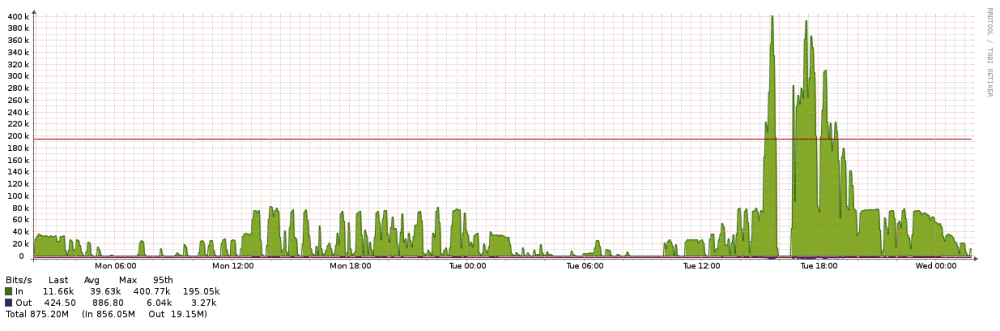
Thanks for the thoughts I do understand where you are coming from on this. The strange this is I really do not have issues connection wise. Heck, I have a full time VPN running that is streaming a live video stream. (http://www.outsideourbubble.com/live-coach-cam) I use a VPN to get around Verizon's private IP so I can get in and out of our coaches network. Also, remember I mentioned I also tried a local connection, thus a totally different ISP with the same results. Attached is a graph showing my VPN connection to the camera over the last 48 hours. You can see that the connection remains solid and you can tell when we travel as we have a lot of people join along. You can even see the area we went through today along I-10 that has no internet. (The time is not set on the graph, it is ahead.) All in all, been traveling for a long time and we live on the Internet and make our living on it as I still own a few other communities. I really only run into issues when are a in a far out area with poor service (then I have boosters and directional antennas to try to correct) or when we get on a crowded tower. Like this past weekend. But with all that said...Yup, something surely is weird with trying to get an update. Guess I am just unlikely. And yes, totally agree that if it is working, don't touch it. And I usually do not upgrade unless a new feature comes out or something stops working with some service. That is why I was a little concerned with the auto update. But at the same time while I have run into issues with other software updates, but could revert back, I really have never had an issue with Sonorr, SickBeard (When I was running it before it was dropped.) and SABnzdb updates, thus was not totally worries but would like the current beta. Oh, in regards to it's working so don't tough it and then why did I choose to do this vs using the windows machine that has always just worked? Well, I ran into an issue where the that machine, running SSD's, I do not turn off when traveling. Well Sonorr found some new files and brought them down and I never knew it as they could not be processed out to the server for it was off. So over time, they collected, and collected... So I said Hey, that server is just sitting doing nothing most of the time...so lets use it. So when we travel, I shut it down so no more issues. So, here we are. Thanks again. Come this Sunday we were be a a park were I will have access to 75Mbps off a fiber line right into our coach. I have a port on the back of the coach where I can plug right in and it runs to the front to feed the router. All devices flow though the router (Asus RT-N66U) which is either wired to a hard line to the net or is connected via ethernet to a Raspberry Pi that handles the Internet via USB from a JetPack. (It also handles the VPN.) Thanks again for the support.