





David Bott
Members
-
Joined
-
Last visited
Everything posted by David Bott
-
Thanks CHBMB, I'll keep trying.
-
And here it is from a different location, bouncing through different servers. I know you can not do anything about it, but very weird to say the least. ----------------------------------- GID/UID ----------------------------------- User uid: 99 User gid: 100 ----------------------------------- Hit http://ppa.launchpad.net trusty InRelease Ign http://mirror.nexcess.net/ubuntu/ trusty InRelease Hit http://ppa.launchpad.net trusty/main amd64 Packages Get:1 http://mirror.nexcess.net/ubuntu/ trusty-security InRelease [64.4 kB] Get:2 http://mirror.nexcess.net/ubuntu/ trusty-updates InRelease [64.4 kB] Hit http://mirror.nexcess.net/ubuntu/ trusty Release.gpg Get:3 http://mirror.nexcess.net/ubuntu/ trusty-security/main Sources [127 kB] Get:4 http://mirror.nexcess.net/ubuntu/ trusty-security/restricted Sources [3,920 B] Get:5 http://mirror.nexcess.net/ubuntu/ trusty-security/universe Sources [36.5 kB] Get:6 http://mirror.nexcess.net/ubuntu/ trusty-security/multiverse Sources [2,165 B] Get:7 http://mirror.nexcess.net/ubuntu/ trusty-security/main amd64 Packages [477 kB] Get:8 http://mirror.nexcess.net/ubuntu/ trusty-security/restricted amd64 Packages [20.2 kB] Get:9 http://mirror.nexcess.net/ubuntu/ trusty-security/universe amd64 Packages [156 kB] Get:10 http://mirror.nexcess.net/ubuntu/ trusty-security/multiverse amd64 Packages [4,645 B] Get:11 http://mirror.nexcess.net/ubuntu/ trusty-updates/main Sources [311 kB] Get:12 http://mirror.nexcess.net/ubuntu/ trusty-updates/restricted Sources [5,219 B] Get:13 http://mirror.nexcess.net/ubuntu/ trusty-updates/universe Sources [181 kB] Get:14 http://mirror.nexcess.net/ubuntu/ trusty-updates/multiverse Sources [5,116 B] Get:15 http://mirror.nexcess.net/ubuntu/ trusty-updates/main amd64 Packages [836 kB] Get:16 http://mirror.nexcess.net/ubuntu/ trusty-updates/restricted amd64 Packages [23.4 kB] Get:17 http://mirror.nexcess.net/ubuntu/ trusty-updates/universe amd64 Packages [427 kB] Get:18 http://mirror.nexcess.net/ubuntu/ trusty-updates/multiverse amd64 Packages [14.1 kB] Hit http://mirror.nexcess.net/ubuntu/ trusty Release Get:19 http://mirror.nexcess.net/ubuntu/ trusty/main Sources [1,335 kB] *** Running /etc/my_init.d/00_regen_ssh_host_keys.sh... *** Running /etc/my_init.d/10_add_user_abc.sh... *** Running /etc/my_init.d/20_apt_update.sh... W: Size of file /var/lib/apt/lists/mirrors.ubuntu.com_mirrors.txt_dists_trusty-security_multiverse_binary-amd64_Packages.gz is not what the server reported 4645 4647 W: Size of file /var/lib/apt/lists/mirrors.ubuntu.com_mirrors.txt_dists_trusty-updates_multiverse_binary-amd64_Packages.gz is not what the server reported 14086 14091 E: Method gave invalid 103 Redirect message *** Running /etc/my_init.d/30_set_config.sh... *** Running /etc/rc.local... *** Booting runit daemon... *** Runit started as PID 40
-
Well...New location. 5 hours West. High speed data. Tried both local Wi-Fi and Verizon and sorry to say it still does not seem to be able to pull the update. I even went on a VPN and connected through other servers in NY, Chicago, and San Fran. Seems to stop at the same place when it tries to run one of the scripts. Kind of at a loss as to why. Very pondering to say the least. ----------------------------------- GID/UID ----------------------------------- User uid: 99 User gid: 100 ----------------------------------- Hit http://ppa.launchpad.net trusty InRelease Ign http://mirrors.syringanetworks.net/ubuntu-archive/ trusty InRelease Hit http://ppa.launchpad.net trusty/main amd64 Packages Hit http://mirrors.syringanetworks.net/ubuntu-archive/ trusty-security InRelease Hit http://mirrors.syringanetworks.net/ubuntu-archive/ trusty-updates InRelease Get:1 http://mirrors.syringanetworks.net/ubuntu-archive/ trusty Release.gpg [933 B] Get:2 http://mirrors.syringanetworks.net/ubuntu-archive/ trusty-security/main Sources [127 kB] Hit http://mirrors.syringanetworks.net/ubuntu-archive/ trusty-security/universe Sources Get:3 http://mirrors.syringanetworks.net/ubuntu-archive/ trusty-security/multiverse Sources [2,165 B] Hit http://ubuntu.mirror.constant.com/ trusty Release Hit http://ubuntu.mirror.constant.com/ trusty-security/restricted Sources *** Running /etc/my_init.d/00_regen_ssh_host_keys.sh... *** Running /etc/my_init.d/10_add_user_abc.sh... *** Running /etc/my_init.d/20_apt_update.sh... E: Method gave invalid 103 Redirect message *** Running /etc/my_init.d/30_set_config.sh... *** Running /etc/rc.local... *** Booting runit daemon... *** Runit started as PID 41
-
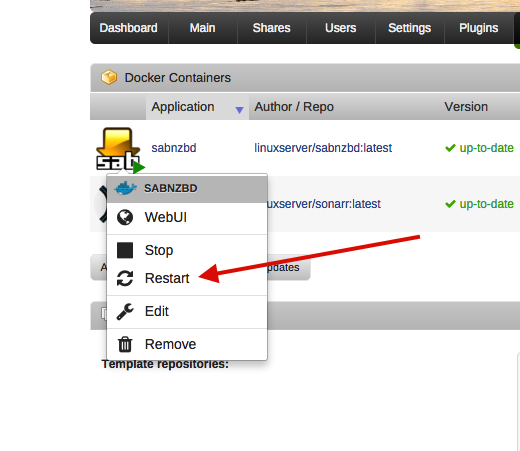
It will update when the server starts up as the docker service and ergo all the containers will be restarted. As regards the auto-updating we make comment of this on the first line of our docker hub page that is linked on the first page of this thread. Ah...Good to know as that could become an issue if it updates and for whatever reason the update may not be wanted. I have, guess like you all have, seen some bad updates come out. Even Kodi had some poor released right down to video or audio stopping. I am guessing there is not a way in your containers to turn that off so it only looks when you tell it to or click on RESTART vs just doing it on every load? But then again, maybe it is not as bad as I am thinking it could be. I am just basing it on history of some updates that broke things. Thanks again for the help.
-
like this you mean ? http://lime-technology.com/forum/index.php?topic=37732.0 Yep, I did read that. But it still does not help with things like upgrades and that Up-To-Date does not really mean that if taking about what you installed etc. A lot of the thread was issues people still had with mappings and where to put things right down to be sure to use the cache and set it to use that only. I did read the thread, and still, sorry to say, had mapping issues and where and where not I should put things.
-
Hey....Does it only run an UPDATE when you tell it to restart a given application? Or will it also look for new versions when you reboot the server? (I ask for when we move the coach like we will tomorrow, I shut the server down to protect the drives.) Thanks
-
"OK, we pulled the same container, I get that. " That was all I was looking to make sure. I was looking to see if there was a difference somewhere. Maybe you did call a different container or something. I was looking for a difference. It is great you all work on these for us. It is outstanding to say the least. The issue that things are not always equal and most of us who are using such tools only do so for we do not know how to work with the OS directly. Docker, as you know much better than I, was originally made for a sandbox for testing. Here it is being used as an install tool to make it easy for users of UnRAID, or other such systems, where people need installers. I have spent the last 3 days working on two installs. Two. The documentation for UnRAID and using docker is very sparse. Mapping information is not clear and was most of my issue as some things worked, and some did not. Then you have the issue of so many different containers for the same program and which one to actually use. I went with Linuxserver.io ones as they seemed to be supported. (And are, so thanks.) All in all when I happened to notice I had not received the most current versions I went out seeking how to upgrade as these were from a Docker file. Again, no information is available. More research looking for answers such as can you use the automatic updater built into something like Sonorr or do you have to let Docker take care of it? Then that gets more confusing as when you look at Dockers tab you see "Up-to-date". But it is not stated anywhere that it is not referring to the program installed, but the container. So then I find out you just need to just restart the application to get an update. Well, who would think restarting something would also upgrade it without you telling it to do so or it at least asking you? I would not have thought that. (IE, what if the new version actually has issues that are being reported and you do not want to upgrade to that version.) So ok, I do that and then find it may or may not work based on the internet. Someone as a normal user, like me, would have no idea what is happening. All you know at this time is you can not get the program when trying to call it up on your browser. (No idea it is trying to look for an upgrade and thus has not even loaded yet. And if it finds it, it needs to download and install. By that time you are clicking RESTART again.) Oh, wonderful. Anyway, thanks for all the help on this for I clearly do not have any clue on Docker and in turn the containers or the updates. Then when you run into the issues mentioned above, it can, and does, get someone totally lost. Well, it has been a long three days to get something running that I have run for years on a Windows machine. Thank you again for looking into the issues I had (have) and to help get me running. I do thank you for how you maintain this stuff. (Someone needs to write a..."Hey you! Yes You. Here is what you should know about using Docker before you freak out."
-
Hi...Ok, just did the DNS change and that and something different took place but I still did not make the upgrade. But got closer. ----------------------------------- GID/UID ----------------------------------- User uid: 99 User gid: 100 ----------------------------------- *** Running /etc/my_init.d/20_apt_update.sh... Hit http://ppa.launchpad.net trusty InRelease Ign http://mirrors.tripadvisor.com/ubuntu/ trusty InRelease Get:1 http://mirrors.tripadvisor.com/ubuntu/ trusty-security InRelease [64.4 kB] Hit http://ppa.launchpad.net trusty/main amd64 Packages Get:2 http://mirrors.tripadvisor.com/ubuntu/ trusty-updates InRelease [64.4 kB] Hit http://mirrors.tripadvisor.com/ubuntu/ trusty Release.gpg Get:3 http://mirrors.tripadvisor.com/ubuntu/ trusty-security/main Sources [127 kB] Get:4 http://mirrors.tripadvisor.com/ubuntu/ trusty-security/restricted Sources [3,920 B] Get:5 http://mirrors.tripadvisor.com/ubuntu/ trusty-security/universe Sources [36.5 kB] Get:6 http://mirrors.tripadvisor.com/ubuntu/ trusty-security/multiverse Sources [2,165 B] Get:7 http://mirrors.tripadvisor.com/ubuntu/ trusty-security/main amd64 Packages [477 kB] ----------------------------------- GID/UID ----------------------------------- User uid: 99 User gid: 100 ----------------------------------- Hit http://ppa.launchpad.net trusty InRelease Ign http://mirrors.tripadvisor.com/ubuntu/ trusty InRelease Get:1 http://mirrors.tripadvisor.com/ubuntu/ trusty-security InRelease [64.4 kB] Hit http://ppa.launchpad.net trusty/main amd64 Packages Get:2 http://mirrors.tripadvisor.com/ubuntu/ trusty-updates InRelease [64.4 kB] Hit http://mirrors.tripadvisor.com/ubuntu/ trusty Release.gpg Get:3 http://mirrors.tripadvisor.com/ubuntu/ trusty-security/main Sources [127 kB] Get:4 http://mirrors.tripadvisor.com/ubuntu/ trusty-security/restricted Sources [3,920 B] Get:5 http://mirrors.tripadvisor.com/ubuntu/ trusty-security/universe Sources [36.5 kB] Get:6 http://mirrors.tripadvisor.com/ubuntu/ trusty-security/multiverse Sources [2,165 B] Get:7 http://mirrors.tripadvisor.com/ubuntu/ trusty-security/main amd64 Packages [477 kB] Get:8 http://mirrors.tripadvisor.com/ubuntu/ trusty-security/restricted amd64 Packages [20.2 kB] Get:9 http://mirrors.tripadvisor.com/ubuntu/ trusty-security/universe amd64 Packages [156 kB] Get:10 http://mirrors.tripadvisor.com/ubuntu/ trusty-security/multiverse amd64 Packages [4,647 B] Get:11 http://mirrors.tripadvisor.com/ubuntu/ trusty-updates/main Sources [311 kB] Get:12 http://mirrors.tripadvisor.com/ubuntu/ trusty-updates/restricted Sources [5,219 B] Get:13 http://mirrors.tripadvisor.com/ubuntu/ trusty-updates/universe Sources [181 kB] Get:14 http://mirrors.tripadvisor.com/ubuntu/ trusty-updates/multiverse Sources [5,111 B] Get:15 http://mirrors.tripadvisor.com/ubuntu/ trusty-updates/main amd64 Packages [836 kB] Get:16 http://mirrors.tripadvisor.com/ubuntu/ trusty-updates/restricted amd64 Packages [23.4 kB] Get:17 http://mirrors.tripadvisor.com/ubuntu/ trusty-updates/universe amd64 Packages [427 kB] Get:18 http://mirrors.tripadvisor.com/ubuntu/ trusty-updates/multiverse amd64 Packages [14.1 kB] Hit http://mirrors.tripadvisor.com/ubuntu/ trusty Release Get:19 http://mirrors.tripadvisor.com/ubuntu/ trusty/main Sources [1,335 kB] Get:20 http://mirrors.tripadvisor.com/ubuntu/ trusty/restricted Sources [5,335 B] Hit http://mirrors.tripadvisor.com/ubuntu/ trusty/universe Sources Get:21 http://mirrors.tripadvisor.com/ubuntu/ trusty/multiverse Sources [211 kB] Get:22 http://mirrors.tripadvisor.com/ubuntu/ trusty/restricted amd64 Packages [16.0 kB] Get:23 http://mirrors.tripadvisor.com/ubuntu/ trusty/universe amd64 Packages [7,589 kB] Hit http://mirrors.tripadvisor.com/ubuntu/ trusty/main amd64 Packages Get:24 http://mirrors.tripadvisor.com/ubuntu/ trusty/multiverse amd64 Packages [132 kB] Err http://mirrors.tripadvisor.com/ubuntu/ trusty/main amd64 Packages 404 Not Found [Mirror: http://mirrors.tripadvisor.com/ubuntu/] Fetched 4,248 kB in 2min 15s (31.3 kB/s) *** Running /etc/my_init.d/00_regen_ssh_host_keys.sh... *** Running /etc/my_init.d/10_add_user_abc.sh... *** Running /etc/my_init.d/20_apt_update.sh... W: Failed to fetch mirror://mirrors.ubuntu.com/mirrors.txt/dists/trusty/main/binary-amd64/Packages 404 Not Found [Mirror: http://mirrors.tripadvisor.com/ubuntu/] E: Some index files failed to download. They have been ignored, or old ones used instead. *** Running /etc/my_init.d/30_set_config.sh... *** Running /etc/rc.local... *** Booting runit daemon... *** Runit started as PID 42 Dec 7 18:20:22 24ae7fef105b syslog-ng[50]: syslog-ng starting up; version='3.5.3' 2015-12-07 18:20:23,640::INFO::[sabnzbdplus:1260] -------------------------------- 2015-12-07 18:20:23,640::INFO::[sabnzbdplus:1261] sabnzbdplus-0.8.0Beta1 (rev=1ba588f530642cb2b804b58a48c5260ed7cd473e (not committed))
-
"Failing to fetch the mirror is something local to you." But you are calling to a different place than I am. Is the call not coded somewhere as to where to go look? If it is, then I surely got a different file than you did as it is looking in another place. So just to be sure...My container came from... https://hub.docker.com/r/linuxserver/sabnzbd/ Wait...Unless you mean LOCAL to me like to looks at the closest repository to my actual location via Internet IP and that repository could be wrong.
-
And it seems now I know why Sonarr was not updating either. It is also broken. From what I read, this information comes from the container files. If this is the case, and I am not sure, that could mean both of the containers for Sonarr and SABnzbd are no longer valid. They will install, but can not update. Both of my containers came from Lunuxserver.io. Anyone? This surely is not a good thing. Sonarr restart.... *** Running /etc/my_init.d/20_apt_update.sh... We are now refreshing packages from apt repositorys, this *may* take a while W: Failed to fetch mirror://mirrors.ubuntu.com/mirrors.txt/dists/trusty/restricted/source/Sources 404 Not Found [Mirror: http://mirrors.syringanetworks.net/ubuntu-archive/] W: Failed to fetch mirror://mirrors.ubuntu.com/mirrors.txt/dists/trusty/universe/source/Sources 404 Not Found [Mirror: http://mirrors.syringanetworks.net/ubuntu-archive/] W: Failed to fetch mirror://mirrors.ubuntu.com/mirrors.txt/dists/trusty/multiverse/source/Sources 404 Not Found [Mirror: http://mirrors.syringanetworks.net/ubuntu-archive/] W: Failed to fetch mirror://mirrors.ubuntu.com/mirrors.txt/dists/trusty/main/binary-amd64/Packages 404 Not Found [Mirror: http://mirrors.syringanetworks.net/ubuntu-archive/] E: Some index files failed to download. They have been ignored, or old ones used instead.
-
From what I can tell...the mirror it's trying to use 'mirros.syringanetworks.net' doesn't have an ubuntu/deb repo at that location any longer. So either you used a different docker container image, or you have a different version of something that has the right mirror.
-
Yup...I get nothing like that as you can see. So then, now what? As it seems I am not getting the right data or something. I am running the current version of UnRAID also.
-
HI YA... Thanks for remembering we live full time in a motor coach. We started after I sold AVSForum. (http://www.outsideourbubble.com/about-us) Right now our link is fine. 3 to 8Mbps down. Over the weekend it seems that the tower was overloaded and I could not get more than .5 down. As far as logs, which one? I ask for if I click on the one in the Docker area to the far right, it window opens but it is empty. So I would need to try to find the ones you would like. Here is the lines from the system log when I clicked on restart. (The second to last line was when I tried to see the log.) ----------- Dec 7 15:55:34 Server php: /usr/local/emhttp/plugins/dynamix.docker.manager/scripts/docker 'restart' 'sabnzbd' Dec 7 15:55:34 Server kernel: veth7f41627: renamed from eth0 Dec 7 15:55:34 Server kernel: docker0: port 1(veth81c51e5) entered disabled state Dec 7 15:55:34 Server kernel: docker0: port 1(veth81c51e5) entered disabled state Dec 7 15:55:34 Server avahi-daemon[14562]: Withdrawing workstation service for veth7f41627. Dec 7 15:55:34 Server avahi-daemon[14562]: Withdrawing workstation service for veth81c51e5. Dec 7 15:55:34 Server kernel: device veth81c51e5 left promiscuous mode Dec 7 15:55:34 Server kernel: docker0: port 1(veth81c51e5) entered disabled state Dec 7 15:55:34 Server kernel: device veth8e6ca16 entered promiscuous mode Dec 7 15:55:34 Server kernel: docker0: port 1(veth8e6ca16) entered forwarding state Dec 7 15:55:34 Server kernel: docker0: port 1(veth8e6ca16) entered forwarding state Dec 7 15:55:34 Server avahi-daemon[14562]: Withdrawing workstation service for veth042b412. Dec 7 15:55:34 Server kernel: eth0: renamed from veth042b412 Dec 7 15:55:43 Server emhttp: cmd: /usr/local/emhttp/plugins/dynamix.docker.manager/scripts/docker logs --tail=350 -f sabnzbd Dec 7 15:55:49 Server kernel: docker0: port 1(veth8e6ca16) entered forwarding state ------------------------- Oh Wait...I telnet'ed to the server and ran that script line above and got this... *** Shutting down runit daemon (PID 40)... 2015-12-07 15:55:34,561::WARNING::[__init__:178] Signal 15 caught, saving and exiting... 2015-12-07 15:55:34,562::INFO::[nzbqueue:257] Saving queue 2015-12-07 15:55:34,563::INFO::[__init__:924] Saving data for queue10.sab in /config/admin/queue10.sab 2015-12-07 15:55:34,564::INFO::[__init__:924] Saving data for totals10.sab in /config/admin/totals10.sab 2015-12-07 15:55:34,564::INFO::[__init__:924] Saving data for rss_data.sab in /config/admin/rss_data.sab 2015-12-07 15:55:34,565::INFO::[__init__:924] Saving data for watched_data2.sab in /config/admin/watched_data2.sab 2015-12-07 15:55:34,565::INFO::[postproc:85] Saving postproc queue 2015-12-07 15:55:34,565::INFO::[__init__:924] Saving data for postproc2.sab in /config/admin/postproc2.sab *** Killing all processes... *** Running /etc/my_init.d/00_regen_ssh_host_keys.sh... *** Running /etc/my_init.d/10_add_user_abc.sh... ----------------------------------- GID/UID ----------------------------------- User uid: 99 User gid: 100 ----------------------------------- *** Running /etc/my_init.d/20_apt_update.sh... Hit http://ppa.launchpad.net trusty InRelease Ign http://mirrors.syringanetworks.net/ubuntu-archive/ trusty InRelease Hit http://ppa.launchpad.net trusty/main amd64 Packages Hit http://mirrors.syringanetworks.net/ubuntu-archive/ trusty-security InRelease Hit http://mirrors.syringanetworks.net/ubuntu-archive/ trusty-updates InRelease Hit http://mirrors.syringanetworks.net/ubuntu-archive/ trusty Release.gpg Get:1 http://mirrors.syringanetworks.net/ubuntu-archive/ trusty-security/main Sources [127 kB] Hit http://www.club.cc.cmu.edu/pub/ubuntu/ trusty Release Get:2 http://www.club.cc.cmu.edu/pub/ubuntu/ trusty-security/restricted Sources [4,035 B] E: Method gave invalid 103 Redirect message *** Running /etc/my_init.d/30_set_config.sh... *** Running /etc/rc.local... *** Booting runit daemon... *** Runit started as PID 42 Dec 7 15:55:42 24ae7fef105b syslog-ng[50]: syslog-ng starting up; version='3.5.3' 2015-12-07 15:55:42,874::INFO::[sabnzbdplus:1260] -------------------------------- 2015-12-07 15:55:42,874::INFO::[sabnzbdplus:1261] sabnzbdplus-0.8.0Beta1 (rev=1ba588f530642cb2b804b58a48c5260ed7cd473e (not committed)) 2015-12-07 15:55:42,874::INFO::[sabnzbdplus:1273] Platform = posix 2015-12-07 15:55:42,874::INFO::[sabnzbdplus:1274] Python-version = 2.7.6 (default, Jun 22 2015, 17:58:13) [GCC 4.8.2] 2015-12-07 15:55:42,875::INFO::[sabnzbdplus:1275] Arguments = /usr/bin/sabnzbdplus --config-file /config --server 0.0.0.0:8080 2015-12-07 15:55:42,875::INFO::[sabnzbdplus:1320] Read INI file /config/sabnzbd.ini 2015-12-07 15:55:42,977::INFO::[__init__:948] Loading data for rss_data.sab from /config/admin/rss_data.sab 2015-12-07 15:55:42,978::INFO::[__init__:948] Loading data for totals10.sab from /config/admin/totals10.sab 2015-12-07 15:55:42,979::INFO::[postproc:91] Loading postproc queue 2015-12-07 15:55:42,979::INFO::[__init__:948] Loading data for postproc2.sab from /config/admin/postproc2.sab 2015-12-07 15:55:42,980::INFO::[__init__:948] Loading data for queue10.sab from /config/admin/queue10.sab 2015-12-07 15:55:42,981::INFO::[__init__:948] Loading data for watched_data2.sab from /config/admin/watched_data2.sab 2015-12-07 15:55:42,981::INFO::[__init__:948] Loading data for Rating.sab from /config/admin/Rating.sab 2015-12-07 15:55:42,982::INFO::[__init__:951] /config/admin/Rating.sab missing 2015-12-07 15:55:42,982::INFO::[scheduler:187] Setting schedule for midnight BPS reset 2015-12-07 15:55:42,983::INFO::[downloader:235] Resuming 2015-12-07 15:55:42,983::INFO::[__init__:339] All processes started 2015-12-07 15:55:42,983::INFO::[sabnzbdplus:361] Web dir is /usr/share/sabnzbdplus/interfaces/Glitter 2015-12-07 15:55:42,984::INFO::[sabnzbdplus:361] Web dir is /usr/share/sabnzbdplus/interfaces/Config 2015-12-07 15:55:42,995::INFO::[sabnzbdplus:493] _yenc module... found! 2015-12-07 15:55:42,995::INFO::[sabnzbdplus:501] par2 binary... found (/usr/bin/par2) 2015-12-07 15:55:42,996::INFO::[sabnzbdplus:506] par2-classic binary... found (/usr/bin/par2) 2015-12-07 15:55:42,996::INFO::[sabnzbdplus:509] unrar binary... found (/usr/bin/unrar) 2015-12-07 15:55:42,996::INFO::[sabnzbdplus:514] unzip binary... found (/usr/bin/unzip) 2015-12-07 15:55:42,996::INFO::[sabnzbdplus:519] 7za binary... found (/usr/bin/7za) 2015-12-07 15:55:42,997::INFO::[sabnzbdplus:525] nice binary... found (/usr/bin/nice) 2015-12-07 15:55:42,997::INFO::[sabnzbdplus:529] ionice binary... found (/usr/bin/ionice) 2015-12-07 15:55:42,997::INFO::[sabnzbdplus:534] pyOpenSSL... found (True) 2015-12-07 15:55:42,999::INFO::[sabnzbdplus:1524] Starting web-interface on 0.0.0.0:8080 2015-12-07 15:55:43,002::INFO::[_cplogging:216] [07/Dec/2015:15:55:43] ENGINE Bus STARTING 2015-12-07 15:55:43,005::INFO::[_cplogging:216] [07/Dec/2015:15:55:43] ENGINE Started monitor thread '_TimeoutMonitor'. 2015-12-07 15:55:43,106::INFO::[_cplogging:216] [07/Dec/2015:15:55:43] ENGINE Serving on http://0.0.0.0:8080 2015-12-07 15:55:43,107::INFO::[_cplogging:216] [07/Dec/2015:15:55:43] ENGINE Bus STARTED 2015-12-07 15:55:43,609::INFO::[sabnzbdplus:1596] Starting sabnzbdplus-0.8.0Beta1 2015-12-07 15:55:43,610::INFO::[dirscanner:299] Dirscanner starting up 2015-12-07 15:55:43,611::INFO::[urlgrabber:70] URLGrabber starting up Hope that helps. I see that it does call some type of updater. (As you know...I did not.) I do see... E: Method gave invalid 103 Redirect message <--- So it seems it can not do something. hummmm?
-
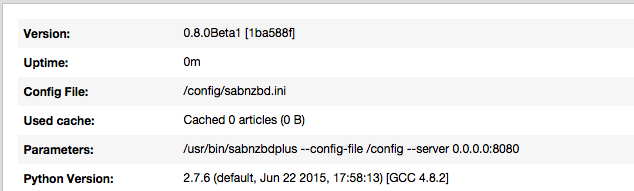
Hey... If you mean just simply click on RESTART, done that. Still the same version. No sure if a setting is missing or something that I should have set. But it stayed at beta 1. Thanks
-
Hey... Ok, the new installed I just did was 0.8.0Beta1 [1ba588f]. (First off had no idea this was a beta install, should have been mentioned in original post. ) Anyway...Seeing this is a BETA and they are currently on Beta 3, and this is Beta 1, how do you upgrade the beta? Where do you get it? Is there a container that updates it or something? Unlike Sonarr, there is no update you can click and it is done. Please kindly advise. Thanks ------------------------------------------------------------------------------- 0.8.0Beta3 by The SABnzbd-Team ------------------------------------------------------------------------------- - Speedlimit corrections - Fixed bug that could lead to all NZBs being reported as duplicates - Skin improvements ------------------------------------------------------------------------------- 0.8.0Beta2 by The SABnzbd-Team ------------------------------------------------------------------------------- - Improvements in IPv6 handling - Extension of SSL protocols (where supported) - Many improvemnts in the Glitter skin - On Windows, Season Sort often failed - Speedlimiting can now be absolute or in percentage - Scheduler action to remove completed history items
-
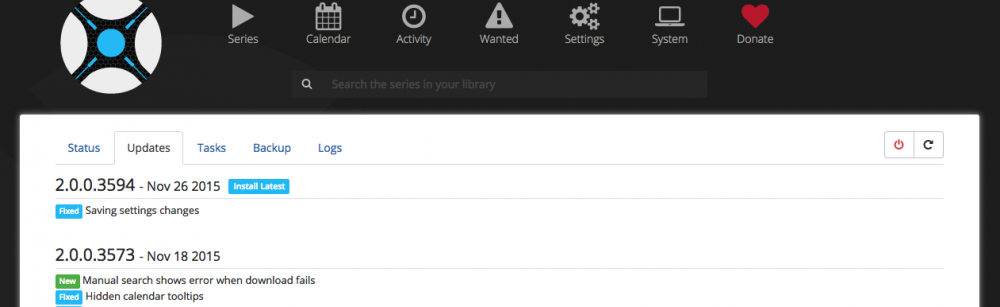
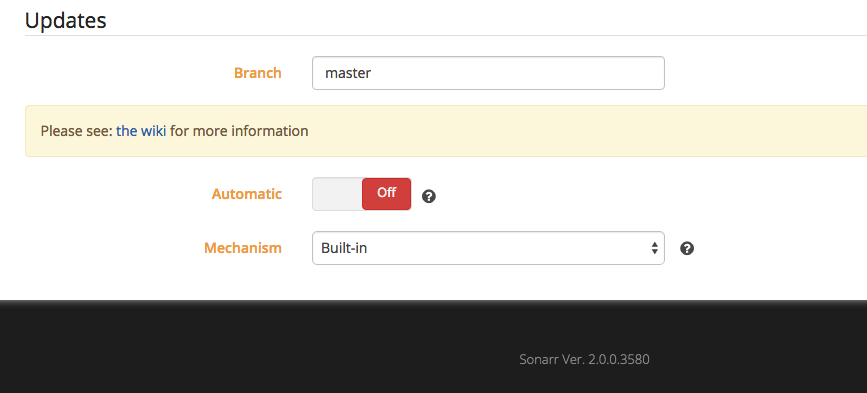
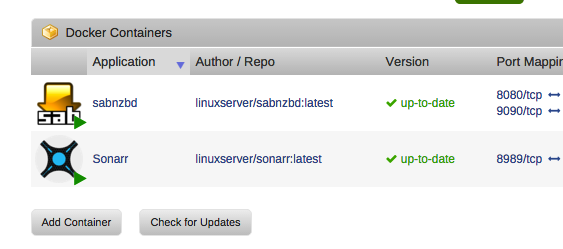
Morning... Did that...Same version. 2.0.0.3580. Docker tells me I am up-to-date. (Clicking check for updates shows the same.) Sonorr says to "Update to the latest version". I have automatic updates in Sonorr turned off. (For I am not sure if I can use that with a Docker thingy. Or do I now treat it as a normal install and use the auto update from within Sonorr?) SABnzbd is Version: 0.8.0Beta1 [1ba588f] Check for New Release is OFF within SABnzbd. (Are they all beta versions?) Thanks!
-
Hummmm....I just installed it an I got 2.0.0.3580. So that in itself seems to be an issue. Just need to restart it? Does the Docker bring it down on it's own? I would think it would auto restart. Ok, this seems weird that I got an old version and/or it did not update. (But still not sure how that is done. Docker or Sonarr?)
-
Well, all in all, I got it woking. Tested and all. So now I have all my shows imported in and it's waiting for tonights shows. I was totally lost with the system making user shares out of items I would place on the cache drive. Seeing that I had the cache drive set to be able to be seen, it was very confusing seeing the directories on that drive as well as being listed as directories by themselves as user shares. So now I have hidden the cache drive from showing and still have appdata and downloads showing. Now I only hope it works like it should. No reason it should not. So, question, how are upgrades handed? IE..I should have upgrade turned off inside Sonarr right? For it needs a docker file or something. Will Docker do it automatically or how is the best way to handle it? Sonarr show 2.0.0.3580 but my Windows version is newer. (Not sure if they release updates for the platforms at the same time.) Thanks all.
-
Ah. Got it. Any reason why would I not want appdata to be on like drive5 only so it then is in the protected array?
-
Ok, thanks for the help. So just making a directory automatically makes a share for it? Even if I had made that directory on the Cache drive which is not part of the array? I did not expect to see two "downloads" directories (One on the cache drive and one on the in /mnt/user at all and really seems weird.) Also, why is the 20 gig docker.img showing up in two places?
-
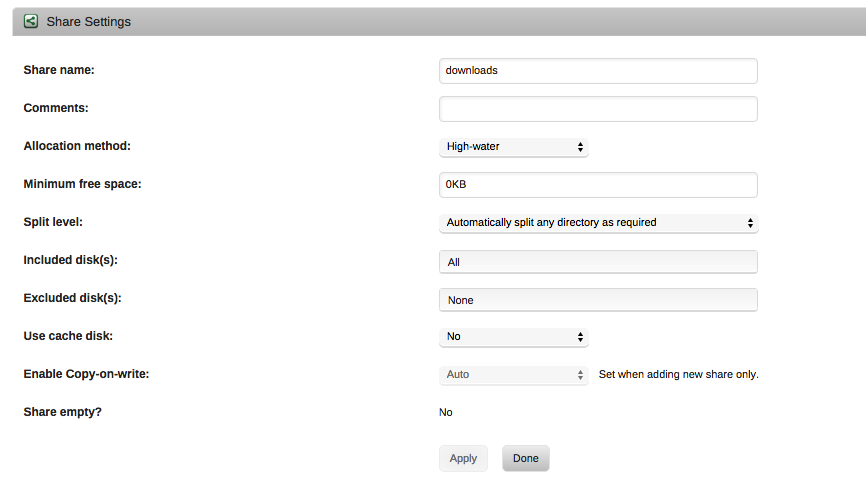
Hey... Ok, I have no idea where or how things are stored or now. I say this because even though I killed everything, including Docker itself deleting the 20G docker image file, when I did it all again, I see old directories like the original Download with the capital D. I also see a share was made called downloads. I did not make this share. I DID create a download directory located at /mnt/cache/downloads as I set this up like referenced above. Thus I made the directory only...I did not make the share...yet it is there. With that said...Sonarr and SABnzdb are working together. How...I am not really sure. I am totally lost on the directories and the shares. This is what I have now in Docker... SABnzbd.... /config ---> /mnt/user/appdata/SABnzbd/ /downloads ---> /mnt/cache/downloads/complete/ /incomplete-downloads ---> /mnt/cache/downloads/incomplete/ Sonarr... /downloads ---> /mnt/cache/downloads/complete/ /config ---> /mnt/user/appdata/Sonarr/ /tv ---> /mnt/user/TV/ Inside SABnzbd....Under Folders it reads.... Default Base Folder: /config Temp Download: /incomplete-downloads Complete Download: /downloads ....and it works. So totally lost on the download share. So how do I have a downloads share? (See attached for settings.) See if you can follow this....Using a terminal... If I go into /mnt/cache/ I see: appdata docker.img downloads If I go into /mnt/cache/downloads I see: complete incomplete If I go into /mnt/user/ I see all my shares normal shares but also see the file docker.img that was made on the cache drive. (20gigs and same time stamp on it as on the cache drive) and I also see a downloads folder. If I go into /mnt/user/downloads/ I see: complete incomplete If I drop a file into /mnt/user/downloads/ that file does not show up in /mnt/cache/downloads. However when SABnzbd is downloading, I see the files inside the "incomplete" folder from either location... (Add the share that was made is not set to use the cache drive!) /mnt/cache/downloads/incomplete/The.Middle.S07E08.HDTV.x264-LOL /mnt/user/downloads/incomplete/The.Middle.S07E08.HDTV.x264-LOL So I have no idea how this is working at all and what is needed and what is not. AUGH!!! Even the actual docker.img files shows both on the cache drive and in the the /mnt/user. Yet on the Docker setting page it shows it should be in /mnt/cache/docker.img. Are you lost? I am.
-
Well would that not mean that /config would also be equal or it would not work? Right now /config for each point to other appdata directories and yet the information is stored in the right place for each program. So /config is not /config for all containers it seem each container would have it's own setting mappings...no? I am not sure why I am having such an issue with this. I just killed everything and will start over. So...anyone care to suggest settings for... The Docker Guide reads... "It is important that when naming Container volumes that you specify a path that won’t conflict with already existing folders present in the container. If unfamiliar with Linux, using a prefix such as “unraid_” for the volume name is a safe bet (e.g., “/unraid_media” is a valid Container volume name)." So...anyone care to suggest settings for... Sonarr Install Mapping.... /downloads ---> /config ---> /tv ---> SABnzbd Mapping... /config ---> /downloads ---> /incomplete-downloads --->
-
Ok... This is where I now stand after another download test. First the maps... Sonarr Install Mapping.... /downloads ---> /mnt/user/appdata/SABnzbd/downloads/complete/ /config ---> /mnt/user/appdata/Sonarr/ /tv ---> /mnt/user/TV/ SABnzbd Mapping... /config ---> /mnt/user/appdata/SABnzbd/ /downloads ---> /mnt/user/appdata/SABnzbd/downloads/complete /incomplete-downloads ---> /mnt/user/appdata/SABnzbd/downloads/incomplete/ And SABnzbd Folder settings... Default Base Folder: /config Temp ---> /incomplete-downloads Completed ---> /downloads Told Sonarr to download a TV show...It found it and sent to it SABnzbd. SABnzbd started the download and the files appeared in /mnt/user/appdata/SABnzbd/downloads/incomplete/ (As expected.) When it was done downloading, the files where made and placed in /mnt/user/appdata/SABnzbd/downloads/complete/TV (As expected based on the TV category) At that point one would expect Sonarr to then go to move the file. At this point, Sonorr no longer seems to attempt to do that. Sonarr shows the TV show 100% dowloaded inside the WANTED area. Sonarr shows the TV show inside the QUEUE area. Thats it. Nothing else has happened. Now Sonarr does not try to move it after words. Only thing in the log for the TV show is the find it and sending it to SABnzbd... 15-12-6 10:13:50.4|Info|NzbSearchService|Searching 4 indexers for [The Middle : S07E09] 15-12-6 10:13:52.3|Info|DownloadDecisionMaker|Processing 34 releases 15-12-6 10:13:54.1|Info|Sabnzbd|Adding report [The.Middle.S07E09.HDTV.x264-LOL] to the queue. 15-12-6 10:13:54.5|Info|DownloadService|Report sent to Sabnzbd Downloader. The.Middle.S07E09.HDTV.x264-LOL No now Sonarr is no longer trying to get it. Interesting Enough...If I go into Activity and click on the little guy image for manual import...The TV show shows up there to be manually imported.
-
So then, what it is the point of the mappings for each for download?
-
Hi...Yes, I do know it is case sensitive in this environment. However, the way it is being used would not make a difference as the mapping was pointing the the right place and the mapping is what should be important.

