





anibis2
Members
-
Joined
-
Last visited
Everything posted by anibis2
-
They both work. The one I linked is the most recent release that I could find where hardware transcoding still worked. I didn't see the need to go all the way back to 1.24 as I only encountered this issue recently.
-
Ah nice, just making sure. I was making some changes to my firewall when I noticed it was bombing, wasn't sure if I broke something on my end or what. I see the package was updated yesterday, so probably something from that.
-
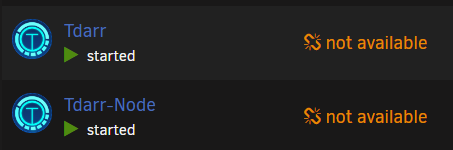
Is anyone else having problems updating the app since yesterday? Both Tdarr and Tdarr Node.
-
For those people having hardware transcoding issues, I switched to the last major version which resolved the issue for me. Just change the repo from linuxserver/plex to linuxserver/plex:version-1.29.2.6364-6d72b0cf6 Once a fixed version of 1.30 comes out just switch it back to linuxserver/plex
-
I am having the same issue, fully updated all around. It stopped working within the past couple weeks, but I'm not sure exactly when. I also tried the linuxserver/plex repo and had the same issue. I can see the transcode start, but the stream doesn't start. *EDIT Seems to be a known bug: https://forums.plex.tv/t/quicksync-hardware-transcoding-error-4294967279/829247/6
-
Correct, you can re-enable bridging and everything should work as it usually does.
-
Go into Settings > Network Settings > Routing Table, then add a route pointing your local subnet (192.168.0.0/24 in my case) to br0. It should look like that when you're done. There will be other routes for your docker subnets, as well as ipv6 if applicable. Just leave those alone.

-
The subnet route did the trick. For whatever reason br0 is slow for reads only, so strange. Maybe it's the Realtek 2.5Gbe NIC, or perhaps something with my config. So stoked that it's fixed! I spent a bit of money on 2.5Gbe / 4TB SSD's and it was disappointing for it to make no difference.
-
Thanks for that, I didn't come across it in my searches. When I disable bridging reads are 220MB/s+ which is more what I would expect. I do run VM's which was one of the features that brought me to Unraid in 2015, so disabling bridging is not an option. I did try with bridging enabled and no VM's powered on, same slow read speeds. The machine is also in the basement on the other side of the house, so running a second cable would be a pain. *EDIT* I created a new route for my local subnet to go out eth0, that fixed the issue. I am not seeing any knock-on effects after adding this route (br0 to local subnet seems to be permanent). Am I missing anything?
-
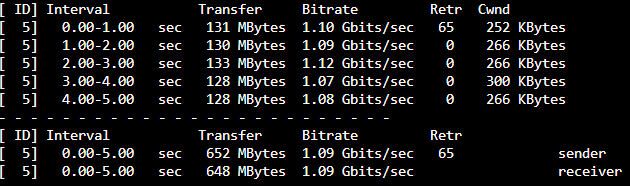
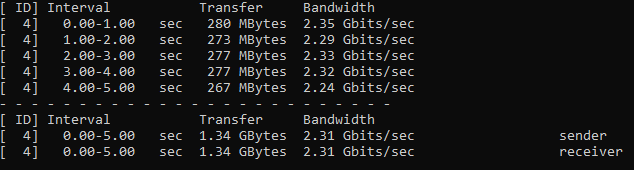
Here's Unraid > Windows 11: And Windows 11 > Unraid So, it is a network problem. Where should I go from here? Please keep in mind that I see this 130MB mark on my QNAP as well, so it's not a Windows issue.
-
Hi, I have spent many hours trying to resolve this issue to no avail. I have a 10th Gen Intel i7 / 48GB / Realtek 2.5Gbe card. 2x 4TB Samsung 860 EVO BTRFS cache and a single 500GB Hynix nvme drive, along with 6 spinners. When I copy Veeam backup files from the cache/nvme drives to a Windows PC (Server 2019 and Windows 11) I get about 130MB/s. When I write a (different) large file from those same Windows PC's to the cache drive I saturate the 2.5Gbe link. Direct copies between the nvme/ssd top out at 500MB/s or so, the top speed of the Samsung. There has been no activity on the spinners when running these tests. I also hit the 130MB/s cap when copying backups from the Unraid box (cache only) to my QNAP. When I work on the QNAP cache / empty array with my Windows machines I get 250MB/s or so. Unraid can read (and write) to the QNAP at the same 250MB/s speed. Diags are attached. *EDIT* Transfers between my two 2.5Gbe Windows machines saturate the link both ways. Thanks. unraid-diagnostics-20220516-2310.zip
-
The cron error will likely resolve itself. The X-Frame error can be resolved by editing the Nextcloud NGINX default config. There is a guide on the previous page of this thread showing what you need to add. I had the trusted proxy error as well, I had to add letsencrypt to the Nextcloud config.php file. 'trusted_proxies' => array ( 0 => 'letsencrypt', ), Also on page 86 of this thread. Search is your friend.



