





anibis2
Members
-
Joined
-
Last visited
Everything posted by anibis2
-
Ah yeah I just figured that out as you did and updated my original post. Thanks for the help!
-
Are you using Browserless or something else for your scraping? I tried making the above change and I get the same error. I changed it from ws://[IP]:[PORT]/?token=[TOKEN] to ws://[IP]:[PORT]/chromium/playwright?token=[TOKEN]. When that didn't work, I deleted the chromium part and got a playwright version mismatch error. UPDATE I saw that the Browserless container I was using from the Unraid appstore hadn't been updated in over a year, so I swapped to the repo that Browserless v2 uses. All is well now with the updated websocket URL.
-
I am having this issue as well. I've tried re-creating Browserless from the default template, as well as adding port 3012 to it (is that websocket, or http?). I do see activity in the Browserless logs when I try to refresh a link in Karakeep, but I see the same error as @Rewrap . I believe this started with the latest Karakeep update. Rolling back to 0.25.0 breaks my Karakeep instance, so I am unable to verify. UPDATE I was able to downgrade to 0.25.0 (thank you snapshots), and crawling works as expected now.
-
The latest update (5.1.1-2-01) broke my ProtonVPN WireGuard implmentation. Rolling back to the previous version corrects the error.
-
I replaced my tried-and-true fan control scripts with this docker earlier in the week and it's working great. Will it ever be possible to control NVIDIA GPU fans without having to use privileged? Just curious if it's just a flat no it can't happen, or something that's on the roadmap. I know this is still new, and it's already the best Unraid fan controller by a large margin. I didn't even know this platform existed. Thanks for bringing it to Unraid!
-
Is there any way to setup the WG VPN in a fail over configuration? It would be nice to have it automatically try another server if the first one fails. Proton VPN likes to take their servers down for maintenance, other times they're just full.
-
From what I understand after seeing it work, there is very little actually stored on the array. All this docker does is download the site data and then upload it to ArchiveTeam, so you aren't doing any of the actual archiving.
-
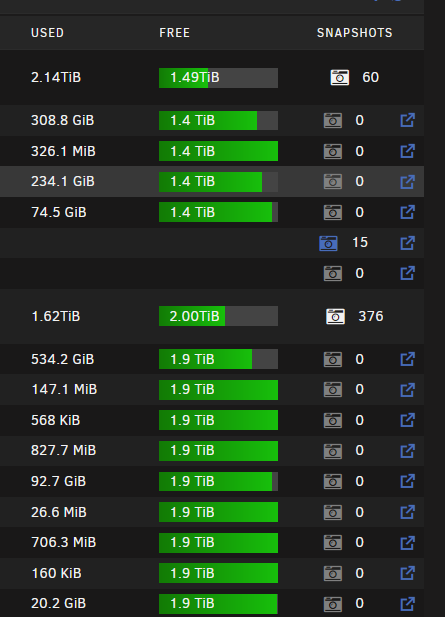
All of my snapshots disappeared with the new version. They come back if I disable Lazy Load and manually refresh.
-
Yeah I can't get it working either. I think this docker has been abandoned.
-
I'm having an issue on Unraid 7.0 b2 where FlareSolverr stops working after the 7.0 b1 > b2 OS update. I had no issues when updating from the previous version to 7.0 b1. I've upgraded and downgraded a few times, and the issue is definitely related to the patch. Prowlarr is also routed the same way but works fine. I've tried the two different FlareSolverr dockers, both had the same behavior. FlareSolverr does work when I pull it out of the DelugeVPN docker network. I am routing the two containers by setting their networks to none and adding a string pointing to DelugeVPN in the Extra Parameters field. The WebUI on FlareSolver does come up after about 5 minutes (usually takes seconds), it loads normally thereafter. Sonarr/Radarr/Prowlarr are unable to communicate with FlareSolverr. When I run a test I see a hit come in the logs, but it doesn't get a response. The logs look fine otherwise, no errors or anything.
-
Yeah, I figured as much. I've just never seen that error, nor could I find anything online with others running into the same issue. Just wanted to make sure I'm not doing something wrong.
-
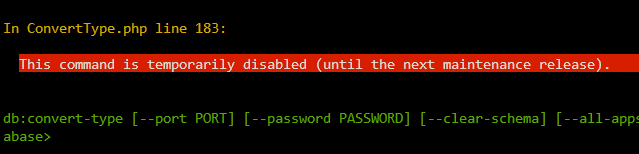
I am attempting to migrate from MariaDB to PostgreSQL and am at the step where I need to convert the database. I am running this command: sudo occ db:convert-type --all-apps --port 5432 --password "password" pgsql nextcloud <postgresql IP> nextcloud Here's the result: Anyone have any ideas? I tried searching for "This command is temporarily disabled (until the next maintenance release). " and found nothing.
-
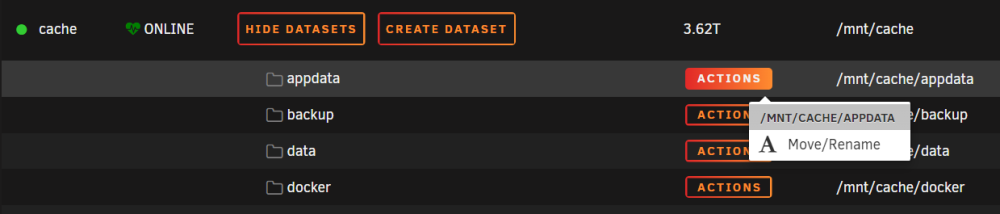
I have no option to create a snapshot when clicking on the "Actions" menu on a particular pool. I have a second ZFS pool that I use for VM's, it has the Snapshot option. My cache pool does not have this option, it simply has "Move/Rename". Any ideas? *EDIT: I figured it out, I had shares and not datasets. Not sure why that happened in the first place, but it's fixed.
-
It ended up being a misconfiguration on the VPN that particular host uses which was blocking LAN access. I did clean up my users, so thanks for that info.
-
Ok, so I removed the plugin and updated it to your 2.8.0 release, this has gotten rid of the Access Denied error. I believe I misinterpreted the error; it was actually triggering when I would start/restart the service. I see no errors when I try to connect the client to the server, WinNUT just hangs for about 30 seconds then says it cannot connect. Here's my config, the log is attached: MODE=netserver [qnapups] driver = usbhid-ups port = auto LISTEN 0.0.0.0 [admin] password=***** actions=set actions=fsd instcmds=all [root] password=***** upsmon master [admin] password=**** upsmon slave MONITOR [email protected] 1 root ***** master SHUTDOWNCMD "/sbin/poweroff" POWERDOWNFLAG /etc/nut/killpower NOTIFYFLAG ONBATT SYSLOG+EXEC NOTIFYFLAG ONLINE SYSLOG+EXEC NOTIFYCMD "/usr/sbin/nut-notify" NOTIFYFLAG REPLBATT SYSLOG+EXEC NUT.txt
-
I updated to 6.12.4 yesterday and am having issues with my remote NUT devices. Unraid itself sees the UPS just fine.
-
When is the docker going to be updated with 27.0.2? It's been a few days now...
-
When I try to exclude my Grafana data directory it slows down to a crawl. The .tar was growing slowly as time went on, and there was I/O activity on the disks. The Grafana tar was 500MB after 20 minutes of running Plex, which is 32GB and has many more files, takes about 90 seconds. I just turned off the external part on Grafana and it's working well now, takes about a minute. *EDIT* I wasn't paying attention with Grafana, I didn't realize how the docker path mappings were configured. I was excluding my DB's, but there were other container paths pointing to the root Unraid file system. I didn't catch that even though you pointed it out, but now I get it. The plugin is working fine for me nothing out of the ordinary.
-
That's definitely much better. Exclusions appear to be working as expected, as is the "Save external volumes" setting. The coloring is better as well. I had a different issue when it tried to backup Grafana. The debug log is attached. Not sure if it's app related, or something with my configuration. ab.debug.log
-
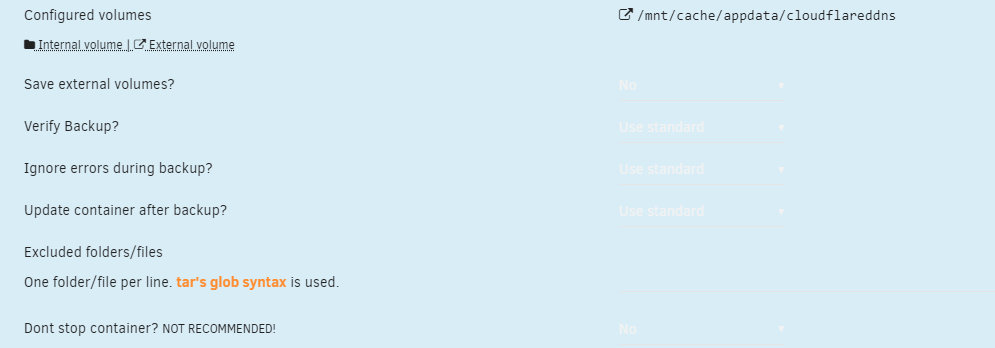
Ah, maybe it was just backup to an external drive. Regardless, the setting is set to no. Kinda hard to read with the coloring issues.

-
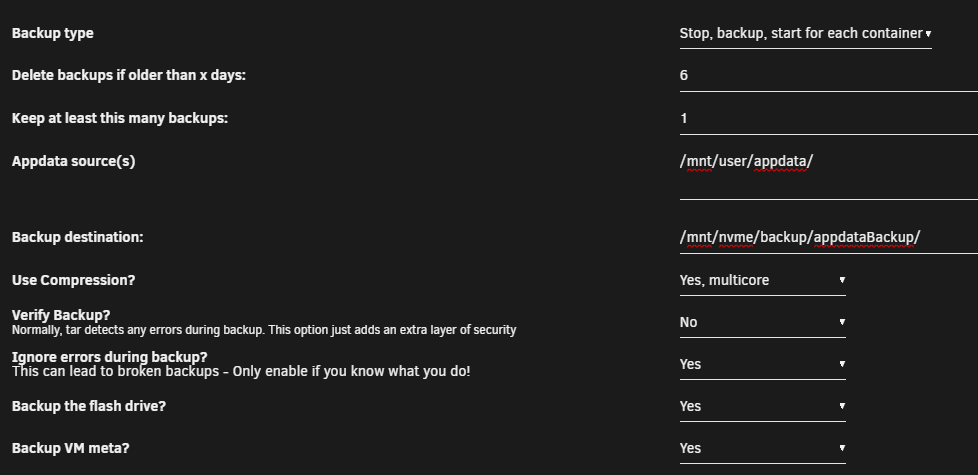
I do not see a setting for "Backup external volumes". I do remember seeing it on the old Appdata Backup plugin. I did try disabling the flash drive / VM meta backup, but there was no change.
-
I'm having the same issue with Plex. The .tar for my 32GB Plex appdata folder was up to ~250GB before I stopped the backup. I tried excluding my media folders thinking it was grabbing those, but that didn't affect anything. I also tried to exclude my Grafana db's, but nah. Good thing we're in beta. Also, I run Unraid in dark mode, and the coloring is off when you drive to the individual docker settings.
-
I had permission issues with the docker initially, couldn't write to config or apps. I think it was from the Unraid permission tool; I had to run it on my cache drive a couple months back. 26 seems fine to me. My instance is pretty small though.
-
It's fixed for me with the new docker image. I'm on Nextcloud 26 and am not seeing any issues other than an X-Robot-Tag error in Nextcloud admin, but I have verified that my X-Robot-Tag set.
-
Here's a one-liner from the above thread that fixes the docker update issue. It does the same thing as manually editing the file. Just ssh to your box / use the Web terminal and paste the command. sed -i "s#distribution.manifest.v2+json'#distribution.manifest.v2+json,application/vnd.oci.image.index.v1+json'#" /usr/local/emhttp/plugins/dynamix.docker.manager/include/DockerClient.php This will not persist when you reboot Unraid. The real fix will be in the in the next Unraid release.




