adminmat
Members
-
Joined
-
Last visited
Everything posted by adminmat
-
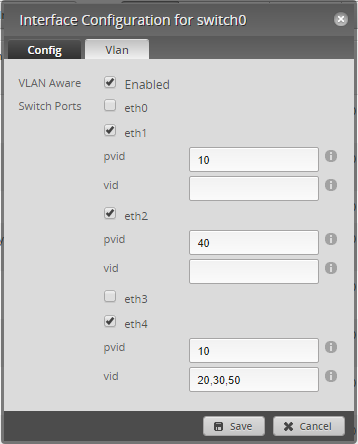
Update!!! Got it working. I forgot to add the VLAN number to the "vid" field on the Edgerouter's switch0 for the Switch's trunk port. As soon as I added 50 the Plex WebUI lit up. 🤘 Victory! I can also confirm that I CAN ping from my PC on VLAN10 to the Plex Container on VLAN50.
-
So how I understand your post: in order to access the Plex server locally from your PC, both Plex and the PC would have to be in the same Subnet / VLAN. And any IoT device accessing Plex would have to be on the same Subnet / VLAN. For example. I'd have to put my Roku, PC, phone, laptop (for viewing) and Plex all on the same Subnet / VLAN. I must understand you incorrectly for this seems quite limited and a security issue.
-
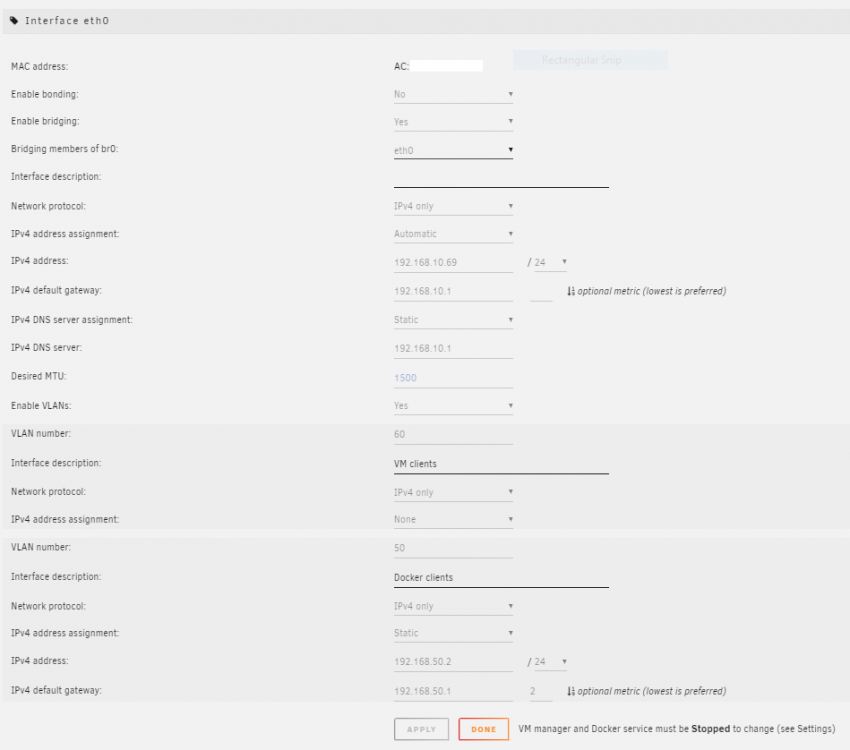
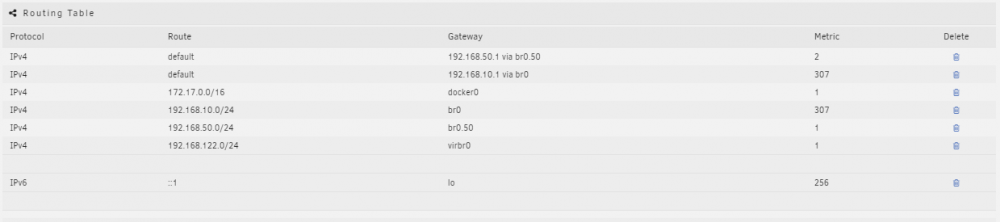
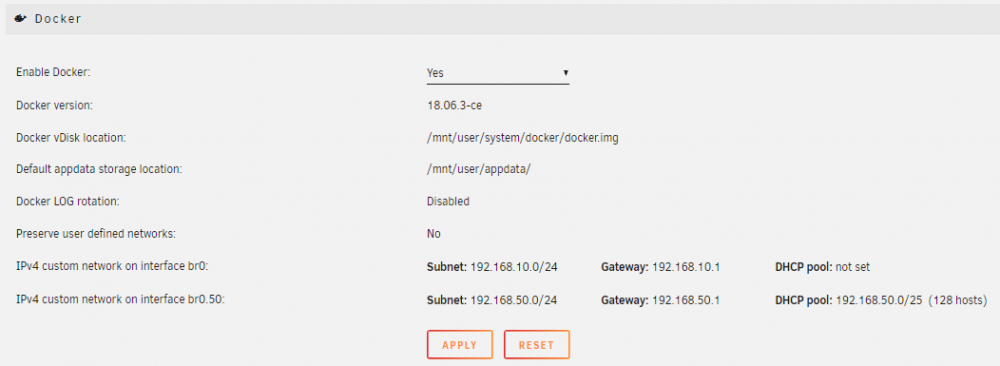
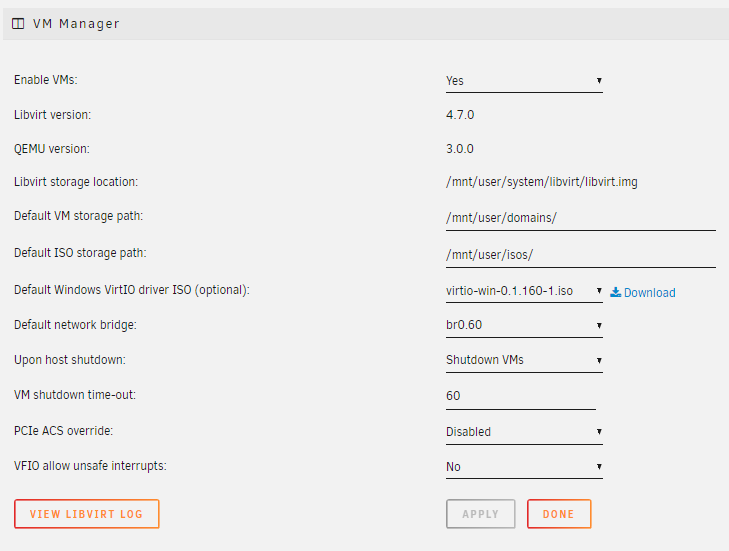
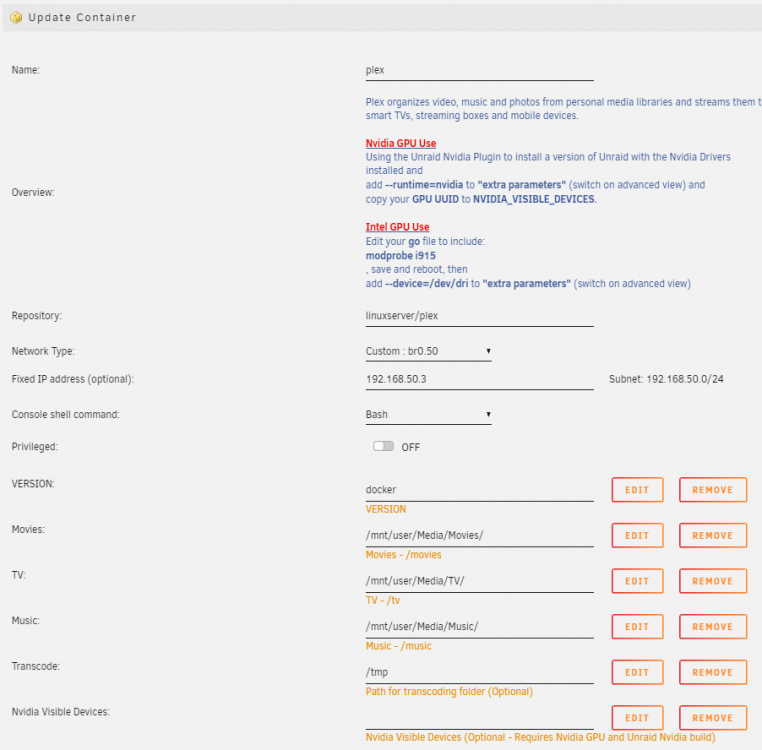
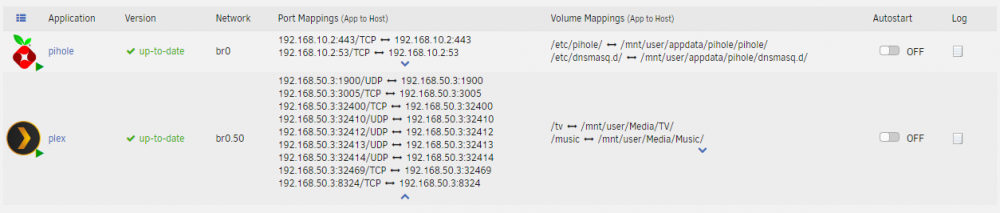
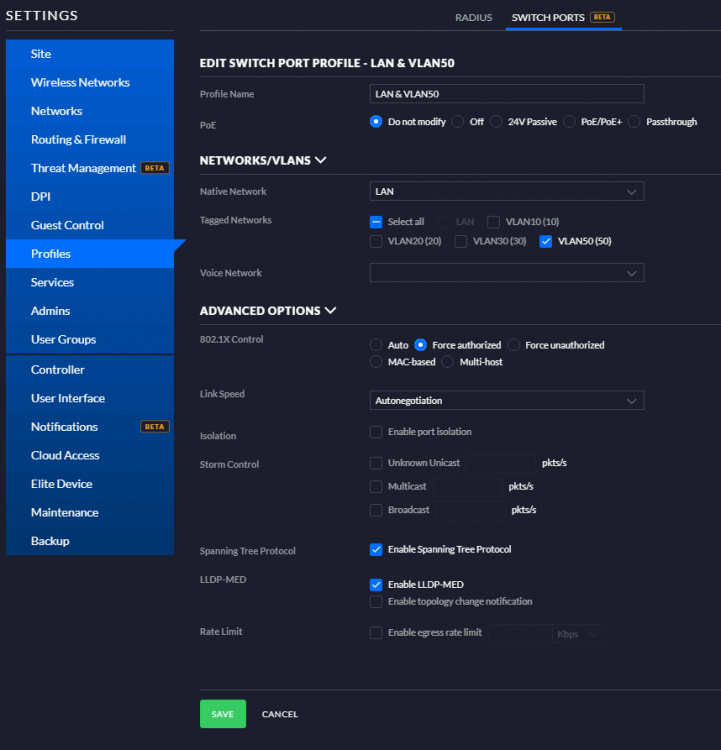
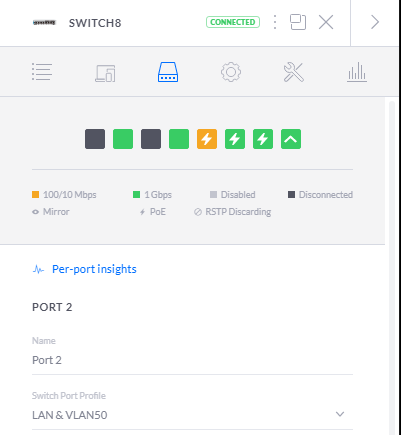
has something changed for 6.6.7? I tried this tonight but lost WebUI access (and all access) to my Plex Container. I've been running Plex just fine. From my secure LAN (VLAN10) desktop I can't ping Plex (192.168.50.3) or Docker (192.168.50.2) but I can ping the unRAID server (192.168.10.69). My router firewall rules are set up so I can ping any subnet from VLAN10. I have an EdgerouterX. Here is my setup. Please let me know what I'm doing wrong. unRAID is connected to switch port 2.
-
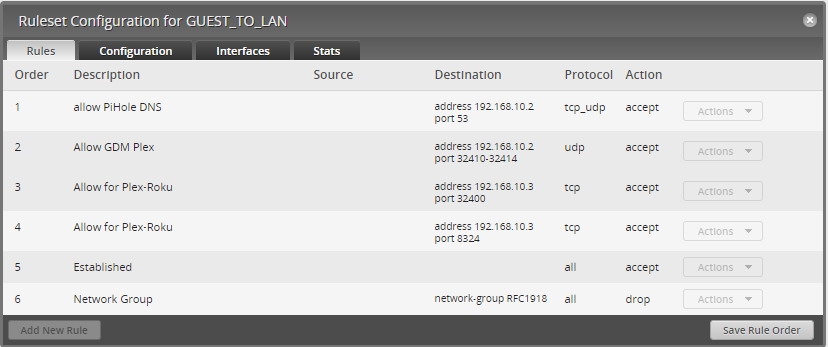
Update! I got it working! This time with much less whining on the forums as usual 😃 It was GDM Network Discovery!! I had to open a destination port range to my Plex server's IP address. Ports 32410 to 32414. So I'm allowing GDM port range 32410-32414, UDP to my Plex IP address! I'm allowing 32400 and 8324 also to the Plex IP. Thanks @Hoopster for looking at it with me.
-
Update: I unexpectedly figured it out. This time with much less whining on the forums as usual 😃 It was GDM Network Discovery!! I had to open a destination port range to my Plex server's IP address. Ports 32410 to 32414. I didn't have to list anything in the Source tab. My current rule blocks all traffic between VLANs but already allows traffic FROM VLAN10 to anywhere.
-
I CAN actually specify a 2nd DNS server on my router. I didn't know what that was for! So that's like a failover DNS field? Wow. I'm going to use 8.8.8.8 and do a test.
-
Yes, Pi-Hole is also giving me problems on unRAID. When I shut down the server I have to manually go into my router and change the DNS settings for 4 different subnets or I get locked out internet connections. I think having Pi-Hole on a RPi is a much better option.
-
Well that is a bit more comforting to know others are sharing main LAN subnets with IoT devices. Before I deployed my unRAID server I spent a couple weeks segregating my network. I read so many warnings on why you need to do that it scared me probably more than it should. It was a MASSIVE pain to set up. I haven't even started to do any remote connections (outside of my home) yet. I'm still trying to get things working here. I'm starting to think it's a waste of time to have all these VLANs. The amount of time I've spent on it I could have restored all my data from backups ten times over.
-
Thanks @Hoopster, Ok, question for you. Do you segregate your IoT devices? (Your smart TV, Nvidia Shield, ect) from your unRAID server? The easiest thing for me to do it just place my Roku and Smart TV on my Secure LAN but I'm hoping not to. It seems VLANs are maybe more trouble than they are worth. Every application I add (Pi-Hole, Plex) turns into a week long fight with firewall rules, etc. Thoughts?
-
Thanks Squid. So I've posted this question in several forums. Redit, Ubiquiti, etc. And People keep posting that link. However, what I'd like to do is connect the Plex server running on VLAN10 (192.168.10.3) to the Roku on the IoT network VLAN30 (192.168.30.13). I want to directly connect the two. I don't want to send the movie to Plex's server, then have it come back to my Roku that's sitting right next to the server. I imagine this is quite common where someone would configure their network to have their IoT devices (Roku, Shield, Vero 4K+) on a VALN secured from their management network. And I've seen this question asked on the Ubiquiti forums about a dozen times but they don't come up with a solution. I was able to pass all my DNS traffic through my VLAN for Pi-Hole with the firewall rule that I posted above. I'm hoping that it's a similar solution but I want to make sure I have both unRAID and Plex server configured properly so I can rule them out as the issue. Does this make sense?
-
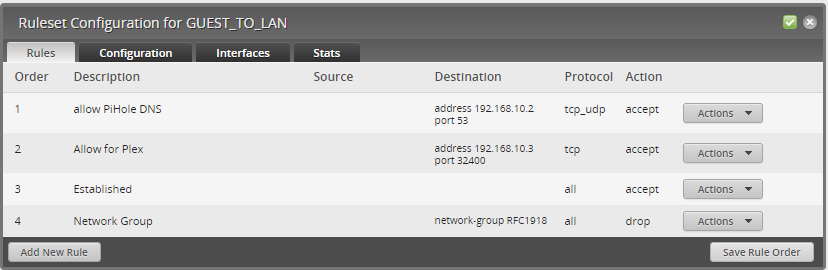
So I added a rule to ALLOW TCP to DESTINATION address 192.168.10.3 (my Plex server on unRAID) and port: 32400. Am I setting this up wrong? What IP do I need to open the port for? The Roku's or the Plex server's? Or my unRAID's server? And is it a "DESTINATION" or a "SOURCE"?
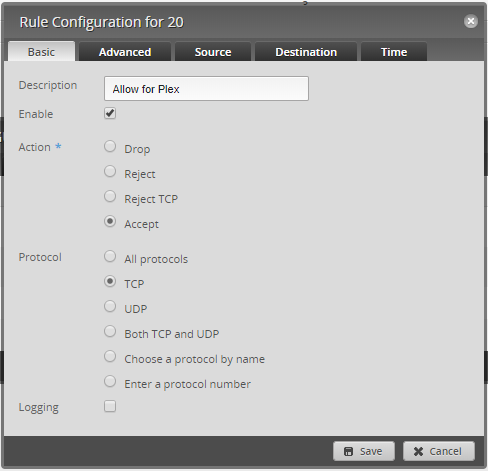
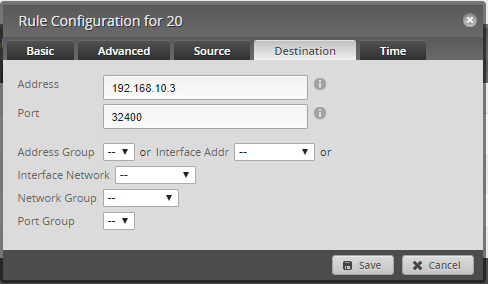
-
So update: I tried every combination of allowing ports within my network. And I can't get Plex to connect directly to the Roku. I am now trying Network Type br0 which gives Plex it's own IP address. Now I completely lost Remote Access (the slow 2mb/s connection). I still CAN connect and play directly when on the same network from within the LAN.
-
I'm having trouble getting the Plex to be found outside of the network. I'm using "Network Type" Custom: br0 I've assigned Plex it's own IP address in the Secure LAN of my network. I can only watch TV/Movies when connected direclty to that network. Should I not have used "Custom: br0" ? I can't find any explanation of why you would use the differnet "Network Types". Most posts focus on the shares which I have working properly.
-
Thanks for the links but I'm not understanding when you would use a Host network type over a Bridge. I have a ESXi host running with VMs. They each have their own IP address. Which the Plex docker doesn't get if it's set up as a Host network type. I have several VLANs on my network with firewall rules separating them for security. Do i need to set up the Plex docker in Bridge mode in order for my Plex to be passed to my IoT network Roku? I tried opening port 8324 and 32400 in my router so the Plex server and the Roku can communicate locally but it's not working. Any ideas?
-
Would LOVE to find a video guide on how to set up Plex in unraid. Funny SpaceinvaderOne didnt make one. got this:
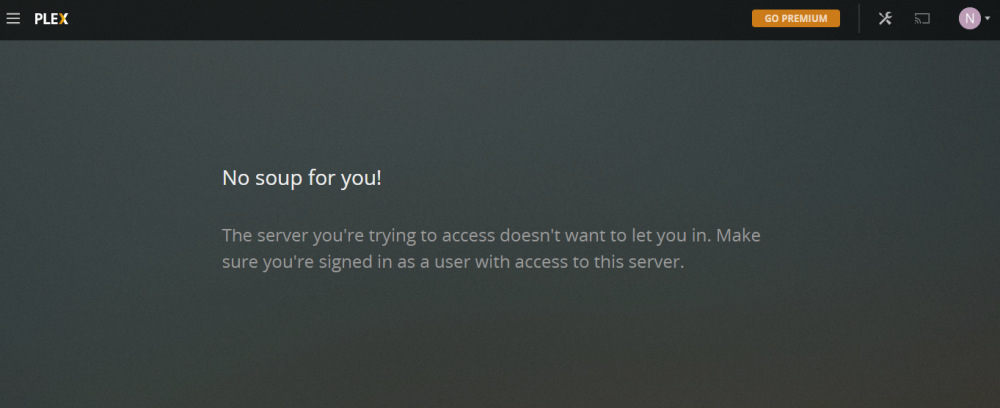
-
Believe it or not I did spend 4 hours googling this and there are no updated guides on setting this up. The guides I find are missing most of these fields. 1- Network type: Should I be using Bridge, Host, br0 or Custom? And why? (please explain what this means. I'm using br0 for Pi-Hole but I don't know why) 2- What do I map for "Transcode"? I assume I'll need to transcode. What do I do here? 3- Can I close off some of these ports? 4- How did I get upgraded to an "Advanced Member" when I'm probably the biggest idiot on here? 🤪
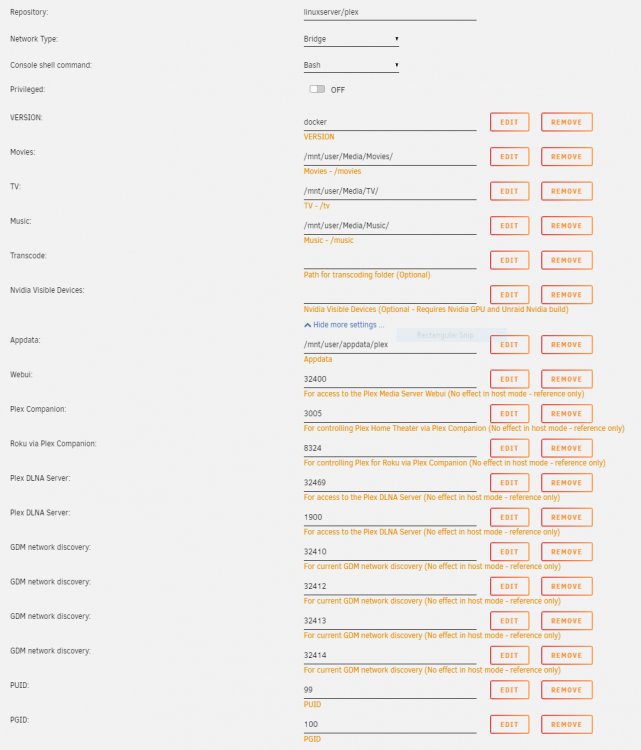
-
So after uninstalling and reinstalling pihole it's working again. For some reasons the network configuration changed. Still trying to figure out how to use pihole over multiple VLANs though
-
ran pihole fine for a day when I went to reset I got this: Do I need to uninstall it and reinstall?
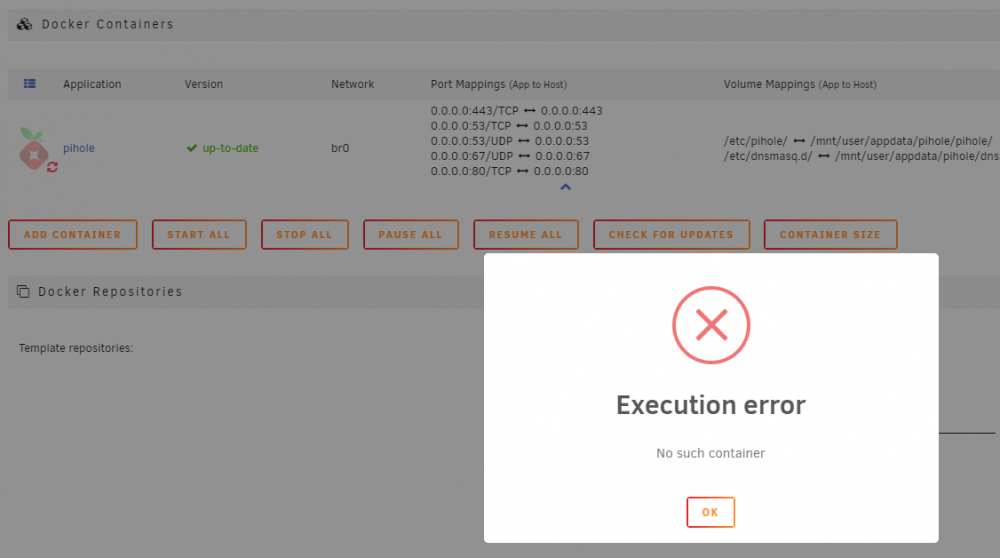
-
I have 4 VLANs running on an EdgerouterX. All VLANs are segregated but VLAN10 can establish communication with any other VLAN (via firewall rules) I have a pihole on VLAN10 in an unRAID server. How can I let VLAN20 utilize the pihole as well? I've tried many firewall rule to no success. Is my only option to set up a pihole for every VLAN? Surely there is a better way.
-
-
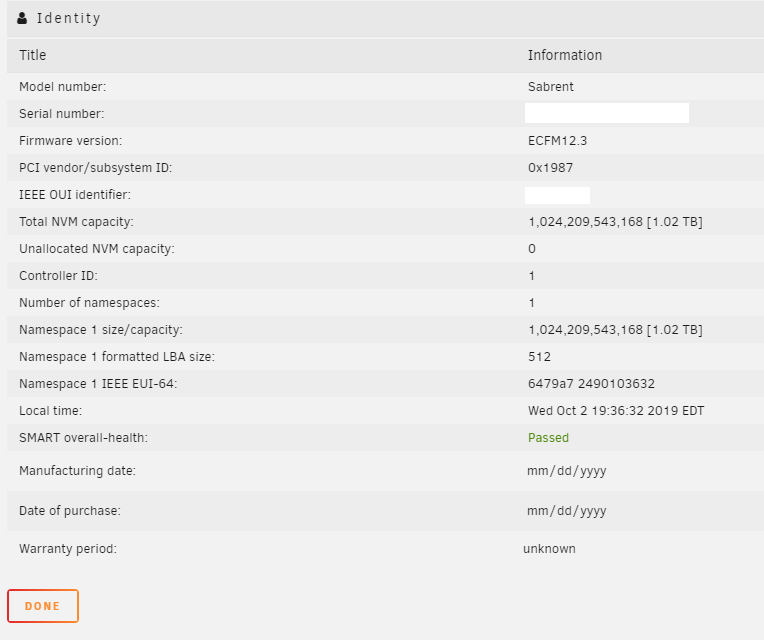
I have two cache drives installed (Sabrent 1TB m.2 NVME). The reviews complained they have a 4K sector allocation and Sabrent offers a utility to convert them to 512. However the SMART scan says they already have an LBA size of 512. Should I be concerned that the SMART is not correct? (See attached screenshot) Do I need to convert them to 512?