





GMAsterAU
Members
-
Joined
-
Last visited
Everything posted by GMAsterAU
-
@Rafaqs Thank you for this solution. That worked here. Well done! @JorgeB Thank you for looking into this, perhaps there is a larger underlying issue within Unraid; @bmartino1 Thank you for your work in this space and lending your experience. Have a great Holiday period!
-
Thank you for trying to help with this, but unfortuantely it did not make a difference. Here is my samba config: [global] fruit:aapl = yes fruit:nfs_aces = no fruit:copyfile = yes multicast dns register = yes ea support = yes [TimeMachine] path = /mnt/user/TimeMachine browseable = yes read only = no guest ok = no writeable = yes acl map full control = yes acl allow execute always = yes map archive = yes map system = yes map hidden = yes vfs objects = catia fruit streams_xattr fruit:encoding = native fruit:metadata = stream fruit:resource = stream fruit:locking = none ea support = yes store dos attributes = yes fruit:time machine = yes ; fruit:time machine max size = 0 valid users = gabriel create mask = 0660 force create mode = 0660 directory mask = 0770 force directory mode = 0770 force user = root force group = root testparm output: [TimeMachine] create mask = 0660 directory mask = 0770 force create mode = 0660 force directory mode = 0770 force group = root force user = root include = /boot/config/smb-extra.conf map hidden = Yes map system = Yes path = /mnt/user/TimeMachine valid users = gabriel vfs objects = catia fruit streams_xattr write list = gabriel fruit:time machine max size = 5000000M fruit:time machine = yes fruit:metadata = stream fruit:encoding = native Do you have any other suggestions? I did also do a sanity check by creating a backup on a removable external drive, which worked without issues (however I have to note that it had to be formatted as APSF, as it refuces to work with HFS+). I also read somewhere that the name of the mac can have an impact. Mine used to be 'Gabriel's MacBook Pro', so I changed it to 'MacBookPro_M4'. No effect. I also captured the output from a newly created backup with sudo log stream --predicate 'subsystem == "com.apple.TimeMachine"' --info --style compact | tee tm_system_log.txt. Output is in the attached file tm_system_log.txt
-
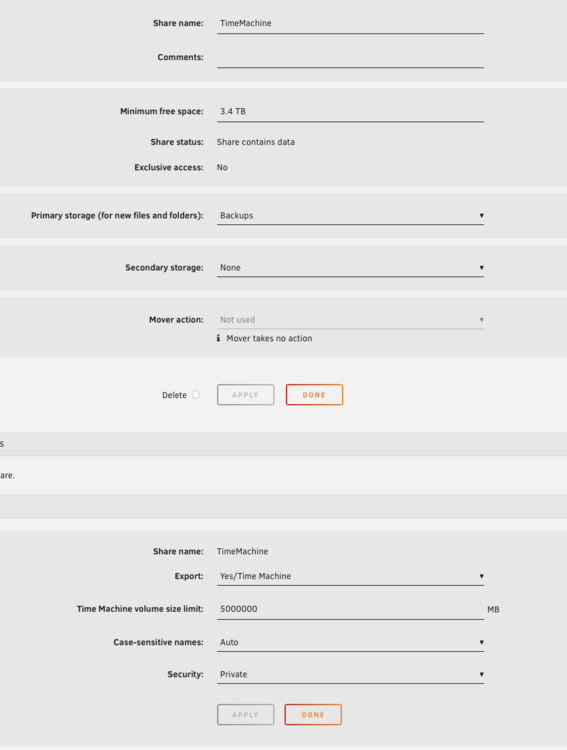
Hi Jorge, restoring, making new share, and even reinstalling macos has had no effect. I am on macos 26.2. As requested: Settings for TM share; While TimeMachine is sitting on a ZFS pool, I thought I would try a share on the main array too, just to be sure and I get the same error message of 'The backup disk image could not be created'. tower-diagnostics-20251220-1058.zip
-
I am also experiencing the same issue. Also macOS 26.1 with Unraid 7.2.2
-
Awesome plugin, are you planning to add support for the MB temperature? In my case it more accurately reflects the case temperature. thank you!
-
As title says, since 7.1.4 I have noticed that Samba as been crashing. I have no way of recreating or triggering it. I only notice because on the Mac a message pops up that network drives were disconnected. Jun 23 11:41:45 Tower smbd[1808387]: [2025/06/23 11:41:45.871258, 0] ../../lib/util/fault.c:178(smb_panic_log) Jun 23 11:41:45 Tower smbd[1808387]: =============================================================== Jun 23 11:41:45 Tower smbd[1808387]: [2025/06/23 11:41:45.871374, 0] ../../lib/util/fault.c:179(smb_panic_log) Jun 23 11:41:45 Tower smbd[1808387]: INTERNAL ERROR: unable to get back to old directory Jun 23 11:41:45 Tower smbd[1808387]: in smbd (smbd[192.168.1.) (client [192.168.1.141]) pid 1808387 (4.21.3) Jun 23 11:41:45 Tower smbd[1808387]: [2025/06/23 11:41:45.880782, 0] ../../lib/util/fault.c:186(smb_panic_log) Jun 23 11:41:45 Tower smbd[1808387]: If you are running a recent Samba version, and if you think this problem is not yet fixed in the latest versions, please consider reporting this bug, see https://wiki.samba.org/index.php/Bug_Reporting Jun 23 11:41:45 Tower smbd[1808387]: [2025/06/23 11:41:45.880793, 0] ../../lib/util/fault.c:191(smb_panic_log) Jun 23 11:41:45 Tower smbd[1808387]: =============================================================== Jun 23 11:41:45 Tower smbd[1808387]: [2025/06/23 11:41:45.880797, 0] ../../lib/util/fault.c:192(smb_panic_log) Jun 23 11:41:45 Tower smbd[1808387]: PANIC (pid 1808387): unable to get back to old directory Jun 23 11:41:45 Tower smbd[1808387]: in 4.21.3 Jun 23 11:41:45 Tower smbd[1808387]: [2025/06/23 11:41:45.892378, 0] ../../lib/util/fault.c:303(log_stack_trace) tower-diagnostics-20250623-1248.zip
-
I also experienced connection issues in 7.1.3 and rolled back. Now on 7.1.4, everything appears to be fine. Thank you Edit: system specs added Server 1 had issues on 7.1.3, Server 2 did not Server #1 Server #2 OS Version: 7.1.4 M/B: ASUSTeK COMPUTER INC. ProArt Z790-CREATOR WIFI BIOS: American Megatrends Inc., Version 3002 CPU: Intel® Core™ i7-14700 @ 2079 MHz MEMORY: 64 GiB DDR5 NIC 1: Onboard (AQtion AQC113CS NBase-T/IEEE 802.3an) NIC 2: Onboard (Intel Corporation Ethernet Controller I226-V) Storage Controller: LSI 9300-16i OS Version: 7.1.4 M/B: ASRock B450 Pro4 BIOS: American Megatrends Inc., Version P8.02 CPU: AMD Athlon 3000G with Radeon Vega Graphics @ 3500 MHz MEMORY: 16 GiB DDR4 NIC 1: Onboard (RTL8111/8168/8211/8411 PCI Express Gigabit Ethernet Controller) Storage Controller 1: Onboard ([AMD] 400 Series Chipset SATA Controller) Storage Controller 2: Onboard (ASM1061/ASM1062 Serial ATA Controller)
-
I figured it out. It was a user script that was running at array start up. It was writing to a path driectly to cache and as such I guess interrupted the formatting process. Once I disabled it and then ran through the steps it worked. For future reference: - empty cache - turn off Docker - pause all userscripts writing to cache on array start - stop the array, - click the first pool device and "erase pool" - set the filesystem and profile you want - start the array, - format Thank you for your help
-
I used the command, ran it twice, first time it said nothing, second time it returned that there was nothing to rm. The I started array, formatted drives, which again seemingly did nothing, but I just discovered that despite the message that it is unmountable, I can see cache in MC and create a folder on it.
-
No change tower-diagnostics-20250401-2056.zip
-
Followed your instructions, same problemtower-diagnostics-20250401-1919.zip
-
I had a 3 disk zfs pool, and wanted to increase its size to 5. I went ahead and moved all data off the disks, removed the datasets, removed the pool, rebooted, then used unassigned devices to format the drives individually and then created a new pool. Now I want to format the pool, but when I click on the 'Format will create a file system in all Unmountable disks', it says that it is formatting but then returns the same 'Unmountable: wrong or no file system' message. checked zpool import: root@Tower:~# zpool import no pools available to import tower-diagnostics-20250401-1900.zip

-
Thanks for that. I am currently restoring it. Let's see what happens.
-
Hi there, I am experiencing random crashes of the container. Seems to not be triggered my anything in particular. Following shutdown, container will not auto-start, but has to be manually started. Thanks in advance text error warn system array login Info App: Loading Fanart, Version=1.0.16.0, Culture=neutral, PublicKeyToken=null from /config/plugins/Fanart.dll Info App: Loading Tvdb, Version=1.5.0.0, Culture=neutral, PublicKeyToken=null from /config/plugins/Tvdb.dll Info App: Loading MediaBrowser.Plugins.Anime, Version=1.5.6.0, Culture=neutral, PublicKeyToken=null from /config/plugins/MediaBrowser.Plugins.Anime.dll Info App: Loading OMDb, Version=1.0.21.0, Culture=neutral, PublicKeyToken=null from /config/plugins/OMDb.dll Info App: Loading playback_reporting, Version=2.1.0.5, Culture=neutral, PublicKeyToken=null from /config/plugins/playback_reporting.dll Info App: Loading Emby.Api, Version=4.8.8.0, Culture=neutral, PublicKeyToken=null Info App: Loading Emby.Web, Version=4.8.8.0, Culture=neutral, PublicKeyToken=null Info App: Loading MediaBrowser.Model, Version=4.8.8.0, Culture=neutral, PublicKeyToken=null Info App: Loading MediaBrowser.Common, Version=4.8.8.0, Culture=neutral, PublicKeyToken=null Info App: Loading MediaBrowser.Controller, Version=4.8.8.0, Culture=neutral, PublicKeyToken=null Info App: Loading Emby.Providers, Version=4.8.8.0, Culture=neutral, PublicKeyToken=null Info App: Loading Emby.Photos, Version=4.8.8.0, Culture=neutral, PublicKeyToken=null Info App: Loading Emby.Server.Implementations, Version=4.8.8.0, Culture=neutral, PublicKeyToken=null Info App: Loading Emby.LiveTV, Version=4.8.8.0, Culture=neutral, PublicKeyToken=null Info App: Loading Emby.ActivityLog, Version=4.8.8.0, Culture=neutral, PublicKeyToken=null Info App: Loading Emby.Server.MediaEncoding, Version=4.8.8.0, Culture=neutral, PublicKeyToken=null Info App: Loading Emby.LocalMetadata, Version=4.8.8.0, Culture=neutral, PublicKeyToken=null Info App: Loading Emby.Notifications, Version=4.8.8.0, Culture=neutral, PublicKeyToken=null Info App: Loading Emby.Web.GenericUI, Version=4.8.8.0, Culture=neutral, PublicKeyToken=null Info App: Loading Emby.Codecs.Dxva, Version=4.8.8.0, Culture=neutral, PublicKeyToken=null Info App: Loading Emby.Codecs, Version=4.8.8.0, Culture=neutral, PublicKeyToken=null Info App: Loading Emby.Server.Connect, Version=4.8.8.0, Culture=neutral, PublicKeyToken=null Info App: Loading Emby.Server.Sync, Version=4.8.8.0, Culture=neutral, PublicKeyToken=null Info App: Loading EmbyServer, Version=4.8.8.0, Culture=neutral, PublicKeyToken=null Info SqliteUserRepository: Sqlite version: 3.42.0 Info SqliteUserRepository: Sqlite compiler options: ATOMIC_INTRINSICS=1,COMPILER=gcc-10.3.0,DEFAULT_AUTOVACUUM,DEFAULT_CACHE_SIZE=-2000,DEFAULT_FILE_FORMAT=4,DEFAULT_JOURNAL_SIZE_LIMIT=-1,DEFAULT_MMAP_SIZE=0,DEFAULT_PAGE_SIZE=4096,DEFAULT_PCACHE_INITSZ=20,DEFAULT_RECURSIVE_TRIGGERS,DEFAULT_SECTOR_SIZE=4096,DEFAULT_SYNCHRONOUS=2,DEFAULT_WAL_AUTOCHECKPOINT=1000,DEFAULT_WAL_SYNCHRONOUS=2,DEFAULT_WORKER_THREADS=0,ENABLE_COLUMN_METADATA,ENABLE_DBSTAT_VTAB,ENABLE_FTS3,ENABLE_FTS3_PARENTHESIS,ENABLE_FTS3_TOKENIZER,ENABLE_FTS4,ENABLE_FTS5,ENABLE_GEOPOLY,ENABLE_MATH_FUNCTIONS,ENABLE_PREUPDATE_HOOK,ENABLE_RTREE,ENABLE_SESSION,ENABLE_UNLOCK_NOTIFY,ENABLE_UPDATE_DELETE_LIMIT,LIKE_DOESNT_MATCH_BLOBS,MALLOC_SOFT_LIMIT=1024,MAX_ATTACHED=10,MAX_COLUMN=2000,MAX_COMPOUND_SELECT=500,MAX_DEFAULT_PAGE_SIZE=8192,MAX_EXPR_DEPTH=1000,MAX_FUNCTION_ARG=127,MAX_LENGTH=1000000000,MAX_LIKE_PATTERN_LENGTH=50000,MAX_MMAP_SIZE=0x7fff0000,MAX_PAGE_COUNT=1073741823,MAX_PAGE_SIZE=65536,MAX_SCHEMA_RETRY=25,MAX_SQL_LENGTH=1000000000,MAX_TRIGGER_DEPTH=1000,MAX_VARIABLE_NUMBER=250000,MAX_VDBE_OP=250000000,MAX_WORKER_THREADS=8,MUTEX_PTHREADS,OMIT_LOOKASIDE,SECURE_DELETE,SYSTEM_MALLOC,TEMP_STORE=1,THREADSAFE=1 Info SqliteUserRepository: Opening sqlite connection to /config/data/users.db Info SqliteUserRepository: Default journal_mode for /config/data/users.db is wal Info SqliteUserRepository: PRAGMA foreign_keys=1 Info SqliteUserRepository: Result of setting SQLITE_DBCONFIG_DQS_DDL to 0 is 0 Info SqliteUserRepository: Result of setting SQLITE_DBCONFIG_DQS_DML to 0 is 0 Info ActivityRepository: Opening sqlite connection to /config/data/activitylog.db Info ActivityRepository: Default journal_mode for /config/data/activitylog.db is wal Info ActivityRepository: PRAGMA foreign_keys=1 Info ActivityRepository: Result of setting SQLITE_DBCONFIG_DQS_DDL to 0 is 0 Info ActivityRepository: Result of setting SQLITE_DBCONFIG_DQS_DML to 0 is 0 Info NetworkManager: Detecting local network addresses Info NetworkManager: networkInterface: Ethernet eth0, Speed: 10000000000, Description: eth0 Info NetworkManager: GatewayAddresses: 192.168.240.1 Info NetworkManager: UnicastAddresses: 192.168.240.22 Info NetworkManager: networkInterface: Loopback lo, Speed: -1, Description: lo Info NetworkManager: GatewayAddresses: Info NetworkManager: UnicastAddresses: 127.0.0.1 Info NetworkManager: Detected local ip addresses: [{"IPAddress":"192.168.240.22","HasGateWayAddress":true,"PrefixLength":24,"IPv4Mask":"255.255.255.0"},{"IPAddress":"127.0.0.1","HasGateWayAddress":false,"PrefixLength":8,"IPv4Mask":"255.0.0.0"}] Info SqliteDisplayPreferencesRepository: Opening sqlite connection to /config/data/displaypreferences.db Info SqliteDisplayPreferencesRepository: Default journal_mode for /config/data/displaypreferences.db is wal Info SqliteDisplayPreferencesRepository: PRAGMA foreign_keys=1 Info SqliteDisplayPreferencesRepository: Result of setting SQLITE_DBCONFIG_DQS_DDL to 0 is 0 Info SqliteDisplayPreferencesRepository: Result of setting SQLITE_DBCONFIG_DQS_DML to 0 is 0 Info ServerConfigurationManager: Saving system configuration Info App: Begin vacumming SqliteItemRepository Info SqliteItemRepository: Opening sqlite connection to /config/data/library.db Info SqliteItemRepository: Default journal_mode for /config/data/library.db is wal Info SqliteItemRepository: PRAGMA cache_size=-2097152 Info SqliteItemRepository: PRAGMA page_size=4096 Info SqliteItemRepository: PRAGMA foreign_keys=1 Info SqliteItemRepository: Result of setting SQLITE_DBCONFIG_DQS_DDL to 0 is 0 Info SqliteItemRepository: Result of setting SQLITE_DBCONFIG_DQS_DML to 0 is 0 Error Main: Error in appHost.Init *** Error Report *** Version: 4.8.8.0 Command line: /system/EmbyServer.dll -programdata /config -ffdetect /bin/ffdetect -ffmpeg /bin/ffmpeg -ffprobe /bin/ffprobe -restartexitcode 3 Operating system: Linux version 6.1.99-Unraid (root@Develop-612) (gcc (GCC) 12.2.0, GNU ld version 2.40-slack151) #1 SMP PREEMPT_DYNAMIC Tue Jul 16 10:06:03 PDT 2024 Framework: .NET 6.0.25 OS/Process: x64/x64 Runtime: system/System.Private.CoreLib.dll Processor count: 12 Data path: /config Application path: /system SQLitePCL.pretty.SQLiteException: Corrupt: database disk image is malformed SQLitePCL.pretty.SQLiteException: Exception of type 'SQLitePCL.pretty.SQLiteException' was thrown. at SQLitePCL.pretty.SQLiteException.CheckOk(sqlite3 db, Int32 rc) at SQLitePCL.pretty.SQLiteException.CheckOk(sqlite3_stmt stmt, Int32 rc) at SQLitePCL.pretty.StatementImpl.MoveNext() at SQLitePCL.pretty.DatabaseConnection.Execute(IDatabaseConnection This, String sql) at Emby.Sqlite.BaseSqliteRepository.Vacuum() at Emby.Server.Implementations.ApplicationHost.VacuumDatabase(BaseSqliteRepository db) at Emby.Server.Implementations.ApplicationHost.VacuumDatabases() at Emby.Server.Implementations.ApplicationHost.RegisterResources() at Emby.Server.Implementations.ApplicationHost.Init() at EmbyServer.HostedService.StartAsync(CancellationToken cancellationToken) Source: SQLitePCL.pretty TargetSite: Void CheckOk(SQLitePCLEx.sqlite3, Int32) Info Main: Shutdown complete [cont-finish.d] executing container finish scripts... [cont-finish.d] done. [s6-finish] waiting for services. [s6-finish] sending all processes the TERM signal. [s6-finish] sending all processes the KILL signal and exiting. ** Press ANY KEY to close this window **
-
Thank you Dave, I didn't think to look. I was working on a solution to essentially implement a similar function using user scripts. Maybe you find some of the code useful in implementing the logic: #!/bin/bash #VARS=$(awk -F= '/\[/{prefix=$0; next} $1{$1=$1; print prefix $0}' OFS='=' "/var/local/emhttp/var.ini") check_interval=300 parity="off" counter=0 Script="/boot/config/plugins/user.scripts/scripts/PLACEHOLDER/script" ####check if parity check is running paritycheck(){ VARS=$(awk -F= '/\[/{prefix=$0; next} $1{$1=$1; print prefix $0}' OFS='=' "/var/local/emhttp/var.ini") test=$(grep -wn "mdResyncPos" <<< "$VARS") test=$(grep -oP '"\K[^"\047]+(?=["\047])' <<< "$test") #echo "$test" if [ $test == 0 ] && [ "$counter" == 0 ]; then echo "Parity Check / Sync / Rebuild not running." echo "Stopping here" exit 0 elif [ $test == 0 ] && [ "$counter" != 0 ]; then parity="off" runscript elif [ $test != 0 ]; then if [ "$counter" == 0 ]; then echo "Parity Check / Sync / Rebuild in progress." parity="on" else : fi fi } ####continue to recheck if parity is running paritycheckstatus () { while [ "$parity" == "on" ] do echo "Parity operation still running" echo "Waiting $check_interval seconds to check again" ((counter=counter+1)) echo "$counter" sleep $check_interval paritycheck done } ####run script when parity check has completed runscript() { bash "$Script" } ##execute arraycheck paritycheck paritycheckstatus My Bash is not the cleanest but it did do the job technically; however I had issues with executing the whole thing reliably from the main server to start it, execute the parity check and then shut down again.
-
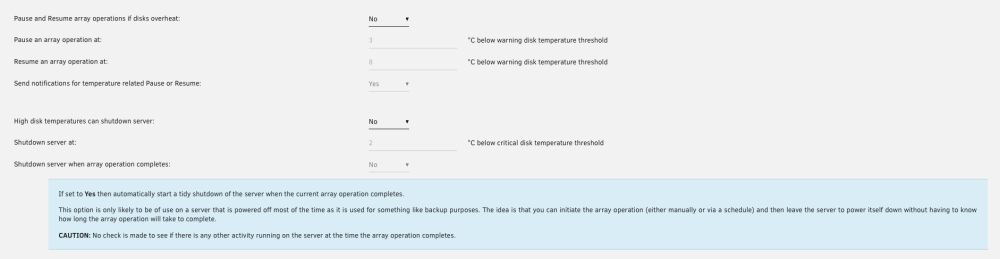
I just noticed that on Version: 2023.07.08 an option for 'Shutdown server when array operation completes:' exists, however it is greyed out. Is there a condition that has to be given to enable it? Thank you for all the great work with this plugin
-
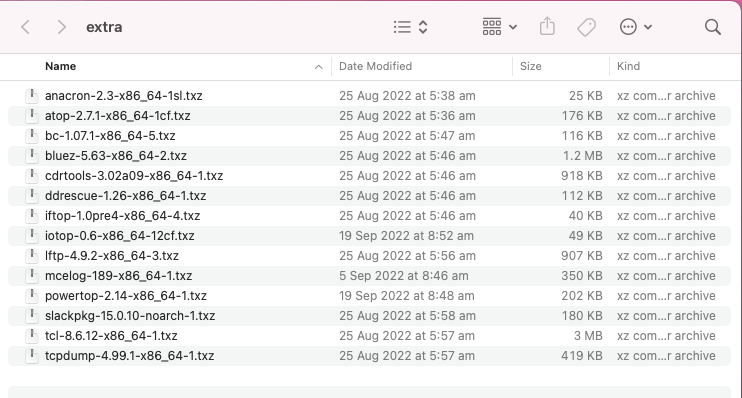
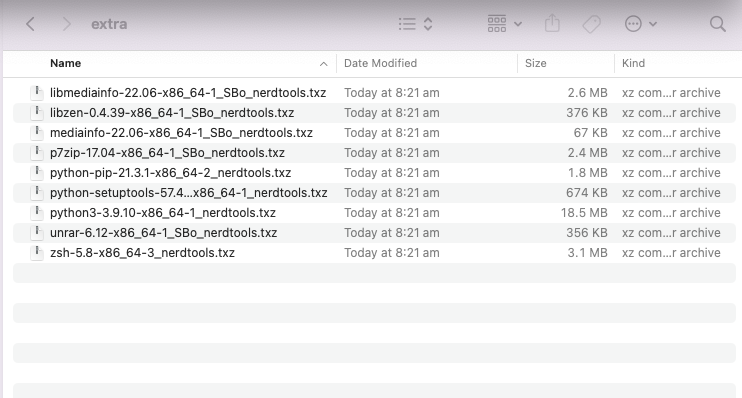
Just tested it on my system and original files in the extra folder were deleted before the nertool packages were installed. Any info I can provide you to help with this? before after
-
You are totally right. I assumed that due diligence was implied with any purchase, especially with mission critical hardware. (The sellers I am referring to I have had very good experiences with and they often specify that this is local stock under local warranty, see below). I have another story to share on this note actually. In Australia we are in a bit of a funny position where not few American companies sell stock under Australian company names/divisions of their mother corps, however items get shipped from overseas or from OEM stock. One of those is Newegg. They have localisation in Australia and once I found an amazing deal for some hardware. Ordered it and found that I had to return some of the items. I was instructed by Newegg to contact the manufacturer as I was outside the US. So I did, turns out that the warranty on the items sold was restricted due to the products not intended for the Australian market. After asking further I was told that there is no physical, or spec difference. Just certain serial numbers are destined for certain locations. What they offered me to do was to give me a discount on a repair/return of a product that was faulty out of the box, even though under Australian law they have to provide me with a refund/exchange. So I went back to Newegg who after much debate (I did not expect having to argue with a customer rep about whether I was entitled to an RMA few days after the items arrived...) agreed to a refund under their international refund policy. Turns out that the warranty period they offer is way less than the manufacturer warranty that I do not have access to was I to purchase the item in Australia locally. Long story short, make sure not only that the sellers are reputable, but also where the item comes from (thinking of Amazon here in particular, even though I personally never had an issue with warranty returns via Amazon).
-
Over the years I have migrated from WD to Seagate. Within Seagate from Ironwolf/Ironwolf Pro to EXOS. The reasons were in the beginning better pricing and speeds. I found that when I started out with 3TB drives on an experimental basis with WD Red drives that they were just not as performant as Seagate drives which were of a similar cost. As I learnt to better handle UNRAID and it started to mature substantially, its deployment in my environment also increased; in the beginning it essentially was a glorified homelab, however now it was becoming mission critical. The move to Seagate followed a thorough evaluation of drives and I decided to go with 8TB IronWolf drives (ST8000VN004). Unfortunately for me, those particular drives were plagued by constant issues, with drives seemingly uncontrollably and randomly dropping offline. This wasted a lot of time for me and pushed me to upgrade to 12TB drives (ST12000VN0008) just to escape the hellhole that was having to RMA drives constantly, to the point where I got to first name basis with the local Seagate rep, and waiting to rebuild the array and associated down time. [Just a brief note: this appears to be a predominant issue related to certain(?) LSI contollers. Once I moved to drives to a backup server without LSI they have been working fine]. The 12TB drives Ironwolf fared a lot better, however I must have gotten onto a bad batch and I was experiencing hardware failures at a much higher rate than expected. Drives would last anywhere from a couple days to a couple months. You may be familiar with the bathtub curve. Here I was with a semi stable system that was really not fulfilling its needs, while also needing to expand the storage one more time as our operational needs grew. That is when the 8 drive limit came into play... should one go lower, cheaper capacity over more drives or not.... I started experimenting with Ironwolf Pro and Exos drives and found that the difference in $/TB in my location was generally minimal; so it came down to features. Ironwolf Pro is marketed as a Prosumer drive for a NAS of up to 24 drives, with slightly worse performance across the board compared to EXOS. In the end I settled for the EXOS x16 16TB drives (ST16000NM001G). I have not experienced any drive failures in over a year of 24x7 operation (other than a DOA, but that may happen). I agree with @KingfisherUK, the higher speeds are a welcome bonus. Additionally, where I am, there are way better deals available for EXOS drives and often they show up in large quantities on commercial IT sites for low prices, reduced by as much as 50% of RRP. These sites are definitely not geared towards the regular home consumer. At the end of the day it comes down to budget and if you can save the money, go for it.
-
@Squid thank you for a great plugin, which I personally use every day and that enables myself and the community to run our servers in such customised ways! Out of curiosity, which version of cron is currently used by the plugin? when using crontab.guru it warns that some expressions are not standard and may not run. Do you have experiences with using expressions such as 'run every 3rd month, Jan-Dec'?
-
ok for me the (semi)-permanent solution was: set MB BIOS to 'PME wake from S5 state' and add ethtool -s eth0 wol g at the end of the GO file. Now as long as I do unplug the computer I can WOL and shutdown no issues. If I unplug the machine, then I have to manually start it and can proceed from there.
-
I am having the exact same issue. when I start motherboard and go into bios, then shutdown, WOL works without issue; somehow the shutdown procedure overwrites the 'Wake-on:' setting of eth0 to 'd'. Did you ever find a permanent solution? I am also finding that the Sleep plugin does not allow me to wake the machine up again, no matter which letter is set for eth0. Update: when setting the controller manually to g with ethtool -s eth0 wol g then I can wake the server from sleep and it retains the setting.
-
oh! thank you for that! It is true that I had no idea that there were any issues. It already corrected over 50 errors. I will post an update when it is complete. Thank you again!
-
Pool Device is called "Backupmachine" and the new disk is sdg also called "Backupmachine 4" tower-diagnostics-20210716-2010.zip
-
Thanks JorgeB. I just added an another disk to the pool and nothing is happening. It was renamed automatically in sequence, but is not encrypted (does not have the lock symbol on the disk icon) and shows no io at all. Am I missing something or do I have to empty the pool and redefine it from scratch to expand it?


