almulder
Members
-
Joined
-
Last visited
-
Sonos Panel Sonos Panel is a self-hosted, touchscreen-friendly web app for controlling a whole-house Sonos system. It's built for cheap wall-mounted tablets: tap a room, tap a song, done. Everything runs locally on your own server. No cloud, no account, no internet dependency. It also includes a built-in music library that streams your own files straight to the speakers, which sidesteps the Sonos 65,000-track index limit entirely. My own library is over 160,000 tracks and all of it is playable. Available in Community Applications. Search for "Sonos Panel". === FEATURES ===- Every room in your system, tap to control. Grouped rooms expand under their group head - Group Rooms dialog like the official app. The room you tap becomes the group coordinator, plus Party Mode and saved group presets - Play/pause/skip/seek, per-room and group volume, per-speaker EQ, sleep timers, shuffle, repeat, crossfade - Full queue management: view, jump, remove, drag to reorder, clear, save the queue as a playlist. Updates live from speaker events - Sonos Favorites and Playlists (create, rename, delete, add and remove tracks), plus Line-In sources - Multi-account support. If your household has several logins for one service, each gets its own list with editable names, so nobody kills anyone else's stream - Network Music Library: browse by Artists, Albums, Songs, Genres, Composers, Folders, or Recently Added, with unified search and self-healing album art - Optional 4-digit passcode that locks structural changes (deleting playlists, editing groups) behind an onscreen keypad while leaving playback open for guests - Ambient screensaver, plus up to 3 extra tabs that embed other local dashboards like Home Assistant or Hubitat - Works with both Sonos S1 and S2 systems === REQUIREMENTS ===- A Sonos system (S1 or S2) - A free IP address on your LAN for the container - Optional: a folder of music files if you want the Network Music Library === INSTALL === 1. In Unraid, go to Settings > Docker > Network Types and set br0 to ipvlan mode. This is strongly recommended for Sonos. 2. Install Sonos Panel from Community Applications. 3. Set Network Type to br0 and set Fixed IP Address to a free IP on your LAN, outside your router's DHCP range. 4. Optionally set Music Path to a folder of music files. 5. Apply, then open http://<the-ip-you-chose>/ . No port number needed. IMPORTANT: bridge networking will not work. Sonos discovery uses SSDP multicast, which Docker's bridge network silently blocks. The container will start fine and simply never find any speakers. The panel also needs its own LAN address so the speakers can stream local music back from it. === KEY SETTINGS ===Sonos System - s2 (default) or s1. One container controls one generation, since S1 and S2 are separate Sonos households that cannot mix. To control both, install the container twice with different IPs and appdata paths. Music Path - read-only folder of music files. Enables the Network Music Library. Passcode - optional 4-digit code. Leave blank to disable the lock entirely and leave everything unlocked. Rescan Schedule - daily@HH:MM or weekly@DAY@HH:MM. A quick incremental rescan always runs at container start regardless. Public Base URL - leave blank. It auto-detects correctly on br0 and host networking. Only set it if speakers fail to play local files. === MUSIC FORMAT LIMITS ===The scanner only indexes files your speakers can actually play: MP3 / AAC / M4A / OGG: up to 320 kbps WMA: up to 355 kbps (no WMA Lossless) FLAC / ALAC: up to 24-bit on S2, 16-bit on S1 AIFF / WAV: up to 16-bit All lossless: 48 kHz sample rate maximum Anything over those limits is skipped, not added. Hi-res files at 88.2, 96, or 192 kHz are the usual case. Every skipped file is listed with its reason in incompatible-files.txt in the appdata folder. The panel does not convert files. === TROUBLESHOOTING ===No speakers found Almost always networking. Confirm Network Type is br0 with a fixed IP, and that br0 is set to ipvlan under Settings > Docker. Bridge mode cannot work. Local music files won't play Check incompatible-files.txt in your appdata folder first, since the file may be over the format limits above. If files are indexed but still silent, the speakers may not be able to reach the panel. Try setting Public Base URL to http://<container-ip> explicitly. Music is on another machine (NAS, Windows share) Mount it on the Unraid host first using Unassigned Devices, then point Music Path at /mnt/remotes/... . A Windows-style \\server\share path will not work inside a container. A music service shows the wrong name or a generic icon The container log prints the exact service name Sonos reports every time a source plays, along with the key you need. Look for a line starting with "Play source:". Add that key to public/icons/music_services.js with a display name, drop in a matching PNG, and refresh. No code changes or rebuild needed. Some rooms are missing If you have both S1 and S2 hardware, check the Sonos System setting. Each container only shows one generation, and the startup log lists exactly which devices were included or excluded and why. First library scan is slow Expected. A large library takes several minutes the first time. Every scan after that is incremental, so rescans take seconds. === LINKS ===Project and source: https://github.com/almulder/Sonos_Panel Issues and bug reports: https://github.com/almulder/Sonos_Panel/issues License: MIT === REPORTING PROBLEMS ===Post here or open a GitHub issue. Either is fine. To help me help you, please include: - Your Unraid version and the container's network type - Whether your Sonos system is S1 or S2 - The relevant container log output (Docker tab, click the icon, Logs) - What you expected versus what happened
-
@SimonF any luck getting it to show booting and array starting and such before its fully up and running?
-
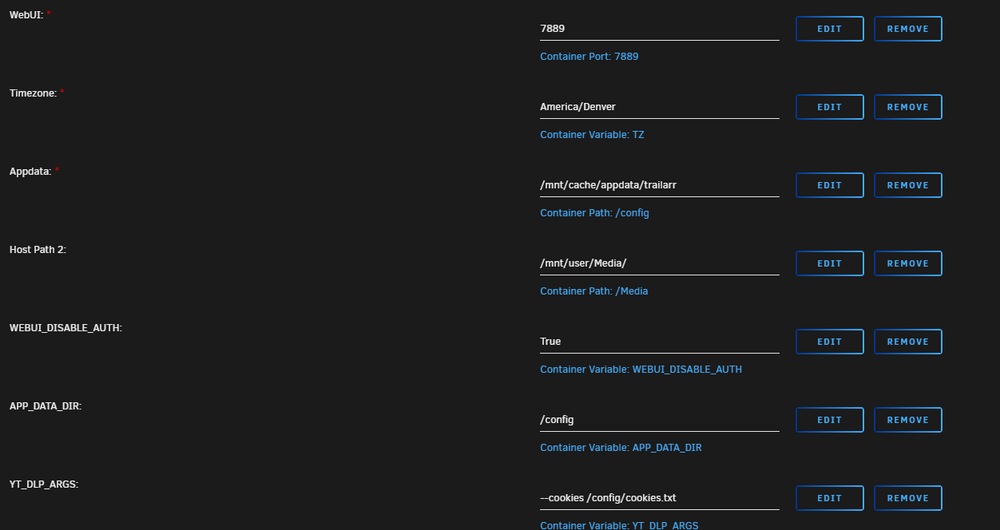
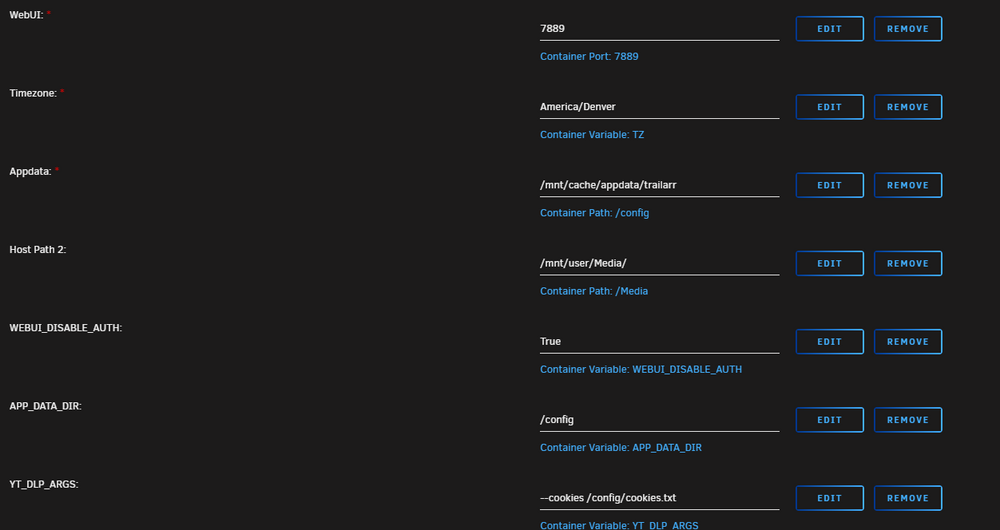
yes that does do it. myabe you can help with one more. i am getting Some trailers will not download, in the log it says "Sign in to confirm your age. " So i looked into how to export my cookies as load then into the docker, but they never seem to take (Exported them from firefox using ym per their github) see my updated screenshots above. Also the docker defaulted to /mnt/docker_v/appdata/trailarr/, it should be defaulting to /mnt/user/appdata/trailarr
-
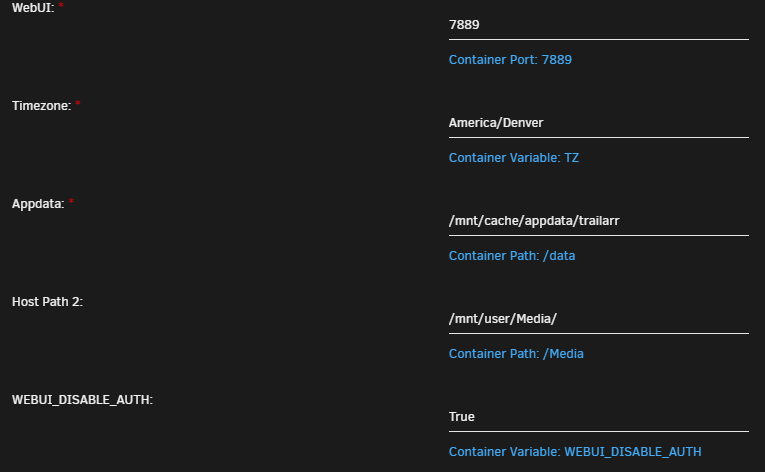
Need help with Trailarr. I have it setup as follows: No config files are ever saved at the app data location. The app will work, but if it gets shutdown and restarted, it looses all info. and I have to resetup everything. this happens every time. I don't belive it was setup corectly since it will not save the config info. Please help! Update: Ok I have it saving the files, but it will not download videos. here is my config: I get this error: Exception: ERROR: [youtube] 8Zv7wd1a-5A: Sign in to confirm you’re not a bot. Use --cookies-from-browser or --cookies for the authentication. See https://github.com/yt-dlp/yt-dlp/wiki/FAQ#how-do-i-pass-cookies-to-yt-dlp for how to manually pass cookies. Also see https://github.com/yt-dlp/yt-dlp/wiki/Extractors#exporting-youtube-cookies for tips on effectively exporting YouTube cookies I logged into youtube via firefox and exported my cookies and addded them into trailarr, but continue to get the error.
-
system says there is an update to "Fix Common Problems" Installed Version2024.12.04 Upgrade Version2024.12.19a but when I run the update i get this message: plugin: updating: fix.common.problems.plg Executing hook script: pre_plugin_checks +============================================================================== | Skipping package fix.common.problems-2024.12.04-x86_64-1 (already installed) +============================================================================== ---------------------------------------------------- fix.common.problems has been installed. Copyright 2016-2024, Andrew Zawadzki Version: 2024.12.04 ---------------------------------------------------- plugin: fix.common.problems.plg updated Executing hook script: gui_search_post_hook.sh Executing hook script: post_plugin_checks Just wanted to make you aware as I am sure a line of code was missed.
-
I might just look into using user scripts to make a backup of what is needed i nexcloud-aio so I dont backup useless stuff.
-
So what is the best way to get Nextcloud-aio to backup and restart properly. I have been trying appdata backup but it seems to have issue and all the sub containers dont work after Nextcloud-aio-mastercontainer is backed and restarted, I have to go into the GUI and tell it to restart them. Not sure what I am missing. thoughs
-
yes the nvme is passed through from the IOMMU, But all the times I have been doing this, I never noticed the boot order section, I was always doing it in the bios. did it here and now it works flawlessly thanks
-
can you clarify what you mean
-
So I have my stuff setup for passthrough, but what is the proper way to setup for windows 11 to be able to boot from the NVME as a standard drive not a img on the nvme. I have installed, but then windows never reboots to the nvme. I have to manualy select it in the vm bios. I have nuked everything a few times retrying. i have looked at a few videos but no luck. please help.
-
anyone?
-
nic2 is passed through to VM2, VM1 shares nic1 with unraid and uses the vitrio driver.
-
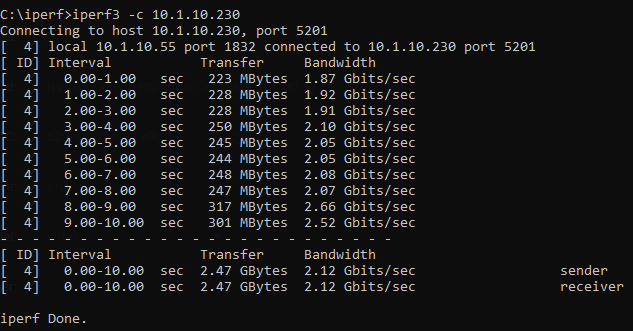
So I have a Pro WS WRX80E-SAGE SE that has 2 10GB nic's One is passed through to a VM (Connected to a switch at 1GB) and the other is used for unraid and shared to a different VM (And this nic is connected via a 10GB switch and shows "10000 Mbps, full duplex, mtu 1500" so its connected 10GB however my VM is only getting 2GB when testing using iperf3 The VM is using virtio and in windows set jumbo frames to 9014. Any idea how to get the full 10GB speed between them?
-
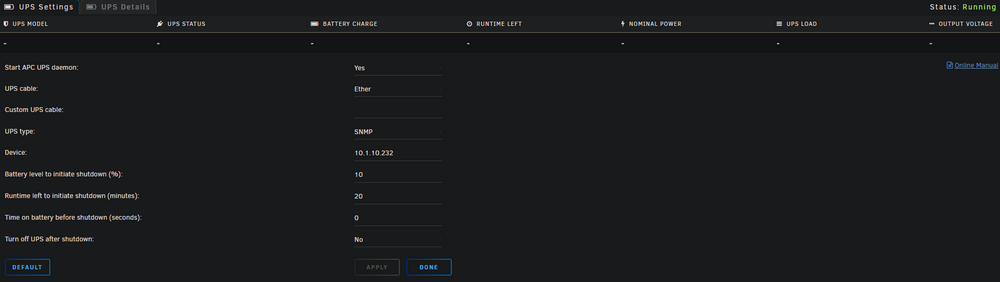
anyone else have issues with the UPS plugin not working?
-
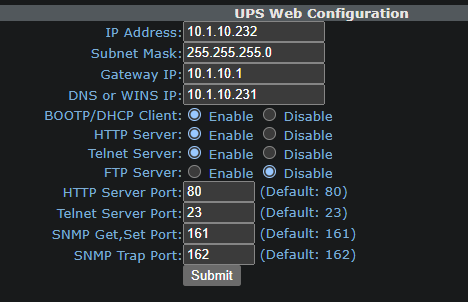
So I have a Minutman E1000RTXL2U UPS and it was working, I got a second one and was going to use that and have unraid monitor that one instead, put in the info and is never populates, changed it back to the original and now that one does not populate. Anyone else have this issue? (they both had different IP address, so that is not the issue, Even removed the second one from the network, same issue)