





phyzical
Members
-
Joined
-
Last visited
Everything posted by phyzical
-
Thanks @joz adding a policy solved it for me too
-
hey, I have this plugin https://github.com/phyzical/docker.labelInjector Which i use js to add a button to retroactivly inject labels into existing containers. this all works fine using the plugin page via docker.labelInjector.Docker.page But if i try to do the same with the AddContainer page i seem to have no effect injecting my js/css/php? docker.labelInjector.AddContainer.page Does anyone know why this might be?
-
as an interim fix you can just add this as a userscript on startup to patch the file #!/bin/bash awk 'NR==1209{$0=" e.split(\"\\n\").filter(e => e.length >= 3).forEach((e) => {"} {print}' /usr/local/emhttp/plugins/folder.view2/scripts/docker.js > tmpfile && mv tmpfile /usr/local/emhttp/plugins/folder.view2/scripts/docker.js
-
So for the current downloadable version of folderview2 2025.04.13 for the folder overviews, there is one minor bug for some reason theres an extra /n causing an extra item changing line 1209 to the follow fixes it /usr/local/emhttp/plugins/folder.view2/scripts/docker.js e.split('\n').filter(e => e.length >= 3).forEach((e) => { i can also confirm this one change fixes the issue you see with the graph @LDrake @VladoPortos who forked and released folderview2 looks like he changed a bunch of stuff and reverted the release of 2025.05.26 , im sure he just got too busy with work and life happens. So in the current source the above change wont change anything but would fix it in the current installable version. Not exactly sure what direction this plugin should go as not sure what he was planning with the changes. the play might be to fork this at the source 2025.04.13 and just get it back to stable
-
Ah cool, ill also try 7.2 with it and report back when its out
-
so small update hasn't crashed besides the one crash above since using my old 980 a+ the 990 plus again the 990 pro is in the server just unassigned, has not "disconnected". at some point ill switch back to the 990 pro and see if it disconnects again, one thing i felt like i noticed is that the 990 pro wasn't "in perfectly" like a bit of the gold for the socket was exposed so maybe after a bit of heat + vibration it caused a quick dc. so i shoved it in harder. as my mobo has these spring locks instead of screw locks. So if i switch back and it doesn't disconnect again its 100% poor design for the nvme holder on the mobo/ user error (i guess?). If it does disconnect again its 100% some weird compatibility issue/issue with this 990 pro nvme and something else in the server
-
well already dropped out within 30 minutes under xfs too.. 1756616838906 2025-08-31T05:07:18.906Z Aug 31 13:07:18 MEDIABOX kernel: nvme1n1p1: writeback error on inode 2416483205, offset 164364288, sector 1256814832 1756616838906 2025-08-31T05:07:18.906Z Aug 31 13:07:18 MEDIABOX kernel: nvme1n1p1: writeback error on inode 2416483205, offset 160227328, sector 1256806752 1756616838906 2025-08-31T05:07:18.906Z Aug 31 13:07:18 MEDIABOX kernel: nvme1n1p1: writeback error on inode 2416483205, offset 122421248, sector 1256732912 1756616838906 2025-08-31T05:07:18.906Z Aug 31 13:07:18 MEDIABOX kernel: nvme1n1p1: writeback error on inode 2416483205, offset 95731712, sector 1256680784 1756616838906 2025-08-31T05:07:18.906Z Aug 31 13:07:18 MEDIABOX kernel: nvme1n1p1: writeback error on inode 2685179091, offset 18612224, sector 1396474624 1756616838906 2025-08-31T05:07:18.906Z Aug 31 13:07:18 MEDIABOX kernel: nvme1n1p1: writeback error on inode 2416483205, offset 64466944, sector 1256619720 1756616838906 2025-08-31T05:07:18.906Z Aug 31 13:07:18 MEDIABOX kernel: nvme1n1p1: writeback error on inode 6242232336, offset 0, sector 3277792568 1756616838906 2025-08-31T05:07:18.906Z Aug 31 13:07:18 MEDIABOX kernel: nvme1n1p1: writeback error on inode 2685179091, offset 11272192, sector 1396460288 1756616838906 2025-08-31T05:07:18.906Z Aug 31 13:07:18 MEDIABOX kernel: nvme1n1p1: writeback error on inode 2416483205, offset 25690112, sector 1256543984 1756616838906 2025-08-31T05:07:18.906Z Aug 31 13:07:18 MEDIABOX kernel: XFS (nvme1n1p1): Please unmount the filesystem and rectify the problem(s). 1756616838906 2025-08-31T05:07:18.906Z Aug 31 13:07:18 MEDIABOX kernel: XFS (nvme1n1p1): Filesystem has been shut down due to log error (0x2). 1756616838906 2025-08-31T05:07:18.906Z Aug 31 13:07:18 MEDIABOX kernel: XFS (nvme1n1p1): log I/O error -5 1756616838906 2025-08-31T05:07:18.906Z Aug 31 13:07:18 MEDIABOX kernel: I/O error, dev nvme1n1, sector 1256556272 op 0x1:(WRITE) flags 0x104000 phys_seg 5 prio class 0 1756616838906 2025-08-31T05:07:18.906Z Aug 31 13:07:18 MEDIABOX kernel: I/O error, dev nvme1n1, sector 1953518033 op 0x1:(WRITE) flags 0x29800 phys_seg 1 prio class 0 1756616838906 2025-08-31T05:07:18.906Z Aug 31 13:07:18 MEDIABOX kernel: I/O error, dev nvme1n1, sector 1256945872 op 0x1:(WRITE) flags 0x104000 phys_seg 72 prio class 0 1756616838906 2025-08-31T05:07:18.906Z Aug 31 13:07:18 MEDIABOX kernel: nvme nvme1: Disabling device after reset failure: -19 1756616838906 2025-08-31T05:07:18.906Z Aug 31 13:07:18 MEDIABOX kernel: nvme 0000:03:00.0: enabling device (0000 -> 0002) 1756616838906 2025-08-31T05:07:18.906Z Aug 31 13:07:18 MEDIABOX kernel: I/O error, dev nvme1n1, sector 558844616 op 0x0:(READ) flags 0x80700 phys_seg 4 prio class 0 1756616838906 2025-08-31T05:07:18.906Z Aug 31 13:07:18 MEDIABOX kernel: nvme1n1: I/O Cmd(0x2) @ LBA 558844616, 256 blocks, I/O Error (sct 0x3 / sc 0x71) 1756616838906 2025-08-31T05:07:18.906Z Aug 31 13:07:18 MEDIABOX kernel: nvme nvme1: Try "nvme_core.default_ps_max_latency_us=0 pcie_aspm=off pcie_port_pm=off" and report a bug 1756616838906 2025-08-31T05:07:18.906Z Aug 31 13:07:18 MEDIABOX kernel: nvme nvme1: Does your device have a faulty power saving mode enabled? 1756616838906 2025-08-31T05:07:18.906Z Aug 31 13:07:18 MEDIABOX kernel: nvme nvme1: controller is down; will reset: CSTS=0xffffffff, PCI_STATUS=0x11 with xfs though you can still shutdown and reboot via the ui atleast.
-
noope ;( i will try xfs next i think and then follow up with removing the 990 pro and instead try the 980 + 990 evo plus edit: switched 990 pro to xfs will see what happens over the next few weeks
-
ive been experiencing similar issues. i have 2 cache pools no redundancy just 1 for appdata and 1 for burst stuff like sab/transcodes ect. i had 1 980 pro 1tb that had ~5pb R/W, once i got a 2tb 990 pro my problems started, at first i thought it was just the 980 was on its last legs so i bought another 990 evo plus 1tb to replace. at first the 980 was dropping out 99% of the time. once i switched the 980 for the 990 evo plus then the 990 pro began dropping out. i then updated the firmware on the 990 pro and it was stable for a few weeks. But this week its back again... its weird itll be fine for like a solid period then just begin dropping out once a day until i do something and it will be fine for a another period of time. i think my next steps will be pull out the 990 pro and try the 980 with the 990 evo and see if that changes anything. was also considering just changing the 990 pro back to xfs so that it just keeps ticking along. i have noticed i can cause it to drop out when there is alot of IO occuring i.e i process a bunch of unzips at once ,while theres transcodes running. so its 100% IO related Does anyone know if its a zfs specific issue and using something like xfs will just let it keep ticking along? the worst part is when this occurs my cpus get pinned at 100% due to it trying to perform ls commands on the cache share. maybe its mover?
-
touch wood. all is fine after updating the ssd's firmware (or the mobo bios update)
-
all fine over the weekend, ill post back next monday
-
Yah as a few others have mentioned it just exits. i was suspicious as it was so quick, but seemed to work probably like 2 mins? just reboot and double check the firmware version it should now match whatever you installed
-
no instant crash like the last 3 hours. but ive seen that before, will update in the coming days. given my track record maybe i should say nothing its like my server is watching me ☠️
-
to anyone else that comes along and gets no successful prompt on update, i too had this. after reboot it did infact update in the identify tab. no one seems to have stated that it updated in this case when it happens to them so figured i would confirm I also just updated mid run of all my stuff docker ect. no issues Thanks for the post @Tolete heres hoping it fixes my zfs drive is gone issues
-
hmm so the latest firmware for the affect nvme actually states (6B2QJXD7) To address the intermittent non-recognition Some issue posts of people having the 990 pro drive just disconnect on windows pcs mid gaming ect. But there was also 2 more mobo bio updates so ive actioned that and the nvme firmware im just going to put on my fingers crossed hat
-
also noticed that nvme firmwares are a thing... so ill try one a time ofc nvme firmware mobo bios move drive to another slot
-
so i have come across a few posts around heat causing the controllers to fail, and this ssd would be sitting directly below the GPU and it has one of those combined heatsink things. and that is pretty hot. i know that nmes are supposed to be warm and fine. but maybe ill try moving it away from the slow directly below the gpu?
-
do you think i would have a better time running this nvme drive not on zfs? or it would just surface in a different way?
-
one thought i have had though is this might have all started once i started running two nvme drives
-
ive already gone through all that in the past. i was running into those issues for quite a while around a year ago, did all the bios updates, ill check for new updates just incase though it ended up being a cooling issue i found. and after i replaced the cooler it went away. until recently this started occuring. it was constantly that one nvme. after replacing it is now affecting the second one. this nvme only has 25 days online time.. so i dont think its the drive and sadly it just occurred again with the boot drive append. ill try mem testing again, back when i was running into the cpu issues it never failed though..
-
just trying the power nvme append to the boot drive as i didnt try that the first time (its possible ymnewer one does suffer from it and the older one was just dieing)
-
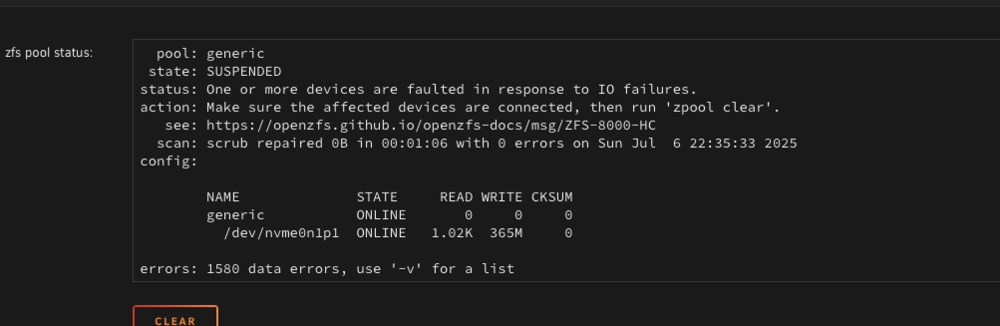
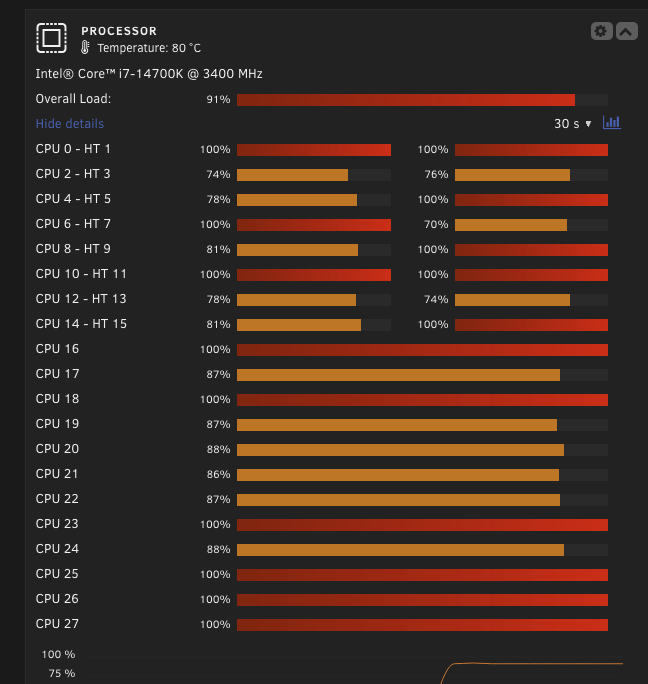
Sigh.... everytime you decide its fixed. its not. friday comes i finish and BAM cpu pegged at 100% i was suspicious, but rebooted. Nothing showing in htop as using anything ina. crazy amount.. i see the occasional ls of all disk drives same thing happend and then The second nvme started doing what the first one did again... this drive s solely used for temp data but is connected to the main pool of drives this second nvme is pretty new this is driving me crazy...
-
no crashes guess it was just the bad ssd
-
have replaced the drive, will post back in a week
-
i do agree, and was going to. until i saw the other drive do the same thing just wanted 2 cents from others incase its actually something else.


