






kaleb112494
Members
-
Joined
-
Last visited
Everything posted by kaleb112494
-
Installed the Realtek RTL8111 plugin from CA as suggested, and set upstream router as NTP sync. Will update around this time tomorrow. Thanks for helping to take a look @bmartino1
-
Correct on all fronts so far. This is bare metal, was previously a Windows system until I convinced the owner to try Unraid out. Unfortunately, I feel that this has left a sour taste in his mouth. Found this in /var/log/nginx/error.log just a moment ago root@BlockBuster2:~# cat /var/log/nginx/error.log 2025/12/02 18:04:43 [info] 9694#9694: Using 116KiB of shared memory for nchan in /etc/nginx/nginx.conf:162 2025/12/02 18:04:43 [info] 9694#9694: Using 262144KiB of shared memory for nchan in /etc/nginx/nginx.conf:162 2025/12/02 18:10:45 [alert] 34899#34899: *309 open socket #20 left in connection 258 2025/12/02 18:10:45 [alert] 34899#34899: *317 open socket #29 left in connection 268 2025/12/02 18:10:45 [alert] 34899#34899: *336 open socket #38 left in connection 269 2025/12/02 18:10:45 [alert] 34899#34899: *361 open socket #34 left in connection 271 2025/12/02 18:10:45 [alert] 34899#34899: *321 open socket #30 left in connection 272 2025/12/02 18:10:45 [alert] 34899#34899: aborting 2025/12/02 18:10:46 [emerg] 37618#37618: "nchan_max_reserved_memory" directive is duplicate in /etc/nginx/nginx.conf:51 2025/12/02 18:21:01 [alert] 38228#38228: *1 open socket #3 left in connection 7 2025/12/02 18:21:01 [alert] 38228#38228: *17 open socket #19 left in connection 9 2025/12/02 18:21:01 [alert] 38228#38228: *15 open socket #21 left in connection 11 2025/12/02 18:21:01 [alert] 38228#38228: *9 open socket #22 left in connection 12 2025/12/02 18:21:01 [alert] 38228#38228: *11 open socket #23 left in connection 13 2025/12/02 18:21:01 [alert] 38228#38228: *13 open socket #24 left in connection 14 2025/12/02 18:21:01 [alert] 38228#38228: *1806 open socket #38 left in connection 20 2025/12/02 18:21:01 [alert] 38228#38228: *1788 open socket #30 left in connection 23 2025/12/02 18:21:01 [alert] 38228#38228: aborting ker process: ./nchan-1.3.7/src/store/spool.c:479: spool_fetch_msg: Assertion `spool->msg_status == MSG_INVALID' failed. 2025/12/02 18:21:03 [alert] 83383#83383: worker process 83384 exited on signal 6 2025/12/02 18:21:39 [alert] 83518#83518: *90 open socket #38 left in connection 21 2025/12/02 18:21:39 [alert] 83518#83518: *62 open socket #21 left in connection 24 2025/12/02 18:21:39 [alert] 83518#83518: *94 open socket #39 left in connection 26 2025/12/02 18:21:39 [alert] 83518#83518: *83 open socket #40 left in connection 27 2025/12/02 18:21:39 [alert] 83518#83518: *92 open socket #41 left in connection 28 2025/12/02 18:21:39 [alert] 83518#83518: *135 open socket #36 left in connection 29 2025/12/02 18:21:39 [alert] 83518#83518: aborting 2025/12/02 18:22:52 [alert] 86436#86436: *6 open socket #18 left in connection 8 2025/12/02 18:22:52 [alert] 86436#86436: *4 open socket #19 left in connection 9 2025/12/02 18:22:52 [alert] 86436#86436: *8 open socket #20 left in connection 10 2025/12/02 18:22:52 [alert] 86436#86436: *10 open socket #21 left in connection 11 2025/12/02 18:22:52 [alert] 86436#86436: *12 open socket #22 left in connection 12 2025/12/02 18:22:52 [alert] 86436#86436: *14 open socket #23 left in connection 13 2025/12/02 18:22:52 [alert] 86436#86436: *178 open socket #30 left in connection 16 2025/12/02 18:22:52 [alert] 86436#86436: *203 open socket #33 left in connection 28 2025/12/02 18:22:52 [alert] 86436#86436: aborting 2025/12/02 18:23:31 [alert] 87725#87725: *1 open socket #3 left in connection 7 2025/12/02 18:23:31 [alert] 87725#87725: *3 open socket #18 left in connection 8 2025/12/02 18:23:31 [alert] 87725#87725: *5 open socket #19 left in connection 9 2025/12/02 18:23:31 [alert] 87725#87725: *7 open socket #20 left in connection 10 2025/12/02 18:23:31 [alert] 87725#87725: *9 open socket #21 left in connection 11 2025/12/02 18:23:31 [alert] 87725#87725: *11 open socket #22 left in connection 12 2025/12/02 18:23:31 [alert] 87725#87725: *21 open socket #24 left in connection 14 2025/12/02 18:23:31 [alert] 87725#87725: *42 open socket #34 left in connection 24 2025/12/02 18:23:31 [alert] 87725#87725: aborting ker process: ./nchan-1.3.7/src/store/spool.c:479: spool_fetch_msg: Assertion `spool->msg_status == MSG_INVALID' failed. 2025/12/02 18:23:33 [alert] 88744#88744: worker process 88745 exited on signal 6 ker process: ./nchan-1.3.7/src/store/spool.c:479: spool_fetch_msg: Assertion `spool->msg_status == MSG_INVALID' failed. 2025/12/02 18:23:35 [alert] 88744#88744: worker process 88822 exited on signal 6 2025/12/02 18:24:11 [alert] 88968#88968: *32 open socket #21 left in connection 8 2025/12/02 18:24:11 [alert] 88968#88968: *34 open socket #22 left in connection 9 2025/12/02 18:24:11 [alert] 88968#88968: *50 open socket #27 left in connection 14 2025/12/02 18:24:11 [alert] 88968#88968: *44 open socket #28 left in connection 15 2025/12/02 18:24:11 [alert] 88968#88968: *46 open socket #29 left in connection 16 2025/12/02 18:24:11 [alert] 88968#88968: *48 open socket #30 left in connection 17 2025/12/02 18:24:11 [alert] 88968#88968: *52 open socket #31 left in connection 18 2025/12/02 18:24:11 [alert] 88968#88968: *54 open socket #32 left in connection 19 2025/12/02 18:24:11 [alert] 88968#88968: aborting ker process: ./nchan-1.3.7/src/store/spool.c:479: spool_fetch_msg: Assertion `spool->msg_status == MSG_INVALID' failed. 2025/12/02 18:24:13 [alert] 90495#90495: worker process 90496 exited on signal 6 ker process: ./nchan-1.3.7/src/store/spool.c:479: spool_fetch_msg: Assertion `spool->msg_status == MSG_INVALID' failed. 2025/12/02 18:24:15 [alert] 90495#90495: worker process 90534 exited on signal 6 2025/12/02 18:25:48 [alert] 90733#90733: *177 open socket #21 left in connection 9 2025/12/02 18:25:48 [alert] 90733#90733: *38 open socket #26 left in connection 13 2025/12/02 18:25:48 [alert] 90733#90733: *40 open socket #27 left in connection 14 2025/12/02 18:25:48 [alert] 90733#90733: *42 open socket #28 left in connection 15 2025/12/02 18:25:48 [alert] 90733#90733: *46 open socket #30 left in connection 17 2025/12/02 18:25:48 [alert] 90733#90733: *49 open socket #31 left in connection 18 2025/12/02 18:25:48 [alert] 90733#90733: aborting ker process: ./nchan-1.3.7/src/store/spool.c:479: spool_fetch_msg: Assertion `spool->msg_status == MSG_INVALID' failed. 2025/12/02 18:25:49 [alert] 94566#94566: worker process 94567 exited on signal 6 ker process: ./nchan-1.3.7/src/store/spool.c:479: spool_fetch_msg: Assertion `spool->msg_status == MSG_INVALID' failed. 2025/12/02 18:25:51 [alert] 94566#94566: worker process 94612 exited on signal 6 2025/12/02 18:26:22 [alert] 94789#94789: *24 open socket #5 left in connection 7 2025/12/02 18:26:22 [alert] 94789#94789: *29 open socket #22 left in connection 9 2025/12/02 18:26:22 [alert] 94789#94789: *41 open socket #28 left in connection 15 2025/12/02 18:26:22 [alert] 94789#94789: *43 open socket #29 left in connection 16 2025/12/02 18:26:22 [alert] 94789#94789: *45 open socket #30 left in connection 17 2025/12/02 18:26:22 [alert] 94789#94789: *47 open socket #31 left in connection 18 2025/12/02 18:26:22 [alert] 94789#94789: aborting ker process: ./nchan-1.3.7/src/store/spool.c:479: spool_fetch_msg: Assertion `spool->msg_status == MSG_INVALID' failed. 2025/12/02 18:26:24 [alert] 96348#96348: worker process 96349 exited on signal 6 ker process: ./nchan-1.3.7/src/store/spool.c:479: spool_fetch_msg: Assertion `spool->msg_status == MSG_INVALID' failed. 2025/12/02 18:26:26 [alert] 96348#96348: worker process 96418 exited on signal 6 2025/12/02 18:47:08 [alert] 96633#96633: *2232 open socket #5 left in connection 27 2025/12/02 18:47:08 [alert] 96633#96633: aborting root@BlockBuster2:~# I do have two Web UI tabs open currently - one on his network, and one on my workstation from home. I am accessing it from a domain that is reverse proxied via a caddy container on this same Unraid system.
-
This is pretty much a fresh installation of Unraid 7.2.2 - no upgrades and very few plugins/containers/etc. Diag from server ~30 minutes after forced reboot. blockbuster2.0-diagnostics-20251202-2054.zip
-
Jumping in on this. Unraid 7.2.2, have tried all of the potential fixes presented previously. Enabled syslog copy to USB, found same symptoms as presented previously (inability to stay logged in via console, web UI non-responsive while some containers are responsive, disabling VPN, server not responding to ACPI calls). Visible from login prompt (console) crond[2360] exit status 1 from user root /usr/local/emhttp/plugins/dynamix/scripts/monitor &> /dev/null crond[2360] exit status 1 from user root /usr/local/emhttp/plugins/dynamix/scripts/monitor &> /dev/null crond[2360] exit status 1 from user root /usr/local/emhttp/plugins/dynamix/scripts/monitor &> /dev/null crond[2360] exit status 1 from user root /usr/local/emhttp/plugins/dynamix/scripts/monitor &> /dev/null crond[2360] exit status 1 from user root /usr/local/emhttp/plugins/dynamix/scripts/monitor &> /dev/null crond[2360] exit status 1 from user root /usr/bin/run-parts /etc/cron.hourly 1> /dev/nulll crond[2360] exit status 1 from user root /usr/local/emhttp/plugins/dynamix/scripts/monitor &> /dev/null Unable to present diagnostics, as server needs to be rebooted to become usable again. The best I have are these following syslog entries: Dec 1 20:36:42 tower rc.rsyslogd: Syslog server daemon... Started. Dec 1 20:36:43 tower rsyslogd: [origin software="rsyslogd" swVersion="8.2102.0" x-pid="88242" x-info="https://www.rsyslog.com"] start Dec 1 20:37:02 tower ool www[78640]: /usr/local/emhttp/plugins/dynamix/scripts/rsyslog_config Dec 1 20:37:02 tower rc.rsyslogd: Restarting Syslog server daemon... Dec 1 20:37:02 tower rc.rsyslogd: Stopping Syslog server daemon... Dec 1 20:37:03 tower rc.rsyslogd: killall --ns 88875 rsyslogd Dec 1 20:37:06 tower rc.rsyslogd: Syslog server daemon... Started. Dec 1 20:37:07 tower rsyslogd: [origin software="rsyslogd" swVersion="8.2102.0" x-pid="88963" x-info="https://www.rsyslog.com"] start Dec 1 21:55:47 tower webgui: Successful login user root from 192.168.1.226 Dec 1 21:55:59 tower webgui: CaddyV2: Could not download icon https://d1q6f0aelx0por.cloudfront.net/product-logos/library-caddy-logo.png Dec 1 21:57:18 tower ool www[186718]: Successful logout user root from 192.168.1.226 Dec 1 22:02:25 tower webgui: Successful login user root from 192.168.1.226 Dec 1 22:02:32 tower webgui: CaddyV2: Could not download icon https://d1q6f0aelx0por.cloudfront.net/product-logos/library-caddy-logo.png Dec 1 22:02:55 tower ool www[194847]: Successful logout user root from 192.168.1.226 Dec 2 01:24:27 tower monitor_nchan: Stop running nchan processes All instances of the web UI were logged out and closed.
-
Thanks for this, I was really trying to wrap my head around the error I was receiving when installing without any of the options I won't use.
-
Thank you for this. I have been experiencing this issue since 6.10.X, as I am notorious for leaving browser sessions open. Back before unraid-api, I was able to just restart rc.nginx without issue, but that solution stopped working after 6.11.3. Similar resolution, different methodology. EDIT: I suppose we can't really call it a solution until the problem ceases to occur in the first place.
-
Thanks for creating a quick replacement for NerdPack! I second ctop, great little program to keep Docker containers in check.
-
Following, as I am experiencing a similar issue. Removed some lines, as it's ~22 lines long. For my system, I'm using an R9 5900 (non-x), which is not listed as supported by my board, but this issue has only recently started for me. I was getting >4 month uptime until about 2 months ago. Nothing has changed since then, other than updating plugins and whatnot. Based on "SB.PCI0" in the error, it looks like it's related to a PCIe device? PCI0 is where my X520-DA2 is located currently. When my server goes offline, I am unable to reach it via the network. I haven't been home when this occurs to see if it is responsive other than network. Like other posts, there doesn't appear to be anything in /var/log/syslog (and by extension, /boot/logs) that states anything about a kernel issue, and the ACPI issue only reads during boot. If nothing else, I hope that my diagnostics have similarities to OP's so that we can find a solution. unraid-diagnostics-20230316-1819.zip
-
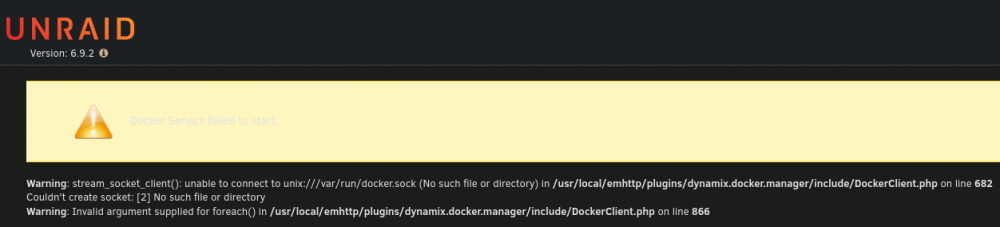
Hey guys, haven't ran into this one before. Wish I knew docker a little better, but hopefully someone can help educate me on what to look for. Had an issue with an NVME pool in BTRFS RAID 10 where one of the drives went AWOL for a few hours. The pool reestablished itself automagically into a 2TB pool instead of 1TB, so I'm not sure what happened there. Removed power, waited for caps to dissolve power, then started back up, where NVME returned from it's vacation. Already balanced the pool and rebooted, which did not resolve the issue. Any help would be appreciated. I've already created a backup of the important data on the pool, so I can start from scratch if necessary - but I'm really, really, REALLY trying to avoid that if possible. TIA for any assistance. liteserver-diagnostics-20220402-1541.zip

-
I can confirm that this was the solution for my system hanging at "Starting Samba"
-
Thanks for the reply. I reached out, and they've been maintaining the package in nightly rolling releases, as opposed to commiting to the master image on GH, which then causes the Docker image to not get these nightly updates. Or so I'm told 😅
-
I second VanDAM, this would be awesome!
-
Is TaskCafe still maintained? I see that there have been commits and updates pushed, but the docker container doesn't ever have new updates. TIA




