





thunderclap
Members
-
Joined
-
Last visited
Everything posted by thunderclap
-
Thanks. I was using static and tried both Cloudflare and Google's DNS numbers but those weren't working. These two you provided work. Weird.
-
After resetting everything, I can now do a ping of cnn.com, msnbc.com, and ebay.com and it's now pinging back but when trying to access the community apps it still hangs.
-
I had an issue several days ago when I could no longer access my Unraid box remotely via domain name. I ultimately fixed it by resetting my fiber gateway. (I turn off all the wifi/firewall stuff and go through my own router.) Since then that problem is resolved, but I can no longer access the community apps section or look for updates. I've tried restarting my server, my router, and my modem but that hasn't resolved anything. If I try pinging a site in the terminal it can't get out. I've tried changing the network from ipvlan to macvlan and that hasn't worked wither. Attached is my diagnostic log. Hopefully someone can steer me in the right direction. Thanks. buhmonte-server-diagnostics-20260808-1237.zip
-
I'm aware of the procedure and have done it. I've also installed fresh versions of the docker but still no update.
-
It doesn't look like it's available yet. I'm using the Proton version and have tried both Release and Beta options but it's still showing Mismatched Version one I try to connect in Enshrouded.
-
So what is the preferred version to install, Enshrouded or Enshrouded_Proton?
-
Deleted docker and vm images and reinstalled everything and that seems to have fixed the issue. Thanks for the help!
-
And now my dockers are all missing. buhmonte-server-diagnostics-20260414-1246.zip
-
I moved everything back to where they're supposed to be (not sure why stuff is going to the Array when they're configured to only use the pool, but that's another issue). I've attached an updated diagnostic file since I still can't update. buhmonte-server-diagnostics-20260414-1138.zip
-
Logs added. Thank you. buhmonte-server-diagnostics-20260413-1108.zip
-
I'm not sure when this started happening but it's within the last two weeks. I'm on 7.2.4 and suddenly I can no longer update dockers and my VM's aren't showing up. If I try updating all containers or an individual one nothing happens, and when I go the the VM screen it's asif the page stops loading and won't load anything immediately after the Virtual Machines tab. Any ideas how to fix this? Thanks.
-
I'm trying to install Resourcespace through Docker Compose. Everything is installed but for some reason I can't access it through the port I've configured. I'm hoping someone might be able to point me in the right direction in getting this working. The github files are here. And I've configured the .yaml as so. services: resourcespace: build: . container_name: resourcespace restart: unless-stopped depends_on: - mariadb volumes: - filestore:/var/www/html/filestore - ./config.php:/var/www/html/include/config.php networks: - frontend - backend environment: - TZ=America/Chicago ports: - "80:8095" mariadb: image: mariadb container_name: mariadb restart: unless-stopped env_file: - db.env volumes: - mariadb:/var/lib/mysql networks: - backend networks: frontend: backend: volumes: mariadb: filestore:I've tried changing the port from 80:80 to 8095 but that didn't help. I also tried 8095:8095 and no luck. I also tried forcing the port under environment using PORT=8095 but no go. Any ideas? Thanks.
-
Since the current model is an external USB 2.0 thumb drive, I'm curious if moving the boot to an internal NVME partition as Spaceinvaderone talks about will speed up the boot time? Because right now it takes 3-5 min. for my system to come online and I'd love for it to be faster.
-
My server went down for some reason where I couldn't even get the display to show on the monitor attached, so I ultimately had to force a restart. When I looked at the logs it showed from when it came back up. Is there some other log I'm missing that I can look at to see what caused the system to crash?
-
Thanks. I'll give this a try.
-
I'm trying to install a docker container that's housed on Github as there's not Docker Hub version (or alternate) available. I've tried a few tutorials Google found but none seem to work and result in errors. Can anyone point me in the right direction? If there's no way to do this, then is there a way to clone the github files to docker hub? Thanks.
-
I'm wondering if there's any software that can handle remote user management for Linux systems. I want to move my kids systems to Linux from Windows and would like something similar to Family Safety were I can set active time for the computer (e.g. 3pm - 10pm) and limit it to a couple hours within that window. An added perk would be for them to send a request for more time to a phone app, or for me to be able to remotely. Is there any software/container like that available?
-
Didn't used to be. Maybe the flash is failing?
-
The last several updates I've done to Unraid seem to take an exceptionally long time. I'm updating from 7.1.4 to 7.2-rc2 and it's been going for 30 min now and just finished Archiving process. Is it normal for it to take this long?
-
Is there anything special that needs to be done after upgrading a motherboard? I went from a 9700K to a 14600K and now when running Emby there is a long pause prior to the media starting.
-
I use Channels (getchannels.com) as my DVR for antenna and IPTV. I want to it to use my Mullvad VPN and have successfully set it up using Unraid's VPN Manager, however if I try to access it outside my network I can't. Can anyone direct me how to make the docker accessible remotely so I can use it while away from home?
-
I finally managed to get into the GUI and as an experiment changed the network from ipvlan to macvlan and it's been stable ever since. If things become unstable again I'll post the diagnostics. I was finally able to get into the GUI and as an experiment changed ipvlan to macvlan and that seems to have resolved the issue. Not sure if that was the problem or not, but if the issue comes up again I'll share the diagnostics.
-
I upgraded to 7.1.4 and ever since then I'm having trouble with connections. I can't connect to the Unraid GUI, I can't connect to share folders from my main system, and trying to connect to dockers is hit and miss: sometimes they'll connect and other times they won't. Any idea how to resolve this issue?
-
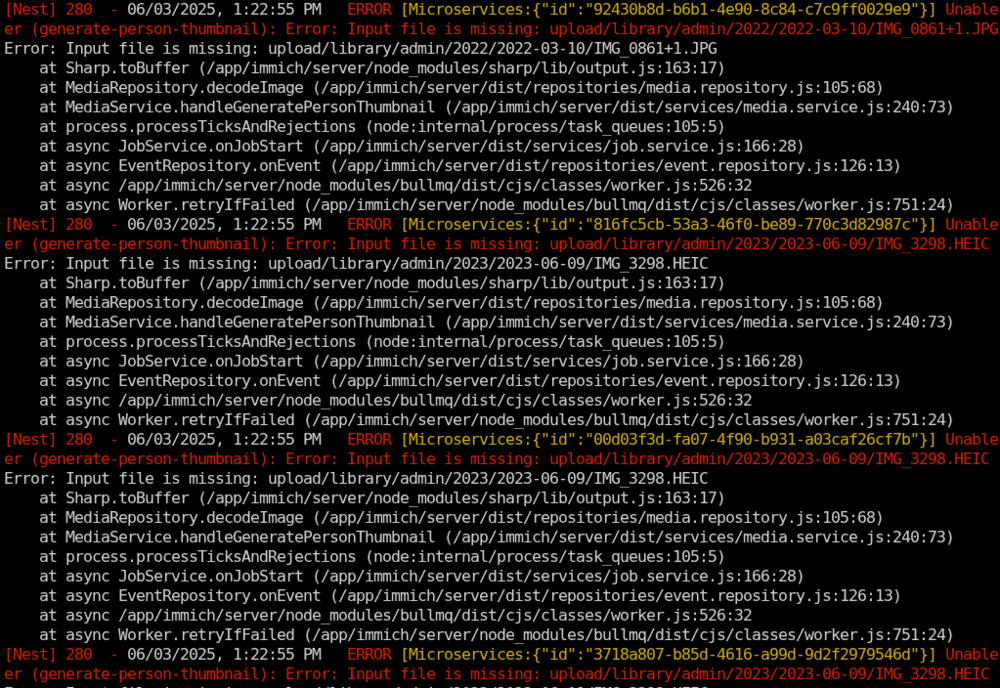
I couldn't find thread dedicated to the CA Immich so I'm posting here. I hope that's okay. I was running in a docker-compose based on the official instructions. With the latest update I realized how out of date the .env and docker-compose files were so I replaced with the mosr current code updating the custom paths as needed. However the docker-compose version refused to start, so I decided to migrate to the CA version of Immich. Installation and configuration went smoothly, and the import of the Portgres database was fine. I logged into Immich and none of the images would display. At first I thought it might be a user and group issue so I changed ownership to abc:users. That didn't help. So then I changed the permission of the directory first to 755, then 775, and finally 777. So no good. I then thought maybe it was a thumbnail issue so I backed that directory up and tried to recreate them and that's when I noticed in the logs Immich is claiming the actual photo files are missing. So I went to the directories and they are there. Does anyone have any idea what's going on? The file is there and in the right place yet Immich can't find it. Any help is appreciated.

-
I'm hoping someone can assist with a problem I'm running into. I was running an older version of Immich that used docker.compose and .env files from several years ago. When upgrading to the latest I decided to upgrade that code so it matched what the devs have in their latest version. No problems there, except when Immich came up it started as if running for the first time and wanted to create an admin account. After some struggling I decided to move from the Docker Compose version to the CA version. Again, no problems installing and configuring everything. I restored the database to the postgres docker and Immich asked for me to log in and not create a new account. This was great news, except when I loaded my account it's not finding any of my photos or videos. I checked the directory where that stuff was stored and it's all there, but Immich isn't seeing it. Does anybody have a suggestion how to resolve this? I don't want to import stuff all over again. Thanks.


