





Noego
Members
-
Joined
-
Last visited
-
It didn't solve the issue. I tried to pull the QBitTorrentVPN and I get the same issue. So I guess it is not the docker, but more likely some setup elsewhere. EDIT: I have no idea why, but I updated to the newest Mac OS and got an error message about access to a folder (locale time folder). I reinstalled the docker, and everything works fine now.
-
It is running using the 'bridge'.
-
It is Docker Desktop. I am running it on a MacBook. What is the equivalent - do you know that? EDIT: So I found some kind of firewall, turned if off and tried - but it didn't solve anything. 😞 I can see that the Docker Subnet (in docker desktop setting) is: 192.168.65.0/24 Could this cause any conflicts?
-
I have tried from two different devices now, with two different browsers. The issue remains. As an additional information my issue started before the latest update of the docker container.
-
The local ip address is 192.168.1.2. Is this what you wanted to know? It is the same machine which is running the docker container.
-
I am about to give up - I can't access my DelugeVPN WebUI when VPN is enabled. I am using PIA. I have tried several different openvpn files, and I have updated the docker image, updated the docker, reinstalled the entire docker - nothing works. I am running through Desktop Docker on a MacBook Pro (macOS 13.5.2). I didn't have any issues, but then I updated the Docker Desktop application, and couldn't access the gui. I can't seem to find any errors / warnings in the log. What am I missing? Thanks in advance.
-
I am trying to set up a thin client on an ubuntu VM running on my Unraid server. The same server as my DelugeVPN docker container. But I cannot open and edit the auth file? It just say I don't have permission. How do I connect the thin client? Is there a default username/password?
-
I have been trying to install the plugin "Read MP3 AudioBook metadata" within the package, in order to be able to handle audiobooks as well as regular books. This however doesn't work. Does anybody have experience in how to handle audiobooks in calibre? And is it possible to do in this package?
-
It works for me now, so guess you're right Thanks anyway
-
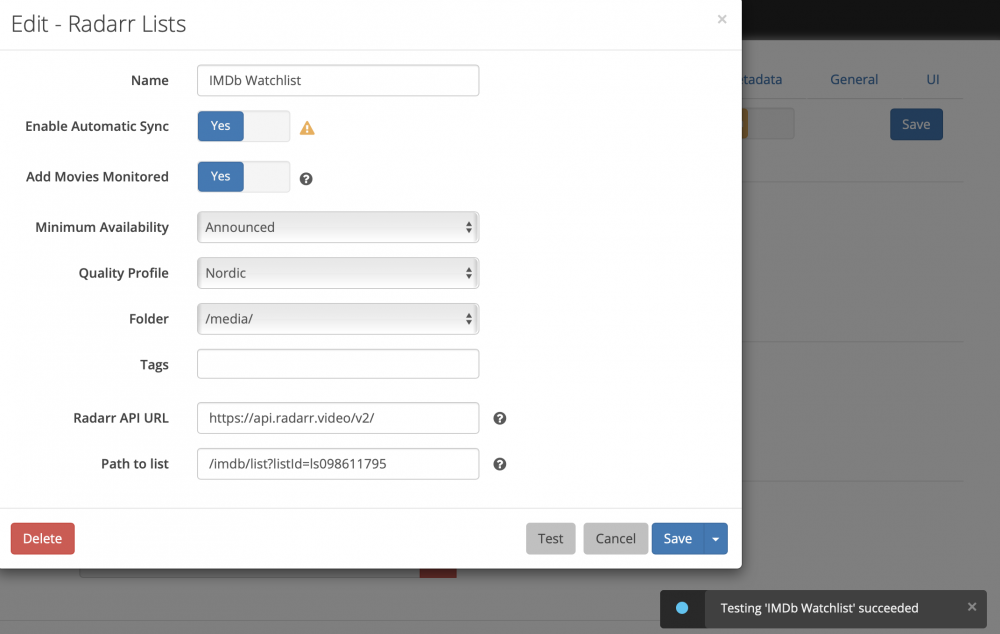
Hey! I hope somebody are able to help me. I am having some problems with adding movies from a IMDB watch list. I have created the list, as seen in the picture, and the connection works. When I first did it, I was able to fetch the list and add movies without problems. But when I try to add the movies from the list now, I just receive the error ' Sorry. We Couldn't Find Any Movies Matching " '. I don't know if anybody can help me, but I can't seem to find any answer on how to solve this.

-
@PeterBI tried to restart and it didn't solve the problem. Afterwards, I deleted the dokcer + image file, and reinstalled it - as @trurl suggested. Super easy - every single setting was saved (by the C.A. I think?) and it solved the problem. The docker is now down to 1,5GB. Thanks guys!
-
So I should just delete the docker + the image, and set it up again? Will all my torrents be there, or do I need to set them up manually afterwards?
-
Hey, I accidentally saved a file inside the docker. Is there any way to upon the docker-image and delete this file? The docker-image is at the moment at: I have already set up a lot of torrents seeding and downloading, after I shifted the download folder - so I would be sad if I had to redo all that
-
I can't seem to get the scrapers working. Just get an error : With the following from the logs: Is the scraper included in this docker?
-
I think I solved the problem. I needed to check a setting called "Loopback" in my router. Don't know what it does, but I think it did the trick.

