





oldfart
Members
-
Joined
-
Last visited
Everything posted by oldfart
-
Apologies - yes it DOES work. I used a film that was direct playing, Tried again with a 4K film (mkv) that needed transcoding - success!!
-
Maybe I should have been more specific Have followed all the steps in this topic Can't get it to work any logs to look at to give a clue?
-
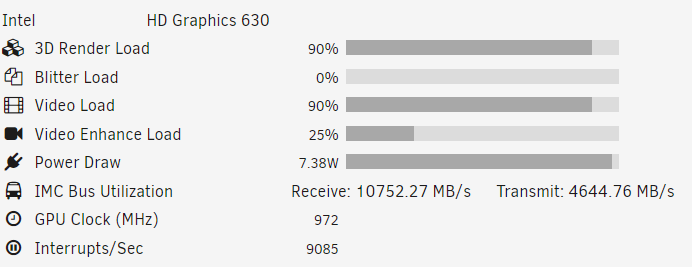
I am getting nowhere with Plex & HW encoding - the iGPU is showing zero load when playing a video. Can anyone please assist? Unraid 6.12.1 running on i5-7400(which IS quick-sync enabled) From CLI: intel_gpu_top -L card0 Intel Kabylake (Gen9) pci:vendor=8086,device=5912,card=0 └─renderD128 which version of Plex is supposed to be installed? there are 6 versions on the Apps page I have the official (Plex) version installed
-
No, nothing is broken at the moment, I'm just trying to prevent a future problem.
-
There is no 'after the problem occurs' - there is constant (24/7) writing to the array, which is something I want to stop, because of future HD failure due to too many writes.
-
Unraid OS 6.11.5 I didn't think about this issue when I set up my array. I have UniFi Video writing to drive 1 (so also to the parity disk) UniFi Video is writing 24/7 to the array, thus hammering 2 disks. Sooner or later, the disks are going to reach their max writes and fail. One possibility: Move disk 1 to an unassigned device, thus saving the parity disk, but loosing disk protection. That disk is a WD Purple, so is designed for 24/7 operation. Any advice please??
-
Thanks - will try that
-
Just cleared all my data, so all that's on the drives are VMs and docker files
-
My appdata share is the default - automatically split any directory as required. tried a new share, that didn't work if i alter the appdata share, will maybe break the docker
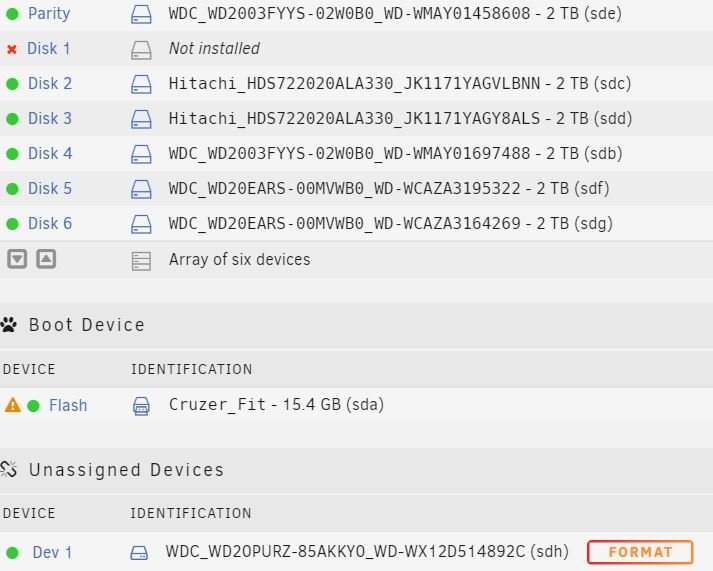
 I have a docker (vaultwarden) split over 2 disks (/mnt/user/appdata/vaultwarden) how can I get all the data onto 1 disk and ensure it stays there? I need it on 1 disk, so I can run a script to back it up. Can I - just move the data onto one disk, then delete the data off the other? Should I make a new share, set to only one disk, and move all the data onto that Will any of the above break the docker? p.s. Tried making a new share and moving all the data onto it - that didn't work - lost all the users! So put it all back.I have 7 disks in my array disk 4 is empty and I want to remove it. Disk 7 has VMs on it. If I reconfigure the array, disk 7 will now be disk 6 Do I do anything to tell unraid where those VMs are, or does it sort its own life out?Ah, OK thanksI replaced disk 6 with this one: disk 6 ST2000VN004-2E4164_Z52C16FV The MAIN page shows a historical device with the same details: dev1 ST2000VN004-2E4164_Z52C16FV Can I safely delete this historical device?I am trying to tidy my *very* messy system. 1. I have existing VMs - 2 of them are split over two drives. How do I combine them/back them up to move? 2. I have 6 (2TB) disks - I intend to use 1-3 for VMs and 4-6 for data would it make sense to make a "VM" share (over the first 3 disks) then use that share when creating a new VM or just assign disk 1,2 or 3 when creating the VM ThanksJust picked up on this topic I have 4 VMs that are split across 2 disks. So, looking for a way to back them up - or combine into one file. New topic, or stay here? ThanksTried to copy the .img file off Unraid onto a windows machine - error, file incompleteI have a vm which is going straight to grub menu disk devices says: /mnt/user/domains/Ubuntu server/vdisk1.img it is not showing as a share; however when I go to domains and look at that folder, 'Ubuntu server' shows up click on it,vdisk1.img is split over 2 disks and is shown in red. had a read on how to recover non-booting grub: grub> ls (proc) (hd0) (hd0,gpt2) (hd0,gpt1) ls (hd0)/ unknown filesystem ls (hd0,gpt1)/ efi/ ls (hd0,gpt2)/ lost+found/ boot/ bin/ dev/ etc/ home/ lib/ lib64/ media/ mnt/ opt/ proc/ root/ run/ sbin/ snap/ srv/ sys/ tmp/ usr/ var/ cdrom/ initrd.img.old vmlinuxz.old initrd.img vmlinux swap.img so, the root filesystem is at (hd0,gpt2) the suggestion I found on the internet is: grub> set root=(hd0,gpt2) grub> linux vmlinuz root=/dev/sda1 grub> initrd initrd.img grub> boot I am unsure about the line linux vmlinuz root=/dev/sda1 I don't want to set the wrong device any ideas??[solved] doh - the array had auto-started, so couldn't change drive. took array offline, all workingFollowed the wiki, now stuck "Assign the new drive in the slot of the old drive" how?? new drive shows as unassigned and there is no disk 1 says uninstalled - how do I get the unassigned into disk 1
 Thanks a lot - now workingauto discovery is enabled by default - so yes. still messing with config file, could use an example if possible so far I got messages in HA: one example - Message 51 received on homeassistant/tower/unifivideo at 23:24: { "id": "01bf4d6e-9ed7-39d0-2d3b-af595f3d5398", "status": "started", "coreCount": "2", "ram": "4096M", "primaryGPU": "VNC:5900", "name": "unifivideo", "mac": "52:54:00:38:64:fc" } QoS: 0 - Retain: false my config.yaml: mqtt: discovery: true discovery_prefix: homeassistant/towerProbably a HomeAssistant problem. I get the MQTT messages at my HA when starting unraid-api and when anything changes (start/stop a docker) so, the MQTT bit is working! but MQTT auto discovery on HA does not work - I have no unraid entities listed in HA any ideas?Unraid Version: 6.9.1 PCIe ACS override: set to BOTH internal error: qemu unexpectedly closed the monitor: 2021-04-10T09:19:09.126415Z qemu-system-x86_64: -device vfio-pci,host=0000:08:03.0,id=hostdev0,bus=pci.7,addr=0x1: vfio 0000:08:03.0: Failed to set up TRIGGER eventfd signaling for interrupt INTX-0: VFIO_DEVICE_SET_IRQS failure: Device or resource busy




