





Bjur
Members
-
Joined
-
Last visited
Everything posted by Bjur
-
Thanks for the quick answer:) What about 2. If I want to have 2 destinations. 1 locally which will be a folder in Rclone that syncs with cloud and a second one that will be a USB drive attaced? Would it be possible to backup to two destinations? 3. Would it also be possible to have docker templates backed up? Also would it be possible to not have the as tar files if it's uncompressed in regards to deduplicating backup software?
-
Hi thanks for the plugin. This post below scares me a little bit. I've just installed appdata backup 2.5 and Unraid 6.11.5. 1. If I want to backup USB flash drive and put in a folder in USB backup destination, would I then have my appdata folder deleted? 2. If I want to have 2 destinations. 1 locally which will be a folder in Rclone that syncs with cloud and a second one that will be a USB drive attaced? 3. Would it also be possible to have docker templates backed up?
-
When I did this I still find to have issues so I did what you guys suggested that was creating a script with mount permissions being set up startup array and that seems to have fixed it.
-
I've survived the last couple of days without a crash in mounts, so something must have changed. Thanks for the help.
-
Thanks for the explanation. My mergerfs is not in a docker, I just followed the guide here, so I'm guessing mergerfs is being built in the script. So don't know how to fix this.
-
Where do you do this, because I seems to have the same problem?
-
Nope. Hope someone can help to resolve what can cause this...
-
I have the same problem ever after manually using the permission script from bolognaise. Any thoughts?
-
An update. If I didn't schedule to run the shares, but run the permission tool on mountmerger, local and rclone and afterwards manually started each of the shares I had, I can write to it in Windows. So my question is on the script above, how do I include to run the 3 folders in the script instead of having to create a script for each library? I have 5 rclone mounts so have created 5 scripts for those, but would like to not have 3 scripts for permissions, so I can schedule it to run on startup and I will have to manually mount each rclone share afterwards in the future.
-
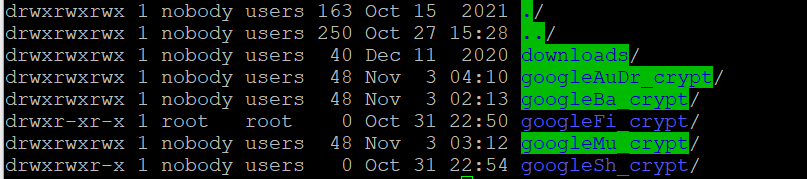
I will try and see if I can find some ok priced memory and expand. I only have 2 memory slot on my board. Also can you see where this goes wrong. I can't write to my shares except the blue colored. Can see their permissions are changed compared to the others. They should have the same scripts.
-
Thanks for the info. I'm running Unraid in a VMware host with i5-9600K 32 GB memory where 16 GB are allocated to Unraid. How much should there be then? Ps. I wasn't even uploading, just normal playback where it stopped when I skipped back.
-
In regards to why I'm loosing my share from time to time, I get this error: Oct 31 22:39:45 Unraid kernel: [ 18010] 0 18010 16976 2511 110592 0 0 notify Oct 31 22:39:45 Unraid kernel: oom-kill:constraint=CONSTRAINT_NONE,nodemask=(null),cpuset=/,mems_allowed=0,global_oom,task_memcg=/,task=rcloneorig,pid=6284,uid=0 Oct 31 22:39:45 Unraid kernel: Out of memory: Killed process 6284 (rcloneorig) total-vm:13626112kB, anon-rss:12490308kB, file-rss:4kB, shmem-rss:35408kB, UID:0 pgtables:25380kB oom_score_adj:0
-
It seems to work:) What a nightmare. Thanks for the help @Kaizac @Bolagnaise @DZMM. The folder structure I will test on a later note, because that will take some time. In regards to the missing mount, I don't know but will give you heads up if it happens again. My line should be stable.
-
No sorry I didn't see the \ I've tried now and test if it works. Will let you guys know.
-
Thanks for the help guys. I've stopped all my rclone mounts, and ran the permission tool on my disk. I didn't include cache, since that was not advised, so I have included dockers. Should I also run it on cache with dockers, seems the are correct folder wise. I added the UID, PID, Umask to all my user scripts just in case. I will try and test now.
-
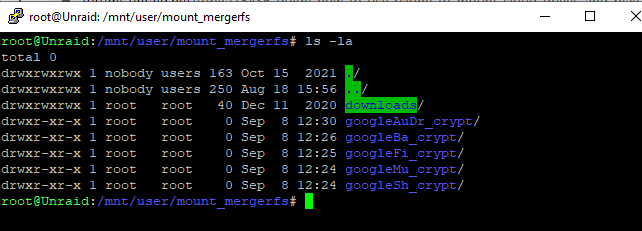
@KaizacI tried using the UID/PID/UMASK in userscripts mount and added it to the section in the mountscript: # create rclone mount rclone mount \ --allow-other \ --buffer-size 256M \ --dir-cache-time 720h \ --drive-chunk-size 512M \ --log-level INFO \ --vfs-read-chunk-size 128M \ --vfs-read-chunk-size-limit off \ --vfs-cache-mode writes \ --bind=$RCloneMountIP \ $RcloneRemoteName: $RcloneMountLocation & --uid 99 --gid 100 --umask 002 Sonarr still won't get import access from the complete local folder where it's at. My rclone mount folders are still showing root: @BolagnaiseIf I try the permission docker tool, I would risk breaking Plex transcoder, which I don't want. Also if I run the tool. Would I only have to run it once of each time I reboot? @DZMM In regards to the Rclone share missing, it has happened a few times even when watching a movie, where I need to reboot to get that specific share working again while the other ones still working.
-
Thanks for the answer @DZMM. I will strongly consider if it's worth the effort because it is working fine that part. But can you answer guid gid umask should be in the scrip above? Also I've seen a couple of times that my movies share dissappear suddenly without any reason all other scripts don't have this. Am I the only one who have seen this?
-
Thanks Kaizac. It regards to the paths that makes sense with /mnt/user only. The only problem I see if I do it that way in Sonarr and especially in Plex it would need to refresh libraries because of file change. One of my scripts looks like this below. I'm guessing the guid gid umask should be under this section?: --drive-pacer-min-sleep 10ms \ --drive-pacer-burst 1000 \ --vfs-cache-mode full \ --vfs-read-chunk-size 256M \ --vfs-cache-max-size 100G \ --vfs-cache-max-age 96h \ --vfs-read-ahead 2G \ What I find confusing when looking at your screenshots again, is that you point to the local folders. Why are you not using the /mnt/unionfs/ or mnt/mergerfs/ folders? The reason is that I point all downloaded stuff to local folder and in the night it will upload. If I do it like you write won't it take longer time to move and use upload initially or what is the benefit. #!/bin/bash ###################### #### Mount Script #### ###################### ### Version 0.96.6 ### ###################### ####### EDIT ONLY THESE SETTINGS ####### # INSTRUCTIONS # 1. Change the name of the rclone remote and shares to match your setup # 2. NOTE: enter RcloneRemoteName WITHOUT ':' # 3. Optional: include custom command and bind mount settings # 4. Optional: include extra folders in mergerfs mount # REQUIRED SETTINGS RcloneRemoteName="googleSh_crypt" # Name of rclone remote mount WITHOUT ':'. NOTE: Choose your encrypted remote for sensitive data RcloneMountShare="/mnt/user/mount_rclone" # where your rclone remote will be located without trailing slash e.g. /mnt/user/mount_rclone MergerfsMountShare="/mnt/user/mount_mergerfs" # location without trailing slash e.g. /mnt/user/mount_mergerfs. Enter 'ignore' to disable DockerStart="sonarr" # list of dockers, separated by space, to start once mergerfs mount verified. Remember to disable AUTOSTART for dockers added in docker settings page LocalFilesShare="/mnt/user/local" # location of the local files and MountFolders you want to upload without trailing slash to rclone e.g. /mnt/user/local. Enter 'ignore' to disable MountFolders=\{"media/tv,downloads/complete"\} # comma separated list of folders to create within the mount # Note: Again - remember to NOT use ':' in your remote name above # OPTIONAL SETTINGS # Add extra paths to mergerfs mount in addition to LocalFilesShare LocalFilesShare2="ignore" # without trailing slash e.g. /mnt/user/other__remote_mount/or_other_local_folder. Enter 'ignore' to disable LocalFilesShare3="ignore" LocalFilesShare4="ignore" # Add extra commands or filters Command1="" Command2="" Command3="" Command4="" Command5="" Command6="" Command7="" Command8="" --allow-other \ --dir-cache-time 5000h \ --attr-timeout 5000h \ --log-level INFO \ --poll-interval 10s \ --cache-dir=/mnt/user/mount_rclone/cache/$RcloneRemoteName \ --drive-pacer-min-sleep 10ms \ --drive-pacer-burst 1000 \ --vfs-cache-mode full \ --vfs-read-chunk-size 256M \ --vfs-cache-max-size 100G \ --vfs-cache-max-age 96h \ --vfs-read-ahead 2G \ --bind=$RCloneMountIP \ $RcloneRemoteName: $RcloneMountLocation & CreateBindMount="N" # Y/N. Choose whether to bind traffic to a particular network adapter RCloneMountIP="192.168.1.253" # My unraid IP is 172.30.12.2 so I create another similar IP address NetworkAdapter="eth0" # choose your network adapter. eth0 recommended VirtualIPNumber="3" # creates eth0:x e.g. eth0:1. I create a unique virtual IP addresses for each mount & upload so I can monitor and traffic shape for each of them ####### END SETTINGS ####### ############################################################################### ##### DO NOT EDIT ANYTHING BELOW UNLESS YOU KNOW WHAT YOU ARE DOING ####### ############################################################################### ####### Preparing mount location variables ####### LocalFilesLocation="$LocalFilesShare/$RcloneRemoteName" # Location for local files to be merged with rclone mount RcloneMountLocation="$RcloneMountShare/$RcloneRemoteName" # Location for rclone mount MergerFSMountLocation="$MergerfsMountShare/$RcloneRemoteName" # Rclone data folder location ####### create directories for rclone mount and mergerfs mounts ####### mkdir -p /mnt/user/appdata/other/rclone/remotes/$RcloneRemoteName #for script files if [[ $LocalFileShare == 'ignore' ]]; then echo "$(date "+%d.%m.%Y %T") INFO: Not creating local folders as requested." else echo "$(date "+%d.%m.%Y %T") INFO: Creating local folders." eval mkdir -p $LocalFilesLocation/"$MountFolders" fi mkdir -p $RcloneMountLocation mkdir -p $MergerFSMountLocation ####### Check if script is already running ####### echo "$(date "+%d.%m.%Y %T") INFO: *** Starting mount of remote ${RcloneRemoteName}" echo "$(date "+%d.%m.%Y %T") INFO: Checking if this script is already running." if [[ -f "/mnt/user/appdata/other/rclone/remotes/$RcloneRemoteName/mount_running" ]]; then echo "$(date "+%d.%m.%Y %T") INFO: Exiting script as already running." exit else echo "$(date "+%d.%m.%Y %T") INFO: Script not running - proceeding." touch /mnt/user/appdata/other/rclone/remotes/$RcloneRemoteName/mount_running fi ####### Create Rclone Mount ####### # Check If Rclone Mount Already Created if [[ -f "$RcloneMountLocation/mountcheck" ]]; then echo "$(date "+%d.%m.%Y %T") INFO: Success ${RcloneRemoteName} remote is already mounted." else echo "$(date "+%d.%m.%Y %T") INFO: Mount not running. Will now mount ${RcloneRemoteName} remote." # Creating mountcheck file in case it doesn't already exist echo "$(date "+%d.%m.%Y %T") INFO: Recreating mountcheck file for ${RcloneRemoteName} remote." touch mountcheck rclone copy mountcheck $RcloneRemoteName: -vv --no-traverse # Check bind option if [[ $CreateBindMount == 'Y' ]]; then echo "$(date "+%d.%m.%Y %T") INFO: *** Checking if IP address ${RCloneMountIP} already created for remote ${RcloneRemoteName}" ping -q -c2 $RCloneMountIP > /dev/null # -q quiet, -c number of pings to perform if [ $? -eq 0 ]; then # ping returns exit status 0 if successful echo "$(date "+%d.%m.%Y %T") INFO: *** IP address ${RCloneMountIP} already created for remote ${RcloneRemoteName}" else echo "$(date "+%d.%m.%Y %T") INFO: *** Creating IP address ${RCloneMountIP} for remote ${RcloneRemoteName}" ip addr add $RCloneMountIP/24 dev $NetworkAdapter label $NetworkAdapter:$VirtualIPNumber fi echo "$(date "+%d.%m.%Y %T") INFO: *** Created bind mount ${RCloneMountIP} for remote ${RcloneRemoteName}" else RCloneMountIP="" echo "$(date "+%d.%m.%Y %T") INFO: *** Creating mount for remote ${RcloneRemoteName}" fi # create rclone mount rclone mount \ --allow-other \ --buffer-size 256M \ --dir-cache-time 720h \ --drive-chunk-size 512M \ --log-level INFO \ --vfs-read-chunk-size 128M \ --vfs-read-chunk-size-limit off \ --vfs-cache-mode writes \ --bind=$RCloneMountIP \ $RcloneRemoteName: $RcloneMountLocation & # Check if Mount Successful echo "$(date "+%d.%m.%Y %T") INFO: sleeping for 5 seconds" # slight pause to give mount time to finalise sleep 5 echo "$(date "+%d.%m.%Y %T") INFO: continuing..." if [[ -f "$RcloneMountLocation/mountcheck" ]]; then echo "$(date "+%d.%m.%Y %T") INFO: Successful mount of ${RcloneRemoteName} mount." else echo "$(date "+%d.%m.%Y %T") CRITICAL: ${RcloneRemoteName} mount failed - please check for problems." rm /mnt/user/appdata/other/rclone/remotes/$RcloneRemoteName/mount_running exit fi fi ####### Start MergerFS Mount ####### if [[ $MergerfsMountShare == 'ignore' ]]; then echo "$(date "+%d.%m.%Y %T") INFO: Not creating mergerfs mount as requested." else if [[ -f "$MergerFSMountLocation/mountcheck" ]]; then echo "$(date "+%d.%m.%Y %T") INFO: Check successful, ${RcloneRemoteName} mergerfs mount in place." else # check if mergerfs already installed if [[ -f "/bin/mergerfs" ]]; then echo "$(date "+%d.%m.%Y %T") INFO: Mergerfs already installed, proceeding to create mergerfs mount" else # Build mergerfs binary echo "$(date "+%d.%m.%Y %T") INFO: Mergerfs not installed - installing now." mkdir -p /mnt/user/appdata/other/rclone/mergerfs docker run -v /mnt/user/appdata/other/rclone/mergerfs:/build --rm trapexit/mergerfs-static-build mv /mnt/user/appdata/other/rclone/mergerfs/mergerfs /bin # check if mergerfs install successful echo "$(date "+%d.%m.%Y %T") INFO: *sleeping for 5 seconds" sleep 5 if [[ -f "/bin/mergerfs" ]]; then echo "$(date "+%d.%m.%Y %T") INFO: Mergerfs installed successfully, proceeding to create mergerfs mount." else echo "$(date "+%d.%m.%Y %T") ERROR: Mergerfs not installed successfully. Please check for errors. Exiting." rm /mnt/user/appdata/other/rclone/remotes/$RcloneRemoteName/mount_running exit fi fi # Create mergerfs mount echo "$(date "+%d.%m.%Y %T") INFO: Creating ${RcloneRemoteName} mergerfs mount." # Extra Mergerfs folders if [[ $LocalFilesShare2 != 'ignore' ]]; then echo "$(date "+%d.%m.%Y %T") INFO: Adding ${LocalFilesShare2} to ${RcloneRemoteName} mergerfs mount." LocalFilesShare2=":$LocalFilesShare2" else LocalFilesShare2="" fi if [[ $LocalFilesShare3 != 'ignore' ]]; then echo "$(date "+%d.%m.%Y %T") INFO: Adding ${LocalFilesShare3} to ${RcloneRemoteName} mergerfs mount." LocalFilesShare3=":$LocalFilesShare3" else LocalFilesShare3="" fi if [[ $LocalFilesShare4 != 'ignore' ]]; then echo "$(date "+%d.%m.%Y %T") INFO: Adding ${LocalFilesShare4} to ${RcloneRemoteName} mergerfs mount." LocalFilesShare4=":$LocalFilesShare4" else LocalFilesShare4="" fi # mergerfs mount command mergerfs $LocalFilesLocation:$RcloneMountLocation$LocalFilesShare2$LocalFilesShare3$LocalFilesShare4 $MergerFSMountLocation -o rw,async_read=false,use_ino,allow_other,func.getattr=newest,category.action=all,category.create=ff,cache.files=partial,dropcacheonclose=true # check if mergerfs mount successful echo "$(date "+%d.%m.%Y %T") INFO: Checking if ${RcloneRemoteName} mergerfs mount created." if [[ -f "$MergerFSMountLocation/mountcheck" ]]; then echo "$(date "+%d.%m.%Y %T") INFO: Check successful, ${RcloneRemoteName} mergerfs mount created." else echo "$(date "+%d.%m.%Y %T") CRITICAL: ${RcloneRemoteName} mergerfs mount failed." rm /mnt/user/appdata/other/rclone/remotes/$RcloneRemoteName/mount_running exit fi fi fi ####### Starting Dockers That Need Mergerfs Mount To Work Properly ####### # only start dockers once if [[ -f "/mnt/user/appdata/other/rclone/remotes/$RcloneRemoteName/dockers_started" ]]; then echo "$(date "+%d.%m.%Y %T") INFO: dockers already started." else touch /mnt/user/appdata/other/rclone/remotes/$RcloneRemoteName/dockers_started echo "$(date "+%d.%m.%Y %T") INFO: Starting dockers." docker start $DockerStart fi rm /mnt/user/appdata/other/rclone/remotes/$RcloneRemoteName/mount_running echo "$(date "+%d.%m.%Y %T") INFO: Script complete" exit
-
PS: in regards to the mount scripts. Is it the mount script to mount the shares in user scripts, else I don't know where it's located. I don't even know where the merger mount is.
-
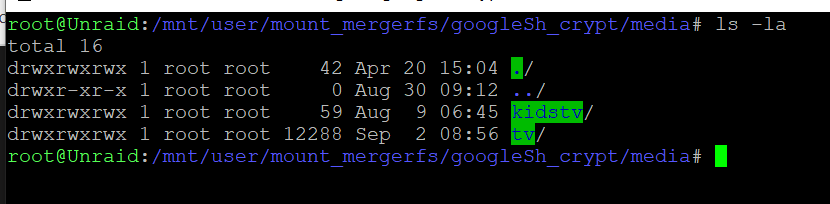
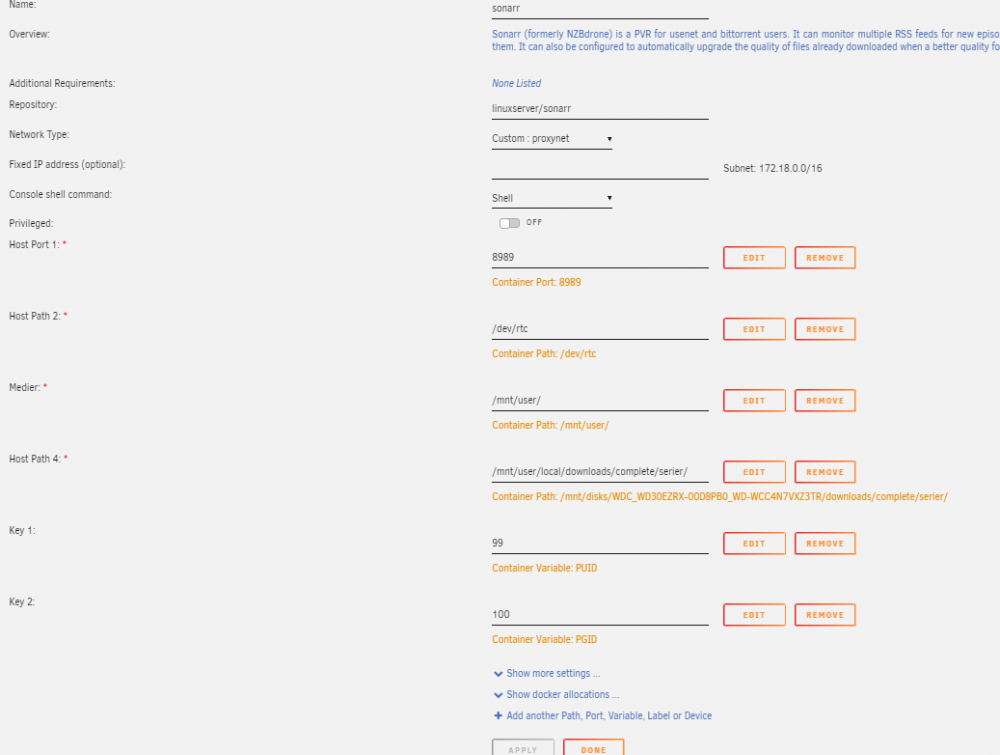
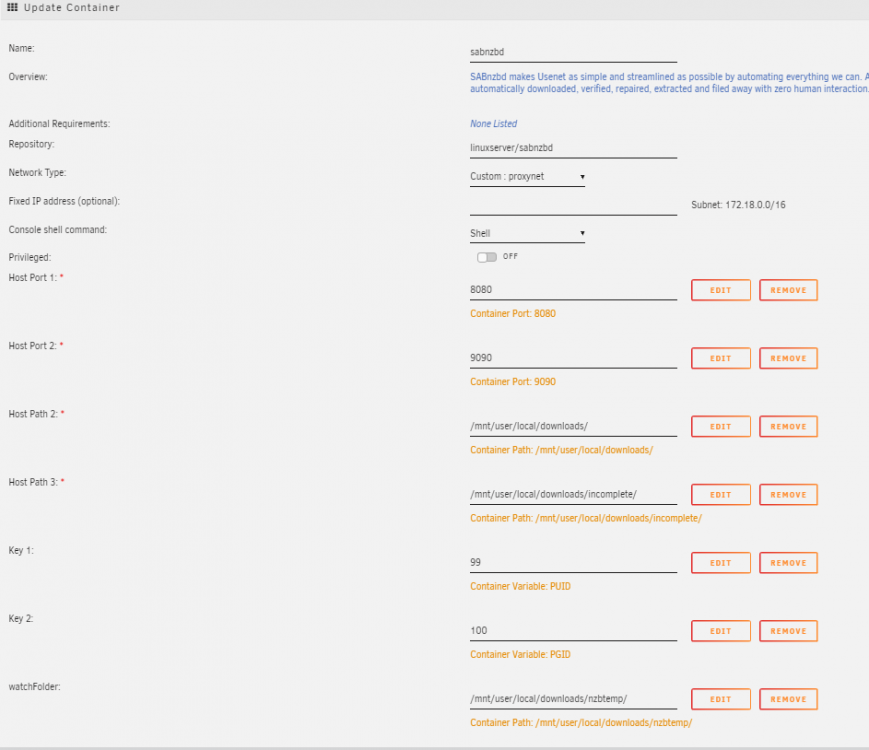
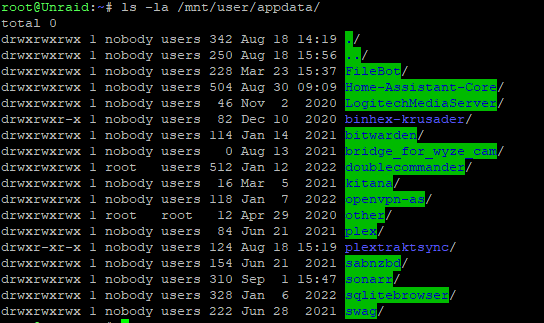
Thanks for the answer. I'm not sure I follow. What's wrong with my mappings. When I start to download it puts it in local folder before uploading it. The dockers are mounted path in media folder in mount_merger folders. All is what I was adviced in here and have worked before. The /dev/rtc is only shown once in template, but that's default. The other screenshots from ssh is the direct paths as asked for. I'm not an expert, so please share advice on what I should map differently.
-
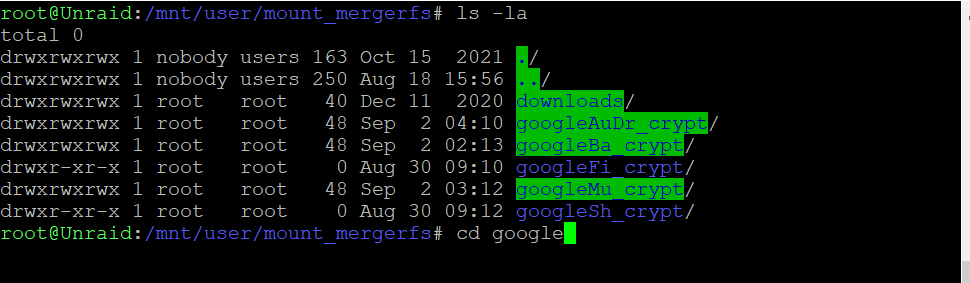
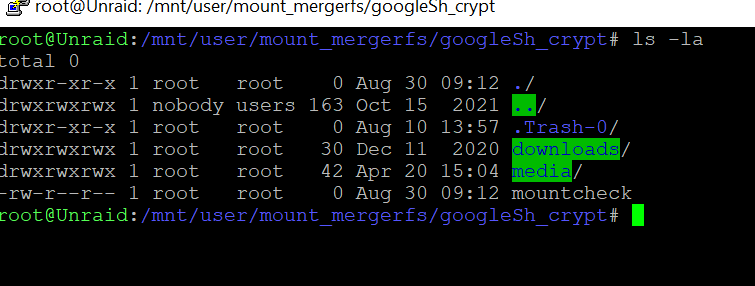
This is how it looks. But it has never been a problem with 6.9.2 but 6.10 is a problem. Sonarr is PUID 99 and GGID 100
-
Hi @Bolagnaise: I have update Unraid to 6.10 stable in order to avoid any problems, but I have problems with Sonarr not moving files because of permissions. My folders is showing this. Which of you fixes should I use. Should I just add --uid 98 \ --gid 99 \ to my scripts or do I need to do some extra work.
-
Got it working by updating the unmount script.
-
Turns out I'm getting this out of memery error. Anyone knows the reason? I can't get one of my upload scripts to work. It says already running exiting. It has always worked but suddenly don't. Any help? 21:28:20 Unraid kernel: [ 6608] 0 6608 2061 643 49152 0 0 awk Aug 9 21:28:20 Unraid kernel: [ 6616] 0 6616 1060 578 45056 0 0 pgrep Aug 9 21:28:20 Unraid kernel: [ 6624] 0 6624 616 184 40960 0 0 sleep Aug 9 21:28:20 Unraid kernel: oom-kill:constraint=CONSTRAINT_NONE,nodemask=(null),cpuset=/,mems_allowed=0,global_oom,task_memcg=/,task=rcloneorig,pid=6563,uid=0 Aug 9 21:28:20 Unraid kernel: Out of memory: Killed process 6563 (rcloneorig) total-vm:14764432kB, anon-rss:12917756kB, file-rss:4kB, shmem-rss:33508kB, UID:0 pgtables:27584kB oom_score_adj:0 Aug 9 21:29:41 Unraid emhttpd: read SMART /dev/sdb Aug 9 21:58:24 Unraid webGUI: Successful login user root
-
A quick question. Is people updating the rclone plugin or leave it on an older version. I haven't updated it since I started using it, because I'm afraid if it gets more unstable. I've experienced a couple of times now one of my shares dissappear suddenly but a reboot of Unraid solves it. Perhaps an updated Rclone plugin is more stable?



