vvolfpack
Members
-
Joined
-
Last visited
Everything posted by vvolfpack
-
I'm facing a similar issue too. I've tried all the steps detailed above and unable to find a resolution. I also copied over my libvirt.img file from a backup, but still no luck. Here's what I see in my libvirt logs under Settings > VM Manager 2020-02-15 23:46:48.072+0000: 22980: info : libvirt version: 5.10.0 2020-02-15 23:46:48.072+0000: 22980: info : hostname: vvolfbox 2020-02-15 23:46:48.072+0000: 22980: warning : qemuDomainObjTaint:9301 : Domain id=1 name='Gaming' uuid=05a5b827-d0e0-6148-6908-a6cf7506671d is tainted: high-privileges 2020-02-15 23:46:48.072+0000: 22980: warning : qemuDomainObjTaint:9301 : Domain id=1 name='Gaming' uuid=05a5b827-d0e0-6148-6908-a6cf7506671d is tainted: host-cpu 2020-02-16 18:55:24.227+0000: 22981: warning : qemuDomainObjTaint:9301 : Domain id=2 name='Gaming' uuid=05a5b827-d0e0-6148-6908-a6cf7506671d is tainted: high-privileges 2020-02-16 18:55:24.227+0000: 22981: warning : qemuDomainObjTaint:9301 : Domain id=2 name='Gaming' uuid=05a5b827-d0e0-6148-6908-a6cf7506671d is tainted: host-cpu 2020-02-16 18:56:51.838+0000: 22977: error : qemuMonitorIO:619 : internal error: End of file from qemu monitor 2020-02-16 18:57:00.541+0000: 22982: warning : qemuDomainObjTaint:9301 : Domain id=3 name='Gaming' uuid=05a5b827-d0e0-6148-6908-a6cf7506671d is tainted: high-privileges 2020-02-16 18:57:00.541+0000: 22982: warning : qemuDomainObjTaint:9301 : Domain id=3 name='Gaming' uuid=05a5b827-d0e0-6148-6908-a6cf7506671d is tainted: host-cpu 2020-02-16 19:00:44.554+0000: 22977: error : qemuMonitorIO:619 : internal error: End of file from qemu monitor Also attaching my diagnostics. Any help would be much appreciated! I've made a lot of tweaks a lot on my VM and would hate to lose all of it vvolfbox-diagnostics-20200216-2020.zip
-
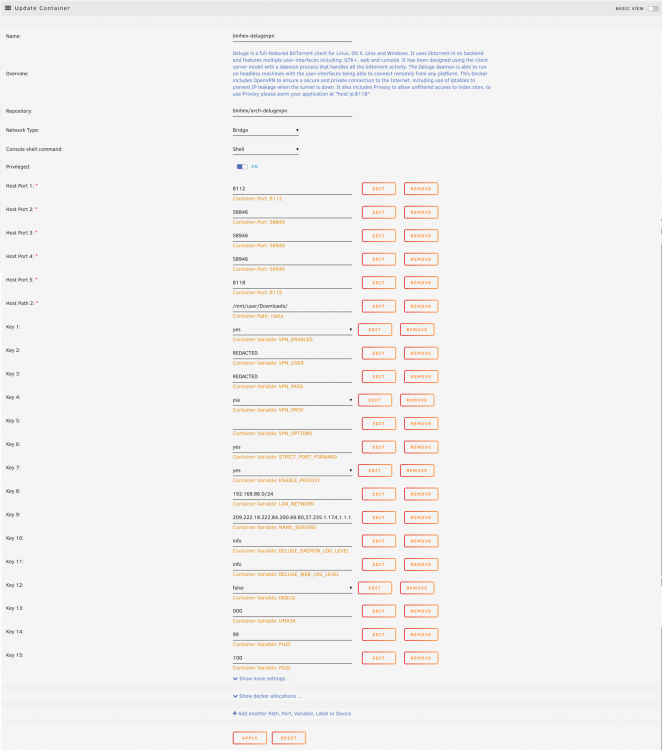
I had an error where Deluge was using the container disk image for my downloads, thus setting off warnings. Not sure what triggered this change, but when I tried to revert the location to usual <screenshot>, I got a command failed error: Error response from daemon: endpoint with name binhex-delugevpn already exists in network bridge.. Anything I'm missing? root@localhost:# /usr/local/emhttp/plugins/dynamix.docker.manager/scripts/docker run -d --name='binhex-delugevpn' --net='bridge' --privileged=true -e TZ="America/Los_Angeles" -e HOST_OS="Unraid" -e 'VPN_ENABLED'='yes' -e 'VPN_USER'='REDACTED' -e 'VPN_PASS'='REDACTED' -e 'VPN_PROV'='pia' -e 'VPN_OPTIONS'='' -e 'STRICT_PORT_FORWARD'='yes' -e 'ENABLE_PRIVOXY'='yes' -e 'LAN_NETWORK'='192.168.86.0/24' -e 'NAME_SERVERS'='209.222.18.222,84.200.69.80,37.235.1.174,1.1.1.1,209.222.18.218,37.235.1.177,84.200.70.40,1.0.0.1' -e 'DELUGE_DAEMON_LOG_LEVEL'='info' -e 'DELUGE_WEB_LOG_LEVEL'='info' -e 'DEBUG'='false' -e 'UMASK'='000' -e 'PUID'='99' -e 'PGID'='100' -p '8112:8112/tcp' -p '58846:58846/tcp' -p '58946:58946/tcp' -p '58946:58946/udp' -p '8118:8118/tcp' -v '/mnt/user/Downloads/':'/data':'rw' -v '/mnt/user/appdata/binhex-delugevpn':'/config':'rw' 'binhex/arch-delugevpn' 13da363b92fbdc7dcf0b37d926e09828d3f6dd11f05cbf1677321a618df3abcf /usr/bin/docker: Error response from daemon: endpoint with name binhex-delugevpn already exists in network bridge. The command failed.
-
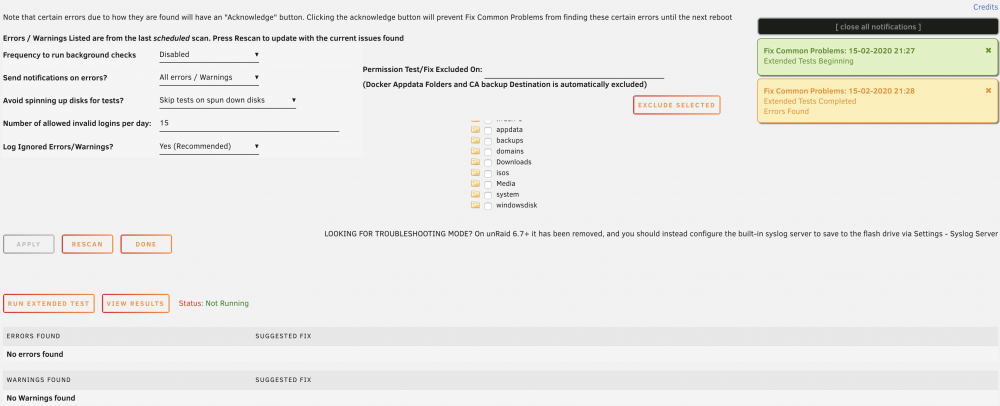
I ran an Extended Test on my server and after the test was completed it gave me a notification: Extended Tests Completed. Errors Found. But the Errors tab doesn't show any errors, neither does my syslog. How should I diagnose the problem?