





vvolfpack
Members
-
Joined
-
Last visited
Everything posted by vvolfpack
-
Hey all! I'm hoping some of you have encountered and solved a similar issue with Plex server crashing on Docker. I had this problem several weeks ago and reported it in August. Others have also reported something similar here and here. The problem seemed to resolve itself for a few weeks until the last update, but now it's back. Summary of the issue: Plex server crashes intermittently, typically following or during a long media download cycle. Restarting the Docker container brings it back online, but the crashes repeat. I haven't found any clear clues in the logs. Would anyone be willing to help me troubleshoot this? I apologize if I've uploaded the wrong logs (details below) Attached logs: Stable log from this morning Log from a crash event Log after restarting the container and regaining stability Plex Media Server.1_Pre_Fail.log Plex Media Server.Working.log Plex Media Server_Post_Restart.log
-
I too am having this same issue since August. Any update or tips to fix would be really helpful!
-
I'm having an issue with my Plex server crashing intermittently. It comes back online after I restart the docker, but it typically goes down during or after a long download cycle when media is added. I couldn't find anything helpful in the logs. Could someone help me troubleshoot this? I apologize if I uploaded the wrong logs. Plex Media Server.1.log
-
Just wanted to thank this thread for all the great discussion that helped me with my decision. I initially went with these ASM1166 cards (1, 2) , but both didn't get detected by my Windows machines ( 1 intel-based and 1 amd-based) for a firmware update. Returned them for a refund. I then followed other recommendations on the thread to order cards from more reliable sources like SYBA even though they're a bit more expensive. Here's the actual JMicron JMB582 card I ordered. Decided to go with a 2-port card instead for lower power consumption compared to 4/6 ports. Can confirm that it added only 3 watts on idle. One word of caution though that upon installing the expansion on my Z390 UD mobo, it automatically turned off my SATA controllers upon reboot. A simple fix via BIOS did it and now everything is working smoothly.
-
This worked - thank you!
-
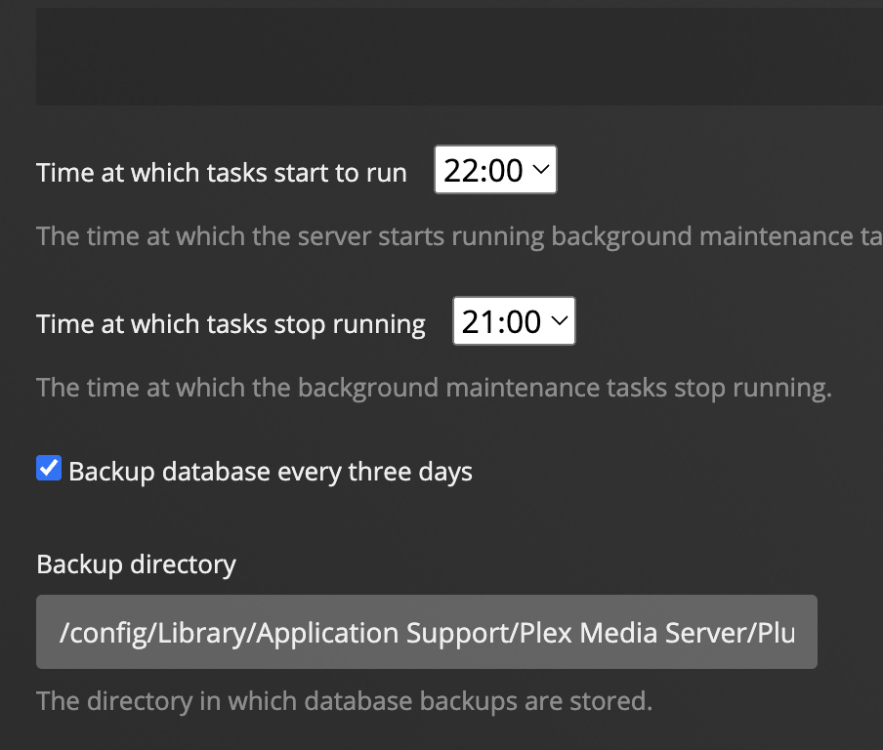
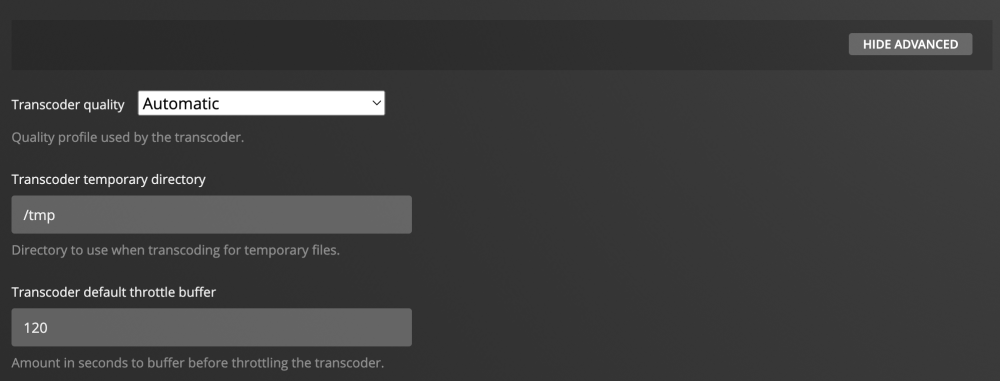
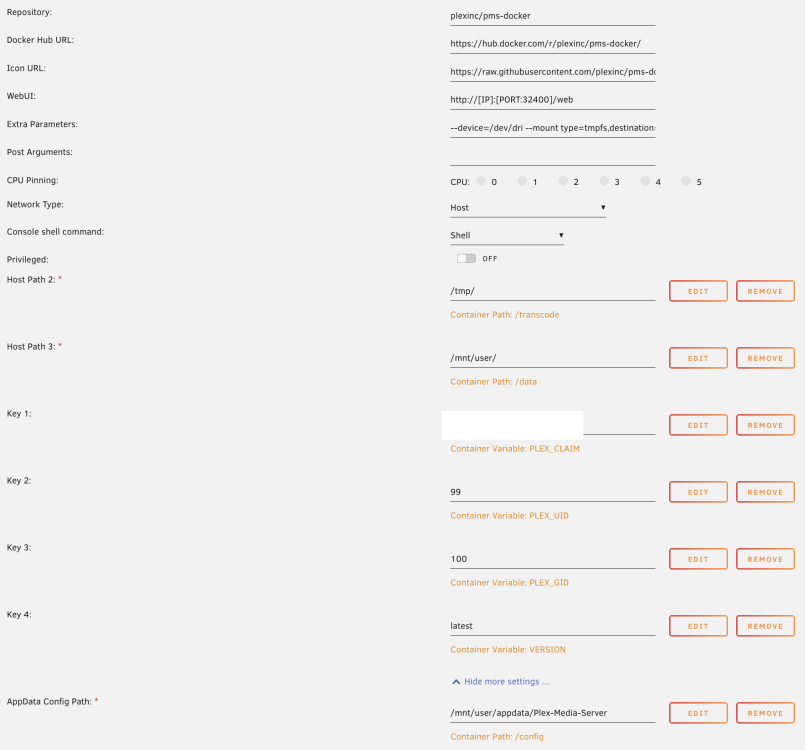
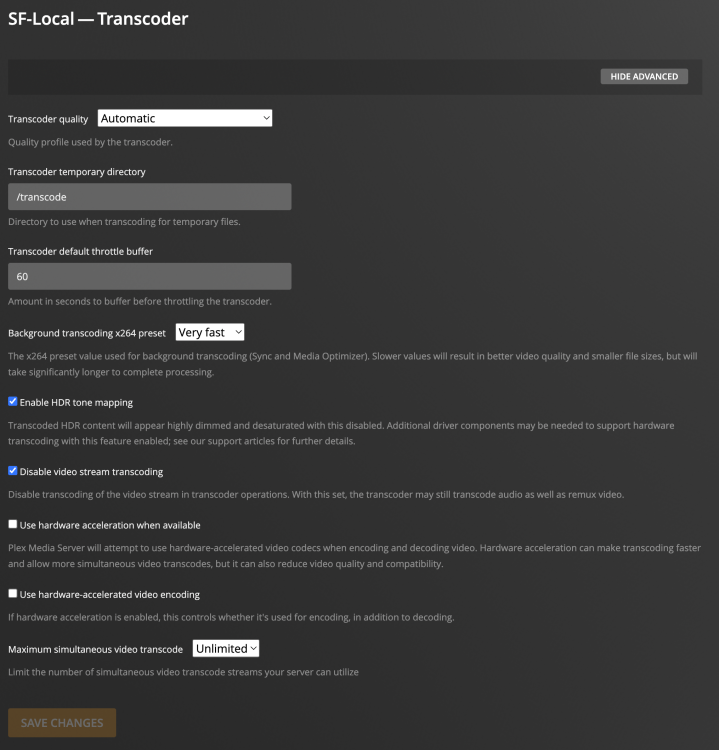
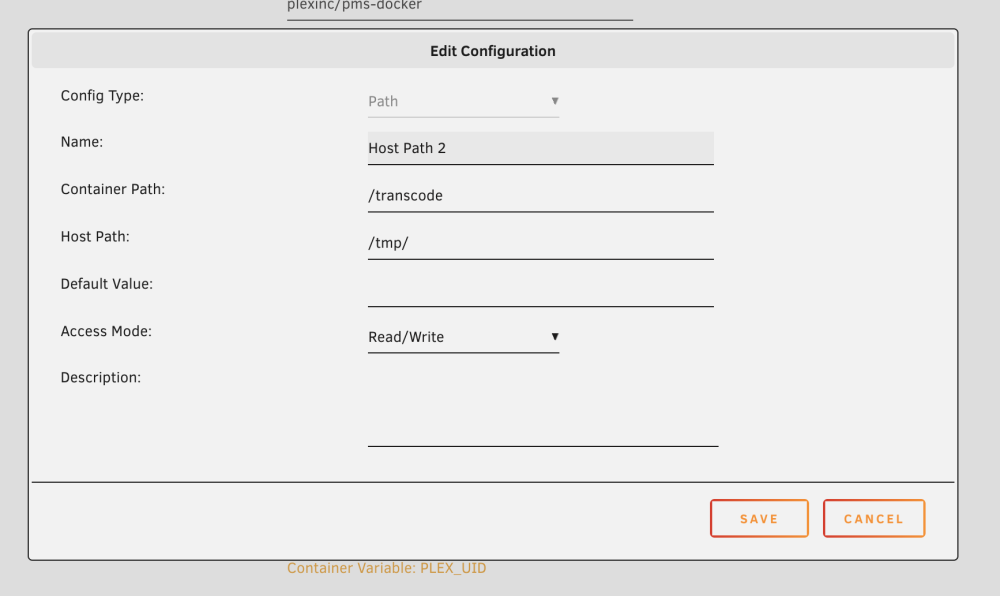
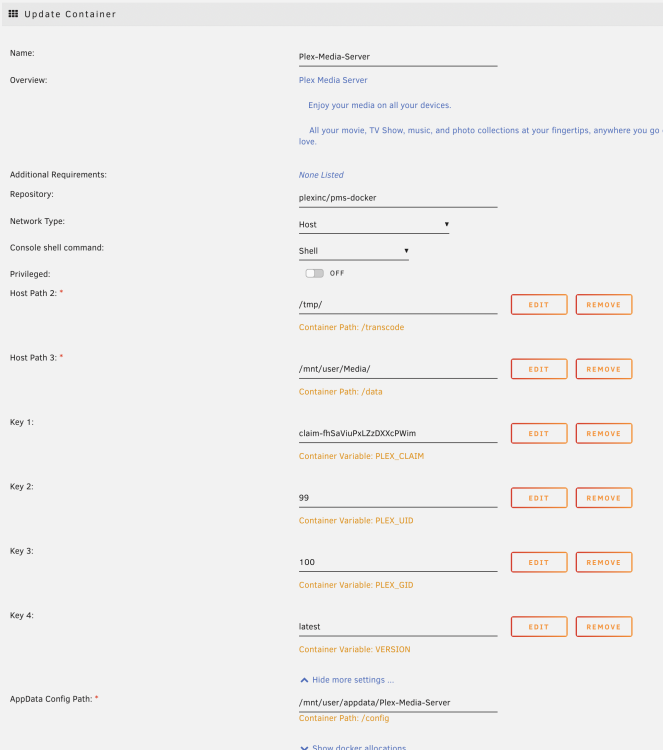
I'm running Plex Inc's PMS Docker and have the parameters set up for hardware transcoding and its directory set to RAM. I followed the serveral guides online to set this up. Settings attached! I suspect Plex's metadata is getting saved to RAM since every time my system reboots, my library mappings within the app are all reset and it re-downloads all my metadata files upon correcting the file mappings. Is that possible? Any help from the community would be greatly appreciated! Also attaching screenshots of the settings from within the docker and the template vvolfbox-diagnostics-20221204-2234.zip
-
Much like others on this thread recently, my Web UI isn't loading anymore, but upon checking my log file, I'm seeing that privoxy is connecting and so is my ovpn file from PIA. I'm sure I'm missing something here. The only difference is that I upgraded my mobo, which didn't impact anything in my other containers supervisord.log
-
Thank you for all your comments! Turns out that Syslog was indeed running on the NVMe. I was able to resolve it. Thanks!
-
this is really useful! Noob question: Is there a guide that goes over how to set this up? Go File in config?
-
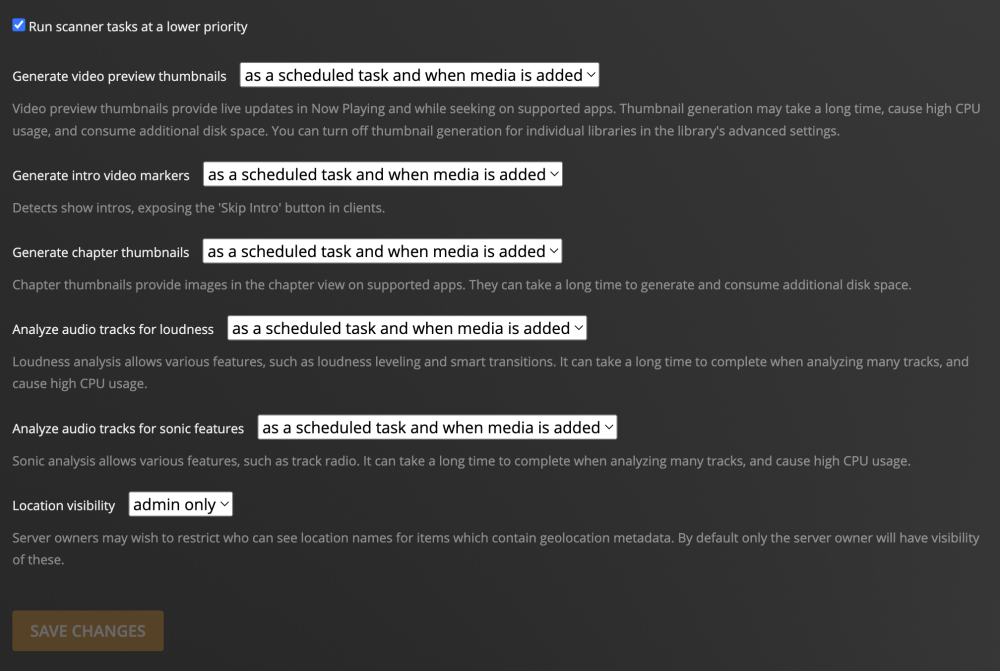
I have the same problem as OP. However, it didn't dissipate after updating the docker. I'm using the docker by Plex Inc. and have thumbnails video previews turned on. It's likely that the thumbnails are getting written directly on the image file? Uploading screenshots of my mappings within the docker and from Plex directly! Any advise would be phenomenal. Thanks! vvolfbox-diagnostics-20221110-0807.zip

-
It's the latter! Server does not boot once I removed the unassigned NVMe device from its slot
-
I'm in the same boat as OP wherein my server doesn't boot if I remove the NVME drive (which is currently unassigned) from the slot. It's not in a cache pool with the primary m.2 device. Before following the same steps by JorgeB to troubleshoot, I wanted to check with the forum if I can proceed. FWIW, I'm going through a full migration of the server to a new MoBo, Intel CPU, and a new cache drive. vvolfbox-diagnostics-20221105-1812.zip
-
Thanks for the tips! I was trying to run this script and it fails when run using User Scripts, but it works when run from within the console of the docker container. User Scripts scheduled script: Fails #!/bin/bash docker exec binhex-qbittorrentvpn curl -c ~/mam.cookies -b ~/mam.cookies https://t.myanonamouse.net/json/dynamicSeedbox.php Script used when running from within the docker container: Successfully works curl -c ~/mam.cookies -b ~/mam.cookies https://t.myanonamouse.net/json/dynamicSeedbox.php Any tips on what I'm doing incorrectly?
-
You're a top person! I started using the script you provided (modified ever so slightly for my audio file use-case) and it's working like a charm. Super appreciated!
-
This thread was extremely helpful, thanks! My use-case is slightly different wherein I'm looking to find just my audiobook files (m4a, mp3, etc.) from the downloads folder to a temp folder, where they'll be tagged separately with metadata. I wanted the downloads folder to be untouched since I'm seeding from there. I tried creating this script, but unfortunately, it isn't doing its job and I would love some help from someone who is more proficient in Linux commands. #!/bin/sh find /mnt/user/Downloads/torrents/completed/audiobooks/ -type f \( -iname \*.m4b -o -iname \*.mp3 -o -iname \*.mp4 -o -iname \*.m4a -o -iname \*.ogg \) -mmin -3 -exec cp -n "{}" /mnt/user/Media/Audiobooks/Temp/ \; I added this as new under User Scripts and nothing happens when I run it. The log file doesn't generate any errors either. What am I doing incorrectly?
-
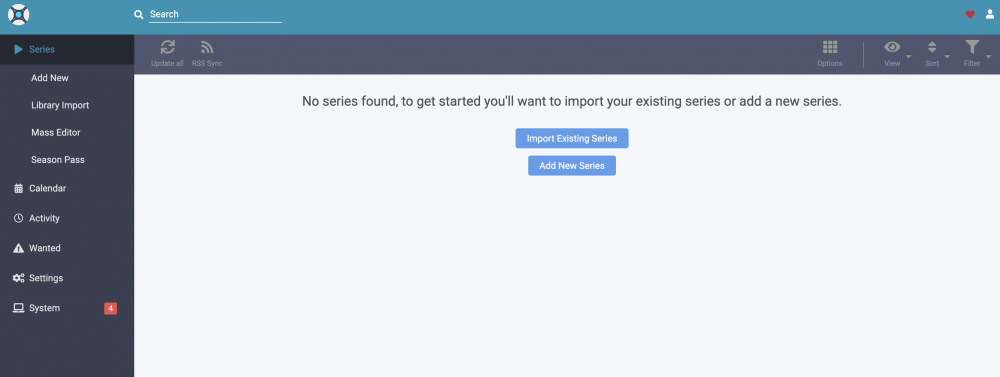
I upgraded to 6.9.2 yesterday and played around with SSL and remote access on Unraid. All went smooth until I opened Sonarr & Radarr this morning only to see all my data wiped :(. Have others noticed this too or is this just being me noobing around? Uploading logs for Radarr over here too in case the issues are related sonarr.txt radarr.txt
-
I'm facing the same issue. I had a GPU passed through to the VM. Had to move it to a different system, and now the VM won't start via VNC either. Getting a similar error to OP. fwiw, got the same error message when I removed my nvme drive too (which wasn't passed through) Execution error: Device 0000:05:00.1 not found: could not access /sys/bus/pci/devices/0000:05:00.1/config: No such file or directory Unable to find Bus 05 Slot O1 in my XML. Could something else be the issue here? <?xml version='1.0' encoding='UTF-8'?> <domain type='kvm'> <name>Gaming</name> <uuid>05a5b827-d0e0-6148-6908-a6cf7506671d</uuid> <description>Gaming and Plex</description> <metadata> <vmtemplate xmlns="unraid" name="Windows 10" icon="windows.png" os="windows10"/> </metadata> <memory unit='KiB'>17301504</memory> <currentMemory unit='KiB'>17301504</currentMemory> <memoryBacking> <nosharepages/> </memoryBacking> <vcpu placement='static'>8</vcpu> <cputune> <vcpupin vcpu='0' cpuset='2'/> <vcpupin vcpu='1' cpuset='10'/> <vcpupin vcpu='2' cpuset='4'/> <vcpupin vcpu='3' cpuset='12'/> <vcpupin vcpu='4' cpuset='5'/> <vcpupin vcpu='5' cpuset='13'/> <vcpupin vcpu='6' cpuset='6'/> <vcpupin vcpu='7' cpuset='14'/> </cputune> <os> <type arch='x86_64' machine='pc-i440fx-4.2'>hvm</type> <loader readonly='yes' type='pflash'>/usr/share/qemu/ovmf-x64/OVMF_CODE-pure-efi.fd</loader> <nvram>/etc/libvirt/qemu/nvram/05a5b827-d0e0-6148-6908-a6cf7506671d_VARS-pure-efi.fd</nvram> </os> <features> <acpi/> <apic/> <hyperv> <relaxed state='on'/> <vapic state='on'/> <spinlocks state='on' retries='8191'/> <vendor_id state='on' value='none'/> </hyperv> </features> <cpu mode='host-passthrough' check='none'> <topology sockets='1' cores='4' threads='2'/> <cache mode='passthrough'/> <feature policy='require' name='topoext'/> </cpu> <clock offset='localtime'> <timer name='hypervclock' present='yes'/> <timer name='hpet' present='no'/> </clock> <on_poweroff>destroy</on_poweroff> <on_reboot>restart</on_reboot> <on_crash>restart</on_crash> <devices> <emulator>/usr/local/sbin/qemu</emulator> <disk type='block' device='disk'> <driver name='qemu' type='raw' cache='writeback'/> <source dev='/dev/disk/by-id/ata-Samsung_SSD_860_PRO_1TB_S5HVNE0MA06968M'/> <target dev='hdc' bus='virtio'/> <boot order='1'/> <address type='pci' domain='0x0000' bus='0x00' slot='0x06' function='0x0'/> </disk> <disk type='file' device='cdrom'> <driver name='qemu' type='raw'/> <source file='/mnt/user/isos/Win10_1909_English_x64.iso'/> <target dev='hda' bus='ide'/> <readonly/> <boot order='2'/> <address type='drive' controller='0' bus='0' target='0' unit='0'/> </disk> <disk type='file' device='cdrom'> <driver name='qemu' type='raw'/> <source file='/mnt/user/isos/virtio-win-0.1.173-2.iso'/> <target dev='hdb' bus='ide'/> <readonly/> <address type='drive' controller='0' bus='0' target='0' unit='1'/> </disk> <controller type='ide' index='0'> <address type='pci' domain='0x0000' bus='0x00' slot='0x01' function='0x1'/> </controller> <controller type='virtio-serial' index='0'> <address type='pci' domain='0x0000' bus='0x00' slot='0x04' function='0x0'/> </controller> <controller type='pci' index='0' model='pci-root'/> <controller type='usb' index='0' model='qemu-xhci' ports='15'> <address type='pci' domain='0x0000' bus='0x00' slot='0x07' function='0x0'/> </controller> <interface type='bridge'> <mac address='52:54:00:ec:3e:28'/> <source bridge='br0'/> <model type='virtio'/> <address type='pci' domain='0x0000' bus='0x00' slot='0x03' function='0x0'/> </interface> <serial type='pty'> <target type='isa-serial' port='0'> <model name='isa-serial'/> </target> </serial> <console type='pty'> <target type='serial' port='0'/> </console> <channel type='unix'> <target type='virtio' name='org.qemu.guest_agent.0'/> <address type='virtio-serial' controller='0' bus='0' port='1'/> </channel> <input type='tablet' bus='usb'> <address type='usb' bus='0' port='1'/> </input> <input type='mouse' bus='ps2'/> <input type='keyboard' bus='ps2'/> <graphics type='vnc' port='-1' autoport='yes' websocket='-1' listen='0.0.0.0' keymap='en-us'> <listen type='address' address='0.0.0.0'/> </graphics> <sound model='ich9'> <address type='pci' domain='0x0000' bus='0x00' slot='0x08' function='0x0'/> </sound> <video> <model type='qxl' ram='65536' vram='65536' vgamem='16384' heads='1' primary='yes'/> <address type='pci' domain='0x0000' bus='0x00' slot='0x02' function='0x0'/> </video> <hostdev mode='subsystem' type='pci' managed='yes'> <driver name='vfio'/> <source> <address domain='0x0000' bus='0x05' slot='0x00' function='0x0'/> </source> <address type='pci' domain='0x0000' bus='0x00' slot='0x05' function='0x0' multifunction='on'/> </hostdev> <hostdev mode='subsystem' type='pci' managed='yes'> <driver name='vfio'/> <source> <address domain='0x0000' bus='0x05' slot='0x00' function='0x1'/> </source> <address type='pci' domain='0x0000' bus='0x00' slot='0x05' function='0x1'/> </hostdev> <hostdev mode='subsystem' type='pci' managed='yes'> <driver name='vfio'/> <source> <address domain='0x0000' bus='0x07' slot='0x00' function='0x1'/> </source> <address type='pci' domain='0x0000' bus='0x00' slot='0x09' function='0x0'/> </hostdev> <hostdev mode='subsystem' type='pci' managed='yes'> <driver name='vfio'/> <source> <address domain='0x0000' bus='0x07' slot='0x00' function='0x3'/> </source> <address type='pci' domain='0x0000' bus='0x00' slot='0x0a' function='0x0'/> </hostdev> <memballoon model='virtio'> <address type='pci' domain='0x0000' bus='0x00' slot='0x0b' function='0x0'/> </memballoon> </devices> </domain>
-
I'm also facing the same issue since migrating to 3. Lists imported via Trakt are getting monitored, but movies aren't auto-downloading. (I have to manually "Search All" missing movies to trigger a download.
-
Unfortunately, I'm still unable to start my docker in spite of multiple attempts to delete the app data and starting afresh. I've tried all troubleshooting steps. Would appreciate any help here!
-
Reboot did the trick for me! Thanks so much!
-
Thanks for the help, saarg! I followed your suggestion and looked up the 6.7 release which led me to this awesome thread. Worked for both, the GPU and the USB hub.
-
I have 3 USB 3.0 controllers with legacy support. I also have XHCI enabled in my BIOS. My motherboard has 2x 2.0 ports and 4x 3.0 ports. Unraid is plugged into a 2.0 port 07:00.1 USB controller: Advanced Micro Devices, Inc. [AMD] Matisse USB 3.0 Host Controller 07:00.3 USB controller: Advanced Micro Devices, Inc. [AMD] Matisse USB 3.0 Host Controller 0c:00.3 USB controller: Advanced Micro Devices, Inc. [AMD] Matisse USB 3.0 Host Controller My Unraid's on Bus 1 (IOMMU Group 21 —07:00.1), whereas the Genesys USB Hub is on Bus 6 (Group 31 — 0c:00.3). How might I solve for this?
-
@methanoid @saarg I'm reaching out to you since you two have been phenomenally helpful so far on this thread with your comments and would love to get your input on what I'm doing wrong with this passthrough. I followed Spaceinvader's video to a T and read through every comment on this thread, but sadly, my Unraid won't boot unless it's booted in GUI Mode after adding the vfio code to the syslinux config. My USB hub is in its own IOMMU group. Is there anything I'm missing? Syslinux config: default menu.c32 menu title Lime Technology, Inc. prompt 0 timeout 50 label Unraid OS menu default kernel /bzimage append vfio-pci.ids=1022:149c initrd=/bzroot label Unraid OS GUI Mode kernel /bzimage append initrd=/bzroot,/bzroot-gui label Unraid OS Safe Mode (no plugins, no GUI) kernel /bzimage append initrd=/bzroot unraidsafemode label Unraid OS GUI Safe Mode (no plugins) kernel /bzimage append initrd=/bzroot,/bzroot-gui unraidsafemode label Memtest86+ kernel /memtest All USB Controllers Busses Bus 1 --> 0000:07:00.1 (IOMMU group 21) Bus 001 Device 002: ID 0781:5571 SanDisk Corp. Cruzer Fit Bus 001 Device 001: ID 1d6b:0002 Linux Foundation 2.0 root hub Bus 2 --> 0000:07:00.1 (IOMMU group 21) Bus 002 Device 001: ID 1d6b:0003 Linux Foundation 3.0 root hub Bus 3 --> 0000:07:00.3 (IOMMU group 21) Bus 003 Device 003: ID 0b05:18f3 ASUSTek Computer, Inc. AURA LED Controller Bus 003 Device 001: ID 1d6b:0002 Linux Foundation 2.0 root hub Bus 4 --> 0000:07:00.3 (IOMMU group 21) Bus 004 Device 001: ID 1d6b:0003 Linux Foundation 3.0 root hub Bus 5 --> 0000:0c:00.3 (IOMMU group 31) Bus 005 Device 002: ID 05e3:0610 Genesys Logic, Inc. 4-port hub Bus 005 Device 001: ID 1d6b:0002 Linux Foundation 2.0 root hub Bus 6 --> 0000:0c:00.3 (IOMMU group 31) Bus 006 Device 002: ID 05e3:0616 Genesys Logic, Inc. hub Bus 006 Device 001: ID 1d6b:0003 Linux Foundation 3.0 root hub IOMMU Groups -- (Group 31) Controller is in its own group IOMMU group 0: [1022:1482] 00:01.0 Host bridge: Advanced Micro Devices, Inc. [AMD] Starship/Matisse PCIe Dummy Host Bridge IOMMU group 1: [1022:1483] 00:01.1 PCI bridge: Advanced Micro Devices, Inc. [AMD] Starship/Matisse GPP Bridge IOMMU group 2: [1022:1483] 00:01.2 PCI bridge: Advanced Micro Devices, Inc. [AMD] Starship/Matisse GPP Bridge IOMMU group 3: [1022:1482] 00:02.0 Host bridge: Advanced Micro Devices, Inc. [AMD] Starship/Matisse PCIe Dummy Host Bridge IOMMU group 4: [1022:1482] 00:03.0 Host bridge: Advanced Micro Devices, Inc. [AMD] Starship/Matisse PCIe Dummy Host Bridge IOMMU group 5: [1022:1483] 00:03.1 PCI bridge: Advanced Micro Devices, Inc. [AMD] Starship/Matisse GPP Bridge IOMMU group 6: [1022:1482] 00:04.0 Host bridge: Advanced Micro Devices, Inc. [AMD] Starship/Matisse PCIe Dummy Host Bridge IOMMU group 7: [1022:1482] 00:05.0 Host bridge: Advanced Micro Devices, Inc. [AMD] Starship/Matisse PCIe Dummy Host Bridge IOMMU group 8: [1022:1482] 00:07.0 Host bridge: Advanced Micro Devices, Inc. [AMD] Starship/Matisse PCIe Dummy Host Bridge IOMMU group 9: [1022:1484] 00:07.1 PCI bridge: Advanced Micro Devices, Inc. [AMD] Starship/Matisse Internal PCIe GPP Bridge 0 to bus[E:B] IOMMU group 10: [1022:1482] 00:08.0 Host bridge: Advanced Micro Devices, Inc. [AMD] Starship/Matisse PCIe Dummy Host Bridge IOMMU group 11: [1022:1484] 00:08.1 PCI bridge: Advanced Micro Devices, Inc. [AMD] Starship/Matisse Internal PCIe GPP Bridge 0 to bus[E:B] IOMMU group 12: [1022:1484] 00:08.2 PCI bridge: Advanced Micro Devices, Inc. [AMD] Starship/Matisse Internal PCIe GPP Bridge 0 to bus[E:B] IOMMU group 13: [1022:1484] 00:08.3 PCI bridge: Advanced Micro Devices, Inc. [AMD] Starship/Matisse Internal PCIe GPP Bridge 0 to bus[E:B] IOMMU group 14: [1022:790b] 00:14.0 SMBus: Advanced Micro Devices, Inc. [AMD] FCH SMBus Controller (rev 61) [1022:790e] 00:14.3 ISA bridge: Advanced Micro Devices, Inc. [AMD] FCH LPC Bridge (rev 51) IOMMU group 15: [1022:1440] 00:18.0 Host bridge: Advanced Micro Devices, Inc. [AMD] Matisse Device 24: Function 0 [1022:1441] 00:18.1 Host bridge: Advanced Micro Devices, Inc. [AMD] Matisse Device 24: Function 1 [1022:1442] 00:18.2 Host bridge: Advanced Micro Devices, Inc. [AMD] Matisse Device 24: Function 2 [1022:1443] 00:18.3 Host bridge: Advanced Micro Devices, Inc. [AMD] Matisse Device 24: Function 3 [1022:1444] 00:18.4 Host bridge: Advanced Micro Devices, Inc. [AMD] Matisse Device 24: Function 4 [1022:1445] 00:18.5 Host bridge: Advanced Micro Devices, Inc. [AMD] Matisse Device 24: Function 5 [1022:1446] 00:18.6 Host bridge: Advanced Micro Devices, Inc. [AMD] Matisse Device 24: Function 6 [1022:1447] 00:18.7 Host bridge: Advanced Micro Devices, Inc. [AMD] Matisse Device 24: Function 7 IOMMU group 16: [8086:f1a8] 01:00.0 Non-Volatile memory controller: Intel Corporation SSD 660P Series (rev 03) IOMMU group 17: [1022:57ad] 02:00.0 PCI bridge: Advanced Micro Devices, Inc. [AMD] Matisse Switch Upstream IOMMU group 18: [1022:57a3] 03:01.0 PCI bridge: Advanced Micro Devices, Inc. [AMD] Matisse PCIe GPP Bridge IOMMU group 19: [1022:57a3] 03:02.0 PCI bridge: Advanced Micro Devices, Inc. [AMD] Matisse PCIe GPP Bridge IOMMU group 20: [1022:57a3] 03:05.0 PCI bridge: Advanced Micro Devices, Inc. [AMD] Matisse PCIe GPP Bridge IOMMU group 21: [1022:57a4] 03:08.0 PCI bridge: Advanced Micro Devices, Inc. [AMD] Matisse PCIe GPP Bridge [1022:1485] 07:00.0 Non-Essential Instrumentation [1300]: Advanced Micro Devices, Inc. [AMD] Starship/Matisse Reserved SPP [1022:149c] 07:00.1 USB controller: Advanced Micro Devices, Inc. [AMD] Matisse USB 3.0 Host Controller [1022:149c] 07:00.3 USB controller: Advanced Micro Devices, Inc. [AMD] Matisse USB 3.0 Host Controller IOMMU group 22: [1022:57a4] 03:09.0 PCI bridge: Advanced Micro Devices, Inc. [AMD] Matisse PCIe GPP Bridge [1022:7901] 08:00.0 SATA controller: Advanced Micro Devices, Inc. [AMD] FCH SATA Controller [AHCI mode] (rev 51) IOMMU group 23: [1022:57a4] 03:0a.0 PCI bridge: Advanced Micro Devices, Inc. [AMD] Matisse PCIe GPP Bridge [1022:7901] 09:00.0 SATA controller: Advanced Micro Devices, Inc. [AMD] FCH SATA Controller [AHCI mode] (rev 51) IOMMU group 24: [1cc1:8201] 04:00.0 Non-Volatile memory controller: ADATA Technology Co., Ltd. XPG SX8200 Pro PCIe Gen3x4 M.2 2280 Solid State Drive (rev 03) IOMMU group 25: [10de:1c02] 05:00.0 VGA compatible controller: NVIDIA Corporation GP106 [GeForce GTX 1060 3GB] (rev a1) [10de:10f1] 05:00.1 Audio device: NVIDIA Corporation GP106 High Definition Audio Controller (rev a1) IOMMU group 26: [10ec:8168] 06:00.0 Ethernet controller: Realtek Semiconductor Co., Ltd. RTL8111/8168/8411 PCI Express Gigabit Ethernet Controller (rev 26) IOMMU group 27: [10de:1184] 0a:00.0 VGA compatible controller: NVIDIA Corporation GK104 [GeForce GTX 770] (rev a1) [10de:0e0a] 0a:00.1 Audio device: NVIDIA Corporation GK104 HDMI Audio Controller (rev a1) IOMMU group 28: [1022:148a] 0b:00.0 Non-Essential Instrumentation [1300]: Advanced Micro Devices, Inc. [AMD] Starship/Matisse PCIe Dummy Function IOMMU group 29: [1022:1485] 0c:00.0 Non-Essential Instrumentation [1300]: Advanced Micro Devices, Inc. [AMD] Starship/Matisse Reserved SPP IOMMU group 30: [1022:1486] 0c:00.1 Encryption controller: Advanced Micro Devices, Inc. [AMD] Starship/Matisse Cryptographic Coprocessor PSPCPP IOMMU group 31: [1022:149c] 0c:00.3 USB controller: Advanced Micro Devices, Inc. [AMD] Matisse USB 3.0 Host Controller IOMMU group 32: [1022:1487] 0c:00.4 Audio device: Advanced Micro Devices, Inc. [AMD] Starship/Matisse HD Audio Controller IOMMU group 33: [1022:7901] 0d:00.0 SATA controller: Advanced Micro Devices, Inc. [AMD] FCH SATA Controller [AHCI mode] (rev 51) IOMMU group 34: [1022:7901] 0e:00.0 SATA controller: Advanced Micro Devices, Inc. [AMD] FCH SATA Controller [AHCI mode] (rev 51)
-
Running the command doesn't show 'binhex-delugevpn' as a container. However, I do see a folder for the container under appdata. Deleting this folder and reinstalling the docker also shows me the same 'command failed' error from before. Attaching my diagnostics file in case it's an error in the docker image itself since delugevpn downloaded items to its diskimage causing it to reach 100% storage. CONTAINER ID IMAGE COMMAND CREATED STATUS PORTS NAMES dd408724d851 binhex/arch-jackett "/usr/bin/tini -- /b…" 37 hours ago Up 27 hours 0.0.0.0:9117->9117/tcp binhex-jackett 9be5e3a09bc8 binhex/arch-sickchill "/usr/bin/tini -- /b…" 37 hours ago Created binhex-sickchill 6b116441524c linuxserver/openvpn-as "/init" 38 hours ago Up 27 hours 0.0.0.0:943->943/tcp, 0.0.0.0:9443->9443/tcp, 0.0.0.0:1194->1194/udp openvpn-as dd876d1256e3 linuxserver/duckdns "/init" 3 days ago Up 27 hours duckdns 3aedc50e459c binhex/arch-plexpass "/usr/bin/tini -- /b…" 3 days ago Up 27 hours binhex-plexpass 9c7295b66cb6 binhex/arch-sonarr "/usr/bin/tini -- /b…" 6 days ago Exited (0) 3 days ago binhex-sonarr b1fdead365e7 binhex/arch-radarr "/usr/bin/tini -- /b…" 6 days ago Exited (0) 38 hours ago binhex-radarr 348ae87c462b binhex/arch-sabnzbd "/usr/bin/tini -- /b…" 9 days ago Up 27 hours 0.0.0.0:8080->8080/tcp, 0.0.0.0:8090->8090/tcp binhex-sabnzbd d64832469e44 binhex/arch-krusader "/usr/bin/tini -- /b…" 10 days ago Up 27 hours 5900/tcp, 0.0.0.0:6080->6080/tcp binhex-krusader vvolfbox-diagnostics-20200217-1058.zip Edit 1: After a reboot, the command passes successfully, but I'm unable to start the docker. After clicking "Start". It spins for a second and returns to "Stopped" state. Any help would be much appreciated! EDIT 2: Getting these syslogs from trying to start the application Feb 18 23:02:14 vvolfbox kernel: docker0: port 5(veth72bc119) entered blocking state Feb 18 23:02:14 vvolfbox kernel: docker0: port 5(veth72bc119) entered disabled state Feb 18 23:02:14 vvolfbox kernel: device veth72bc119 entered promiscuous mode Feb 18 23:02:14 vvolfbox kernel: IPv6: ADDRCONF(NETDEV_UP): veth72bc119: link is not ready Feb 18 23:02:14 vvolfbox kernel: docker0: port 5(veth72bc119) entered blocking state Feb 18 23:02:14 vvolfbox kernel: docker0: port 5(veth72bc119) entered forwarding state Feb 18 23:02:14 vvolfbox kernel: docker0: port 5(veth72bc119) entered disabled state Feb 18 23:02:14 vvolfbox kernel: eth0: renamed from veth7da683a Feb 18 23:02:14 vvolfbox kernel: IPv6: ADDRCONF(NETDEV_CHANGE): veth72bc119: link becomes ready Feb 18 23:02:14 vvolfbox kernel: docker0: port 5(veth72bc119) entered blocking state Feb 18 23:02:14 vvolfbox kernel: docker0: port 5(veth72bc119) entered forwarding state Feb 18 23:02:15 vvolfbox kernel: docker0: port 5(veth72bc119) entered disabled state Feb 18 23:02:15 vvolfbox kernel: veth7da683a: renamed from eth0 Feb 18 23:02:15 vvolfbox kernel: docker0: port 5(veth72bc119) entered disabled state Feb 18 23:02:15 vvolfbox kernel: device veth72bc119 left promiscuous mode Feb 18 23:02:15 vvolfbox kernel: docker0: port 5(veth72bc119) entered disabled state Any help would be much appreciated, @binhex!
-
Thanks for the tip! I'll reboot the server once I'm back home in 2 days, since I'm worried I won't be able to log back into it via OpenVPN upon reboot. (Array has a password, so does my root account)



