





Flyinace2000
Members
-
Joined
-
Last visited
Everything posted by Flyinace2000
-
Might of found the issue. Scrypted - used to turn non-home kit cameras into home kit cameras. Apparently if you have had it installed for a while there was a plug in called "python codec", which has been causing issues lately with memory leaks. I just happen to check my Glances dashboard and Scrypted was using 7GB of memory and the system was at 90% of ram used. Restarted Scrypted and memory went back to about 1.2gb. Deleted the plug-in and now memory is at about 800mb. Will continue to monitor.
-
thanks. I'll look into pinning VMs and Docker to cores 1,2,3 and leave unraid core 0. I've also updated the global share settings fuse flags to max and enable flash drive activity fix. I've also reviewed Nextcloud, which has had a LOT of new features and I really just use it for cloud storage for clients to drop off files for me (and for me to share back). I went through all the settings and disabled a LOT of the extra stuff that I am not using. So hopefully that helps as well. I'll check back in a few days!
-
Like the title says. I've done MemTest for 20'ish hours and RAM tested fine. I'm running on an HP290 G1 (i3 9100) w/ 16gb ram. HBA card and 9 drives. I've worked with some people on the discount to clean up some share configs, but thought I would post here. logs and diagnostics are attached. When the problem starts all docker webui goes down. No unifi, no Nextcloud, heimdal, nothing. Server responds to pings, but no ssh.unraid logs.txthomeserver-diagnostics-20250731-1734.zip unraid logs.txt
-
Issue Opened: stopped 'Filter failed' - #36
-
Trying to get my older Samsung M2875 working with AirPrint from my phones. It already supports AirPrint on my Desktop, but it hasn't been updated to support iOS. At first I had the "rastertoufr2" which I solved by installing the linux drivers inside of the docker container. When I add the new printer I upload the PPD file for the printer (from the same linux driver package Samsung_M267x_287x_Series.ppd). Now when doing a test page from the admin console I get a " stopped 'Filter failed' " error
-
never mind, I can't read. There was a note at the bottom that walks you through updating. thanks all.
-
Hey All, I'm running the Unify controller following the instructions here: During the update command I get the following error. root@UniFiController:/# sudo apt-get update && sudo apt-get install unifi -y Get:1 http://security.ubuntu.com/ubuntu jammy-security InRelease [129 kB] Hit:2 http://archive.ubuntu.com/ubuntu jammy InRelease Ign:4 https://repo.mongodb.org/apt/ubuntu bionic/mongodb-org/3.6 InRelease Hit:5 https://repo.mongodb.org/apt/ubuntu bionic/mongodb-org/3.6 Release Get:6 http://archive.ubuntu.com/ubuntu jammy-updates InRelease [128 kB] Get:7 https://repo.mongodb.org/apt/ubuntu bionic/mongodb-org/3.6 Release.gpg [801 B] Ign:7 https://repo.mongodb.org/apt/ubuntu bionic/mongodb-org/3.6 Release.gpg Get:3 https://dl.ui.com/unifi/debian stable InRelease [2,292 B] Get:8 http://archive.ubuntu.com/ubuntu jammy-updates/main amd64 Packages [1,791 kB] Get:9 http://archive.ubuntu.com/ubuntu jammy-updates/universe amd64 Packages [1,100 kB] Reading package lists... Done W: https://repo.mongodb.org/apt/ubuntu/dists/bionic/mongodb-org/3.6/Release.gpg: Key is stored in legacy trusted.gpg keyring (/etc/apt/trusted.gpg), see the DEPRECATION section in apt-key(8) for details. W: GPG error: https://repo.mongodb.org/apt/ubuntu bionic/mongodb-org/3.6 Release: The following signatures were invalid: EXPKEYSIG 58712A2291FA4AD5 MongoDB 3.6 Release Signing Key <[email protected]> E: Repository 'https://dl.ui.com/unifi/debian stable InRelease' changed its 'Codename' value from 'unifi-8.1' to 'unifi-8.2' N: This must be accepted explicitly before updates for this repository can be applied. See apt-secure(8) manpage for details. root@UniFiController:/#
-
Running the update command but get the following error: oot@UniFiController:/# sudo apt-get update && sudo apt-get install unifi -y Get:1 http://security.ubuntu.com/ubuntu jammy-security InRelease [129 kB] Hit:2 http://archive.ubuntu.com/ubuntu jammy InRelease Ign:4 https://repo.mongodb.org/apt/ubuntu bionic/mongodb-org/3.6 InRelease Hit:5 https://repo.mongodb.org/apt/ubuntu bionic/mongodb-org/3.6 Release Get:6 http://archive.ubuntu.com/ubuntu jammy-updates InRelease [128 kB] Get:7 https://repo.mongodb.org/apt/ubuntu bionic/mongodb-org/3.6 Release.gpg [801 B] Ign:7 https://repo.mongodb.org/apt/ubuntu bionic/mongodb-org/3.6 Release.gpg Get:3 https://dl.ui.com/unifi/debian stable InRelease [2,292 B] Get:8 http://archive.ubuntu.com/ubuntu jammy-updates/main amd64 Packages [1,791 kB] Get:9 http://archive.ubuntu.com/ubuntu jammy-updates/universe amd64 Packages [1,100 kB] Reading package lists... Done W: https://repo.mongodb.org/apt/ubuntu/dists/bionic/mongodb-org/3.6/Release.gpg: Key is stored in legacy trusted.gpg keyring (/etc/apt/trusted.gpg), see the DEPRECATION section in apt-key(8) for details. W: GPG error: https://repo.mongodb.org/apt/ubuntu bionic/mongodb-org/3.6 Release: The following signatures were invalid: EXPKEYSIG 58712A2291FA4AD5 MongoDB 3.6 Release Signing Key <[email protected]> E: Repository 'https://dl.ui.com/unifi/debian stable InRelease' changed its 'Codename' value from 'unifi-8.1' to 'unifi-8.2' N: This must be accepted explicitly before updates for this repository can be applied. See apt-secure(8) manpage for details. root@UniFiController:/#
-
This worked great. Gave my DHCP server the generated MAC for the container and it got the same IP as my old controller (docker). Imported all the settings and up and running. Thanks!
-
That's what I thought as well. I manually checked and nothing else is using those ports. I'll try a reboot. Thanks! Reboot fixed it. Very strange.
-
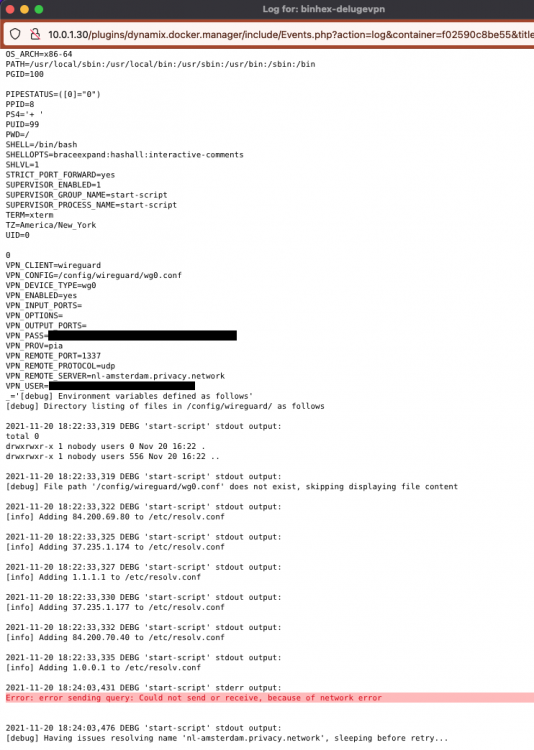
Just noticed my container wasn't running. When starting it throws an error "Execution Error - Server Error". Using PIA and fireguard. was working fine. Last log was from Jan 23rd. UnRaid Logs show the following Jan 30 12:00:04 HomeServer kernel: docker0: port 7(veth07cd363) entered blocking state Jan 30 12:00:04 HomeServer kernel: docker0: port 7(veth07cd363) entered disabled state Jan 30 12:00:04 HomeServer kernel: device veth07cd363 entered promiscuous mode Jan 30 12:00:04 HomeServer kernel: docker0: port 7(veth07cd363) entered blocking state Jan 30 12:00:04 HomeServer kernel: docker0: port 7(veth07cd363) entered forwarding state Jan 30 12:00:04 HomeServer kernel: docker0: port 7(veth07cd363) entered disabled state Jan 30 12:00:04 HomeServer kernel: docker0: port 7(veth07cd363) entered disabled state Jan 30 12:00:04 HomeServer kernel: device veth07cd363 left promiscuous mode Jan 30 12:00:04 HomeServer kernel: docker0: port 7(veth07cd363) entered disabled state Results from changing the config and saving docker run -d --name='binhex-delugevpn' --net='bridge' --cpuset-cpus='2,3' --privileged=true -e TZ="America/New_York" -e HOST_OS="Unraid" -e HOST_HOSTNAME="HomeServer" -e HOST_CONTAINERNAME="binhex-delugevpn" -e 'VPN_ENABLED'='yes' -e 'VPN_USER'='pxxxxxxxx ' -e 'VPN_PASS'='xxxxxxxxxxxxxxxxxxxxxxxxx' -e 'VPN_PROV'='pia' -e 'VPN_CLIENT'='wireguard' -e 'VPN_OPTIONS'='' -e 'STRICT_PORT_FORWARD'='yes' -e 'ENABLE_PRIVOXY'='no' -e 'LAN_NETWORK'='10.0.1.0/24' -e 'NAME_SERVERS'='1.1.1.1,1.0.0.1,10.0.1.1' -e 'DELUGE_DAEMON_LOG_LEVEL'='info' -e 'DELUGE_WEB_LOG_LEVEL'='info' -e 'VPN_INPUT_PORTS'='' -e 'VPN_OUTPUT_PORTS'='' -e 'DEBUG'='false' -e 'UMASK'='000' -e 'PUID'='99' -e 'PGID'='100' -l net.unraid.docker.managed=dockerman -l net.unraid.docker.webui='http://[IP]:[PORT:8112]/' -l net.unraid.docker.icon='https://raw.githubusercontent.com/binhex/docker-templates/master/binhex/images/deluge-icon.png' -p '8112:8112/tcp' -p '58846:58846/tcp' -p '58946:58946/tcp' -p '58946:58946/udp' -p '8118:8118/tcp' -v '/mnt/user/media/download/':'/data':'rw' -v '/mnt/user/appdata/binhex-delugevpn':'/config':'rw' --sysctl="net.ipv4.conf.all.src_valid_mark=1" 'binhex/arch-delugevpn' b77739803819047075ee5aaf25756fab10fe619a6f776ff54d5c8cb8c5ad627e docker: Error response from daemon: driver failed programming external connectivity on endpoint binhex-delugevpn (2cc0c7c031cb9b1bb7e5a5747b9b4eee2b39e25be783702ab6896bb14d6c209c): Error starting userland proxy: listen tcp4 0.0.0.0:58846: bind: address already in use.
-
Thanks for the plug in. This makes it WAY easier to get software onto my iBook G3 Clamshell.
-
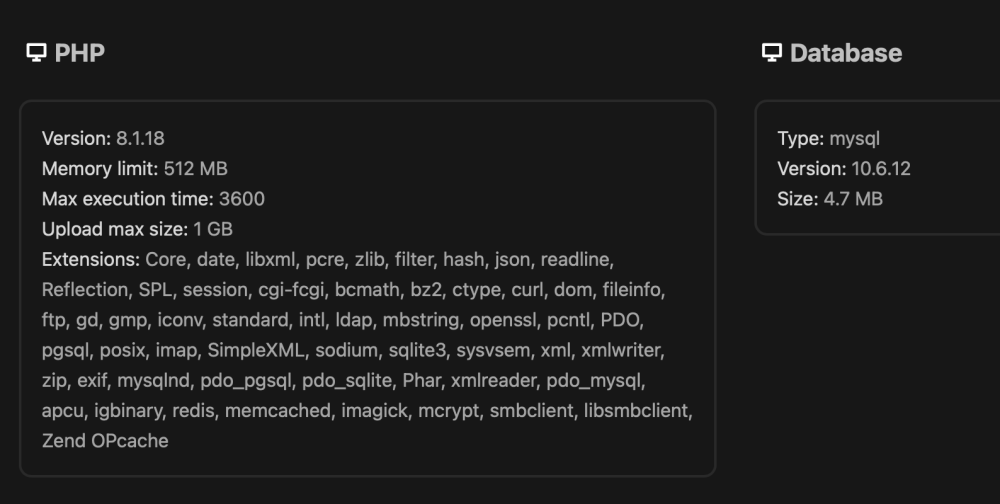
Last night I was updating dockers and my next cloud installation. First shut down the NextCloud docker, updated Maria, then updated NextCloud, turned the docker back on. Went to the admin page and ran the update to go from v25 to 26, but its stuck on step 3. I saw other solutions about removing the updater files, but I don't see any of those. Updating from command line gives me the same please wait message. NextCloud is not in maintenance mode.

-
@Antimarkovnikov I had the same problem over the weekend. I solved it by switching VPN endpoints to one of the Canada servers (Montreal I think). I'm also using WireGuard instead of OpenVPN.
-
Say it with me everyone, it's always DNS. Removed all the DNS Servers from the docker settings except for cloud flair and (for some reason) my routerIP (not my DNS server). Restarted and it worked. My router is an OpenSense box running Adguard. Either way, up and running.
-
Also trying to migrate to Wireguard. Except when I follow the directions with wg0.conf is not generated at start up. Just get an empty folder.
-
This worked for me. After stopping both containers (NextCloud and MariaDB) I deleted the log files (i had two). Turned MariaDB on first, then NextCloud. 30 seconds later i was able to get back to the web log in for NextCloud. Thank You!
-
I'm going to remove this from my server. Besides removing the containers, port forwarding, and reverse proxy config. Anything else?
-
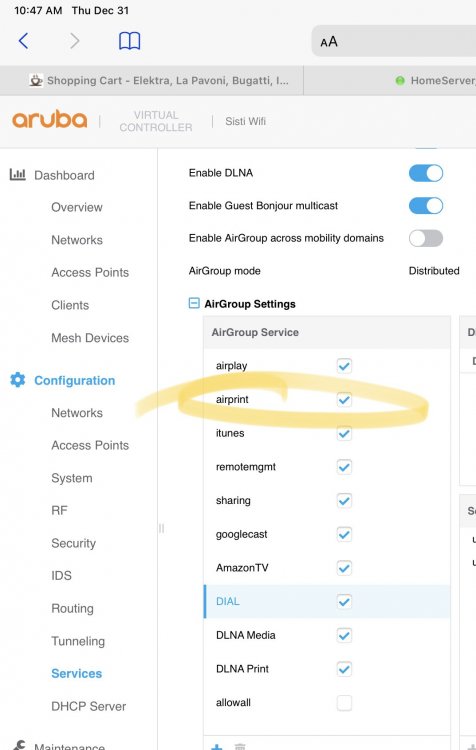
Know what helps a lot? Making sure that your wireless access points are not blocking AirPrint.....
-
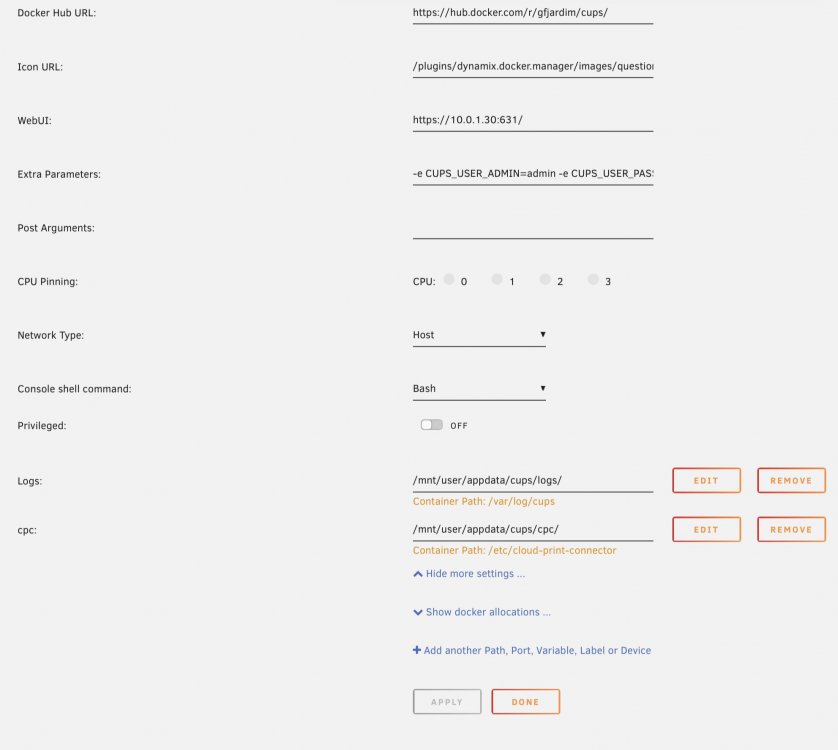
Nope. What’s the proper mapping? Is there documentation that I’m just missing out on?
-
I’m able to add a printer manually to CUPS, but not via network discover. Logs show 31/Dec/2020:09:11:32 -0500] Unable to communicate with avahi-daemon: Daemon not running
-
So this might of been a lost cause. Can I use CUPS to publish my wireless printer so that i can print via my iOS devices? I’ve setup a print share inside of CUPS, i can see that printer share on my desktop, but nothing on iOS devices.
-
Got it started Under the Extra Parameters in advanced view I added "-e CUPS_USER_ADMIN=admin -e CUPS_USER_PASSWORD=password"
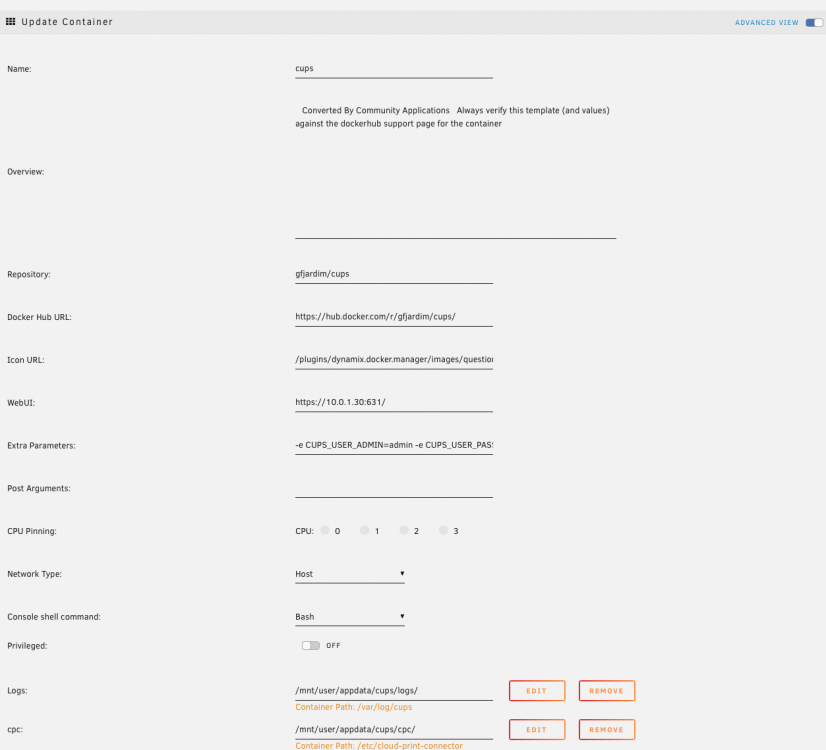
-
Same question, I didn't see any other options. I wish there was more documentation about how to set this up on UnRaid. Just want to publish my Samsun wireless printer so my iPhone/iPad can also print. So far I've gotten to the user/password prompt but it does not accept the defaults mentioned above.
-
I'm running MakeMKV on my desktop (MacOS 10.15). My Unraid box only has a low profile DVD drive. Also, I CAN'T BELIEVE I"VE BEEN USING IT WRONG ALL THESE YEARS AND ADDING A STEP W/ HANDBRAKE. OMG I guess the question I'll have to answer is it worth it to keep a full disk backup going forward for archival purposes, or just the resulting MKV file. THANK YOU






