





droopie
Members
-
Joined
-
Last visited
Everything posted by droopie
-
i cant really try safemode because i dont have an extra monitor and my monitor is mounted. i tried closing all my connections and use the webui as minimal as i can but after like 24hrs i have no luck. when i start getting these messages, i have to ssh into the server and start turning off dockers. when i stop like 2-3 dockers, it becomes stable again. im pretty sure its docker related. i just learned the command to turn off the docker service so next time ill try that but when i turned off the docker service in the settings, it was stable again too. im now trying to leave most of the dockers off to run as little as possible to see what happens. by docker related, that includes maybe that something docker related is using up all the cpu or something.
-
its a pretty frustrating thing to have the webui unresponsive because of this. its worth noting that while im unsure what the cause is, i just decided to select the pairs for all the dockers to use only pairs 2,3,4 and only things like authelia, plex, and reverse proxy to use all. running almost all the usual apps and even some that i use occasionally is giving me just a couple of those lines but nothing compare to a wall of warnings like before.
-
php-fpm[12033]: [WARNING] [pool www] child 24115 exited on signal 9 (SIGKILL) after 26.911869 seconds from start i get ton of these messages daily. it seems that stopping any random docker fixes it. why is this happening? diag.zip
-
jumping in cuz i have the same issue now with them little usb's which i now understand the recommendation of the kingston metal one for example. is it ok to use this last final backup created or files copied from a read only usb? i ask because my previous was a month old and i just installed and configured a bunch of dockers this last month. i saw my logs just when the usb was throwing out errors so i did a flash backup before restarting. when i restarted, i got the usb is read-only. im just affraid if this last backup is corrupt. i did another backup after this last reboot and the size is about half (200mb) but on windows it says the usb is using about 1gb in size. unsure why its such a difference.
-
i cant connect to znc but can connect to all other ircs on thelounge and im able to connect to znc with hexchat. i get the following error: Connection closed unexpectedly: Error: write EPIPE
-
same issue now. did u fix it?
-
can someone help with a way to stay logged in? im using the myjdowloader official extension on my browser but im always getting signed out from the docker. is there anything i can do to stay signed in? or whats an alternative to be able to use my desktop browser and send links to unraids jdownloader?
-
i wasnt able to get any help on discord, reddit, or here for this. i was only told that i needed to forward all the ports from plex. its a big list of ports that i enabled in my router but it did not help. the only way to see dlna is to change out of the custom network but then it breaks all the apps that connect to plex.
-
yea i dont like using bigscreen with dlna but its the only option to watch full-sbs 3d movies. if the custom network for unraid would work, i would be happy with it as its something. but its just another step back. i just wish i found a way to watch MVC 3d on the quest.
-
i was never able to get help with this. so what i have to do is switch it when i want to use dlna but it breaks everything like tautulli. i also sometimes forget to change it back.
-
building a new unraid settup and while initializing all the disks, i come back the next day to find unraid frozen. sometimes it hangs while switching tabs in unraid like Dashboard - Main - Shares. just finished a memory test and it all passed so i dont know what the cause is. also, i see these errors a lot so im not sure if they are related: ntpd[1292]: kernel reports TIME_ERROR: 0x41: Clock Unsynchronized what else should i look for on why its freezing? optix-diagnostics-20230326-2330.zip
-
ill give it a try when i checked last night i didnt see an update thanks
-
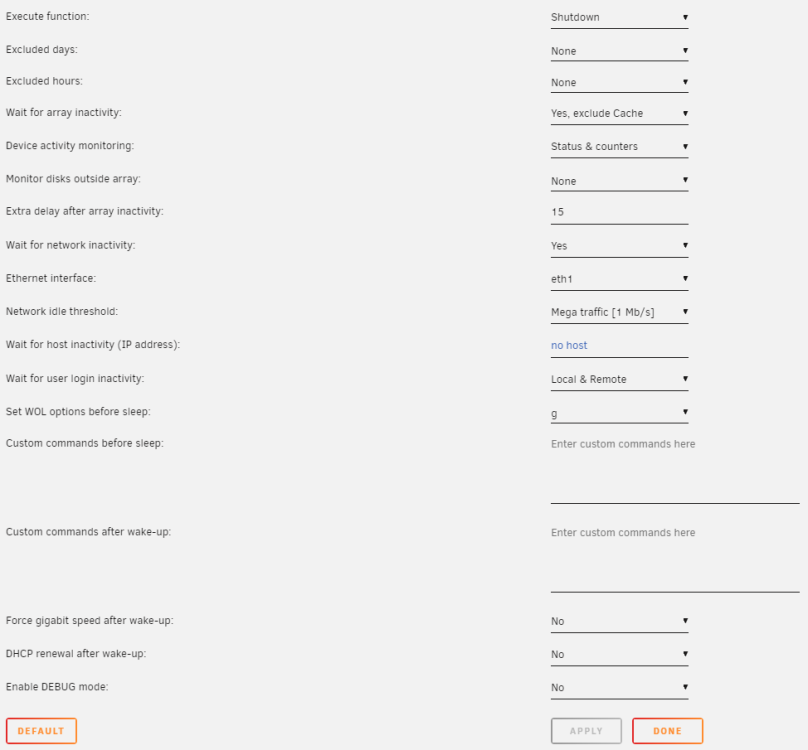
version 2023.02.05 of the plugin and unraid 6.11.5 is putting the computer to sleep too soon. it has only happened since upgrading from like 6.10.x. i have it set to sleep if all arrray disks have been spun down after 15 minutes. here is the screenshot of my current settings if i disable the plugin, unraid works fine so im pretty sure its the plugin and even after the recent update, it still does it. i also attached a diag in case you are able to see anything more. i turn on unraid for movie nights or managing media files so its off more then its on. server-diagnostics-20230212-2228.zip
-
I correctly have the exact same issue from what is in your screenshot after rebooting unRAID. Where and how did your delete the logs?
-
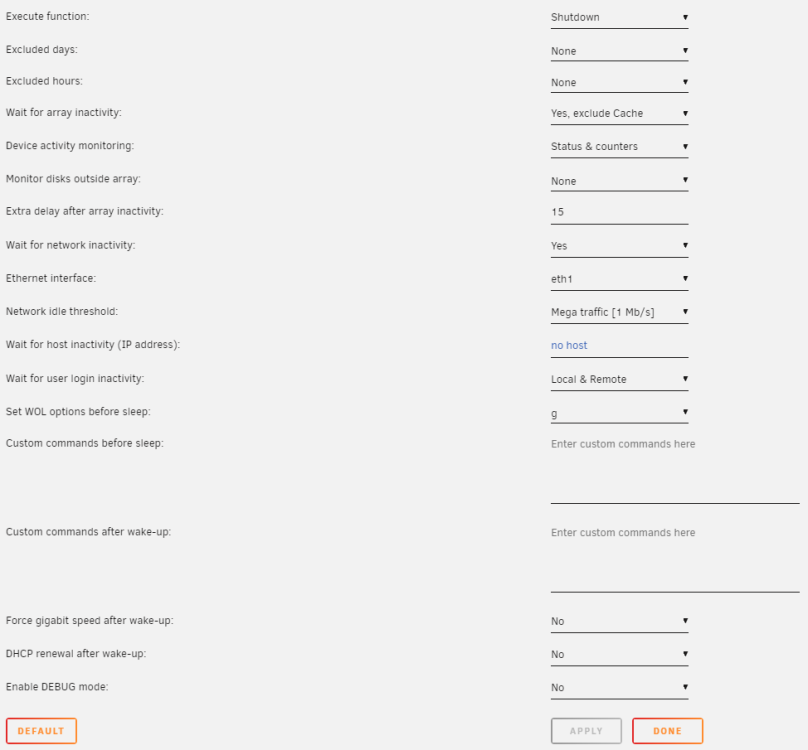
version 2023.02.05 of the plugin and unraid 6.11.5 is putting the computer to sleep too soon. it has only happened since upgrading from like 6.10.x. i have it set to sleep if all arrray disks have been spun down after 15 minutes. here is the screenshot of my current settings if i disable the plugin, unraid works fine so im pretty sure its the plugin and even after the recent update, it still does it. i also attached a diag in case you are able to see anything more. i turn on unraid for movie nights or managing media files so its off more then its on. server-diagnostics-20230212-2228.zip
-
do you guys have a list of supported vpn providers that work with this container? i was on pia for the last like 10years but i have keepsolid vpn unlimited as a secondary and want to give it a try till i find another vpn provider. i cant keepsolid to work after generating the ovpn file and entering the login info it generated.
-
no i havnt done that in fear of losing my download progress, if any. not sure if anything was still downloading. root@Server:~# ls -la /mnt/user/appdata/JDownloader2/ total 13356 drwxrwxrwx 1 nobody users 350 Nov 19 17:40 ./ drwxrwxrwx 1 nobody users 566 Oct 30 21:46 ../ -rw-rw-rw- 1 nobody users 8823535 Nov 18 23:20 Core.jar -rw-rw-rw- 1 nobody users 0 Nov 18 23:19 JD2.lock -rw-rw-rw- 1 nobody users 4 Nov 19 17:40 JD2.port -rwxrw-rw- 1 nobody users 4762119 Nov 18 23:18 JDownloader.jar* -rw-rw-rw- 1 nobody users 5 Nov 19 17:40 JDownloader.pid -rw-rw-rw- 1 nobody users 320 Nov 18 23:19 build.json drwxrwxrwx 1 nobody users 12856 Dec 11 20:49 cfg/ drwxrwxrwx 1 nobody users 0 Dec 16 2020 dlc\ files/ drwxrwxrwx 1 nobody users 56 Nov 17 23:18 extensions/ drwxrwxrwx 1 nobody users 0 Mar 31 2020 java/ drwxrwxrwx 1 nobody users 44 Mar 31 2020 jd/ drwxrwxrwx 1 nobody users 656 Nov 17 23:18 libs/ -rw-rw-rw- 1 nobody users 32034 Mar 31 2020 license.txt -rw-rw-rw- 1 nobody users 39624 Mar 31 2020 license_german.txt drwxrwxrwx 1 nobody users 2022 Sep 24 16:20 licenses/ drwxrwxrwx 1 nobody users 10 Mar 31 2020 log/ drwxrwxrwx 1 nobody users 668 Nov 19 17:40 logs/ drwxrwxrwx 1 nobody users 16 Mar 31 2020 themes/ drwxrwxrwx 1 nobody users 170 Nov 19 21:44 tmp/ drwxrwxrwx 1 nobody users 10 Mar 31 2020 tools/ drwxrwxrwx 1 nobody users 22 Mar 31 2020 translations/ drwxrwxrwx 1 nobody users 22 Mar 31 2020 update/ drwxrwxrwx 1 nobody users 10 Mar 31 2020 xdg/ root@Server:~# that core.jar at the top was red. dont know what that means. edit: it just updated to the latest again and this time, all is good so far! [init ] container is starting... [cont-env ] loading container environment variables... [cont-env ] APP_NAME: loading... [cont-env ] DISPLAY: executing... [cont-env ] DISPLAY: terminated successfully. [cont-env ] DISPLAY: loading... [cont-env ] DOCKER_IMAGE_PLATFORM: loading... [cont-env ] DOCKER_IMAGE_VERSION: loading... [cont-env ] GTK_THEME: executing... [cont-env ] GTK_THEME: terminated successfully. [cont-env ] GTK_THEME: loading... [cont-env ] HOME: loading... [cont-env ] INSTALL_PACKAGES_INTERNAL: executing... [cont-env ] INSTALL_PACKAGES_INTERNAL: terminated successfully. [cont-env ] INSTALL_PACKAGES_INTERNAL: loading... [cont-env ] QT_STYLE_OVERRIDE: executing... [cont-env ] QT_STYLE_OVERRIDE: terminated successfully. [cont-env ] QT_STYLE_OVERRIDE: loading... [cont-env ] TAKE_CONFIG_OWNERSHIP: loading... [cont-env ] XDG_CACHE_HOME: loading... [cont-env ] XDG_CONFIG_HOME: loading... [cont-env ] XDG_DATA_HOME: loading... [cont-env ] XDG_RUNTIME_DIR: loading... [cont-env ] container environment variables initialized. [cont-secrets] loading container secrets... [cont-secrets] container secrets loaded. [cont-init ] executing container initialization scripts... [cont-init ] 10-certs.sh: executing... [cont-init ] 10-certs.sh: terminated successfully. [cont-init ] 10-check-app-niceness.sh: executing... [cont-init ] 10-check-app-niceness.sh: terminated successfully. [cont-init ] 10-cjk-font.sh: executing... [cont-init ] 10-cjk-font.sh: terminated successfully. [cont-init ] 10-clean-logmonitor-states.sh: executing... [cont-init ] 10-clean-logmonitor-states.sh: terminated successfully. [cont-init ] 10-clean-tmp-dir.sh: executing... [cont-init ] 10-clean-tmp-dir.sh: terminated successfully. [cont-init ] 10-fontconfig-cache-dir.sh: executing... [cont-init ] 10-fontconfig-cache-dir.sh: terminated successfully. [cont-init ] 10-init-users.sh: executing... [cont-init ] 10-init-users.sh: terminated successfully. [cont-init ] 10-jwm.sh: executing... [cont-init ] 10-jwm.sh: terminated successfully. [cont-init ] 10-nginx.sh: executing... [cont-init ] 10-nginx.sh: terminated successfully. [cont-init ] 10-set-tmp-dir-perms.sh: executing... [cont-init ] 10-set-tmp-dir-perms.sh: terminated successfully. [cont-init ] 10-vnc-password.sh: executing... [cont-init ] 10-vnc-password.sh: terminated successfully. [cont-init ] 10-web-data.sh: executing... [cont-init ] 10-web-data.sh: terminated successfully. [cont-init ] 10-x11-unix.sh: executing... [cont-init ] 10-x11-unix.sh: terminated successfully. [cont-init ] 10-xdg-runtime-dir.sh: executing... [cont-init ] 10-xdg-runtime-dir.sh: terminated successfully. [cont-init ] 15-install-pkgs.sh: executing... [cont-init ] 15-install-pkgs.sh: terminated successfully. [cont-init ] 55-jdownloader2.sh: executing... [cont-init ] 55-jdownloader2.sh: terminated successfully. [cont-init ] 85-take-config-ownership.sh: executing... [cont-init ] 85-take-config-ownership.sh: terminated successfully. [cont-init ] 89-info.sh: executing... ╭――――――――――――――――――――――――――――――――――――――――――――――――――――――――――――――――――――――╮ │ │ │ Application: JDownloader 2 │ │ Application Version: n/a │ │ Docker Image Version: 22.12.2 │ │ Docker Image Platform: linux/amd64 │ │ │ ╰――――――――――――――――――――――――――――――――――――――――――――――――――――――――――――――――――――――╯ [cont-init ] 89-info.sh: terminated successfully. [cont-init ] all container initialization scripts executed. [init ] giving control to process supervisor. [supervisor ] loading services... [supervisor ] loading service 'default'... [supervisor ] loading service 'app'... [supervisor ] loading service 'gui'... [supervisor ] loading service 'certsmonitor'... [supervisor ] service 'certsmonitor' is disabled. [supervisor ] loading service 'jwm'... [supervisor ] loading service 'xvnc'... [supervisor ] loading service 'nginx'... [supervisor ] loading service 'logmonitor'... [supervisor ] service 'logmonitor' is disabled. [supervisor ] all services loaded. [supervisor ] starting services... [supervisor ] starting service 'xvnc'... [xvnc ] Xvnc TigerVNC 1.12.0 - built Dec 11 2022 21:13:44 [xvnc ] Copyright (C) 1999-2021 TigerVNC Team and many others (see README.rst) [xvnc ] See https://www.tigervnc.org for information on TigerVNC. [xvnc ] Underlying X server release 12013000, The X.Org Foundation [xvnc ] Sun Dec 11 22:12:54 2022 [xvnc ] vncext: VNC extension running! [xvnc ] vncext: Listening for VNC connections on /tmp/vnc.sock (mode 0660) [xvnc ] vncext: Listening for VNC connections on all interface(s), port 5900 [xvnc ] vncext: created VNC server for screen 0 [supervisor ] starting service 'jwm'... [supervisor ] starting service 'nginx'... [nginx ] Listening for HTTP connections on port 5800. [supervisor ] starting service 'app'... [supervisor ] all services started.
-
root@Server:~# ls -ld /mnt/user/appdata/JDownloader2 drwxrwxrwx 1 nobody users 350 Nov 19 17:40 /mnt/user/appdata/JDownloader2/ root@Server:~#
-
root@Server:~# docker inspect JDownloader2 [ { "Id": "f35528dc05cbca5545345f15ab79c25ea74f8092653a4bbc5126ec86eee51960", "Created": "2022-12-11T03:57:47.722381712Z", "Path": "/init", "Args": [], "State": { "Status": "exited", "Running": false, "Paused": false, "Restarting": false, "OOMKilled": false, "Dead": false, "Pid": 0, "ExitCode": 1, "Error": "", "StartedAt": "2022-12-11T04:02:17.810888587Z", "FinishedAt": "2022-12-11T04:02:23.936802349Z" }, "Image": "sha256:717805b0e624b5e8db46749770984db77e52f175a34903f387f6fed3915f55f0", "ResolvConfPath": "/var/lib/docker/containers/f35528dc05cbca5545345f15ab79c25ea74f8092653a4bbc5126ec86eee51960/resolv.conf", "HostnamePath": "/var/lib/docker/containers/f35528dc05cbca5545345f15ab79c25ea74f8092653a4bbc5126ec86eee51960/hostname", "HostsPath": "/var/lib/docker/containers/f35528dc05cbca5545345f15ab79c25ea74f8092653a4bbc5126ec86eee51960/hosts", "LogPath": "/var/lib/docker/containers/f35528dc05cbca5545345f15ab79c25ea74f8092653a4bbc5126ec86eee51960/f35528dc05cbca5545345f15ab79c25ea74f8092653a4bbc5126ec86eee51960-json.log", "Name": "/JDownloader2", "RestartCount": 0, "Driver": "btrfs", "Platform": "linux", "MountLabel": "", "ProcessLabel": "", "AppArmorProfile": "", "ExecIDs": null, "HostConfig": { "Binds": [ "/mnt/user/Downloads/:/output:rw", "/mnt/user/appdata/JDownloader2:/config:rw" ], "ContainerIDFile": "", "LogConfig": { "Type": "json-file", "Config": { "max-file": "1", "max-size": "50m" } }, "NetworkMode": "bridge", "PortBindings": { "5800/tcp": [ { "HostIp": "", "HostPort": "7807" } ], "5900/tcp": [ { "HostIp": "", "HostPort": "7907" } ] }, "RestartPolicy": { "Name": "no", "MaximumRetryCount": 0 }, "AutoRemove": false, "VolumeDriver": "", "VolumesFrom": null, "CapAdd": null, "CapDrop": null, "CgroupnsMode": "host", "Dns": [], "DnsOptions": [], "DnsSearch": [], "ExtraHosts": null, "GroupAdd": null, "IpcMode": "private", "Cgroup": "", "Links": null, "OomScoreAdj": 0, "PidMode": "", "Privileged": false, "PublishAllPorts": false, "ReadonlyRootfs": false, "SecurityOpt": null, "UTSMode": "", "UsernsMode": "", "ShmSize": 67108864, "Runtime": "runc", "ConsoleSize": [ 0, 0 ], "Isolation": "", "CpuShares": 0, "Memory": 0, "NanoCpus": 0, "CgroupParent": "", "BlkioWeight": 0, "BlkioWeightDevice": [], "BlkioDeviceReadBps": null, "BlkioDeviceWriteBps": null, "BlkioDeviceReadIOps": null, "BlkioDeviceWriteIOps": null, "CpuPeriod": 0, "CpuQuota": 0, "CpuRealtimePeriod": 0, "CpuRealtimeRuntime": 0, "CpusetCpus": "", "CpusetMems": "", "Devices": [], "DeviceCgroupRules": null, "DeviceRequests": null, "KernelMemory": 0, "KernelMemoryTCP": 0, "MemoryReservation": 0, "MemorySwap": 0, "MemorySwappiness": null, "OomKillDisable": false, "PidsLimit": null, "Ulimits": null, "CpuCount": 0, "CpuPercent": 0, "IOMaximumIOps": 0, "IOMaximumBandwidth": 0, "MaskedPaths": [ "/proc/asound", "/proc/acpi", "/proc/kcore", "/proc/keys", "/proc/latency_stats", "/proc/timer_list", "/proc/timer_stats", "/proc/sched_debug", "/proc/scsi", "/sys/firmware" ], "ReadonlyPaths": [ "/proc/bus", "/proc/fs", "/proc/irq", "/proc/sys", "/proc/sysrq-trigger" ] }, "GraphDriver": { "Data": null, "Name": "btrfs" }, "Mounts": [ { "Type": "bind", "Source": "/mnt/user/Downloads", "Destination": "/output", "Mode": "rw", "RW": true, "Propagation": "rprivate" }, { "Type": "bind", "Source": "/mnt/user/appdata/JDownloader2", "Destination": "/config", "Mode": "rw", "RW": true, "Propagation": "rprivate" } ], "Config": { "Hostname": "f35528dc05cb", "Domainname": "", "User": "", "AttachStdin": false, "AttachStdout": true, "AttachStderr": true, "ExposedPorts": { "3129/tcp": {}, "5800/tcp": {}, "5900/tcp": {} }, "Tty": false, "OpenStdin": false, "StdinOnce": false, "Env": [ "WEB_LISTENING_PORT=5800", "MYJDOWNLOADER_DEVICE_NAME=None", "JDOWNLOADER_HEADLESS=0", "DISPLAY_WIDTH=1280", "INSTALL_EXTRA_PKGS=", "DARK_MODE=0", "SECURE_CONNECTION_VNC_METHOD=SSL", "USER_ID=99", "GROUP_ID=100", "UMASK=000", "MYJDOWNLOADER_EMAIL=None", "MYJDOWNLOADER_PASSWORD=None", "TZ=America/Chicago", "DISPLAY_HEIGHT=768", "X11VNC_EXTRA_OPTS=", "SECURE_CONNECTION_CERTS_CHECK_INTERVAL=60", "HOST_OS=Unraid", "APP_NICENESS=0", "SECURE_CONNECTION=0", "VNC_LISTENING_PORT=5900", "PATH=/usr/local/sbin:/usr/local/bin:/usr/sbin:/usr/bin:/sbin:/bin:/opt/base/sbin:/opt/base/bin", "ENV=/root/.docker_rc", "SUP_GROUP_IDS=", "LANG=en_US.UTF-8", "KEEP_APP_RUNNING=0", "INSTALL_PACKAGES=", "CONTAINER_DEBUG=0", "VNC_PASSWORD=", "ENABLE_CJK_FONT=0" ], "Cmd": [ "/init" ], "Image": "jlesage/jdownloader-2", "Volumes": { "/config": {}, "/output": {} }, "WorkingDir": "/tmp", "Entrypoint": null, "OnBuild": null, "Labels": { "org.label-schema.description": "Docker container for JDownloader 2", "org.label-schema.name": "jdownloader-2", "org.label-schema.schema-version": "1.0", "org.label-schema.vcs-url": "https://github.com/jlesage/docker-jdownloader-2", "org.label-schema.version": "22.12.1" } }, "NetworkSettings": { "Bridge": "", "SandboxID": "63af38bc5e4603fe3cafaea2281d8cc29d1c67f457c28dc8ef4397fba9e8fef9", "HairpinMode": false, "LinkLocalIPv6Address": "", "LinkLocalIPv6PrefixLen": 0, "Ports": {}, "SandboxKey": "/var/run/docker/netns/63af38bc5e46", "SecondaryIPAddresses": null, "SecondaryIPv6Addresses": null, "EndpointID": "", "Gateway": "", "GlobalIPv6Address": "", "GlobalIPv6PrefixLen": 0, "IPAddress": "", "IPPrefixLen": 0, "IPv6Gateway": "", "MacAddress": "", "Networks": { "bridge": { "IPAMConfig": null, "Links": null, "Aliases": null, "NetworkID": "8d9d0bc315c3fb9fb7f25ef1f45b3b790b9f4916d53bab672331d8169ac264ad", "EndpointID": "", "Gateway": "", "IPAddress": "", "IPPrefixLen": 0, "IPv6Gateway": "", "GlobalIPv6Address": "", "GlobalIPv6PrefixLen": 0, "MacAddress": "", "DriverOpts": null } } } } ] root@Server:~#
-
update didnt fix it for me. [init ] container is starting... [cont-env ] loading container environment variables... [cont-env ] APP_NAME: loading... [cont-env ] DISPLAY: executing... [cont-env ] DISPLAY: terminated successfully. [cont-env ] DISPLAY: loading... [cont-env ] DOCKER_IMAGE_PLATFORM: loading... [cont-env ] DOCKER_IMAGE_VERSION: loading... [cont-env ] GTK_THEME: executing... [cont-env ] GTK_THEME: terminated successfully. [cont-env ] GTK_THEME: loading... [cont-env ] HOME: loading... [cont-env ] INSTALL_PACKAGES_INTERNAL: executing... [cont-env ] INSTALL_PACKAGES_INTERNAL: terminated successfully. [cont-env ] INSTALL_PACKAGES_INTERNAL: loading... [cont-env ] QT_STYLE_OVERRIDE: executing... [cont-env ] QT_STYLE_OVERRIDE: terminated successfully. [cont-env ] QT_STYLE_OVERRIDE: loading... [cont-env ] TAKE_CONFIG_OWNERSHIP: loading... [cont-env ] XDG_CACHE_HOME: loading... [cont-env ] XDG_CONFIG_HOME: loading... [cont-env ] XDG_DATA_HOME: loading... [cont-env ] XDG_RUNTIME_DIR: loading... [cont-env ] container environment variables initialized. [cont-secrets] loading container secrets... [cont-secrets] container secrets loaded. [cont-init ] executing container initialization scripts... [cont-init ] 10-certs.sh: executing... [cont-init ] 10-certs.sh: terminated successfully. [cont-init ] 10-check-app-niceness.sh: executing... [cont-init ] 10-check-app-niceness.sh: terminated successfully. [cont-init ] 10-cjk-font.sh: executing... [cont-init ] 10-cjk-font.sh: terminated successfully. [cont-init ] 10-clean-logmonitor-states.sh: executing... [cont-init ] 10-clean-logmonitor-states.sh: terminated successfully. [cont-init ] 10-clean-tmp-dir.sh: executing... [cont-init ] 10-clean-tmp-dir.sh: terminated successfully. [cont-init ] 10-fontconfig-cache-dir.sh: executing... [cont-init ] 10-fontconfig-cache-dir.sh: terminated successfully. [cont-init ] 10-init-users.sh: executing... [cont-init ] 10-init-users.sh: terminated successfully. [cont-init ] 10-jwm.sh: executing... [cont-init ] 10-jwm.sh: terminated successfully. [cont-init ] 10-nginx.sh: executing... [cont-init ] 10-nginx.sh: terminated successfully. [cont-init ] 10-set-tmp-dir-perms.sh: executing... [cont-init ] 10-set-tmp-dir-perms.sh: terminated successfully. [cont-init ] 10-vnc-password.sh: executing... [cont-init ] 10-vnc-password.sh: terminated successfully. [cont-init ] 10-web-data.sh: executing... [cont-init ] 10-web-data.sh: terminated successfully. [cont-init ] 10-x11-unix.sh: executing... [cont-init ] 10-x11-unix.sh: terminated successfully. [cont-init ] 10-xdg-runtime-dir.sh: executing... [cont-init ] 10-xdg-runtime-dir.sh: terminated successfully. [cont-init ] 15-install-pkgs.sh: executing... [cont-init ] 15-install-pkgs.sh: terminated successfully. [cont-init ] 55-jdownloader2.sh: executing... [cont-init ] 55-jdownloader2.sh: terminated successfully. [cont-init ] 85-take-config-ownership.sh: executing... [cont-init ] 85-take-config-ownership.sh: terminated with error 1.
-
yea im using the trash guides so it says to use /data/torrent on the container path for qbit but for arr's it says to set the container paths to /data. i was wondering if i had to match all them to /data but figured they are smarter and im new to this so just left it as how they said. not sure it needs updating
-
so its safe to change the downloads out of the appdata on the host since thats the default location? changed it from /data to /data/torrents on the container and changed /mnt/user/appdata/data to /mnt/user/data/torrents/ on the host
-
what is the default container path /data to host /mnt/user/appdata/data used for? just noticed it was creating this in my appdata. its on the default template but dont know what it does. trying to setup hardlinks so i made a new path for container /data/torrents/ to host /mnt/user/data/torrents/
-
on my router, i set a static ip for unraid and named it "server". i also setup a custom network named 'server' in unraid. so i am able to use http://server:ANYPORT and it connects to any docker on my browser. so in the docker containers, i set the network type: to custom: 'server'. the reason i used this method was to type in 'server' instead of unraids ip. i assumed this was ok to use so docker containers could connect instead of typing the ip. this was working fine but i am told that nobody does this. that the proper way to use this is for using the container name for the address instead of the custom network name. after installing the notifiarr client and setting the custom network to it, all the containers dont connect to 'server' anymore but they do if i use the unraid ip or the docker container name. if i turn off the notifiarr container, using 'server' works again. if i put it on bridge mode, the containers using 'server' for the address works again. so for now, i dont mind leaving it on bridge mode so that all containers using 'server' for the addresses continue to work and slowly change everything to the name of the container. so, was just wondering, was i doing it wrong by using the name of the custom network as a hostname instead of the docker containers name? im also going to have to change the name of some containers like those like binhex-qbittorrent to just bittorrent. is it safe to change these names? not sure if it will get updates and if so, ill have to change it each time. my last question is, are the names case sensitive? would like to know this before i start updating the names as some are containers have capital letters. edit: tldr: i didnt think it was any different then using "localhost" for unraids docker containers by using "server" for the hostname.
-
after a few days of running only 1 docker at a time, it is nextcloud that is keeping the disk running. since i have a share for nextcloud for its /data in the container and its a fresh setup without any customization, only the disk that has the initial /data files is the drive that is spinning up. after i turn off the docker container for nextcloud, the drive spins down. i am really not sure what is different. i had nextcloud installed before for a few months and i didnt have this issue. i had nextcloud installed the same way, just installed it without any users or customization or even smtp setup. i just installed it just to have it. the only reason i had to reinstall it was because i switched from mysql to mariadb. followed spaceinvaders guide for both times i installed it. if it is going to keep spinning up the drives like this for no reason, it makes me just want to uninstall it. i only wanted it for maybe possibly my daughter to easily have a google drive alternative for school work and to unload some of her phone files to the server but honestly i rather have another app that would allow me access sync files directly to the array with the option to share files to friends/family via a link. if i delete files from the array, i dont want to have to run a command to dump the ghost files and not from the app. ill give file browser and filerun a try but i am hoping i can find a fix for spinning down these drives tho.

