BadCo.
Members
-
Joined
-
Last visited
Everything posted by BadCo.
-
Yup, that broke it haha 😆
-
Yeah it is working fine. Fair enough about not wanting to implement the configs, as they can change from versions. But maybe just add a note somewhere that they are user supplied?
-
Thanks for that. I also ended up manually creating admin config and map rotation.
-
Hey ich777, After installing the Insurgency Sandstorm container, I can't seem to find the config files. The NWI documentation states the configs should be in "Linux: Insurgency/Saved/Config/LinuxServer" but the only folder I have in there is CrashReportClient. Any tips?
-
Found the problem, NAT reflection for anyone else not able to view their dedicated servers on the same network. In pfsense, I set the port forward rules to be 'Pure' https://paste.hardnet.nz/?1cbf9acb427e7875#2RAEoCYZMZz8kzuv9Qg286gQSQKNEmKZgAHq3ScBRXQx
-
Sorry I should have been clearer, it was a bit late last night by the time I gave up The warnings start from 2020.09.27-09.36.43:884 I can't see the server in the Squad custom server browser. Unless I am joining wrong? I realise that you need a license to be in the main Squad Server Browser. Thanks for the help Ich! EDIT: Just to be sure, I have read through all the Squad Dedicated Server documentation on the wiki, and tried searching for the warnings, but haven't found anything related.
-
I seem to be getting a few errors when trying to run a Squad server. Pretty much just pulled the image and hit start and this is what it spits out: https://paste.hardnet.nz/?aa23a85dc14efec8#4CKLQQdL79fMDxBL2SiF6RR9amdWNbEoQVLYWkvnpEC5
-
Thanks for that. On a side note, does anyone know how to update the Jitsi containers without having to start again? Do I just pull the latest image from github?
-
Are you able to post your whole proxy .conf? I am still having issues with getting federation working (and voice calls outside of LAN)
-
Thanks for the help Energen. Unfortunately I was still having issues, and after pondering it for a bit I realised that the instructions on docker hub didn't make sense. I then wiped the install and started from scratch, mounted the /srv/cfg folder (instead of /srv/cfg/conf.php) and added the sample conf.php, edited to allow file uploads and BAM! It works! https://paste.hardnet.nz/?4f6ba2bc6f9225a2#DSwKBzeB5mC37CjoB4wjwawFj2BQu6pHvt6uHmNFsR6w -v '/mnt/user/appdata/privatebin/cfg':'/srv/cfg':'rw'
-
I ended up copying and pasting the default sample conf from gitlab and threw it in the folder conf.php but it threw out an error when the container started. 2020/07/14 06:09:56 [error] 200#200: *1 FastCGI sent in stderr: "PHP message: PHP Warning: parse_ini_file(/srv/cfg/conf.php): failed to open stream: No such file or directory in /srv/lib/Configuration.php on line 121PHP message: PHP Warning: array_key_exists() expects parameter 2 to be array, bool given in /srv/lib/Configuration.php on line 123PHP message: PHP Fatal error: Uncaught Exception: PrivateBin requires configuration section [main] to be present in configuration file. in /srv/lib/Configuration.php:124
-
Thanks for the reply, however this gives me the same result but in a slightly different place, which is just a folder named conf.php and no file to edit. Unless I am misunderstanding something?
-
Any tips for adding the configuration file to PrivateBin? I tried following the docker hub page: But Not sure I have done it correctly... root@localhost:# /usr/local/emhttp/plugins/dynamix.docker.manager/scripts/docker run -d --name='privatebin' --net='proxynet' -e TZ="Pacific/Auckland" -e HOST_OS="Unraid" -p '8888:8080/tcp' -v '/mnt/user/appdata/privatebin/cfg':'/srv/cfg':'rw' -v 'conf.php':'/srv/cfg/conf.php':'ro' -v '/mnt/user/appdata/privatebin':'/srv/data':'rw' --read-only 'privatebin/nginx-fpm-alpine'
-
Thanks for the examples, I'll give them a try. This is what I a, currently using. I have had to change the container port due to a conflict with DashMachine. server { listen 443 ssl; listen [::]:443 ssl; server_name search.mydomain.net; include /config/nginx/ssl.conf; client_max_body_size 0; location / { #enable the next two lines for http auth #auth_basic "Restricted"; #auth_basic_user_file /config/nginx/.htpasswd; # enable the next two lines for ldap auth #auth_request /auth; #error_page 401 =200 /login; include /config/nginx/proxy.conf; resolver 127.0.0.11 valid=30s; set $upstream_app whoogle; set $upstream_port 8798; set $upstream_proto https; proxy_pass $upstream_proto://$upstream_app:$upstream_port; } } EDIT: Just seen my mistake, $uppstream_app name is wrong. Hopefully that's the only one. EDIT2: Still doesn't seem to work EDIT3: Ok it works, yaaay. See below for final config # make sure that your dns has a cname set for whoogle and that your whoogle container is not using a base url # if whoogle is running in bridge mode and the container is named "whoogle", the below config should work as is # if not, replace the line "set $upstream_app whoogle;" with "set $upstream_app <containername>;" # or "set $upstream_app <HOSTIP>;" for host mode, HOSTIP being the IP address of whoogle server { listen 443 ssl; listen [::]:443 ssl; server_name search.hardnet.nz; include /config/nginx/ssl.conf; client_max_body_size 0; location / { include /config/nginx/proxy.conf; resolver 127.0.0.11 valid=30s; set $upstream_app whoogle-search; set $upstream_port 8798; set $upstream_proto http; proxy_pass $upstream_proto://$upstream_app:$upstream_port; proxy_set_header Range $http_range; proxy_set_header If-Range $http_if_range; proxy_set_header Upgrade $http_upgrade; proxy_set_header Connection $http_connection; } }
-
I'm having trouble getting this to work through LS.io letsencrypt reverse proxy, anyone got any tips? What proxy configs are people using?
-
Also, I'm having trouble with voice chat on Riot. Jitsi works fine on it's own, but calling through Riot doesn't work, and I get this... EDIT: A bit more information: This happens with an external client (institute) with a LAN client (badco) and also with two external clients. I have been through this guide and Spaceinvader One's video guide. EDIT2: I created another account and calls work over LAN between two users, but not with one user not on the LAN. I thought if it was peer to peer the STUN server wasn't used, until a third person joined?
-
Great guide, I just happened to be looking for something better then Nextcloud Talk. I did notice two typo's that made me think twice
-
Fixed it by deleting the docker network file, had to remake my docker networks though. Apparently this is a known issue that goes back a few years and occasionally pops up.
-
Nope, only airsonic is using 4040. The container starts fine if I changed the port to 4041. But now my subdomain doesn't work. Also I am using the Linuxserver Letsencrypt container for reverse proxy.
-
Hi, after a recent update I seem to be having a issue with starting the container. See docker run below. root@localhost:# /usr/local/emhttp/plugins/dynamix.docker.manager/scripts/docker run -d --name='airsonic' --net='proxynet' -e TZ="Pacific/Auckland" -e HOST_OS="Unraid" -e 'PUID'='99' -e 'PGID'='100' -e 'JAVA_OPTS'='-Xms256m -Xmx512m' -p '4040:4040/tcp' -v '/mnt/user/media/music':'/music':'rw' -v '/mnt/user/media/playlists':'/playlists':'rw' -v '/mnt/user/media/podcasts':'/podcasts':'rw' -v '/mnt/user/media/':'/media':'rw' -v '/mnt/user/appdata/airsonic':'/config':'rw' 'linuxserver/airsonic' 7340ed86613a0df79c162d0d0fc75a7a52bfa3f7b4ff5ad76db0ca7e2c300ad2 /usr/bin/docker: Error response from daemon: driver failed programming external connectivity on endpoint airsonic (801aca2c85961c65650474f2fcc3b83d5011fed771219d8e72f9cba994d40b42): Bind for 0.0.0.0:4040 failed: port is already allocated. The command failed. Interestingly, Airsonic is the only container that uses port 4040. I have been happily using this container trouble free for a while, so I'm not sure what has started causing this. Any ideas?
-
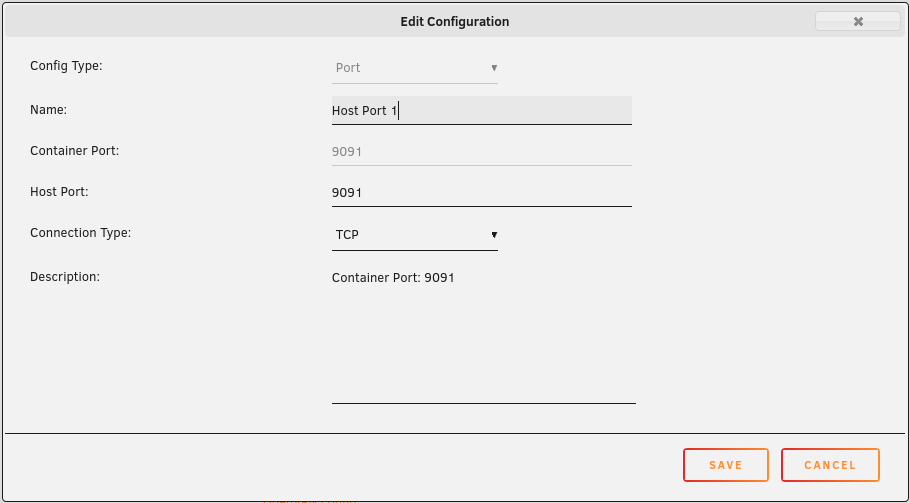
What the hell? I can't understand why the run command has that strange port allocation, it isn't in the template anywhere!? EDIT: I noticed the port is mapped correctly next to the incorrect one -p '1198:badco/udp' -p '1198:1198/udp' EDIT2: Clicked advanced on the template and found multiple port mappings with 1198 mapped to badco and a directory path. Removed them both and the command finished successfully. Thanks for the heads up @clowrym!
-
I seem to be having a few issues with networking in the Transmission docker. First off, if I set the network to Host, then unRAID and all the dockers also run though the VPN. But if I change it to bridge then the docker run fails. See below. root@localhost:# /usr/local/emhttp/plugins/dynamix.docker.manager/scripts/docker run -d --name='Transmission_VPN' --net='bridge' --privileged=true -e TZ="Pacific/Auckland" -e HOST_OS="Unraid" -e 'OPENVPN_USERNAME'='user' -e 'OPENVPN_PASSWORD'='password' -e 'OPENVPN_CONFIG'='AU Melbourne' -e 'OPENVPN_PROVIDER'='PROTONVPN' -e 'LOCAL_NETWORK'='10.10.1.0/24' -e 'TRANSMISSION_RPC_USERNAME'='user' -e 'TRANSMISSION_RPC_PASSWORD'='password' -e 'OPENVPN_OPTS'='--inactive 3600 --ping 10 --ping-exit 60' -e 'PUID'='99' -e 'PGID'='100' -e 'TRANSMISSION_DOWNLOAD_DIR'='/downloads/complete' -e 'TRANSMISSION_RPC_AUTHENTICATION_REQUIRED'='true' -e 'TRANSMISSION_RATIO_LIMIT'='1.1' -e 'TRANSMISSION_RATIO_LIMIT_ENABLED'='true' -e 'TRANSMISSION_DOWNLOAD_QUEUE_SIZE'='5' -e 'TRANSMISSION_CACHE_SIZE_MB'='10' -e 'TRANSMISSION_INCOMPLETE_DIR'='/downloads/incomplete' -e 'TRANSMISSION_WEB_UI'='transmission-web-control' -e 'GLOBAL_APPLY_PERMISSIONS'='false' -e 'OPENVPN_CONFIG'='sg.protonvpn.com.udp' -p '9091:9091/tcp' -p '1198:badco/udp' -p '1198:1198/udp' -v '/mnt/user/appdata/Transmission_VPN/':'/data':'rw' -v '/mnt/user/downloads/torrents/':'/downloads':'rw' -v '/mnt/user/downloads/watch/':'/watch':'rw' -v '/mnt/user/downloads/torrents/complete/':'/mnt/user/T_Media/Torrent/':'rw' -v '/mnt/user/appdata/Transmission_VPN':'/config':'rw' --restart=always --log-opt max-size=50m --log-opt max-file=1 'haugene/transmission-openvpn' /usr/bin/docker: invalid publish opts format (should be name=value but got '9091:9091/tcp'). See '/usr/bin/docker run --help'. The command failed. I'm not sure why that port format is wrong, I haven't touched those settings.