





ZaDoctor
Members
-
Joined
-
Last visited
-
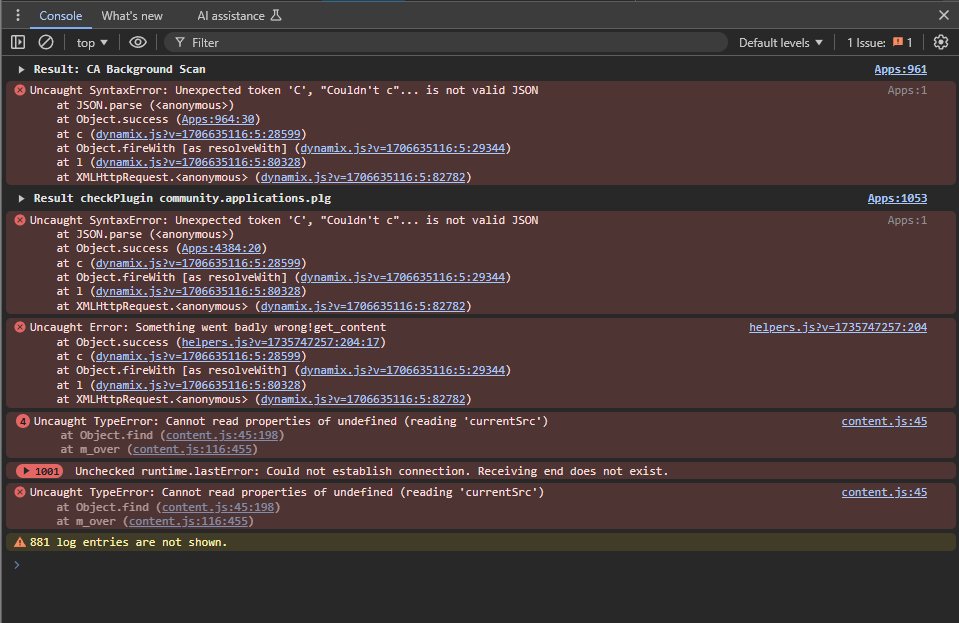
Here are the errors from the console. I both copied the text and posted an image, not sure what is easiest to read. Apps:961 Result: CA Background Scan Apps:1 Uncaught SyntaxError: Unexpected token 'C', "Couldn't c"... is not valid JSON at JSON.parse (<anonymous>) at Object.success (Apps:964:30) at c (dynamix.js?v=1706635116:5:28599) at Object.fireWith [as resolveWith] (dynamix.js?v=1706635116:5:29344) at l (dynamix.js?v=1706635116:5:80328) at XMLHttpRequest.<anonymous> (dynamix.js?v=1706635116:5:82782)Understand this errorAI Apps:1053 Result checkPlugin community.applications.plg Apps:1 Uncaught SyntaxError: Unexpected token 'C', "Couldn't c"... is not valid JSON at JSON.parse (<anonymous>) at Object.success (Apps:4384:20) at c (dynamix.js?v=1706635116:5:28599) at Object.fireWith [as resolveWith] (dynamix.js?v=1706635116:5:29344) at l (dynamix.js?v=1706635116:5:80328) at XMLHttpRequest.<anonymous> (dynamix.js?v=1706635116:5:82782)Understand this errorAI helpers.js?v=1735747257:204 Uncaught Error: Something went badly wrong!get_content at Object.success (helpers.js?v=1735747257:204:17) at c (dynamix.js?v=1706635116:5:28599) at Object.fireWith [as resolveWith] (dynamix.js?v=1706635116:5:29344) at l (dynamix.js?v=1706635116:5:80328) at XMLHttpRequest.<anonymous> (dynamix.js?v=1706635116:5:82782)Understand this errorAI 4content.js:45 Uncaught TypeError: Cannot read properties of undefined (reading 'currentSrc') at Object.find (content.js:45:198) at m_over (content.js:116:455)Understand this errorAI 1000Unchecked runtime.lastError: Could not establish connection. Receiving end does not exist.Understand this errorAI content.js:45 Uncaught TypeError: Cannot read properties of undefined (reading 'currentSrc') at Object.find (content.js:45:198) at m_over (content.js:116:455)Understand this errorAI 881 log entries are not shown.
-
So I haven't been on my server for the last two months and I logged on to see "docker failed to start" so I disabled and reenabled it thinking it would start up fine. But all my dockers were missing so I was going to try and follow the advice in this thread and when I opened community apps and went to previous apps I got the "Something really wrong went on during get_content. Post the resulting file when you click debugging on the left". Any ideas? ca_log.txt
-
Hi Goobaroo, how do you get the Direwolf20 packs to run since they rely on the run.bat file to start the forge.jar file. I am trying to migrate your docker to Pterodactyl so I can have multiple people help manage the server but can seem to get it to run. Thanks for all the work you do creating these dockers they work great
-
@Cyd I have checked a few times for typos, I changed a few other things a as well although just changing values of already set options. I haven't had issues in the past but to be sure I didn't do something completely wrong I reverted back to my old config and it still didn't work. I have been adding them manually and then tried to get automod setup from your guide but that also didn't work. I believe some files got edited when one docker was still up and that might have corrupted something and I tried a quick reinstall without deleting everything but that didn't work. If you are able to upload those other dockers I would love to give them a try. @ich777 Also thanks for all the great dockers I have a ton of your game servers running and they all work great (until I break them😃)
-
Hey @Cyd I followed your guide and got a cluster up and running has been working great although I stopped to add another mod (which I have done before with no issue) and now its stuck in a boot loop. was hoping you might be able to help or at least send me in the right direction. The end changes slightly with different boots example "line 71: 66" will be "line 71: 58" or "line 71: 59". They seem to randomly change from a bunch of numbers all about 50~70 ---Checking if UID: 99 matches user--- ---Checking if GID: 100 matches user--- ---Setting umask to 000--- ---Checking for optional scripts--- ---No optional script found, continuing--- ---Starting...--- ---Update SteamCMD--- Redirecting stderr to '/serverdata/Steam/logs/stderr.txt' [ 0%] Checking for available updates... [----] Verifying installation... Steam Console Client (c) Valve Corporation -- type 'quit' to exit -- Loading Steam API...OK. Connecting anonymously to Steam Public...Logged in OK Waiting for user info...OK ---Update Server--- Redirecting stderr to '/serverdata/Steam/logs/stderr.txt' [ 0%] Checking for available updates... [----] Verifying installation... Steam Console Client (c) Valve Corporation -- type 'quit' to exit -- Loading Steam API...OK. Connecting anonymously to Steam Public...Logged in OK Waiting for user info...OK Success! App '376030' already up to date. ---Prepare Server--- ---Server ready--- ---Start Server--- /opt/scripts/start-server.sh: line 71: 66 Aborted ./ShooterGameServer ${MAP}?listen?SessionName=${SERVER_NAME}?ServerPassword=${SRV_PWD}?ServerAdminPassword=${SRV_ADMIN_PWD}${GAME_PARAMS} ${GAME_PARAMS_EXTRA}
-
I am trying to set up deluge and can't get it to work I followed spaceinvaders tutorial and still can't get it to work. https://pastebin.com/KPP7YT1M
