Toskache
Members
-
Joined
-
Last visited
Everything posted by Toskache
-
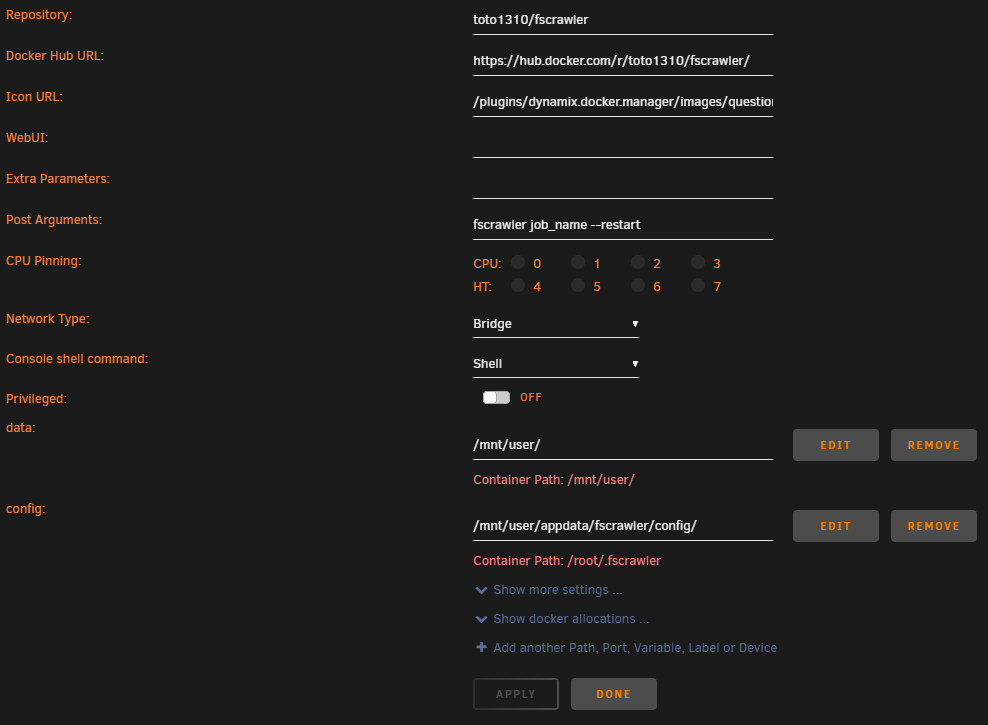
Nice Tutorial, thank you! Unfortunately I have problems to setup fscrawler: The docker configuration: Starting the docker shows the following output in the docker-log: 16:46:01,584 [32mINFO [m [f.p.e.c.f.c.BootstrapChecks] Memory [Free/Total=Percent]: HEAP [226.5mb/3.4gb=6.38%], RAM [4.7gb/15.6gb=30.16%], Swap [0b/0b=0.0]. 16:46:01,611 [33mWARN [m [f.p.e.c.f.c.FsCrawlerCli] job [job_name] does not exist 16:46:01,611 [32mINFO [m [f.p.e.c.f.c.FsCrawlerCli] Do you want to create it (Y/N)? Exception in thread "main" java.util.NoSuchElementException at java.util.Scanner.throwFor(Scanner.java:862) at java.util.Scanner.next(Scanner.java:1371) at fr.pilato.elasticsearch.crawler.fs.cli.FsCrawlerCli.main(FsCrawlerCli.java:225) And indeed, there is no directory "job_name": root@nas:/mnt/user/appdata/fscrawler/config# ls -lah total 0 drwxrwxrwx 1 nobody users 16 Nov 25 16:44 ./ drwxrwxrwx 1 root root 12 Nov 25 09:32 ../ drwxr-xr-x 1 root root 4 Nov 25 09:33 _default/ Creating that directory manualy has no effect. Any ideas?
-
With 6.9.0-beta30 i can observe a performance-issue with my "SoNNeT G10E-1X-E3" network card. It is based on the chipset "Aquantia AQC-107S". With 6.9.0-beta25 i got the following iperf3 results: toskache@10GPC ~ % iperf3 -c 192.168.2.4 Connecting to host 192.168.2.4, port 5201 [ 5] local 192.168.2.199 port 50204 connected to 192.168.2.4 port 5201 [ ID] Interval Transfer Bitrate [ 5] 0.00-1.00 sec 1.15 GBytes 9.90 Gbits/sec [ 5] 1.00-2.00 sec 1.15 GBytes 9.89 Gbits/sec [ 5] 2.00-3.00 sec 1.15 GBytes 9.89 Gbits/sec [ 5] 3.00-4.00 sec 1.15 GBytes 9.89 Gbits/sec [ 5] 4.00-5.00 sec 1.15 GBytes 9.89 Gbits/sec [ 5] 5.00-6.00 sec 1.15 GBytes 9.89 Gbits/sec [ 5] 6.00-7.00 sec 1.15 GBytes 9.89 Gbits/sec [ 5] 7.00-8.00 sec 1.15 GBytes 9.89 Gbits/sec [ 5] 8.00-9.00 sec 1.15 GBytes 9.90 Gbits/sec [ 5] 9.00-10.00 sec 1.15 GBytes 9.89 Gbits/sec - - - - - - - - - - - - - - - - - - - - - - - - - [ ID] Interval Transfer Bitrate [ 5] 0.00-10.00 sec 11.5 GBytes 9.89 Gbits/sec sender [ 5] 0.00-10.00 sec 11.5 GBytes 9.89 Gbits/sec receiver iperf Done. And there where no dropped packets. With the current 6.9.0-beta 30 I get a lot of dropped packets and the iperf3 performance is halved. But just the RX-side. TX is fine. Since 6.9.0-beta 29 also the plugin page is loading extremely slow (approx. 15 seconds). With 6.9.0-beta 25 the loading process took less than 2 seconds. Here are some network informations and attached you can find the diagnostics-file: root@nas:~# ifconfig eth0: flags=4419<UP,BROADCAST,RUNNING,PROMISC,MULTICAST> mtu 1500 ether 00:30:93:14:08:72 txqueuelen 1000 (Ethernet) RX packets 206238861 bytes 292428787789 (272.3 GiB) RX errors 0 dropped 87152 overruns 0 frame 0 TX packets 88635371 bytes 128707642804 (119.8 GiB) TX errors 0 dropped 0 overruns 0 carrier 0 collisions 0 root@nas:~# ethtool eth0 Settings for eth0: Supported ports: [ TP ] Supported link modes: 100baseT/Full 1000baseT/Full 10000baseT/Full 2500baseT/Full 5000baseT/Full Supported pause frame use: Symmetric Receive-only Supports auto-negotiation: Yes Supported FEC modes: Not reported Advertised link modes: 100baseT/Full 1000baseT/Full 10000baseT/Full 2500baseT/Full 5000baseT/Full Advertised pause frame use: No Advertised auto-negotiation: Yes Advertised FEC modes: Not reported Speed: 10000Mb/s Duplex: Full Auto-negotiation: on Port: Twisted Pair PHYAD: 0 Transceiver: internal MDI-X: Unknown Supports Wake-on: pg Wake-on: g Current message level: 0x00000005 (5) drv link Link detected: yes hermann@Hacky ~ % iperf3 -c 192.168.2.4 Connecting to host 192.168.2.4, port 5201 [ 5] local 192.168.2.26 port 52792 connected to 192.168.2.4 port 5201 [ ID] Interval Transfer Bitrate [ 5] 0.00-1.00 sec 519 MBytes 4.36 Gbits/sec [ 5] 1.00-2.00 sec 509 MBytes 4.27 Gbits/sec [ 5] 2.00-3.00 sec 491 MBytes 4.12 Gbits/sec [ 5] 3.00-4.00 sec 410 MBytes 3.44 Gbits/sec [ 5] 4.00-5.00 sec 390 MBytes 3.27 Gbits/sec [ 5] 5.00-6.00 sec 485 MBytes 4.07 Gbits/sec [ 5] 6.00-7.00 sec 447 MBytes 3.75 Gbits/sec [ 5] 7.00-8.00 sec 452 MBytes 3.79 Gbits/sec [ 5] 8.00-9.00 sec 449 MBytes 3.76 Gbits/sec [ 5] 9.00-10.00 sec 481 MBytes 4.03 Gbits/sec - - - - - - - - - - - - - - - - - - - - - - - - - [ ID] Interval Transfer Bitrate [ 5] 0.00-10.00 sec 4.53 GBytes 3.89 Gbits/sec sender [ 5] 0.00-10.00 sec 4.52 GBytes 3.89 Gbits/sec receiver hermann@Hacky ~ % iperf3 -c 192.168.2.4 -P5 Connecting to host 192.168.2.4, port 5201 [ 5] local 192.168.2.26 port 52831 connected to 192.168.2.4 port 5201 [ 7] local 192.168.2.26 port 52832 connected to 192.168.2.4 port 5201 [ 9] local 192.168.2.26 port 52833 connected to 192.168.2.4 port 5201 [ 11] local 192.168.2.26 port 52834 connected to 192.168.2.4 port 5201 [ 13] local 192.168.2.26 port 52835 connected to 192.168.2.4 port 5201 [ ID] Interval Transfer Bitrate [ 5] 0.00-1.00 sec 200 MBytes 1.67 Gbits/sec [ 7] 0.00-1.00 sec 199 MBytes 1.67 Gbits/sec [ 9] 0.00-1.00 sec 199 MBytes 1.67 Gbits/sec [ 11] 0.00-1.00 sec 199 MBytes 1.67 Gbits/sec [ 13] 0.00-1.00 sec 200 MBytes 1.67 Gbits/sec [SUM] 0.00-1.00 sec 996 MBytes 8.36 Gbits/sec - - - - - - - - - - - - - - - - - - - - - - - - - [ 5] 1.00-2.00 sec 199 MBytes 1.67 Gbits/sec [ 7] 1.00-2.00 sec 199 MBytes 1.67 Gbits/sec [ 9] 1.00-2.00 sec 199 MBytes 1.67 Gbits/sec [ 11] 1.00-2.00 sec 199 MBytes 1.67 Gbits/sec [ 13] 1.00-2.00 sec 199 MBytes 1.67 Gbits/sec [SUM] 1.00-2.00 sec 994 MBytes 8.34 Gbits/sec - - - - - - - - - - - - - - - - - - - - - - - - - [ 5] 2.00-3.00 sec 194 MBytes 1.62 Gbits/sec [ 7] 2.00-3.00 sec 196 MBytes 1.65 Gbits/sec [ 9] 2.00-3.00 sec 203 MBytes 1.70 Gbits/sec [ 11] 2.00-3.00 sec 190 MBytes 1.59 Gbits/sec [ 13] 2.00-3.00 sec 186 MBytes 1.56 Gbits/sec [SUM] 2.00-3.00 sec 968 MBytes 8.12 Gbits/sec - - - - - - - - - - - - - - - - - - - - - - - - - [ 5] 3.00-4.00 sec 205 MBytes 1.72 Gbits/sec [ 7] 3.00-4.00 sec 201 MBytes 1.69 Gbits/sec [ 9] 3.00-4.00 sec 204 MBytes 1.71 Gbits/sec [ 11] 3.00-4.00 sec 202 MBytes 1.69 Gbits/sec [ 13] 3.00-4.00 sec 170 MBytes 1.43 Gbits/sec [SUM] 3.00-4.00 sec 982 MBytes 8.24 Gbits/sec - - - - - - - - - - - - - - - - - - - - - - - - - [ 5] 4.00-5.00 sec 200 MBytes 1.68 Gbits/sec [ 7] 4.00-5.00 sec 200 MBytes 1.68 Gbits/sec [ 9] 4.00-5.00 sec 200 MBytes 1.67 Gbits/sec [ 11] 4.00-5.00 sec 200 MBytes 1.67 Gbits/sec [ 13] 4.00-5.00 sec 189 MBytes 1.58 Gbits/sec [SUM] 4.00-5.00 sec 988 MBytes 8.29 Gbits/sec - - - - - - - - - - - - - - - - - - - - - - - - - [ 5] 5.00-6.00 sec 199 MBytes 1.67 Gbits/sec [ 7] 5.00-6.00 sec 199 MBytes 1.67 Gbits/sec [ 9] 5.00-6.00 sec 199 MBytes 1.67 Gbits/sec [ 11] 5.00-6.00 sec 198 MBytes 1.66 Gbits/sec [ 13] 5.00-6.00 sec 196 MBytes 1.64 Gbits/sec [SUM] 5.00-6.00 sec 991 MBytes 8.31 Gbits/sec - - - - - - - - - - - - - - - - - - - - - - - - - [ 5] 6.00-7.00 sec 187 MBytes 1.56 Gbits/sec [ 7] 6.00-7.00 sec 186 MBytes 1.56 Gbits/sec [ 9] 6.00-7.00 sec 186 MBytes 1.56 Gbits/sec [ 11] 6.00-7.00 sec 186 MBytes 1.56 Gbits/sec [ 13] 6.00-7.00 sec 187 MBytes 1.57 Gbits/sec [SUM] 6.00-7.00 sec 932 MBytes 7.82 Gbits/sec - - - - - - - - - - - - - - - - - - - - - - - - - [ 5] 7.00-8.00 sec 142 MBytes 1.19 Gbits/sec [ 7] 7.00-8.00 sec 142 MBytes 1.19 Gbits/sec [ 9] 7.00-8.00 sec 142 MBytes 1.19 Gbits/sec [ 11] 7.00-8.00 sec 142 MBytes 1.19 Gbits/sec [ 13] 7.00-8.00 sec 142 MBytes 1.19 Gbits/sec [SUM] 7.00-8.00 sec 708 MBytes 5.94 Gbits/sec - - - - - - - - - - - - - - - - - - - - - - - - - [ 5] 8.00-9.00 sec 139 MBytes 1.17 Gbits/sec [ 7] 8.00-9.00 sec 139 MBytes 1.17 Gbits/sec [ 9] 8.00-9.00 sec 139 MBytes 1.17 Gbits/sec [ 11] 8.00-9.00 sec 139 MBytes 1.17 Gbits/sec [ 13] 8.00-9.00 sec 139 MBytes 1.17 Gbits/sec [SUM] 8.00-9.00 sec 696 MBytes 5.84 Gbits/sec - - - - - - - - - - - - - - - - - - - - - - - - - [ 5] 9.00-10.00 sec 184 MBytes 1.54 Gbits/sec [ 7] 9.00-10.00 sec 184 MBytes 1.54 Gbits/sec [ 9] 9.00-10.00 sec 184 MBytes 1.54 Gbits/sec [ 11] 9.00-10.00 sec 184 MBytes 1.54 Gbits/sec [ 13] 9.00-10.00 sec 183 MBytes 1.54 Gbits/sec [SUM] 9.00-10.00 sec 918 MBytes 7.70 Gbits/sec - - - - - - - - - - - - - - - - - - - - - - - - - [ ID] Interval Transfer Bitrate [ 5] 0.00-10.00 sec 1.80 GBytes 1.55 Gbits/sec sender [ 5] 0.00-10.00 sec 1.80 GBytes 1.55 Gbits/sec receiver [ 7] 0.00-10.00 sec 1.80 GBytes 1.55 Gbits/sec sender [ 7] 0.00-10.00 sec 1.80 GBytes 1.55 Gbits/sec receiver [ 9] 0.00-10.00 sec 1.81 GBytes 1.56 Gbits/sec sender [ 9] 0.00-10.00 sec 1.81 GBytes 1.55 Gbits/sec receiver [ 11] 0.00-10.00 sec 1.79 GBytes 1.54 Gbits/sec sender [ 11] 0.00-10.00 sec 1.79 GBytes 1.54 Gbits/sec receiver [ 13] 0.00-10.00 sec 1.75 GBytes 1.50 Gbits/sec sender [ 13] 0.00-10.00 sec 1.75 GBytes 1.50 Gbits/sec receiver [SUM] 0.00-10.00 sec 8.96 GBytes 7.70 Gbits/sec sender [SUM] 0.00-10.00 sec 8.95 GBytes 7.69 Gbits/sec receiver iperf Done. Of course I have already tested various cables (CAT 7e). I also swapped the ports on the switch. I use an Xeon E3-1270 v4 @3,5GHz with 16GB ECC-Ram. If necessary, I can provide access via e. g. Anydesk or TeamViewer.
-
@testdasi Now it's simple enough for me. It works very fine. Thank you for your great support and your efforts!
-
It looks like I'm a little too stupid ... At the moment pihole runs fine on a RaPi3, but I want to "move" this service to the unraid server. Unfortunately, I can't get to the web console (website not available). The docker is created with this settings: root @ localhost: # /usr/local/emhttp/plugins/dynamix.docker.manager/scripts/docker run -d --name = 'Pihole-DoT-DoH' --net = 'bridge' -e TZ = "Europe / Berlin "-e HOST_OS =" Unraid "-e 'DNS1' = '127.1.1.1 # 5153' -e 'DNS2' = '127.2.2.2 # 5253' -e 'TZ' = 'Europe / London' -e ' WEBPASSWORD '=' password '-e' INTERFACE '=' br0 '-e' ServerIP '=' 192.168.2.9 '-e' ServerIPv6 '=' '-e' IPv6 '=' False '-e' DNSMASQ_LISTENING '=' all '-p' 10053: 10053 / tcp '-p' 10053: 10053 / udp '-p' 10067: 10067 / udp '-p' 10080: 10080 / tcp '-p' 10443: 10443 / tcp '-v' / mnt / user / appdata / pihole-dot-doh / pihole / ':' / etc / pihole / ':' rw '-v' /mnt/user/appdata/pihole-dot-doh/dnsmasq.d/ ': '/etc/dnsmasq.d/':'rw' -v '/ mnt / user / appdata / pihole-dot-doh / config /': '/ config /': 'rw' --cap-add = NET_ADMIN - -restart = unless-stopped 'testdasi / pihole-dot-doh: stable-amd64' 192.168.2.1 is my router and 192.168.2.4 the IP of the unraid-server. I think the problem is the "ServerIP"-Variable!? I've already tried a few variations. I am grateful for every thought stimulus!
-
Sorry, I thought you where looking for a desktop solution. "Paperless" is a name of an application for macOS. Devonthink is also a desktop solution. I was also looking for an DMS running as a docker container on the unraid-system. But I found nothing running OOB. "EcoDMS" seems to be a good system and is available for Windows, macOS, Linux. There is also a docker-version: https://hub.docker.com/r/ecodms/allinone-18.09/ But I am not sure, what to do to run it on unraid. There used to be a version in the unraid apps-catalouge, but not at the moment.
-
@cmccambridge Thanks for your effort. works fine now. I have have a new Brother ADS-2700w and it works very fine with your ocrmypdf-docker-container. To scan a bunch of different documents it would be great if ocrmypdf would be able to split documents using "seperation-pages" (with special barcode or special text...) which could inserted into the stack before scanning. Is something like that possible? That would bring workflows and productivity to a next level. In one sentence: If the content of a page is just "SEPERATOR-PAGE" than discard that page, save all previous pages and start a new document.
-
Give Devonthink a try!
-
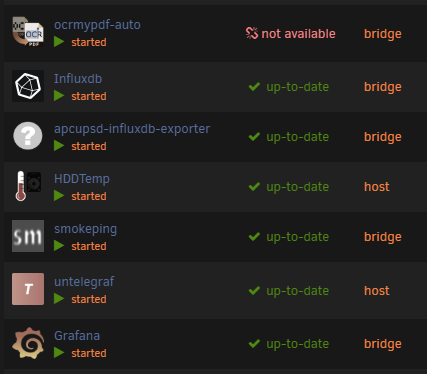
Thanks for the great docker-container. I installed it via "Community Applications". It works very fine. I added also a /archive volume and everything works. But in the list of all my unraid docker-containers there is a "not available" in the version column. Any ideas why?