





Toskache
Members
-
Joined
-
Last visited
Everything posted by Toskache
-
Have you also tried entering the IP Address? Or does your DNS resolve gotenberg and apache-tika-server?
-
Hello, First of all: Happy New Year! I have recently started working with Paperless-ngx. So far everything is going well and I think I can use it to design my "digital workflow". However, I have run into a small problem: I want to import mails without attachments from a specific folder in a mailbox. Basically, this already works fine with mails with PDF attachments. But when I want to import pure emails as eml, there is an error: Error while converting email to PDF: [Errno -2] Name or service not known Of course I have Tika and Gotenberg running as Docker and so far everything looks fine: I have of course also customized the docker configuration of paperless-ngx (PAPERLESS_TIKA_GOTENBERG_ENDPOINT, PAPERLESS_TIKA_ENABLED and PAPERLESS_TIKA_ENDPOINT): docker run -d --name='paperless-ngx' --net='bridge' -e TZ="Europe/Berlin" -e HOST_OS="Unraid" -e HOST_HOSTNAME="nas" -e HOST_CONTAINERNAME="paperless-ngx" -e 'PAPERLESS_REDIS'='redis://192.168.2.4:6379' -e 'PAPERLESS_OCR_LANGUAGE'='deu' -e 'PAPERLESS_OCR_LANGUAGES'='deu' -e 'PAPERLESS_FILENAME_FORMAT'='{created}-{correspondent}-{title}' -e 'PAPERLESS_TIME_ZONE'='Europe/Berlin' -e 'PAPERLESS_FILENAME_FORMAT'='{correspondent}/{created_year}/{created} {document_type}' -e 'USERMAP_UID'='99' -e 'USERMAP_GID'='100' -e 'PAPERLESS_THREADS_PER_WORKER'='2' -e 'PAPERLESS_TASK_WORKERS'='2' -e 'PAPERLESS_TIKA_GOTENBERG_ENDPOINT'='http:/192.168.2.4:3003' -e 'PAPERLESS_TIKA_ENABLED'='1' -e 'PAPERLESS_TIKA_ENDPOINT'='http://192.168.2.4:9998' -e 'PAPERLESS_IGNORE_DATES'='' -e 'PAPERLESS_CONSUMER_POLLING'='0' -e 'PAPERLESS_SECRET_KEY'='e11fl1oa-*ytql8p()07fbj4dzehd+n7k&q5+$1kl7i+mge=ee' -l net.unraid.docker.managed=dockerman -l net.unraid.docker.webui='http://[IP]:[PORT:8000]' -l net.unraid.docker.icon='https://raw.githubusercontent.com/selfhosters/unRAID-CA-templates/master/templates/img/paperless.png' -p '8000:8000/tcp' -v '/mnt/cache/appdata/paperless-ngx/data':'/usr/src/paperless/data':'rw' -v '/mnt/cache/appdata/paperless-ngx/':'/usr/src/paperless/media':'rw' -v '/mnt/user/data/Dokumente/Eingang/2paperless-ngx/':'/usr/src/paperless/consume':'rw' -v '/mnt/user/data/Dokumente/Ausgang/from_paperless-ngx/':'/usr/src/paperless/export':'rw' 'ghcr.io/paperless-ngx/paperless-ngx' Unfortunately I get an error message when paperless-ngx tries to convert the eml into a PDF. Here is an excerpt from the console: Traceback (most recent call last): File "/usr/local/lib/python3.11/site-packages/asgiref/sync.py", line 349, in main_wrap raise exc_info[1] File "/usr/src/paperless/src/documents/consumer.py", line 446, in try_consume_file document_parser.parse(self.path, mime_type, self.filename) File "/usr/src/paperless/src/paperless_mail/parsers.py", line 166, in parse self.archive_path = self.generate_pdf(mail) ^^^^^^^^^^^^^^^^^^^^^^^ File "/usr/src/paperless/src/paperless_mail/parsers.py", line 206, in generate_pdf mail_pdf_file = self.generate_pdf_from_mail(mail_message) ^^^^^^^^^^^^^^^^^^^^^^^^^^^^^^^^^^^^^^^^^ File "/usr/src/paperless/src/paperless_mail/parsers.py", line 327, in generate_pdf_from_mail raise ParseError( documents.parsers.ParseError: Error while converting email to PDF: [Errno -2] Name or service not known The above exception was the direct cause of the following exception: Traceback (most recent call last): File "/usr/local/lib/python3.11/site-packages/celery/app/trace.py", line 477, in trace_task R = retval = fun(*args, **kwargs) ^^^^^^^^^^^^^^^^^^^^ File "/usr/local/lib/python3.11/site-packages/celery/app/trace.py", line 760, in __protected_call__ return self.run(*args, **kwargs) ^^^^^^^^^^^^^^^^^^^^^^^^^ File "/usr/src/paperless/src/documents/tasks.py", line 167, in consume_file document = Consumer().try_consume_file( ^^^^^^^^^^^^^^^^^^^^^^^^^^^^ File "/usr/src/paperless/src/documents/consumer.py", line 474, in try_consume_file self._fail( File "/usr/src/paperless/src/documents/consumer.py", line 115, in _fail raise ConsumerError(f"{self.filename}: {log_message or message}") from exception documents.consumer.ConsumerError: Ihr Zählerstand.eml: Error occurred while consuming document Ihr Zählerstand.eml: Error while converting email to PDF: [Errno -2] Name or service not known Does anyone here have a clever idea?

-
OK, thank you for the fast reply!
-
Currently there are three drives working in a raidz pool. Now I want to remove two of the three cache drives. Beside the cache also docker/appdata is stored on this pool. What is the best way? The zfs voodoo is quite new for me... THX Georg nas-diagnostics-20231009-1930.zip

-
Forget my last post. The check is of course at block level. It stalls again at 60%. I will try doing the check in maintenance mode. Unfortunately I need the docker running.... so I will have to find a good time-slot.
-
@JorgeB I am getting closer to the root cause. I recently tried the docker "calibre" for my big eBook-Collection. The eBooks are original ordered in many sub-directories ("0-9", "A", "B", "C", ...). Calibre imports all the books in a single directory. So there are more than 80K directories in one level. Trying to access that directory seems to stall the system. Now I am trying to delete that directory with an "rm -rf" via the console but that will take a while...
-
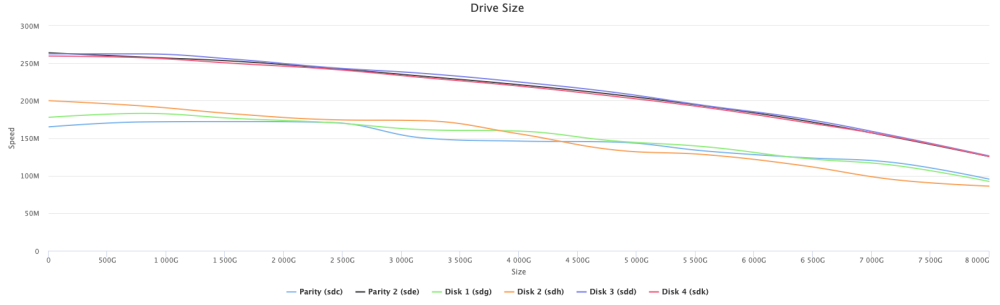
Thank you for the tip @JorgeB, but the diskspeed-test looks IMHO ok:
-
6.12.3-rc3 didn't do the trick. I stopped docker but: What can I do? nas-diagnostics-20230715-1225.zip
-
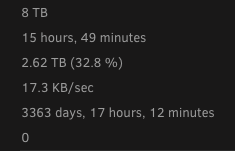
I am on 6.12.2 and after a power-failure the system is performing a parity-check. It starts at 70MB/sec (what is also very slow, usually the check starts with 170MB/sec) and now the system "stalls" with 22KB/sec and a load of over 16 (Intel Xeon E3-1270 v3 with 32GB ECC-RAM). I attached the diagnostic-package. Anny ideas are welcome - I can not wait the estimated 800 days to complete the check PS: * I paused the check - no effect, still load of >16 * I stopped docker - no big effect, still load of >13 I will give 6.12.3-rc3 a try.... nas-diagnostics-20230714-1942.zip
-
Unraid is running with the correct time: root@unraid:~# date Wed May 31 08:33:39 CEST 2023 PBS is configured with my the correct timezone Europe/Berlin but has ~2h offset: # date +%Z Berlin # date Wed May 31 06:37:35 Berlin 2023 Long story short: How can I set the correct time in the PBS-container? I tried also to set the time manually: # date 0531082723.00 date: cannot set date: Operation not permitted Wed May 31 08:27:00 Berlin 2023 Due to the fact that there is no ntpdate or similar installed in the docker, I have no idea how to set the time correctly. For a hint I would be very grateful!
-
I am not able to get this thing running 😞 When I select the timemachine-volume "Urzeitkapsel" and enter the credentials (defaults) my Mac says : "Das ausgewählte Backup-Volume im Netzwerk unterstützt die notwendigen Funktionen nicht." (The selected backup volume on the network does not support the necessary functions.). In the docker-log is this output: chpasswd: password for 'timemachine' changed dbus-daemon[42]: [system] org.freedesktop.DBus.Error.AccessDenied: Failed to set fd limit to 65536: Operation not permitted Found user 'avahi' (UID 86) and group 'avahi' (GID 86). Successfully dropped root privileges. avahi-daemon 0.8 starting up. WARNING: No NSS support for mDNS detected, consider installing nss-mdns! Loading service file /etc/avahi/services/smbd.service. Joining mDNS multicast group on interface eth0.IPv4 with address 192.168.2.250. New relevant interface eth0.IPv4 for mDNS. Joining mDNS multicast group on interface lo.IPv4 with address 127.0.0.1. New relevant interface lo.IPv4 for mDNS. Network interface enumeration completed. Registering new address record for 192.168.2.250 on eth0.IPv4. Registering new address record for 127.0.0.1 on lo.IPv4. Server startup complete. Host name is timemachine.local. Local service cookie is 641408420. Service "urzeitkapsel" (/etc/avahi/services/smbd.service) successfully established. INFO: CUSTOM_SMB_CONF=false; generating [global] section of /etc/samba/smb.conf... INFO: Creating /var/log/samba/cores INFO: Avahi - generating base configuration in /etc/avahi/services/smbd.service... INFO: Avahi - using urzeitkapsel as hostname. INFO: Avahi - adding the 'dk0', 'Urzeitkapsel' share txt-record to /etc/avahi/services/smbd.service... INFO: Group timemachine doesn't exist; creating... INFO: User timemachine doesn't exist; creating... INFO: Setting password from environment variable INFO: INFO: CUSTOM_SMB_CONF=false; generating [Urzeitkapsel] section of /etc/samba/smb.conf... INFO: Samba - Created Added user timemachine. INFO: Samba - Enabled user timemachine. INFO: Samba - setting password INFO: changed ownership of '/opt/timemachine' to 1000:1000 INFO: mode of '/opt/timemachine' changed to 0770 (rwxrwx---) INFO: Avahi - completing the configuration in /etc/avahi/services/smbd.service... INFO: running test for xattr support on your time machine persistent storage location... INFO: xattr test successful - your persistent data store supports xattrs INFO: entrypoint complete; executing 's6-svscan /etc/s6' dbus socket not yet available; sleeping... nmbd version 4.15.7 started. Copyright Andrew Tridgell and the Samba Team 1992-2021 smbd version 4.15.7 started. Copyright Andrew Tridgell and the Samba Team 1992-2021 INFO: Profiling support unavailable in this build. Failed to fetch record! ***** Samba name server TIMEMACHINE is now a local master browser for workgroup VU on subnet 192.168.2.250 ***** error in mds_init_ctx for: /opt/timemachine _mdssvc_open: Couldn't create policy handle for Urzeitkapsel Any Ideas?
-
There is a php-error-message in the "balance-section":
-
There seem to be samba-problems in combination of macOS Monterey and 6.10.0-rc2. Mounting the smaba shares on macOS Monterey works fine but subjectively slightly slower. But immediately after starting a filecopy to the unraid-system, strange things happen: the destination folder goes blank for a moment then suddenly many previously existing folders appear multiple times you can not cancel the copy process the smb share drops I also have the impression that the reactivity/perfomance of the samba shares are much slower than in 6.9.2. The whole thing is reproducible. Unfortunately, I could only test with macOS Monterey. I cannot say whether the problem also occurs with other macOS versions. @Maxrad also Reported: Reverting to 6.9.2 or to 6.10.0-rc1 (Maxrad) worked. Tested with this "Samba extra configuration": #unassigned_devices_start #Unassigned devices share includes include = /tmp/unassigned.devices/smb-settings.conf #unassigned_devices_end [global] spotlight backend = tracker [data] path = /mnt/user/data spotlight = yes #vfs_recycle_start #Recycle bin configuration [global] syslog only = No syslog = 0 logging = 0 log level = 0 vfs:0 #vfs_recycle_end nas.fritz.box-diagnostics-20211108-1021.zip
-
I did a file system check with no "actions". Nothing. Afterwords no rebuild-option.... The question is: Wy was the disk "unmountable" just after a restart?
-
Unfortunately, the online help was no real help. I have added the disk relatively fresh to the array. Because the disk was still unused, I simply formatted the disk. But I still do not know what happened during the reboot.
-
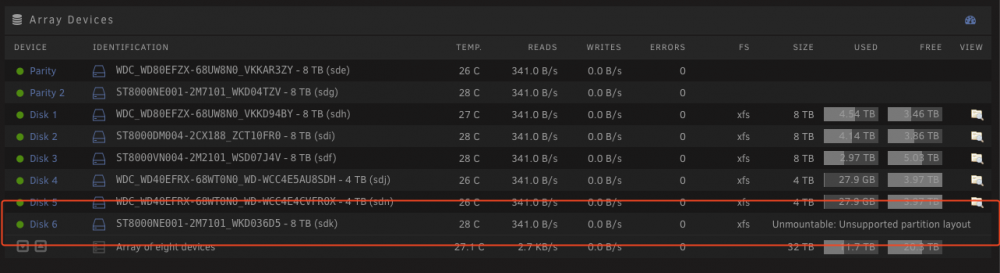
Hi! after a reboot I have one device marked with "Unmountable: Unsupported partition layout". Unfortunately I don't know how to progress now. I attached also the diagnostic-package. Any suggestions? THX George nas.fritz.box-diagnostics-20211017-1636.zip
-
I switched to another case with a new backplane. Works now fine for a while. THX.
-
Have you tried to set the option in the "ocr.config" (usually in appdata/ocrmypdf-auto)?
-
In the current, temporary setup I do not use the backplane. In normal operation, the backplane is powered with 4 Molex connectors (direct from PSU, no splitter).
-
@JorgeB Yes. I now have a "flying" setup with an external power supply and I have the disks connected without the backplane. So far about 65% of the rebuild is done - without errors. Remaining problem causes: PSU Backplane (electronics) Backplane (mechanics (SATA connectors)) Incompatibility between backplane and LSI SAS2308 Does the community's wealth of experience here have a favorite?
-
Hello, I have changed my unraid system from a tower case to a 19'' server case. Mainborad, disks and controller stayed the same. Power supply is different and the Chenbro RM23612 has a backplane. After the conversion everything seemed to run fine, but after a short time the system reported a lot of read errors and kicked one data disk and one of the two parity disks out of the array. Then I installed a new 8TB disk as a data disk replacement and started the resync process. After about 2-3% there were thousands of read errors on other disks and the sync process stopped. I can do what I want, I can't get the array reconstructed. I then mounted all the data disks individually and backed up the data to two drives (unassiged). This worked without any problems. Without error messages. What else I tried: 1. "xfs_repair" on all disks. 2. change the SFF-8087 to SFF-8087 cable 3. selected several "replacement disks" for the failed data disk 4. cursed God and the world 5. was happy about the unraid concept (saved data) I have attached the diagnostic files. Does anyone have any ideas? Br Georg nas.fritz.box-diagnostics-20211005-1532.zip
-
Indeed, it was not activated because I simply did not know... Thanks for the hint!
-
It works with ":version-6.2.25" but not with ":latest" But I have to adopt all APs/USGs manually via CLI (set-inform http://IP.OF.CONTROLLER.DOCKER:8080/inform) again.
-
Changeing the version from "latest" to "version 6.2.23" works, but then all my APs and my USG-3P failed to adopt. After setting the inform-url via ssh (set-inform http://IP.OF.CONTROLLER.DOCKER:8080/inform) it works again.
-
Same issue here. "Patching" the data/db/version with a 6.1.71 works. But this is a very ugly workaround. Whats is the real solution here? 1. Workaround, backup clean install and then importing the backup? or 2. Waiting for a better solution? Happy fathers-day!



