





TrondHjertager
Members
-
Joined
-
Last visited
Everything posted by TrondHjertager
-
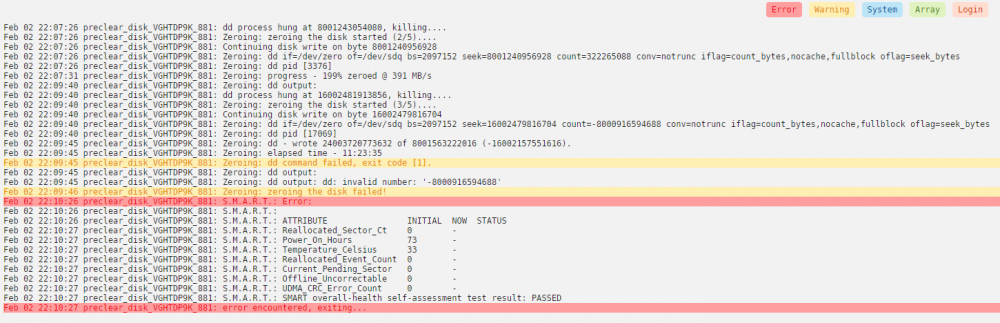
I am getting "Zeroing the disk failed!" error while trying to preclear a brand new 8tb wd red pro-drive. Anyone know what the issue might be? Bad drive? I have only tried this one time. diagnostics attached This is what the log says: unraid02-diagnostics-20210202-2345.zip
-
Yeah, I am leaning towards this as well. The lack of decent backup-solutions for Unraid is really off-putting tbh. I am thinking of switching out both of my unraid servers for CentOS for just this reason. But I will try this solution first and se. Thanks for your input mate!
-
Is there any Urbackup client for unraid? I have my central backup solution running Urbackup on a physical CentOS server, but I cannot find any way of installing a urbackup client on my unraid servers. Any tips?
-
Is this all I need to do? My plex server is running on 192.168.0.9:32400. I have also added the custom server access url in plex. As far as I can tell, it's working okey now. When I first connect to https://plex.mydomain.com I get a warning that tells me that this application isn't hosted by plex, and I need to sign in again. This is fine. When I do this, everything works. Is there anything else I need to, or should configure before using this? And also in the spaceinvaderone video, he adds a custom network to his proxycontainers. I haven't done this with plex as it is on another server. Plex is just running in hostmode. Should I do something about that? Should I create a custom network profile on that server as well? Sorry for all the n00b questions. I am fairly new to this. server { listen 443 ssl; listen [::]:443 ssl; server_name plex.*; include /config/nginx/ssl.conf; client_max_body_size 0; proxy_redirect off; proxy_buffering off; # enable for ldap auth, fill in ldap details in ldap.conf #include /config/nginx/ldap.conf; # enable for Authelia #include /config/nginx/authelia-server.conf; location / { # enable the next two lines for http auth #auth_basic "Restricted"; #auth_basic_user_file /config/nginx/.htpasswd; # enable the next two lines for ldap auth #auth_request /auth; #error_page 401 =200 /ldaplogin; # enable for Authelia #include /config/nginx/authelia-location.conf; include /config/nginx/proxy.conf; resolver 127.0.0.11 valid=30s; set $upstream_app 192.168.0.9; set $upstream_port 32400; set $upstream_proto http; proxy_pass $upstream_proto://$upstream_app:$upstream_port; proxy_set_header Upgrade $http_upgrade; proxy_set_header Connection "upgrade"; proxy_set_header X-Plex-Client-Identifier $http_x_plex_client_identifier; proxy_set_header X-Plex-Device $http_x_plex_device; proxy_set_header X-Plex-Device-Name $http_x_plex_device_name; proxy_set_header X-Plex-Platform $http_x_plex_platform; proxy_set_header X-Plex-Platform-Version $http_x_plex_platform_version; proxy_set_header X-Plex-Product $http_x_plex_product; proxy_set_header X-Plex-Token $http_x_plex_token; proxy_set_header X-Plex-Version $http_x_plex_version; proxy_set_header X-Plex-Nocache $http_x_plex_nocache; proxy_set_header X-Plex-Provides $http_x_plex_provides; proxy_set_header X-Plex-Device-Vendor $http_x_plex_device_vendor; proxy_set_header X-Plex-Model $http_x_plex_model; } }
-
Is there a way of setting up letsencrypt/nginx for multiple servers? I have two unraid servers, one running plex and the other one running things like nextcloud etc. I just installed letsencrypt following spaceinvaderone's how-to on YouTube. I would like to use the letsencrypt/nginx to reverseproxy for my plex container as well, even though it's on another server. Is there any way of doing this? I am mainly wondering about how to achieve the custom networking step on my plex server.
-
Okey. Thanks for all your help
-
I know. I just don't know where to find anything else. Will that error show in the diagnostics-thing? As I said, I'm really new to Linux/Unraid, I'm sorry
-
Looks like a generic error. I tried unmounting the shares, and then remounting them. Then I could start plex without rebooting the server. I am using the offcial Plex docker. Seems a bit strange that it is the docker thats the problem. I cannot brows the mounted shares with krusader when they go "limp". I have had the krusader docker turned off since these problems began just to see if that could somehow cause problems.
-
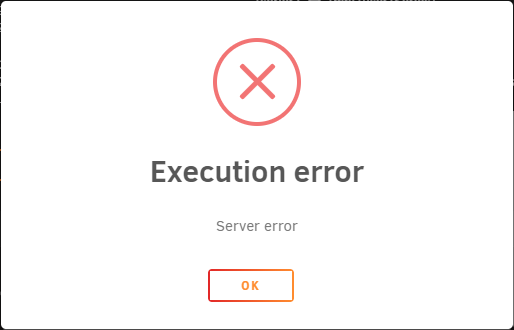
I have tried that, but then I get an execution error and have to restart the entire server to get Plex back up again
-
Yeah, I tried to remount a few times, but had to reboot the server to get them back up. Since then, the stand-up mount has gone "limp" and come back up by it's own. Now i see that the series-mount has gone "limp". I can still use the media on the shares, but I cannot brows the shares, and plex can't scan the share for new content. It's quite strange. I'll add a new diagnostics. unraid02-diagnostics-20200527-1520.zipsorry, forgot the diagnostics unraid02-diagnostics-20200527-1520.zipNow I cannot even unmount and remount it Now I have to stop the plex docker, then remount it.
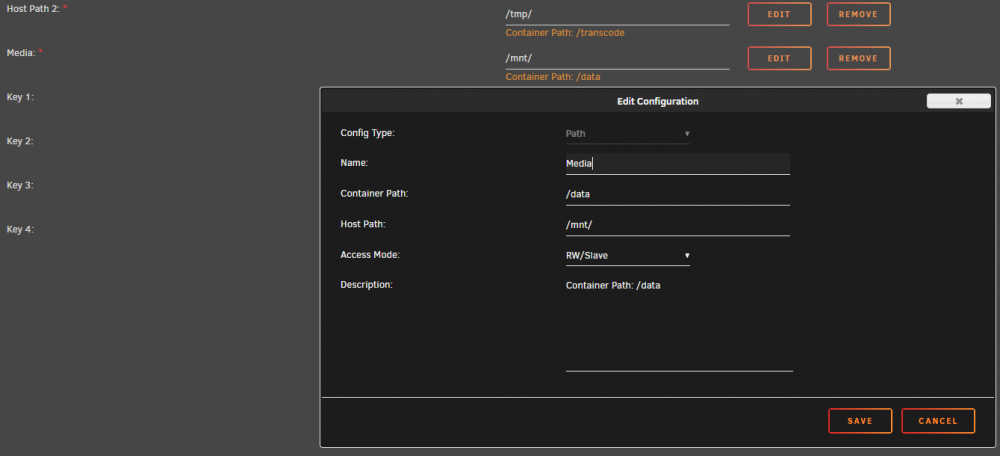

 I have a problem with mounted remote shares "going limp". I have no better way of describing this. I have two file servers, and one of them runs plex as a docker. The other one has three SMB shares, media, movies and series. These three shares have been mounted on the server running plex with unassigned devices. Randomly it seems just to "zone out". In the main screen I can see the mounted shares, and they show up as mounted, but the size, used and free columns just shows 0B free. I can still view media on plex from these shares, but I won't scan them for more media contend. So when I add more content, the content won't get imported before I unmount and remount the shares. I also cannot browse these shares with krusader while they are "limp". I am new to unraid and linux, so I might have done something wrong. I will attach screengrabs of the shares and my plex config. Oh...and they are mounted by using windows AD credentials if that has some significance.
I am having some problems with unBALLANCE. I am trying to gather some series from multiple disks to a single disk. I first choose "Gather", then select the top level folder i want to move under "Select folder", and then choose next. On the "Choose target folder" nothing happens. No target disks appears (even though 3 disks showed up the first time i tried it, but I still couldn't continue), and the logo-thing on the top-rights is "pulsing". Both the previous and next buttons are greyed out, and I cannot do anything. Also, I get a green banner under the top menu which says "unBALANCE needs exclusive access to disks, so disable mover and/or any dockers that write to disks, before running it. Also note that transfer speed may be affected by disk health. Check this plugin.". I have removed the DiskSpeed docker, and stopped all other dockers. I have even tried to disable all dockers from the top level settings in unraid. Any thoughts?
I have a problem with mounted remote shares "going limp". I have no better way of describing this. I have two file servers, and one of them runs plex as a docker. The other one has three SMB shares, media, movies and series. These three shares have been mounted on the server running plex with unassigned devices. Randomly it seems just to "zone out". In the main screen I can see the mounted shares, and they show up as mounted, but the size, used and free columns just shows 0B free. I can still view media on plex from these shares, but I won't scan them for more media contend. So when I add more content, the content won't get imported before I unmount and remount the shares. I also cannot browse these shares with krusader while they are "limp". I am new to unraid and linux, so I might have done something wrong. I will attach screengrabs of the shares and my plex config. Oh...and they are mounted by using windows AD credentials if that has some significance.
I am having some problems with unBALLANCE. I am trying to gather some series from multiple disks to a single disk. I first choose "Gather", then select the top level folder i want to move under "Select folder", and then choose next. On the "Choose target folder" nothing happens. No target disks appears (even though 3 disks showed up the first time i tried it, but I still couldn't continue), and the logo-thing on the top-rights is "pulsing". Both the previous and next buttons are greyed out, and I cannot do anything. Also, I get a green banner under the top menu which says "unBALANCE needs exclusive access to disks, so disable mover and/or any dockers that write to disks, before running it. Also note that transfer speed may be affected by disk health. Check this plugin.". I have removed the DiskSpeed docker, and stopped all other dockers. I have even tried to disable all dockers from the top level settings in unraid. Any thoughts?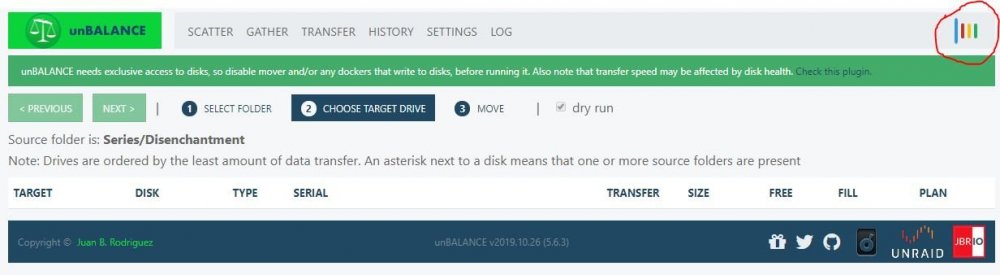 Okey. Thanks a lot for your time and helpunraid01-diagnostics-20200422-0232.zipThe mount button changes to "mounting", then it refreshes the unassigned devices list, and it goes back to unmounted again. No errors, no messages, nothing
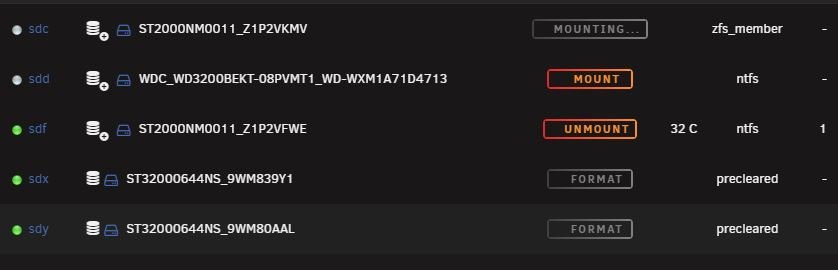 It just shows up at par1 and part2
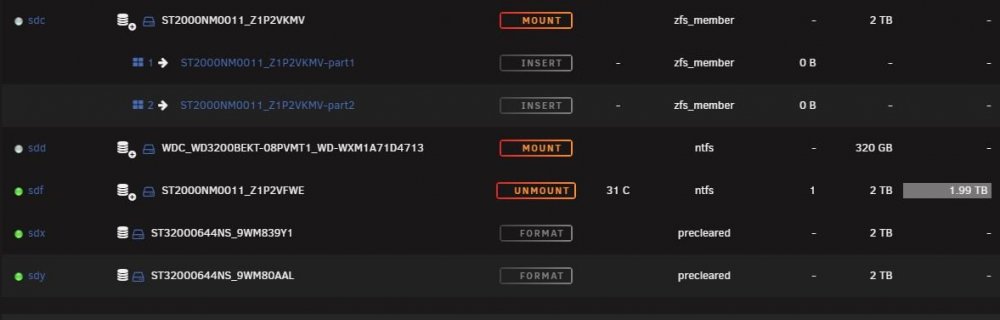 I put the disk back into my windows server, and it works fine. Some diskpart-info listed under. DISKPART> detail disk ATA ST2000NM0011 SCSI Disk Device Disk ID: {9B39AF2E-29EA-11EA-96D2-4CCC6AB01B6B} Type : SAS Status : Online Path : 0 Target : 1 LUN ID : 0 Location Path : PCIROOT(0)#PCI(0200)#PCI(0000)#SAS(P00T01L00) Current Read-only State : No Read-only : No Boot Disk : No Pagefile Disk : No Hibernation File Disk : No Crashdump Disk : No Clustered Disk : No Volume ### Ltr Label Fs Type Size Status Info ---------- --- ----------- ----- ---------- ------- --------- -------- * Volume 1 F DISK01 NTFS Partition 1862 GB Healthy DISKPART> detail partition Partition 2 Type : ebd0a0a2-b9e5-4433-87c0-68b6b72699c7 Hidden : No Required: No Attrib : 0000000000000000 Offset in Bytes: 135266304 Volume ### Ltr Label Fs Type Size Status Info ---------- --- ----------- ----- ---------- ------- --------- -------- * Volume 1 F DISK01 NTFS Partition 1862 GB Healthy DISKPART> detail volume Disk ### Status Size Free Dyn Gpt -------- ------------- ------- ------- --- --- * Disk 1 Online 1863 GB 0 B * Read-only : No Hidden : No No Default Drive Letter: No Shadow Copy : No Offline : No BitLocker Encrypted : No Installable : Yes Volume Capacity : 1862 GB Volume Free Space : 9 GB DISKPART> list partition Partition ### Type Size Offset ------------- ---------------- ------- ------- Partition 1 Reserved 128 MB 17 KB Partition 2 Primary 1862 GB 129 MB I have also removed the preclear plugin and booted the unraid system before removing the disk, that did nothing. What diagnostics do you need? I am new to Unraid, so I am not overly familiar with it's capabilities.Hi! So I'm moving both my storage servers from MS Server2016 to Unraid 6.8.3. I have copied all of my data from server1 over on individual 2TB NTFS formated disks, and now I am trying to copy the data back to the array under Unraid. I am having issues with 1 of the 4 disks. Under the FS field, it's showing as zfs_member, not NTFS. This disk has never been anywhere near a Linux-box or a zfs array. I can mount the 3 other disks just fine, but I cannot mount the last one. the output from fdisk -l /dev/sdh: root@UNRAID01:~# fdisk -l /dev/sdh Disk /dev/sdh: 1.84 TiB, 2000398934016 bytes, 3907029168 sectors Disk model: ST2000NM0011 Units: sectors of 1 * 512 = 512 bytes Sector size (logical/physical): 512 bytes / 512 bytes I/O size (minimum/optimal): 512 bytes / 512 bytes Disklabel type: gpt Disk identifier: 9B39AF2E-29EA-11EA-96D2-4CCC6AB01B6B Device Start End Sectors Size Type /dev/sdh1 34 262177 262144 128M Microsoft reserved /dev/sdh2 264192 3907028991 3906764800 1.8T Microsoft basic data Can anyone tell me how to fix the situation?


