






Januszmirek
Members
-
Joined
-
Last visited
-
Yeah, I guess the key here is that it's essentially someone else's container hence all updates should go smoothly unless there's some unraid specific setting which should be adjusted in the container, but other this we should be good with those 'breaking changes' updates. Thanks again for clarification.
-
Hi im running immich spaceinvader version. Should i be worried before updating from v1.117 to v1.118 based on this: https://github.com/immich-app/immich/releases/tag/v1.118.0 Thanks.
-
All good now:) as it was mentioned here all that was needed was actually for the /thumbs folder to be moved to cache drive and remapping configured. Couldn't believe it was that simple.
-
It worked. It wasn't actually inside /boot but /boot/config. After deleting it, the error didn't show up on next reboot, so thank you!;)
-
Sorry for replying to old topic and noob question but where do I find /boot folder? Im on 6.12.9.
-
Hi, would you care to share step by step guide on how did you make it work. I followed spaceinvader guide to setup the immich. Thanks.
-
Fair enough👍😀. Makes sense.
-
That makes sense;) Thanks! I'll ask differently. Why the plugin now makes a copy of ALL these .xmls anyway when I only select certain (1 actually) container to backup. I could swear that in the past it was copying only the containers you selected in settings. It still doesn't backup other containers but for some reason it does copy these .xlms. Why is that?
-
Thanks! I removed .bak and indeed these are not backeup any more. Can I remove .xml files from usersTemplate as well without breaking anything?
-
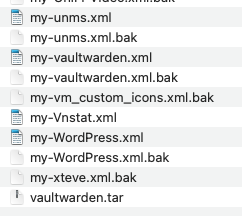
Im using the plugin to mainly backup vaultwarden container. So I only need that vaultwarden.tar file to be created. 1. Is there a way to not create these .xml and .bak files (see below photo)? 2. Also, it appears the plugin 'sees' all my containers even those I have installed ages ago and since removed from unraid (yes also deleted them from the appdata folder). How to update the plugin to only 'see' the actual current containers? Thanks
-
So I finally solved the issue. Turns out it wasn't a corrupt docker image or a problem with docker networks or anything else that I initially suspected. One other issue I was encountering for months now (but somehow did not connect it with this one) is that every night I got notifications about cache disk space filling out (to 100%). I had no idea what was this about as in the morning everything was fine and cache disk was maybe 60% filled. I then forgot I created about 600gb VM on my array - the space i needed for it was too big for my cache. What I however forgot to change after creating the vm was to not attempt moving the VM to cache. Basically as show below: I really did not need this VM anymore, so deleted it and boom! all problems magically disappeared all together. No more btrfs or syslog errors. Doubt this would help anyone, but just wanted to let you know the issue is resolved.

-
You can still use your.domain. No ports forwarding on the router needed. Instead of Proxy Hosts in NPM, use Streams. Helpful link here: https://gist.github.com/Lvdwardt/707d9c3fb4581d38102399f91a21c9c6 Go straight to no 5. You don't have to set up anything else. It works like a charm. Good luck.
-
How about this one: Mar 26 08:58:40 Tower kernel: BTRFS error (device loop2: state EA): bad tree block start, mirror 1 want 20224475136 have 0 Mar 26 08:58:40 Tower kernel: BTRFS error (device loop2: state EA): bad tree block start, mirror 1 want 20224524288 have 0 Mar 26 08:58:45 Tower kernel: BTRFS error (device loop2: state EA): bad tree block start, mirror 1 want 20224507904 have 0 Mar 26 08:58:45 Tower kernel: BTRFS error (device loop2: state EA): bad tree block start, mirror 1 want 20224475136 have 0 Mar 26 08:58:45 Tower kernel: BTRFS error (device loop2: state EA): bad tree block start, mirror 1 want 20224524288 have 0 Mar 26 08:58:45 Tower kernel: BTRFS error (device loop2: state EA): bad tree block start, mirror 2 want 20224524288 have 0 Mar 26 08:58:45 Tower kernel: BTRFS error (device loop2: state EA): bad tree block start, mirror 1 want 20224507904 have 0 Mar 26 08:58:45 Tower kernel: BTRFS error (device loop2: state EA): bad tree block start, mirror 1 want 20224475136 have 0 Mar 26 08:58:45 Tower kernel: BTRFS error (device loop2: state EA): bad tree block start, mirror 1 want 20224524288 have 0 Mar 26 08:58:45 Tower kernel: BTRFS error (device loop2: state EA): bad tree block start, mirror 2 want 20224524288 have 0 Mar 26 08:58:45 Tower kernel: BTRFS error (device loop2: state EA): bad tree block start, mirror 1 want 20224507904 have 0 Mar 26 08:58:45 Tower kernel: BTRFS error (device loop2: state EA): bad tree block start, mirror 1 want 20224475136 have 0 Mar 26 09:12:57 Tower unraid-api[8774]: ⚠️ Caught exception: EIO: i/o error, scandir '/var/run/docker/containerd/daemon/io.containerd.runtime.v2.task/moby/4c765a904e781a4ced957e91ad602ca741043834bba888d3de0d59fca040f5b0/work' Mar 26 09:13:04 Tower unraid-api[11408]: ⚠️ Caught exception: EIO: i/o error, scandir '/var/run/docker/containerd/daemon/io.containerd.runtime.v2.task/moby/4c765a904e781a4ced957e91ad602ca741043834bba888d3de0d59fca040f5b0/work' Mar 26 09:13:11 Tower unraid-api[14508]: ⚠️ Caught exception: EIO: i/o error, scandir '/var/run/docker/containerd/daemon/io.containerd.runtime.v2.task/moby/4c765a904e781a4ced957e91ad602ca741043834bba888d3de0d59fca040f5b0/work' Mar 26 09:13:18 Tower unraid-api[17221]: ⚠️ Caught exception: EIO: i/o error, scandir '/var/run/docker/containerd/daemon/io.containerd.runtime.v2.task/moby/4c765a904e781a4ced957e91ad602ca741043834bba888d3de0d59fca040f5b0/work' Mar 26 09:13:25 Tower unraid-api[20009]: ⚠️ Caught exception: EIO: i/o error, scandir '/var/run/docker/containerd/daemon/io.containerd.runtime.v2.task/moby/4c765a904e781a4ced957e91ad602ca741043834bba888d3de0d59fca040f5b0/work' Mar 26 09:13:32 Tower unraid-api[22508]: ⚠️ Caught exception: EIO: i/o error, scandir '/var/run/docker/containerd/daemon/io.containerd.runtime.v2.task/moby/4c765a904e781a4ced957e91ad602ca741043834bba888d3de0d59fca040f5b0/work' Mar 26 09:13:39 Tower unraid-api[25349]: ⚠️ Caught exception: EIO: i/o error, scandir '/var/run/docker/containerd/daemon/io.containerd.runtime.v2.task/moby/4c765a904e781a4ced957e91ad602ca741043834bba888d3de0d59fca040f5b0/work' Mar 26 09:13:46 Tower unraid-api[27752]: ⚠️ Caught exception: EIO: i/o error, scandir '/var/run/docker/containerd/daemon/io.containerd.runtime.v2.task/moby/4c765a904e781a4ced957e91ad602ca741043834bba888d3de0d59fca040f5b0/work' Mar 26 09:13:53 Tower unraid-api[30200]: ⚠️ Caught exception: EIO: i/o error, scandir '/var/run/docker/containerd/daemon/io.containerd.runtime.v2.task/moby/4c765a904e781a4ced957e91ad602ca741043834bba888d3de0d59fca040f5b0/work' Mar 26 09:14:00 Tower unraid-api[32595]: ⚠️ Caught exception: EIO: i/o error, scandir '/var/run/docker/containerd/daemon/io.containerd.runtime.v2.task/moby/4c765a904e781a4ced957e91ad602ca741043834bba888d3de0d59fca040f5b0/work' Mar 26 09:14:07 Tower unraid-api[2590]: ⚠️ Caught exception: EIO: i/o error, scandir '/var/run/docker/containerd/daemon/io.containerd.runtime.v2.task/moby/4c765a904e781a4ced957e91ad602ca741043834bba888d3de0d59fca040f5b0/work' Mar 26 09:14:14 Tower unraid-api[5324]: ⚠️ Caught exception: EIO: i/o error, scandir '/var/run/docker/containerd/daemon/io.containerd.runtime.v2.task/moby/4c765a904e781a4ced957e91ad602ca741043834bba888d3de0d59fca040f5b0/work' Mar 26 09:14:21 Tower unraid-api[7854]: ⚠️ Caught exception: EIO: i/o error, scandir '/var/run/docker/containerd/daemon/io.containerd.runtime.v2.task/moby/4c765a904e781a4ced957e91ad602ca741043834bba888d3de0d59fca040f5b0/work' Mar 26 09:14:28 Tower unraid-api[9611]: ⚠️ Caught exception: EIO: i/o error, scandir '/var/run/docker/containerd/daemon/io.containerd.runtime.v2.task/moby/4c765a904e781a4ced957e91ad602ca741043834bba888d3de0d59fca040f5b0/work' Mar 26 09:14:35 Tower unraid-api[11448]: ⚠️ Caught exception: EIO: i/o error, scandir '/var/run/docker/containerd/daemon/io.containerd.runtime.v2.task/moby/4c765a904e781a4ced957e91ad602ca741043834bba888d3de0d59fca040f5b0/work' Mar 26 09:14:42 Tower unraid-api[13675]: ⚠️ Caught exception: EIO: i/o error, scandir '/var/run/docker/containerd/daemon/io.containerd.runtime.v2.task/moby/4c765a904e781a4ced957e91ad602ca741043834bba888d3de0d59fca040f5b0/work' It's getting ridiculous now. Some containers start to behave really weird. Nginx won't generate new ssl certs. Plex web does not open. I tried to remove the container but 'Execution error Server error' pop up shows up and I am unable to remove the container. I will try to restart the unraid but this is becoming a chore and a far cry from rock solid experience I had with the machine for the last few years.
-
I don't need macvlan. I'm not sure why it was set up like this in a first place. Anyway, docker rebuilt didn't help. Woke up this morning to find out not only containers but also unraid web interface was not available. Hard reset later, and rebuilt of docker again, this time with ipvlan seems to work so far. At least no syslog errors in log. I will monitor those btfrs errors now. Thanks for the hint with macvlan;) EDIT: Happiness didn't last long. Now, an hour after docker rebuilt, full system crash - only reboot helped. New btfrs errors from log: Mar 24 20:19:25 Tower kernel: BTRFS info (device loop4): using crc32c (crc32c-intel) checksum algorithm Is my cache drive dying? it still shows 0 errors.
-
I have rebuilt docker and restarted the machine. Syslog errors came back right away Mar 23 14:10:10 Tower rsyslogd: omfwd: socket 1: error 101 sending via udp: Network is unreachable [v8.2102.0 try https://www.rsyslog.com/e/2354 ] Mar 23 14:10:10 Tower rsyslogd: omfwd/udp: socket 1: sendto() error: Network is unreachable [v8.2102.0 try https://www.rsyslog.com/e/2354 ] I wonder if this has anything to do with the network type setting in docker? Currently this is setup as follows: Docker custom network type: macvlan Could changing this have impact on these errors? For btfrs errors I will probably need to wait a day or two as these are usually happen during night hours. Hopefully the docker rebuilt helped solve this.


