






Januszmirek
Members
-
Joined
-
Last visited
Everything posted by Januszmirek
-
Yeah, I guess the key here is that it's essentially someone else's container hence all updates should go smoothly unless there's some unraid specific setting which should be adjusted in the container, but other this we should be good with those 'breaking changes' updates. Thanks again for clarification.
-
Hi im running immich spaceinvader version. Should i be worried before updating from v1.117 to v1.118 based on this: https://github.com/immich-app/immich/releases/tag/v1.118.0 Thanks.
-
All good now:) as it was mentioned here all that was needed was actually for the /thumbs folder to be moved to cache drive and remapping configured. Couldn't believe it was that simple.
-
It worked. It wasn't actually inside /boot but /boot/config. After deleting it, the error didn't show up on next reboot, so thank you!;)
-
Sorry for replying to old topic and noob question but where do I find /boot folder? Im on 6.12.9.
-
Hi, would you care to share step by step guide on how did you make it work. I followed spaceinvader guide to setup the immich. Thanks.
-
Fair enough👍😀. Makes sense.
-
That makes sense;) Thanks! I'll ask differently. Why the plugin now makes a copy of ALL these .xmls anyway when I only select certain (1 actually) container to backup. I could swear that in the past it was copying only the containers you selected in settings. It still doesn't backup other containers but for some reason it does copy these .xlms. Why is that?
-
Thanks! I removed .bak and indeed these are not backeup any more. Can I remove .xml files from usersTemplate as well without breaking anything?
-
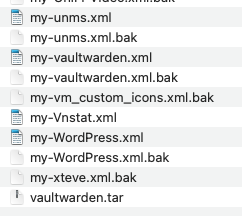
Im using the plugin to mainly backup vaultwarden container. So I only need that vaultwarden.tar file to be created. 1. Is there a way to not create these .xml and .bak files (see below photo)? 2. Also, it appears the plugin 'sees' all my containers even those I have installed ages ago and since removed from unraid (yes also deleted them from the appdata folder). How to update the plugin to only 'see' the actual current containers? Thanks
-
So I finally solved the issue. Turns out it wasn't a corrupt docker image or a problem with docker networks or anything else that I initially suspected. One other issue I was encountering for months now (but somehow did not connect it with this one) is that every night I got notifications about cache disk space filling out (to 100%). I had no idea what was this about as in the morning everything was fine and cache disk was maybe 60% filled. I then forgot I created about 600gb VM on my array - the space i needed for it was too big for my cache. What I however forgot to change after creating the vm was to not attempt moving the VM to cache. Basically as show below: I really did not need this VM anymore, so deleted it and boom! all problems magically disappeared all together. No more btrfs or syslog errors. Doubt this would help anyone, but just wanted to let you know the issue is resolved.

-
You can still use your.domain. No ports forwarding on the router needed. Instead of Proxy Hosts in NPM, use Streams. Helpful link here: https://gist.github.com/Lvdwardt/707d9c3fb4581d38102399f91a21c9c6 Go straight to no 5. You don't have to set up anything else. It works like a charm. Good luck.
-
How about this one: Mar 26 08:58:40 Tower kernel: BTRFS error (device loop2: state EA): bad tree block start, mirror 1 want 20224475136 have 0 Mar 26 08:58:40 Tower kernel: BTRFS error (device loop2: state EA): bad tree block start, mirror 1 want 20224524288 have 0 Mar 26 08:58:45 Tower kernel: BTRFS error (device loop2: state EA): bad tree block start, mirror 1 want 20224507904 have 0 Mar 26 08:58:45 Tower kernel: BTRFS error (device loop2: state EA): bad tree block start, mirror 1 want 20224475136 have 0 Mar 26 08:58:45 Tower kernel: BTRFS error (device loop2: state EA): bad tree block start, mirror 1 want 20224524288 have 0 Mar 26 08:58:45 Tower kernel: BTRFS error (device loop2: state EA): bad tree block start, mirror 2 want 20224524288 have 0 Mar 26 08:58:45 Tower kernel: BTRFS error (device loop2: state EA): bad tree block start, mirror 1 want 20224507904 have 0 Mar 26 08:58:45 Tower kernel: BTRFS error (device loop2: state EA): bad tree block start, mirror 1 want 20224475136 have 0 Mar 26 08:58:45 Tower kernel: BTRFS error (device loop2: state EA): bad tree block start, mirror 1 want 20224524288 have 0 Mar 26 08:58:45 Tower kernel: BTRFS error (device loop2: state EA): bad tree block start, mirror 2 want 20224524288 have 0 Mar 26 08:58:45 Tower kernel: BTRFS error (device loop2: state EA): bad tree block start, mirror 1 want 20224507904 have 0 Mar 26 08:58:45 Tower kernel: BTRFS error (device loop2: state EA): bad tree block start, mirror 1 want 20224475136 have 0 Mar 26 09:12:57 Tower unraid-api[8774]: ⚠️ Caught exception: EIO: i/o error, scandir '/var/run/docker/containerd/daemon/io.containerd.runtime.v2.task/moby/4c765a904e781a4ced957e91ad602ca741043834bba888d3de0d59fca040f5b0/work' Mar 26 09:13:04 Tower unraid-api[11408]: ⚠️ Caught exception: EIO: i/o error, scandir '/var/run/docker/containerd/daemon/io.containerd.runtime.v2.task/moby/4c765a904e781a4ced957e91ad602ca741043834bba888d3de0d59fca040f5b0/work' Mar 26 09:13:11 Tower unraid-api[14508]: ⚠️ Caught exception: EIO: i/o error, scandir '/var/run/docker/containerd/daemon/io.containerd.runtime.v2.task/moby/4c765a904e781a4ced957e91ad602ca741043834bba888d3de0d59fca040f5b0/work' Mar 26 09:13:18 Tower unraid-api[17221]: ⚠️ Caught exception: EIO: i/o error, scandir '/var/run/docker/containerd/daemon/io.containerd.runtime.v2.task/moby/4c765a904e781a4ced957e91ad602ca741043834bba888d3de0d59fca040f5b0/work' Mar 26 09:13:25 Tower unraid-api[20009]: ⚠️ Caught exception: EIO: i/o error, scandir '/var/run/docker/containerd/daemon/io.containerd.runtime.v2.task/moby/4c765a904e781a4ced957e91ad602ca741043834bba888d3de0d59fca040f5b0/work' Mar 26 09:13:32 Tower unraid-api[22508]: ⚠️ Caught exception: EIO: i/o error, scandir '/var/run/docker/containerd/daemon/io.containerd.runtime.v2.task/moby/4c765a904e781a4ced957e91ad602ca741043834bba888d3de0d59fca040f5b0/work' Mar 26 09:13:39 Tower unraid-api[25349]: ⚠️ Caught exception: EIO: i/o error, scandir '/var/run/docker/containerd/daemon/io.containerd.runtime.v2.task/moby/4c765a904e781a4ced957e91ad602ca741043834bba888d3de0d59fca040f5b0/work' Mar 26 09:13:46 Tower unraid-api[27752]: ⚠️ Caught exception: EIO: i/o error, scandir '/var/run/docker/containerd/daemon/io.containerd.runtime.v2.task/moby/4c765a904e781a4ced957e91ad602ca741043834bba888d3de0d59fca040f5b0/work' Mar 26 09:13:53 Tower unraid-api[30200]: ⚠️ Caught exception: EIO: i/o error, scandir '/var/run/docker/containerd/daemon/io.containerd.runtime.v2.task/moby/4c765a904e781a4ced957e91ad602ca741043834bba888d3de0d59fca040f5b0/work' Mar 26 09:14:00 Tower unraid-api[32595]: ⚠️ Caught exception: EIO: i/o error, scandir '/var/run/docker/containerd/daemon/io.containerd.runtime.v2.task/moby/4c765a904e781a4ced957e91ad602ca741043834bba888d3de0d59fca040f5b0/work' Mar 26 09:14:07 Tower unraid-api[2590]: ⚠️ Caught exception: EIO: i/o error, scandir '/var/run/docker/containerd/daemon/io.containerd.runtime.v2.task/moby/4c765a904e781a4ced957e91ad602ca741043834bba888d3de0d59fca040f5b0/work' Mar 26 09:14:14 Tower unraid-api[5324]: ⚠️ Caught exception: EIO: i/o error, scandir '/var/run/docker/containerd/daemon/io.containerd.runtime.v2.task/moby/4c765a904e781a4ced957e91ad602ca741043834bba888d3de0d59fca040f5b0/work' Mar 26 09:14:21 Tower unraid-api[7854]: ⚠️ Caught exception: EIO: i/o error, scandir '/var/run/docker/containerd/daemon/io.containerd.runtime.v2.task/moby/4c765a904e781a4ced957e91ad602ca741043834bba888d3de0d59fca040f5b0/work' Mar 26 09:14:28 Tower unraid-api[9611]: ⚠️ Caught exception: EIO: i/o error, scandir '/var/run/docker/containerd/daemon/io.containerd.runtime.v2.task/moby/4c765a904e781a4ced957e91ad602ca741043834bba888d3de0d59fca040f5b0/work' Mar 26 09:14:35 Tower unraid-api[11448]: ⚠️ Caught exception: EIO: i/o error, scandir '/var/run/docker/containerd/daemon/io.containerd.runtime.v2.task/moby/4c765a904e781a4ced957e91ad602ca741043834bba888d3de0d59fca040f5b0/work' Mar 26 09:14:42 Tower unraid-api[13675]: ⚠️ Caught exception: EIO: i/o error, scandir '/var/run/docker/containerd/daemon/io.containerd.runtime.v2.task/moby/4c765a904e781a4ced957e91ad602ca741043834bba888d3de0d59fca040f5b0/work' It's getting ridiculous now. Some containers start to behave really weird. Nginx won't generate new ssl certs. Plex web does not open. I tried to remove the container but 'Execution error Server error' pop up shows up and I am unable to remove the container. I will try to restart the unraid but this is becoming a chore and a far cry from rock solid experience I had with the machine for the last few years.
-
I don't need macvlan. I'm not sure why it was set up like this in a first place. Anyway, docker rebuilt didn't help. Woke up this morning to find out not only containers but also unraid web interface was not available. Hard reset later, and rebuilt of docker again, this time with ipvlan seems to work so far. At least no syslog errors in log. I will monitor those btfrs errors now. Thanks for the hint with macvlan;) EDIT: Happiness didn't last long. Now, an hour after docker rebuilt, full system crash - only reboot helped. New btfrs errors from log: Mar 24 20:19:25 Tower kernel: BTRFS info (device loop4): using crc32c (crc32c-intel) checksum algorithm Is my cache drive dying? it still shows 0 errors.
-
I have rebuilt docker and restarted the machine. Syslog errors came back right away Mar 23 14:10:10 Tower rsyslogd: omfwd: socket 1: error 101 sending via udp: Network is unreachable [v8.2102.0 try https://www.rsyslog.com/e/2354 ] Mar 23 14:10:10 Tower rsyslogd: omfwd/udp: socket 1: sendto() error: Network is unreachable [v8.2102.0 try https://www.rsyslog.com/e/2354 ] I wonder if this has anything to do with the network type setting in docker? Currently this is setup as follows: Docker custom network type: macvlan Could changing this have impact on these errors? For btfrs errors I will probably need to wait a day or two as these are usually happen during night hours. Hopefully the docker rebuilt helped solve this.
-
Thanks! I'll do that and report back on how it went. I don't suppose I have set up any custom docker network, all containers Network type is 'host' or 'bridge'.
-
I did. See the syslog-old.txt for btrfs errors.
-
I started recently to encounter lots of BTRFS and syslog errors. I would not be normally bothered but recently every few days I wake up to find out my docker containers are basically not working. Arrary restart doesn't help. Only unraid restart helps. But the issue comes back a few days later. What I usually see in log prior to restart is below. Mar 18 04:55:22 Tower rsyslogd: action 'action-3-builtin:omfile' (module 'builtin:omfile') message lost, could not be processed. Check for additional error messages before this one. [v8.2102.0 try https://www.rsyslog.com/e/2027 ] Mar 18 04:55:22 Tower rsyslogd: file '/mnt/user/appdata/syslog-192.168.50.5.log'[2] write error - see https://www.rsyslog.com/solving-rsyslog-write-errors/ for help OS error: No space left on device [v8.2102.0 try https://www.rsyslog.com/e/2027 ] Mar 21 08:24:10 Tower rsyslogd: omfwd/udp: socket 5: sendto() error: Network is unreachable [v8.2102.0 try https://www.rsyslog.com/e/2354 ] Mar 21 08:24:10 Tower rsyslogd: omfwd: socket 5: error 101 sending via udp: Network is unreachable [v8.2102.0 try https://www.rsyslog.com/e/2354 ] Mar 15 15:54:31 Tower kernel: BTRFS error (device loop2: state EA): bad tree block start, mirror 1 want 11436949504 have 0 My array disks, cache disk and flash drive show 0 errors. I have included old log in the zip file (syslog-old.txt), maybe it will be useful for someone to help me out what's wrong with my server. I tried google both issues but nothing helpful was found. Anyway thanks in advance to anyone who has any idea what's going on. tower-diagnostics-20240321-1753.zip
-
Fair point. So I just go and install the same container under a different name and it becomes a completely separate instance I can play with?
-
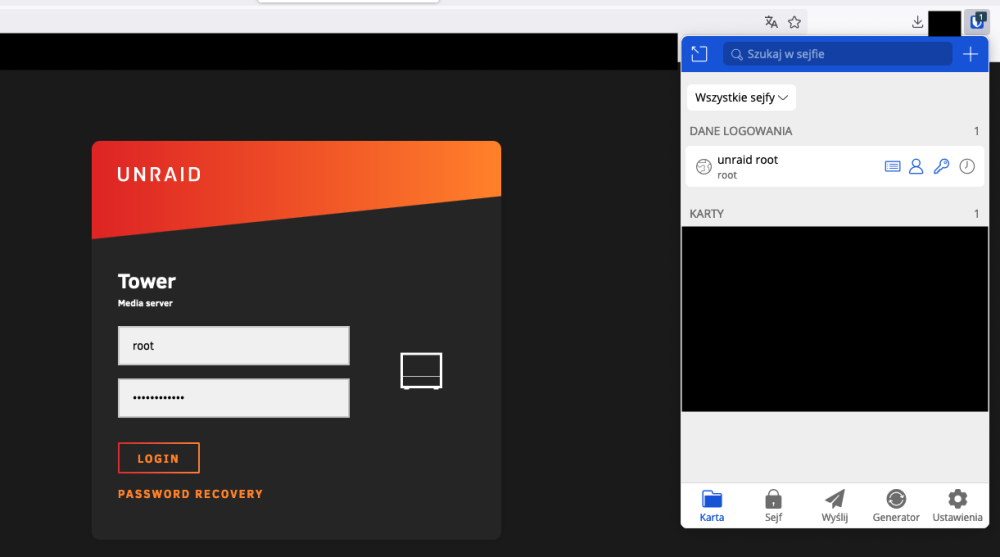
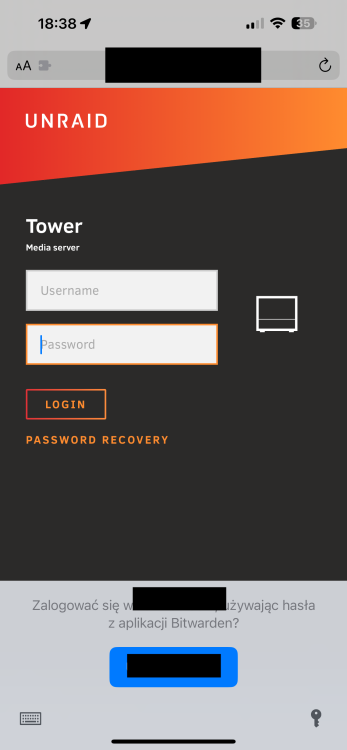
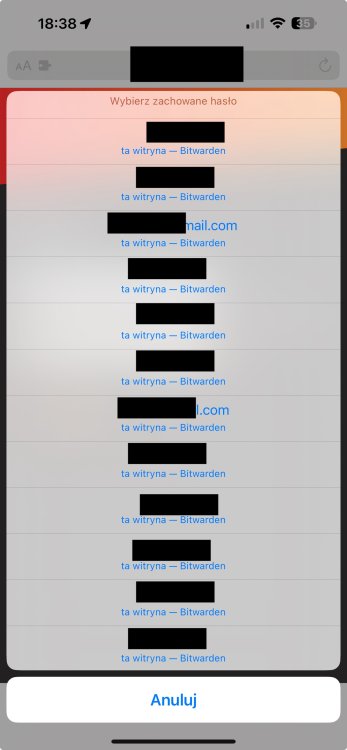
Hi, not sure if this was ever asked about. I am having issues with different recognition of the credentials on a mac machine (using fire fox plugin) vs safari plugin on my iPhone. This is with services on my home server where the IP is the same but each service is using different port. On my mac this works flawlessly where each service' address is defined as 'regular impression'. So when i punch say 192.168.10.2:6060 address it only gives me a single credentials to fill in the login and password form as seen below, and not say 15 different options for every service set up under 192.168.10.2. On my iPhone this sadly is not the case. First of all the suggested credentials are NOT for the service I am trying to access. And second, I need to manually expand the drop-down list to pick up the right credentials. Not only the port is not recognised but because the drop-down menu only shows the logins, not the service address or name, it is really frustrating to actually remember by heart which credentials on the list is the right one. If anyone knows how to solve this issue on the mobile device, please share the solution;)
-
That's great. Can you confirm that you were actually able to recover other users account data? I have multiple accounts set up on my vaultwarden instance and am interested to know if all these accounts can be restored when needed. Thanks;)
-
Quick question about backup and potential restore. So i have vaultwarden set up for myself and have about 5-10 friends and family members having their accounts on this instance as well. Given the disastrous consequences of loosing access to all this data, I thought of some sort of backup solution, just in case. So the way I have configured it currently is I use Appdata Backup plugin to automagically do the copy of entire appdata/valutwarden folder on nightly basis. Then I set up rcolne to have it copy to a remote cloud every morning. Now my question basically is this: Is having the entire appdata/valutwarden folder copy enough to restore everything back to where it was from the last backup? And also if this is enough, in the event of potential rebuilt do I just go and install fresh new instance of vaultwarden container and replace all files in appdata/valutwarden from backup copy? I would really like to be sure that what I am doing now is enough and restoring in case of emergency would be a breeze. All comments and hints most appreciated.
-
Fair enough, tbh WG is the least of my worries atm. I practically lost all my unraid services exposed to external world;( Thanks for chip in anyway.
-
But id DID work previously. Are you saying that with the new update this functionality of having both worlds just disappeared?
-
After the update to 6.12.4 I am more than unhappy with the issues I'm facing. First noticeable issue was wireguard that just stopped working correctly. Until 6.11.x it worked flawlessly. Now I cannot make it to have a client to connect to my unraid and use internet at the same time. I mean i can browse all containers webgui but internet does not work. I had this issue previously but it was incorrect DNS configuration on my part, after I finally figured this out it and was flawless on any client ever since. After the update to 12.4 I can connect through wg to unraid but internet on any of the clients is no more. Yesterday I noticed other network related multiple issues. My plex server suddenly stopped being available remotely. Wordpress page hosted on my unraid is not available anymore, Unraid Connect doesn't work anymore (API KEY: NETWORK_ERRORNETWORK: Unable to connect to https://mothership.unraid.net), my system log is full of network errors and so on. I know there were some maclav/ipvlan changes made with this release and I did changed a few settings accordingly to release notes - probably misconfiguration on my part is what caused the issue but have no idea how to reverse these so i can get to where it was just a week ago before i updated. I hope it is all down to some configuration but no idea where to start so some steer would be much appreciated. Diagnostic log attached. Happy to provide more input if needed. Thanks. tower-diagnostics-20230916-1041.zip




