





mjorud
Members
-
Joined
-
Last visited
-
I have been running a gaming VM (W11) for several years with any big problems. After upgrading from v7.0.0 to v7.1.2 the VM goes in a pause state when trying to play Indiana Jones and the Great Circle. The other game I'm playing, Star Wars Outlaws (do I love LucasArts, or what?) works just fine. To get the VM going again I have to Force Stop. This is what is logged in VM-log: error: kvm run failed Bad address RAX=0000006b3eff41f8 RBX=000000000000002a RCX=00000222517ac070 RDX=00000222d388f0a0 RSI=000002248abe1000 RDI=0000000000000000 RBP=0000006b3eff41f0 RSP=0000006b3eff40f0 R8 =00000222d38bf0b0 R9 =000000000d2b0003 R10=0000000000000000 R11=0000000000000000 R12=0000000000000001 R13=00000000000001d0 R14=00000222d384f0f0 R15=000002248abe1000 RIP=00007ff625ba41c2 RFL=00010202 [-------] CPL=3 II=0 A20=1 SMM=0 HLT=0 ES =002b 0000000000000000 ffffffff 00c0f300 DPL=3 DS [-WA] CS =0033 0000000000000000 ffffffff 00a0fb00 DPL=3 CS64 [-RA] SS =002b 0000000000000000 ffffffff 00c0f300 DPL=3 DS [-WA] DS =002b 0000000000000000 ffffffff 00c0f300 DPL=3 DS [-WA] FS =0053 0000000000000000 0000bc00 0040f300 DPL=3 DS [-WA] GS =002b 0000006b38743000 ffffffff 00c0f300 DPL=3 DS [-WA] LDT=0000 0000000000000000 ffffffff 00c00000 TR =0040 ffffa6805c0e1000 00000067 00008b00 DPL=0 TSS64-busy GDT= ffffa6805c0e2fb0 00000057 IDT= ffffa6805c0e0000 00000fff CR0=80050033 CR2=0000022431a3f000 CR3=0000000747ad3000 CR4=00350ef8 DR0=0000000000000000 DR1=0000000000000000 DR2=0000000000000000 DR3=0000000000000000 DR6=00000000ffff0ff0 DR7=0000000000000400 EFER=0000000000000d01 Code=f3 0f 10 44 24 30 c7 44 24 30 5c d3 5c d3 f3 0f 10 4c 24 30 <f3> 0f 11 46 04 f3 0f 11 4e 08 c7 06 5c d3 5c d3 8b 81 60 06 00 00 89 44 24 30 f3 0f 10 44 Using Q35-9.1 instead of Q35-9.2 on v7.1.2 gives the same error. I downgraded to v7.0.0 and Indiana Jones swings his whip again in the Great Circle. nansen-diagnostics-20250527-1516.zip
-
I dont use the script because I never got it to work.
-
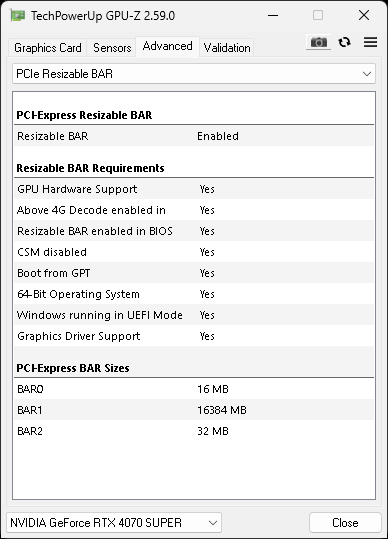
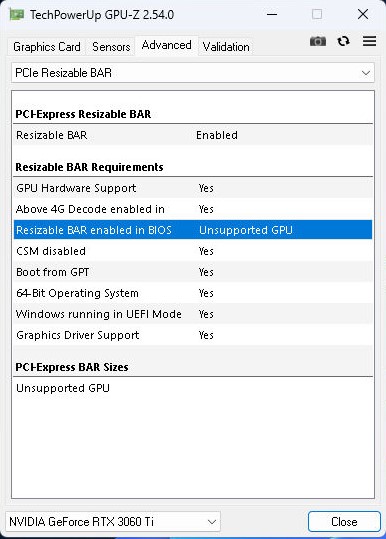
With the new version, v7.0.0 Beta 1, GPU-Z shows that ReBar is enabled.
-
Hi Salty2011! Nice work with gathering the information, and script. I have Zotac RTX 4070 Super with 12 GB of VRAM. UR sets BAR 1 to 16GB. And I think that is the reason ReBar fails. Do you know if it is possible to set it to 12 GB of VRAM? Best regards

-
Hi folks, I used to be a gamer until my mid twenties. Work and family, life as you might call it, "took over". A year or so ago Ron Gilbert released Return to Monkey Island, and man... it took me back to the good old times with adventure games, Lucas Arts, Sierra, Larry, Roger Wilco, Sam'n'Max and so forth. Memory lane... Anyway. Return to Monkey Island woke up the dorment gamer in me and I have played Fallen Order, Survivor, The Last of Us and I'm currently working my way through Alan Wake 2 (scary or what?)... and I'm really looking forward to Outlaws! Not sure why I'm sharing my life story... anyway... to make a long story a bit longer. My current setup is - Intel i7-12700K - 64 GB DDR4 - RTX 4070 Super - Samsung 990 Pro 2 TB (NVMe (passed)) I have pinned 5 P-cores to the Gaming VM (W11) and 32 GB RAM. Pinning 6 cores does not give me any notable performance gain in-game. To play I'm using Sunshine and Moonlight on Apple TV with Xbox 360 controller. Works great, and would work even better if Nvidia fixed the HAGS issue. With RTSS running I see that the GPU is running at ~70% in most games. Will upgrading the CPU to i9-14900K (or even i7-14700K) increase performance? An increase in 1% low FPS would be great. From my limited knowledge about bottlenecking it seems that the CPU is "to blame". I still have the same showstoppers (and a dog) that put the gamer in me to sleep, so when I actually have the time to disembowl some Imperial bastards, find the secret of Monkey Island or shit my pants reading Alan's manuscripts I want to do it with all graphical settings set to HIGH. To summarise... will upgrading from i7-12700K to i9-14900K give me a boost in 1% low FPS? Best regards...
-
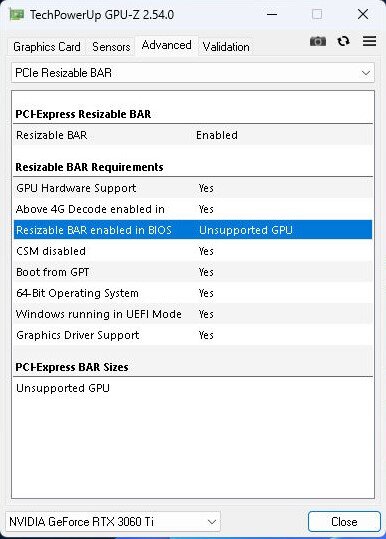
I have see the same thing. GPU-Z shows that Resizable BAR is enabled, even though "Resizable BAR enabled in BIOS" shows Unsupported GPU. Nvidia shows that Resizable BAR is enabled with 8192 MB GDDR6 dedicated video memory and 24572 MB total available graphics memory. Does ReBAR work? Not sure, and I'm not sure how to confirm it in-game.
-
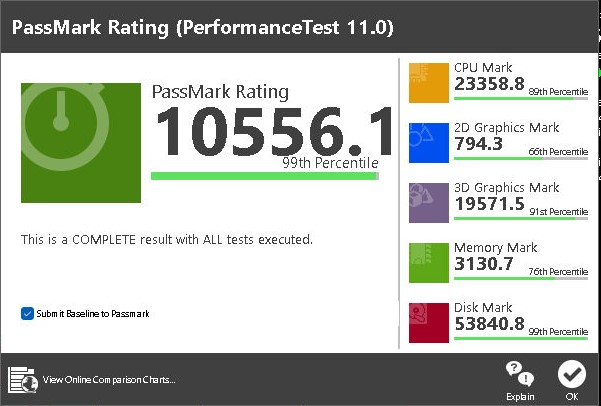
I updated from 6.12.3 to 6.12.4-rc19 today and now I have the resource1_resize folder. Ran the script, but I still have "Unsupported GPU" in GPU-Z. A bonus is that I have seen a 13% increase for both 2D and 3D when running PassMark PerformanceTest after the update.
-
I'm trying the patch but for some reason I'm missing the "resource1_resize" under "/sys/bus/pci/devices/0000\:01\:00.0/". "cat resource1_resize" only gives me "cat: resource1_resize: No such file or directory". I assume that my problem lies there? But if i run "lspci -vvvs 01:00.0 | grep "BAR"" I get: Capabilities: [bb0 v1] Physical Resizable BAR BAR 0: current size: 16MB, supported: 16MB BAR 1: current size: 8GB, supported: 64MB 128MB 256MB 512MB 1GB 2GB 4GB 8GB BAR 3: current size: 32MB, supported: 32MB So by the look of that, everything looks OK.
-
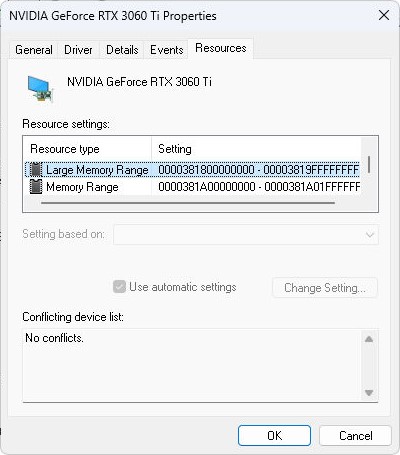
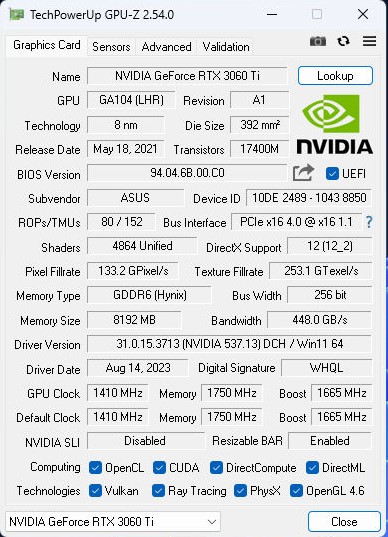
Hi, I have been tinkering with ReBAR and general performance in a W11 Gaming VM. Hardware is i7-12700K, Asus PRIME Z690M-PLUS D4 and Asus RTX 3060 Ti Dual Mini v2. The GPU does support ReBAR. The VM has 12 CPUs and 32 GB RAM allocated. Samsung 990 Pro is passed through as the only disk. The VM is working fine. Not great, but fine. I say fine because it's a hugh step down from bare metal in regard of benchmarks. A little overhead is expected though. I have followed this and other threads and I think I have done everything correctly. GPU-Z shows that ReBAR is enabled... but that the GPU is unsupported. The VM in installed on a NVMe so when booting bare metal the all is good; the GPU is supported. Looking in the Device Manager, Large Memory Range is there. I have to admit that I have not yet tried the user script... This is my results from PerformanceTest. Best regards J
-
Not sure if this is related to the RC, but as I'm running RC... I was watching a movie using Plex Docker and all of a sudden the movie stopped. The Plex container and also the unraid webgui was not accessable. This has happened once before but I did not investigate it. Excerpt from the syslog: May 1 20:41:33 nansen emhttpd: read SMART /dev/sdf May 1 20:45:28 nansen winbindd[6714]: [2023/05/01 20:45:28.136962, 0] ../../source3/winbindd/winbindd.c:821(winbind_client_processed) May 1 20:45:28 nansen winbindd[6714]: winbind_client_processed: request took 128.989669 seconds May 1 20:45:28 nansen winbindd[6714]: [struct process_request_state] ../../source3/winbindd/winbindd.c:437 [2023/05/01 20:43:19.070099] ../../source3/winbindd/winbindd.c:618 [2023/05/01 20:45:28.059768] [128.989669] -> TEVENT_REQ_DONE (2 0)) May 1 20:45:28 nansen winbindd[6714]: [struct resp_write_state] ../../nsswitch/wb_reqtrans.c:307 [2023/05/01 20:45:27.496398] ../../nsswitch/wb_reqtrans.c:344 [2023/05/01 20:45:28.059766] [0.563368] -> TEVENT_REQ_DONE (2 0)) May 1 20:45:28 nansen winbindd[6714]: [struct writev_state] ../../lib/async_req/async_sock.c:267 [2023/05/01 20:45:27.496399] ../../lib/async_req/async_sock.c:373 [2023/05/01 20:45:27.509262] [0.012863] -> TEVENT_REQ_DONE (2 0)) May 1 21:15:33 nansen emhttpd: spinning down /dev/sdh May 1 21:15:33 nansen emhttpd: spinning down /dev/sdd I think it took approx. 2 minutes before the server came online again. Tried to google a bit but came up short. Any idea what's happening? Thank you in advance. nansen-diagnostics-20230501-2141.zip
-
It works as expected and no longer backups volume mappings other than \appdata\. The old version of the backup plugin required the CA Auto Update Applications plugin to be installed (if I remember correctly). Do this new version also require that plugin?
-
Do Appdata Backup also backup all Docker volume mappings? My appdata\binhex-delugevpn is 73 MB but I had to stop the backup process when the backed up archive grew over 200 GB. This also happened to several other Dockers. Please find the debug attached. ab.debug.log
-
WARNING: some attributes cannot be read from corsair-cpro kernel driver WARNING: some attributes cannot be read from corsair-cpro kernel driver Corsair Commander Pro ├── Temperature probe 1 No ├── Temperature probe 2 No ├── Temperature probe 3 No ├── Temperature probe 4 No ├── Fan 1 control mode PWM ├── Fan 2 control mode PWM ├── Fan 3 control mode DC ├── Fan 4 control mode PWM ├── Fan 5 control mode DC └── Fan 6 control mode DC ASUS Aura LED Controller (experimental) └── Firmware version AULA3-AR32-0207 Corsair Commander Pro ├── Temperature probe 1 No ├── Temperature probe 2 No ├── Temperature probe 3 No ├── Temperature probe 4 No ├── Fan 1 control mode PWM ├── Fan 2 control mode PWM ├── Fan 3 control mode DC ├── Fan 4 control mode PWM ├── Fan 5 control mode DC └── Fan 6 control mode DC ASUS Aura LED Controller (experimental) └── Firmware version AULA3-AR32-0207 This is what the log file outputs now. Please note that the ASUS Aura LED Controller is popping up because I have just upgraded the motherboard. I just found out (and I have been using Unraid for 10 years or so) that Unraid has native support for the Corsair Commander Pro. Atleast all fans are visible in the Dashboard.
-
The Docker is up to date, and my config.yaml only contains controller: type: 'commander' fan_sync_speed: '100' I do not have the Kraken.
-
This is the config.yaml controller: type: 'commander' fan_sync_speed: '100' And after the latest update this is what the log says WARNING: some attributes cannot be read from corsair-cpro kernel driver Usage: liquidctl [options] list liquidctl [options] initialize [all] liquidctl [options] status liquidctl [options] set <channel> speed (<temperature> <percentage>) ... liquidctl [options] set <channel> speed <percentage> liquidctl [options] set <channel> color <mode> [<color>] ... liquidctl [options] set <channel> screen <mode> [<value>] liquidctl --help liquidctl --version Usage: liquidctl [options] list liquidctl [options] initialize [all] liquidctl [options] status liquidctl [options] set <channel> speed (<temperature> <percentage>) ... liquidctl [options] set <channel> speed <percentage> liquidctl [options] set <channel> color <mode> [<color>] ... liquidctl [options] set <channel> screen <mode> [<value>] liquidctl --help liquidctl --version Corsair Commander Pro ├── Temperature probe 1 No ├── Temperature probe 2 No ├── Temperature probe 3 No ├── Temperature probe 4 No ├── Fan 1 control mode PWM ├── Fan 2 control mode PWM ├── Fan 3 control mode DC ├── Fan 4 control mode PWM ├── Fan 5 control mode DC └── Fan 6 control mode DC If I open console and write liquidctl status # liquidctl status Corsair Commander Pro ├── Fan 1 speed 1369 rpm ├── Fan 2 speed 1380 rpm ├── Fan 3 speed 1197 rpm ├── Fan 4 speed 1351 rpm ├── Fan 5 speed 1224 rpm ├── Fan 6 speed 1211 rpm ├── +12V rail 12.01 V ├── +5V rail 4.97 V └── +3.3V rail 3.36 V # it seems to work just fine though.

