





morreale
Members
-
Joined
-
am i missing something here? is the path configurable? all of my containers use /mnt/cache_one/appdata/ vs /mnt/user/appdata/ this is reporting 120 containers as orphaned (Appdata share scan found this folder, and no saved Docker template or installed container currently references it) i do see something similiar may have been mentioned above
-
am i missing where it was said how the script should be configured to run? meaning manually or can it be scheduled and how often if so (asking since i saw it mentioned it doesnt run in the background. greaty work by the way. i just added another 128gb
-
Can I get some clarification around moving from macvlan to ipvlan? I have upgraded my backup server and made the change to ipvlan with bridging still enabled. nothing seeing any issues but it is a backup with no VMs and only two dockers running not using a custom network concerned about primary server that is still using macvlan, bridging enabled, host access to custom networks : disabled, ~30 docker containers (10 are using a custom network) and several VMs (some use their own ports on a 4 port nic -Blue Iris for example which is also on a separate vlan) What exactly do I need to change when converting to ipvlan? Does bridging need to be on or off? host access to custom networks? Thanks!
-
-
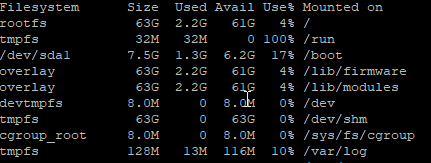
started happening to me yesterday (at least that i noticed)
-
rolled back and sitting between 6%-10%. stopped docker server and rebooted as others have suggested. started items one at a time. seems no matter what combination it eventually starts happening again. Impacts Windows 11 VM running Blue Iris as well. Video becomes lagged by like 30 secs during viewing view web console attaching the diags that were taking right before the downgrade to 6.11.5. Issue doesnt appear to imapct my backjup server. splinter-srv-diagnostics-20230618-2246.zip
-
is this the recoomended guidance vs multiple databases inside the same docker isntance? i am currently running a single instance with dbs for nextcloud and photoprism. i did recently had to rebuild due to errors/corruption that i tried to recover from so i am wondering if that was the cause or an update along the way.
-
I found it. I was looking in the wrong place. Thanks
-
Where is this screen located? I am seeing the rootshare being created under /mnt and it is causing an error in "Fix Common Problems" I also have a rootshare, "unraid_root", that I have manually created and would like to replace it with this one.
-
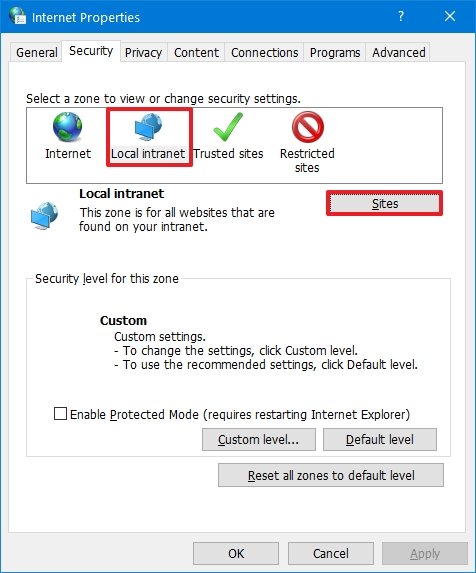
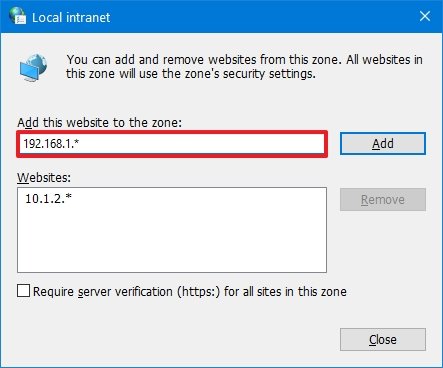
In windows 10/11. Simply search for Internet Options (or Internet Properties) I simply add my server's IP but you can add the entire range.
-
converted to the LSIO container for now. seems to be working correctly
-
Having the same hanging issues during unpacking. The container has worked for years properly. what can I provide to assist with troubleshooting?
-
anyone have success fixing this error Message Error occurred while executing task ClearLog: database disk image is malformed database disk image is malformed Exception System.Data.SQLite.SQLiteException (0x80004005): database disk image is malformed database disk image is malformed at System.Data.SQLite.SQLite3.Reset (System.Data.SQLite.SQLiteStatement stmt) [0x00083] in <61a20cde294d4a3eb43b9d9f6284613b>:0 at System.Data.SQLite.SQLite3.Step (System.Data.SQLite.SQLiteStatement stmt) [0x0003c] in <61a20cde294d4a3eb43b9d9f6284613b>:0 at System.Data.SQLite.SQLiteDataReader.NextResult () [0x0016b] in <61a20cde294d4a3eb43b9d9f6284613b>:0 at System.Data.SQLite.SQLiteDataReader..ctor (System.Data.SQLite.SQLiteCommand cmd, System.Data.CommandBehavior behave) [0x00090] in <61a20cde294d4a3eb43b9d9f6284613b>:0 at (wrapper remoting-invoke-with-check) System.Data.SQLite.SQLiteDataReader..ctor(System.Data.SQLite.SQLiteCommand,System.Data.CommandBehavior) at System.Data.SQLite.SQLiteCommand.ExecuteReader (System.Data.CommandBehavior behavior) [0x0000c] in <61a20cde294d4a3eb43b9d9f6284613b>:0 at System.Data.SQLite.SQLiteCommand.ExecuteNonQuery (System.Data.CommandBehavior behavior) [0x00006] in <61a20cde294d4a3eb43b9d9f6284613b>:0 at System.Data.SQLite.SQLiteCommand.ExecuteNonQuery () [0x00006] in <61a20cde294d4a3eb43b9d9f6284613b>:0 at Marr.Data.DataMapper.Delete[T] (System.String tableName, System.Linq.Expressions.Expression`1[TDelegate] filter) [0x00091] in C:\BuildAgent\work\5d7581516c0ee5b3\src\Marr.Data\DataMapper.cs:803 at Marr.Data.DataMapper.Delete[T] (System.Linq.Expressions.Expression`1[TDelegate] filter) [0x00000] in C:\BuildAgent\work\5d7581516c0ee5b3\src\Marr.Data\DataMapper.cs:777 at NzbDrone.Core.Datastore.BasicRepository`1[TModel].Purge (System.Boolean vacuum) [0x00000] in C:\BuildAgent\work\5d7581516c0ee5b3\src\NzbDrone.Core\Datastore\BasicRepository.cs:214 at NzbDrone.Core.Instrumentation.LogService.Execute (NzbDrone.Core.Instrumentation.Commands.ClearLogCommand message) [0x00000] in C:\BuildAgent\work\5d7581516c0ee5b3\src\NzbDrone.Core\Instrumentation\LogService.cs:28 at NzbDrone.Core.Messaging.Commands.CommandExecutor.ExecuteCommand[TCommand] (TCommand command, NzbDrone.Core.Messaging.Commands.CommandModel commandModel) [0x000f6] in C:\BuildAgent\work\5d7581516c0ee5b3\src\NzbDrone.Core\Messaging\Commands\CommandExecutor.cs:95 at (wrapper dynamic-method) System.Object.CallSite.Target(System.Runtime.CompilerServices.Closure,System.Runtime.CompilerServices.CallSite,NzbDrone.Core.Messaging.Commands.CommandExecutor,object,NzbDrone.Core.Messaging.Commands.CommandModel) at System.Dynamic.UpdateDelegates.UpdateAndExecuteVoid3[T0,T1,T2] (System.Runtime.CompilerServices.CallSite site, T0 arg0, T1 arg1, T2 arg2) [0x00035] in /build/mono/src/mono/external/corefx/src/System.Linq.Expressions/src/System/Dynamic/UpdateDelegates.Generated.cs:1795 at (wrapper dynamic-method) System.Object.CallSite.Target(System.Runtime.CompilerServices.Closure,System.Runtime.CompilerServices.CallSite,NzbDrone.Core.Messaging.Commands.CommandExecutor,object,NzbDrone.Core.Messaging.Commands.CommandModel) at NzbDrone.Core.Messaging.Commands.CommandExecutor.ExecuteCommands () [0x00027] in C:\BuildAgent\work\5d7581516c0ee5b3\src\NzbDrone.Core\Messaging\Commands\CommandExecutor.cs:41
-
posted today - port forwarding for nextgen servers https://www.privateinternetaccess.com/helpdesk/news/posts/introducing-next-generation-port-forwarding
-
same issue here (reverted to binhex/arch-rtorrentvpn:rtorrent-ps-1.1.r54.ga787dd9-1-08)


