





JamesAdams
Members
-
Joined
-
Last visited
Everything posted by JamesAdams
-
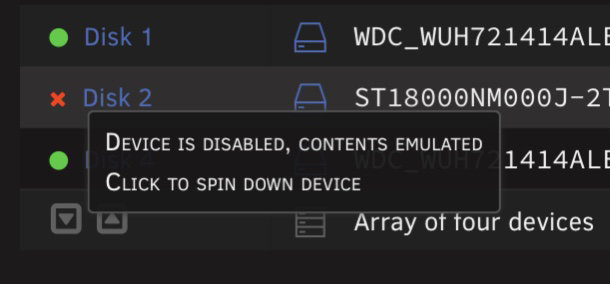
Hi, i have this problem, i rebuild my array and his still here : My SMART test :jamesserver-smart-20230914-1919.zip My diagnostics : jamesserver-diagnostics-20230914-1917.zip Thanks for the help
-
Doesn't work for me with the RX 6800XT
-
1 : We can't use RDP if we don't installe ethernet drivers from virtual CD-ROM 2 : After the restart with the gpu, impossible to install drivers
-
@Kameleon83 Thanks for this soft, it's very great ! His open source ?
-
Same probleme Config 1 LAG : <smbios mode='host'/> + <features> <acpi/> <apic/> <hyperv mode='custom'> <relaxed state='on'/> <vapic state='on'/> <spinlocks state='on' retries='8191'/> <vendor_id state='on' value='none'/> </hyperv> <kvm> <hidden state='on'/> </kvm> </features> + <feature policy='disable' name='hypervisor'/> Config 2 LAG : <smbios mode='host'/> + <features> <acpi/> <apic/> <kvm> <hidden state='on'/> </kvm> </features> + <feature policy='disable' name='hypervisor'/> Config 3 LAG : <smbios mode='host'/> + <features> <acpi/> <apic/> <kvm> <hidden state='on'/> </kvm> <ioapic driver='kvm'/> </features> + <feature policy='disable' name='hypervisor'/>
-
With this option my pc LAG... <smbios mode='host'/> <kvm> <hidden state='on'/> </kvm> <feature policy='disable' name='hypervisor'/> My config : <?xml version='1.0' encoding='UTF-8'?> <domain type='kvm' id='82'> <name>Windows10_MEDIUM_NEW</name> <uuid>cae6e323-ee36-4806-8f64-e01d59036c1a</uuid> <metadata> <vmtemplate xmlns="unraid" name="Windows 10" icon="windows.png" os="windows10"/> </metadata> <memory unit='KiB'>33554432</memory> <currentMemory unit='KiB'>33554432</currentMemory> <memoryBacking> <nosharepages/> </memoryBacking> <vcpu placement='static'>16</vcpu> <cputune> <vcpupin vcpu='0' cpuset='8'/> <vcpupin vcpu='1' cpuset='24'/> <vcpupin vcpu='2' cpuset='9'/> <vcpupin vcpu='3' cpuset='25'/> <vcpupin vcpu='4' cpuset='10'/> <vcpupin vcpu='5' cpuset='26'/> <vcpupin vcpu='6' cpuset='11'/> <vcpupin vcpu='7' cpuset='27'/> <vcpupin vcpu='8' cpuset='12'/> <vcpupin vcpu='9' cpuset='28'/> <vcpupin vcpu='10' cpuset='13'/> <vcpupin vcpu='11' cpuset='29'/> <vcpupin vcpu='12' cpuset='14'/> <vcpupin vcpu='13' cpuset='30'/> <vcpupin vcpu='14' cpuset='15'/> <vcpupin vcpu='15' cpuset='31'/> </cputune> <resource> <partition>/machine</partition> </resource> <os> <type arch='x86_64' machine='pc-i440fx-7.1'>hvm</type> <loader readonly='yes' type='pflash'>/usr/share/qemu/ovmf-x64/OVMF_CODE-pure-efi.fd</loader> <nvram>/etc/libvirt/qemu/nvram/cae6e323-ee36-4806-8f64-e01d59036c1a_VARS-pure-efi.fd</nvram> <smbios mode='host'/> </os> <features> <acpi/> <apic/> <kvm> <hidden state='on'/> </kvm> </features> <cpu mode='host-passthrough' check='none' migratable='on'> <topology sockets='1' dies='1' cores='8' threads='2'/> <cache mode='passthrough'/> <feature policy='disable' name='hypervisor'/> </cpu> <clock offset='localtime'> <timer name='hypervclock' present='yes'/> <timer name='hpet' present='no'/> </clock> <on_poweroff>destroy</on_poweroff> <on_reboot>restart</on_reboot> <on_crash>restart</on_crash> <devices> <emulator>/usr/local/sbin/qemu</emulator> <disk type='file' device='disk'> <driver name='qemu' type='raw' cache='writeback'/> <source file='/mnt/cache/domains/W10/Test/vdisk1.img' index='3'/> <backingStore/> <target dev='hdc' bus='virtio'/> <boot order='1'/> <alias name='virtio-disk2'/> <address type='pci' domain='0x0000' bus='0x00' slot='0x04' function='0x0'/> </disk> <disk type='block' device='disk'> <driver name='qemu' type='raw' cache='writeback'/> <source dev='/dev/disk/by-id/nvme-Samsung_SSD_970_EVO_Plus_500GB_S4EVNF0M883034V' index='2'/> <backingStore/> <target dev='hdd' bus='virtio'/> <alias name='virtio-disk3'/> <address type='pci' domain='0x0000' bus='0x00' slot='0x05' function='0x0'/> </disk> <disk type='file' device='disk'> <driver name='qemu' type='raw' cache='writeback'/> <source file='/mnt/cache/domains/W11/W11-disk-c/vdisk2.img' index='1'/> <backingStore/> <target dev='hde' bus='virtio'/> <alias name='virtio-disk4'/> <address type='pci' domain='0x0000' bus='0x00' slot='0x06' function='0x0'/> </disk> <controller type='pci' index='0' model='pci-root'> <alias name='pci.0'/> </controller> <controller type='virtio-serial' index='0'> <alias name='virtio-serial0'/> <address type='pci' domain='0x0000' bus='0x00' slot='0x03' function='0x0'/> </controller> <controller type='usb' index='0' model='ich9-ehci1'> <alias name='usb'/> <address type='pci' domain='0x0000' bus='0x00' slot='0x07' function='0x7'/> </controller> <controller type='usb' index='0' model='ich9-uhci1'> <alias name='usb'/> <master startport='0'/> <address type='pci' domain='0x0000' bus='0x00' slot='0x07' function='0x0' multifunction='on'/> </controller> <controller type='usb' index='0' model='ich9-uhci2'> <alias name='usb'/> <master startport='2'/> <address type='pci' domain='0x0000' bus='0x00' slot='0x07' function='0x1'/> </controller> <controller type='usb' index='0' model='ich9-uhci3'> <alias name='usb'/> <master startport='4'/> <address type='pci' domain='0x0000' bus='0x00' slot='0x07' function='0x2'/> </controller> <interface type='bridge'> <mac address='52:54:00:7d:e4:59'/> <source bridge='br0'/> <target dev='vnet81'/> <model type='virtio-net'/> <alias name='net0'/> <address type='pci' domain='0x0000' bus='0x00' slot='0x02' function='0x0'/> </interface> <serial type='pty'> <source path='/dev/pts/0'/> <target type='isa-serial' port='0'> <model name='isa-serial'/> </target> <alias name='serial0'/> </serial> <console type='pty' tty='/dev/pts/0'> <source path='/dev/pts/0'/> <target type='serial' port='0'/> <alias name='serial0'/> </console> <channel type='unix'> <source mode='bind' path='/var/lib/libvirt/qemu/channel/target/domain-82-Windows10_MEDIUM_NEW/org.qemu.guest_agent.0'/> <target type='virtio' name='org.qemu.guest_agent.0' state='disconnected'/> <alias name='channel0'/> <address type='virtio-serial' controller='0' bus='0' port='1'/> </channel> <input type='mouse' bus='ps2'> <alias name='input0'/> </input> <input type='keyboard' bus='ps2'> <alias name='input1'/> </input> <audio id='1' type='none'/> <hostdev mode='subsystem' type='pci' managed='yes'> <driver name='vfio'/> <source> <address domain='0x0000' bus='0x0a' slot='0x00' function='0x0'/> </source> <alias name='hostdev0'/> <rom file='/mnt/cache/CacheDevices/Config/GPU/3070/Gainward.RTX3070.8192.201127.rom'/> <address type='pci' domain='0x0000' bus='0x00' slot='0x08' function='0x0'/> </hostdev> <hostdev mode='subsystem' type='pci' managed='yes'> <driver name='vfio'/> <source> <address domain='0x0000' bus='0x0a' slot='0x00' function='0x1'/> </source> <alias name='hostdev1'/> <address type='pci' domain='0x0000' bus='0x00' slot='0x09' function='0x0'/> </hostdev> <hostdev mode='subsystem' type='pci' managed='yes'> <driver name='vfio'/> <source> <address domain='0x0000' bus='0x07' slot='0x00' function='0x1'/> </source> <alias name='hostdev2'/> <address type='pci' domain='0x0000' bus='0x00' slot='0x0a' function='0x0'/> </hostdev> <memballoon model='none'/> </devices> <seclabel type='dynamic' model='dac' relabel='yes'> <label>+0:+100</label> <imagelabel>+0:+100</imagelabel> </seclabel> </domain>
-
Hello, still no definitive solution ? a lot of bullshit for a paying OS
-
Ok, do you have a link please ?
-
Up Sent from my iPhone using Tapatalk
-
Up Sent from my iPhone using Tapatalk
-
It's a real problem my VM crashes several times a day !
-
ok, i have a 3950X and nvidia gpu For GOVERNOR CPU you talk to you about TipsAndTweaks plugin ?
-
yes, i enable CPU isolations yesterday and it's doesn't work I hope someone can provide a solution Can you share with me your hardware configuration and all the plugins and docker you use? Maybe we will find a common denominator.
-
i setup the cpu isolated. I will see if this solves the problem

-
Hi, i have the same probleme. I have 90 docker container and i have the docker folder plugin for organize and the page takes about 20s for load... What is the docker.raw ?
-
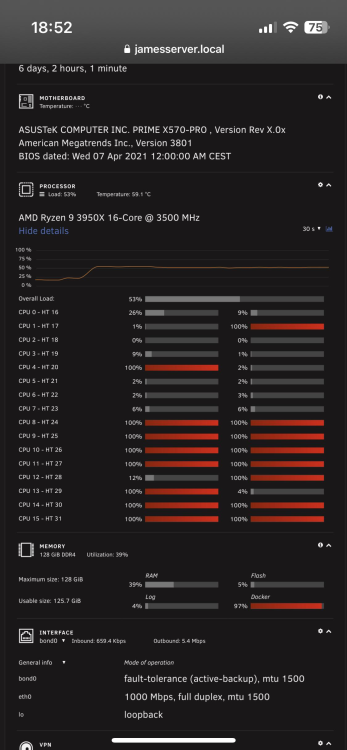
When my VM freez all cpu allowed to the vm are at 100%
-
-
Hi, i have the same thing in my windown 10 vm.
-
Hi, i have a problem, sometimes my gaming vm crash for no reason if anyone have the answer. my log file is attach my VM config : syslog.txt
-
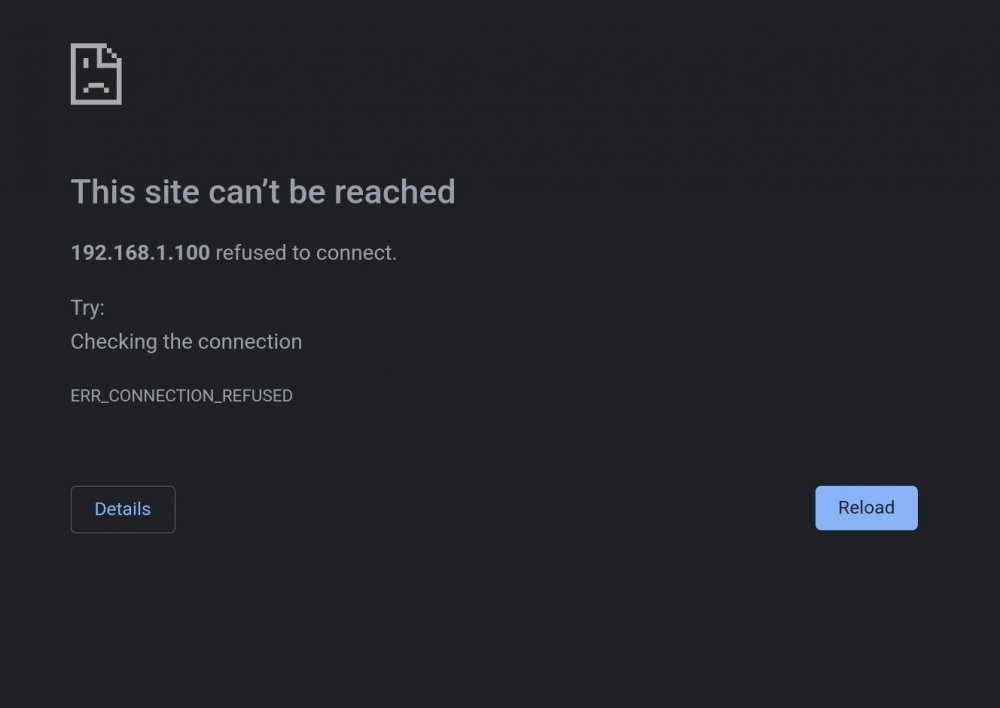
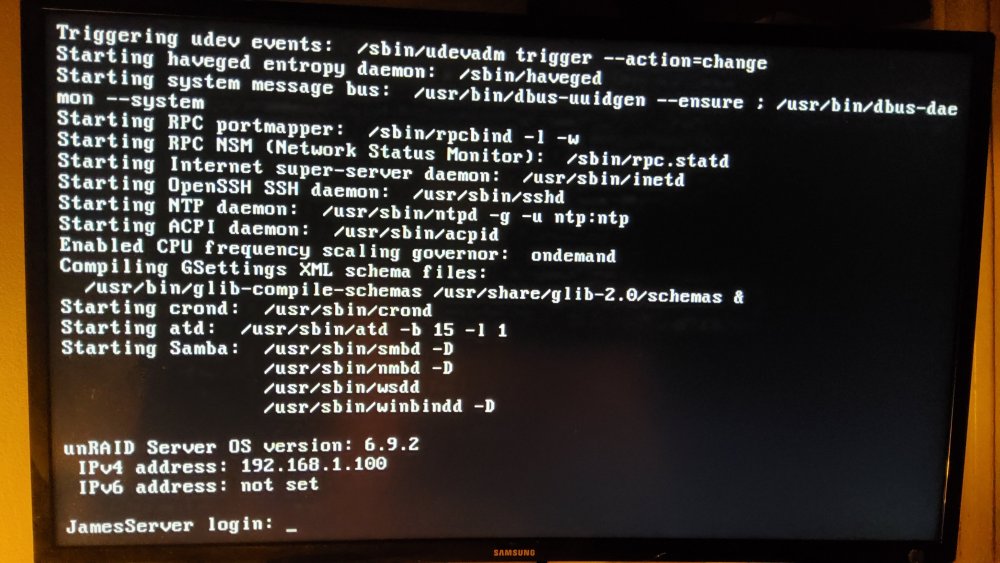
Hi, i restart the server and no i don't have the gui on the web : I have already recreate my usb key Normal boot : connection with cli work (no gui) UNRAID OS GUI Safe Mode (no plugins) : The connection doesn't work Screenshot when UNRAID OS Safe Mode (no plugins, no GUI) :
-
The probleme is my gpu are assigned to the docker...
-
Ok big probleme, i remove the cpu isolation and same probleme 😬
-
Windows10_Low
-
My cpu isolation

-
Hi, i try to isolate a cpu core for my windows vm but when i try to start the vm everything connected to the vm no longer works (vm page, dashboard...) and the vm doesn't start Anyone have a idea please ? I upload my diagnostics generate 2m after start the vm. jamesserver-diagnostics-20220503-1859.zip



