





Tolete
Members
-
Joined
-
Last visited
-
they are all showing DYNAMIC which is the fix you want. So now run: docker exec -it nextcloud php occ maintenance:repair docker exec -it nextcloud php occ db:add-missing-indices docker exec -it nextcloud php occ db:add-missing-columns docker exec -it nextcloud php occ db:add-missing-primary-keys Restart NC that should clear/update the NC error page for you.
-
Short answer is no whith that image as-is. tigerblue77/dell_idrac_fan_controller accepts a single FAN_SPEED value and only flips back to the Dell/BIOS fan profile when the CPU passes CPU_TEMPERATURE_THRESHOLD. It doesn’t have a “ramp by +10%/-10% each interval” algorithm built in. you could test running a small script (container or host cron) that: -Reads temperature every CHECK_INTERVAL (e.g., 60s) -If temp ≥ threshold for the current interval, raise fan speed by +10 (capped) -If temp < threshold for N consecutive intervals (e.g., 2), lower by −10 (floored) -Uses ipmitool raw commands to keep iDRAC in manual and set duty cycle Here’s a drop-in bash script you can run in an Alpine container (or on the Unraid host) that steps fans up/down. It talks to iDRAC over LAN adjust as needed: #!/bin/sh set -eu # ---- CONFIG ---- IDRAC_HOST="${IDRAC_HOST:-192.0.2.10}" # or "local" IDRAC_USER="${IDRAC_USERNAME:-root}" IDRAC_PASS="${IDRAC_PASSWORD:-calvin}" THRESHOLD="${CPU_TEMPERATURE_THRESHOLD:-50}" # °C INTERVAL="${CHECK_INTERVAL:-60}" # seconds STEP="${STEP:-10}" # % per step MIN_SPEED="${MIN_SPEED:-20}" # % MAX_SPEED="${MAX_SPEED:-80}" # % START_SPEED="${START_SPEED:-20}" # % DOWN_STABLE_CYCLES="${DOWN_STABLE_CYCLES:-2}" # stay below threshold this many intervals before stepping down # ---- helpers ---- ipmi() { if [ "$IDRAC_HOST" = "local" ]; then ipmitool -I open "$@" else ipmitool -I lanplus -H "$IDRAC_HOST" -U "$IDRAC_USER" -P "$IDRAC_PASS" "$@" fi } set_manual() { ipmi raw 0x30 0x30 0x01 0x00 >/dev/null 2>&1 || true; } set_auto() { ipmi raw 0x30 0x30 0x01 0x01 >/dev/null 2>&1 || true; } pct_to_hex() { # 0-100 -> 0x00-0x64 v="$1"; [ "$v" -lt 0 ] && v=0; [ "$v" -gt 100 ] && v=100 printf "0x%02x" "$v" } set_speed_pct() { p="$1" hex=$(pct_to_hex "$p") ipmi raw 0x30 0x30 0x02 0xff "$hex" >/dev/null } read_temp() { # Try CPU core avg via 'sensors' (if container/host has it), # else fall back to iDRAC SDR (Inlet Temp). if command -v sensors >/dev/null 2>&1; then t=$(sensors 2>/dev/null | awk '/Core [0-9]+:|Tdie|Package id/ {gsub("[+°C]","",$3); sum+=$3; n++} END{if(n>0) printf "%.0f", sum/n}') [ -n "$t" ] && { echo "$t"; return; } fi ipmi sdr type Temperature | awk '/Inlet.*degrees/ {print int($10); found=1; exit} END{if(!found) print ""}' } # ---- main loop ---- current="$START_SPEED" stable_below=0 echo "Starting stepper: cur=${current}% threshold=${THRESHOLD}°C interval=${INTERVAL}s" set_manual set_speed_pct "$current" trap 'set_auto; echo "Exiting, returned to AUTO."' INT TERM while :; do t=$(read_temp || true) [ -z "$t" ] && { echo "WARN: could not read temp; keeping ${current}%"; sleep "$INTERVAL"; continue; } if [ "$t" -ge "$THRESHOLD" ]; then stable_below=0 next=$(( current + STEP )) [ "$next" -gt "$MAX_SPEED" ] && next="$MAX_SPEED" if [ "$next" -ne "$current" ]; then current="$next" set_manual; set_speed_pct "$current" echo "Temp ${t}°C ≥ ${THRESHOLD}°C -> step UP to ${current}%" else echo "Temp ${t}°C ≥ ${THRESHOLD}°C -> at MAX ${current}%" fi else stable_below=$(( stable_below + 1 )) if [ "$stable_below" -ge "$DOWN_STABLE_CYCLES" ]; then next=$(( current - STEP )) [ "$next" -lt "$MIN_SPEED" ] && next="$MIN_SPEED" if [ "$next" -ne "$current" ]; then current="$next" set_manual; set_speed_pct "$current" echo "Temp ${t}°C < ${THRESHOLD}°C for ${stable_below} cycles -> step DOWN to ${current}%" fi stable_below=0 else echo "Temp ${t}°C < ${THRESHOLD}°C (stability ${stable_below}/${DOWN_STABLE_CYCLES})" fi fi sleep "$INTERVAL" done Run it on Unraid (LAN iDRAC example): docker run -d --name idrac-stepper --restart=unless-stopped \ -e IDRAC_HOST=40.40.10.3 \ -e IDRAC_USERNAME=root -e IDRAC_PASSWORD=calvin \ -e CPU_TEMPERATURE_THRESHOLD=50 \ -e CHECK_INTERVAL=60 \ -e START_SPEED=20 -e STEP=10 -e MIN_SPEED=20 -e MAX_SPEED=80 \ alpine:3.20 sh -c \ "apk add --no-cache ipmitool lm-sensors bash; \ wget -qO /usr/local/bin/stepper.sh https://pastebin.example/idrac-stepper.sh; \ chmod +x /usr/local/bin/stepper.sh; /usr/local/bin/stepper.sh"
-
No problem. No boost in performance or issues noted after update, drive were just happy :) Upgrade can be done on the fly, i did not move my date out of the drives. You could move all data out of drives if you wanted to be extra cautious, once the update is complete you can move the data back. I didn't have any issues and ran everything in place.
-
This means that the oc_filecache table has duplicate row for the same storage and that hash. I would delete it. -check for duplicates SELECT * FROM oc_filecache WHERE storage = 1 AND path_hash = '1bcb3b48154a5423ee962e961cdf6af9'; -decide which you want to keep, and delete the others. Usually I keep the row with the most recent mtime Or the one with larger size. fileid storage path path_hash size mtime 1001 1 files/testfile.txt 1bcb3b48154a5423ee962e961cdf6af9 0 1680000000 1002 1 files/testfile.txt 1bcb3b48154a5423ee962e961cdf6af9 128 1685000000 -delete duplicate I this case in this example it would be 1001 DELETE FROM oc_filecache WHERE fileid = 1001; -that should take care of the error. I would occ files:scan --all from terminal. good luck!
-
what's in there by default?
-
By any chance are you using pfsense? if so, make sure you add to pfsense (Services > DNS Resolver > General Settings > Custom Options) private-domain: "myunraid.net" did you try ssh into the server and remove the ssl yet? 1 ssh root@SERVERIP 2 use_ssl no
-
did we clear the cache?
-
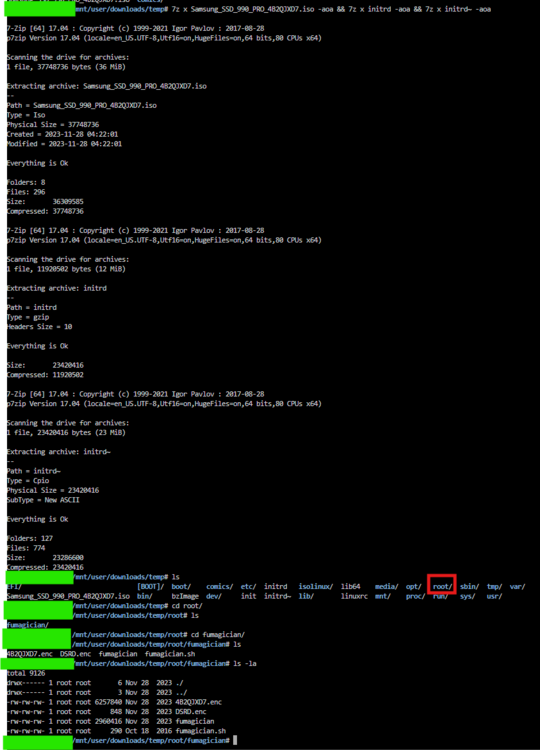
did you use 7z to properly extract the files per the guide? i just did same version for you to test no issues. follow the guide to the the T should work.
-
For those looking to get Xibo 4.2.1 (latest) running. -you will need to remove any current cms or xmr containers/images you currently have running. From the app store install the 'Docker Compose Manager' Create a directory for Xibo CMS mkdir -p /mnt/user/appdata/xibo4/xibo-docker-4.2.1 cd /mnt/user/appdata/xibo4/xibo-docker-4.2.1 Download Xibo CMS Docker Files wget https://github.com/xibosignage/xibo-cms/releases/download/4.2.1/xibo-docker.zip unzip xibo-docker.zip rm xibo-docker.zip Ensure all required directories exist: mkdir -p /mnt/user/appdata/xibo4/{custom,backup,web/theme/custom,library,web/userscripts,ca-certs} Configure the Environment Variables Copy the environment configuration file: cp config.env.template config.env Edit the config.env file: nano config.env Modify the following settings: ## Database Configuration (External MariaDB) MYSQL_HOST=your-mariadb-ip MYSQL_PORT=3306 MYSQL_DATABASE=xibo4 MYSQL_USER=xibo4 MYSQL_PASSWORD=your-secure-password ## XMR Configuration XMR_HOST=tcp://your-mariadb-ip:9505 ## SMTP (Email) Configuration CMS_SMTP_SERVER=smtp.gmail.com:587 [email protected] CMS_SMTP_PASSWORD=your-email-password CMS_SMTP_USE_TLS=YES CMS_SMTP_USE_STARTTLS=YES ## Web Server Configuration CMS_SERVER_NAME=xibo.yourdomain.com ## File Upload Limits (Optional) CMS_PHP_POST_MAX_SIZE=2G CMS_PHP_UPLOAD_MAX_FILESIZE=2G CMS_PHP_MAX_EXECUTION_TIME=300 Configure Docker Compose in Unraid cd /mnt/user/appdata/xibo4/xibo-docker-4.2.1 && nano docker-compose.yml Paste the following docker-compose.yml into the editor: version: "3.8" services: cms-xmr: image: ghcr.io/xibosignage/xibo-xmr:1.0 container_name: xibo-xmr networks: - proxynet ports: - "9505:9505" restart: always mem_limit: 256m env_file: config.env cms-web: image: ghcr.io/xibosignage/xibo-cms:release-4.2.1 container_name: xibo-cms networks: - proxynet depends_on: - cms-xmr volumes: - "/mnt/user/appdata/xibo4/custom:/var/www/cms/custom:Z" - "/mnt/user/appdata/xibo4/backup:/var/www/backup:Z" - "/mnt/user/appdata/xibo4/web/theme/custom:/var/www/cms/web/theme/custom:Z" - "/mnt/user/appdata/xibo4/library:/var/www/cms/library:Z" - "/mnt/user/appdata/xibo4/web/userscripts:/var/www/cms/web/userscripts:Z" - "/mnt/user/appdata/xibo4/ca-certs:/var/www/cms/ca-certs:Z" restart: always environment: - MYSQL_HOST=your-mariadb-ip - MYSQL_PORT=3306 - MYSQL_DATABASE=xibo4 - MYSQL_USER=xibo4 - MYSQL_PASSWORD=your-secure-password - XMR_HOST=tcp://your-mariadb-ip:9505 - CMS_USE_MEMCACHED=true - MEMCACHED_HOST=cms-memcached - CMS_SMTP_SERVER=smtp.gmail.com:587 - [email protected] - CMS_SMTP_PASSWORD=your-email-password - CMS_SMTP_USE_TLS=YES - CMS_SMTP_USE_STARTTLS=YES env_file: config.env ports: - "8976:80" mem_limit: 1g cms-memcached: image: memcached:alpine container_name: xibo-memcached networks: - proxynet command: memcached -m 15 restart: always mem_limit: 100M cms-quickchart: image: ianw/quickchart container_name: xibo-quickchart networks: - proxynet restart: always networks: proxynet: external: true Save and exit (CTRL+X, then Enter). Now, run: cd /mnt/user/appdata/xibo4/xibo-docker-4.2.1 docker compose up -d Once running, open your browser and visit: http://your-unraid-ip:8976 Default Login: Username: xibo_admin Password: password Change the password after logging in.

-
You're seeing ERROR 1193 (HY000): Unknown system variable for innodb_large_prefix and innodb_file_format because these settings have been deprecated and removed in MariaDB 10.3+.
-
did you click the rescan link?
-
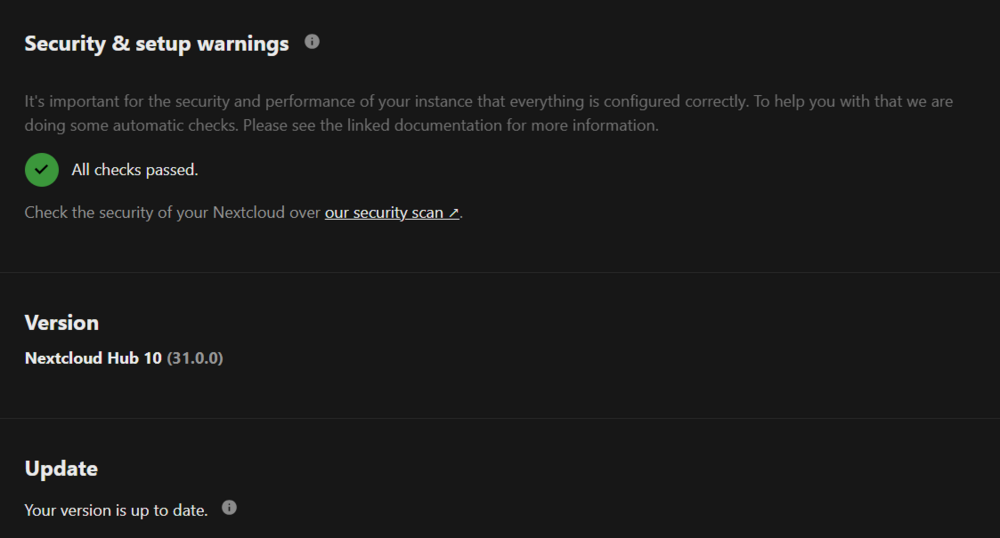
Hello, for anyone having ROW_FORMAT db errors on nextcloud, here is the fix for you. Nextcloud error Incorrect row format found in your database. ROW_FORMAT=Dynamic offers the best database performances for Nextcloud. Please update row format on the following list: oc_accounts, oc_accounts_data, oc_activity, oc_activity_mq, oc_addressbookchanges, oc_addressbooks, oc_appconfig, oc_authorized_groups, oc_authtoken, oc_bruteforce_attempts, oc_calendar_appt_bookings, oc_calendar_appt_configs, oc_calendar_invitations, oc_calendar_reminders, ..... Open a terminal on your Unraid server and run: docker exec -it mariadb mysql -u root -p Enter your MariaDB root password when prompted. Select the Nextcloud Database: USE nextcloud; (Replace nextcloud with your actual Nextcloud database name if different.) Update the ROW_FORMAT for All Affected Tables: Run the following command: SET GLOBAL innodb_large_prefix = 1; SET GLOBAL innodb_file_format = BARRACUDA; SET GLOBAL innodb_file_per_table = 1; Update All Affected Tables to ROW_FORMAT=DYNAMIC Run this command to generate the required ALTER statements: SELECT CONCAT('ALTER TABLE ', table_name, ' ROW_FORMAT=DYNAMIC;') FROM information_schema.tables WHERE table_schema = 'nextcloud'; (Replace nextcloud with your actual Nextcloud database name if different.) This will generate ALTER TABLE statements. Copy the output and execute each ALTER TABLE ... command manually. (your list will vary) ALTER TABLE oc_onlyoffice_filekey ROW_FORMAT=DYNAMIC; ALTER TABLE oc_preferences ROW_FORMAT=DYNAMIC; ALTER TABLE oc_privacy_admins ROW_FORMAT=DYNAMIC; ALTER TABLE oc_profile_config ROW_FORMAT=DYNAMIC; ALTER TABLE oc_properties ROW_FORMAT=DYNAMIC; ALTER TABLE oc_ratelimit_entries ROW_FORMAT=DYNAMIC; ALTER TABLE oc_recent_contact ROW_FORMAT=DYNAMIC; ALTER TABLE oc_richdocuments_assets ROW_FORMAT=DYNAMIC; ALTER TABLE oc_richdocuments_direct ROW_FORMAT=DYNAMIC; ALTER TABLE oc_richdocuments_template ROW_FORMAT=DYNAMIC; ALTER TABLE oc_richdocuments_wopi ROW_FORMAT=DYNAMIC; ALTER TABLE oc_rocket_file_chats ROW_FORMAT=DYNAMIC; ALTER TABLE oc_rocket_users ROW_FORMAT=DYNAMIC; ALTER TABLE oc_schedulingobjects ROW_FORMAT=DYNAMIC; ALTER TABLE oc_share ROW_FORMAT=DYNAMIC; ALTER TABLE oc_share_external ROW_FORMAT=DYNAMIC; ALTER TABLE oc_storages ROW_FORMAT=DYNAMIC; Then restart Mariadb and Nextcloud docker restart mariadb docker restart nextcloud -This is the way.
-
Restart is not required but If the UI does not reflect the upgrade a restart should do it.
-
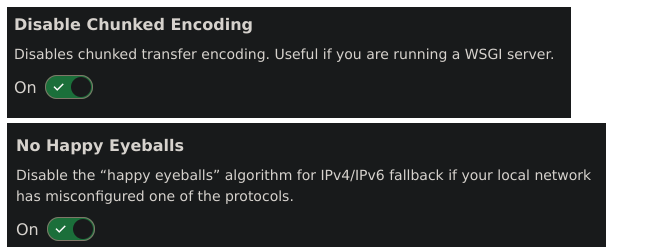
anyone getting a 'blank white page' on Docmost when trying to tunnel out with CF? enable these two Done.
-
Would Cloudflare Tunnel work to avoid opening ports. http://SERVERIPADDRESS:21115 > rustdesk.mydomain.com Then connecting RustDesk clients, use rustdesk.mydomain.com as the server address, so traffic is routed through the Cloudflare Tunnel?





