





marionza
Members
-
Joined
-
Last visited
Everything posted by marionza
-
I replaced the disk Claude identified, ran an error-correcting sync, and then a non-correcting sync came back clean.
-
What would you try first?
-
Do you see anything else in my diagnostics that could be causing this issue?
-
What I've tried: Replaced SATA power and data cables to parity drive, which was showing ATA errors in syslog. ATA errors no more, but still getting parity sync errors. Ran a correcting parity check - corrected 1M+ errors, but new errors appeared immediately on the next non-correcting check. Reseated all RAM and removed the 7th DIMM - went from 7 DIMMs (asymmetric) to 6 DIMMs in 3 matched pairs. Mobo is Supermicro X10SRi-F. Claude noted the errors are deterministic - same starting sector (8,637,552) with contiguous 8-byte stepping pattern, identical across every parity check regardless of RAM configuration. This reproducibility across reboots and RAM changes ruled out RAM as the cause. No way to verify if this is just an AI hallucination. Claude identified disk5 (TOSHIBA HDWE140 874DK07HF58D, sdw) as suspect - SMART report shows 38 logged ICRC errors, UDMA CRC Error Count of 30, and 57,805 power-on hours. Every other drive on the same mpt2sas_cm1 controller shows 0 UDMA CRC errors, isolating the issue to sdw specifically rather than the controller or cabling. Current theory: sdw is intermittently returning corrupted data over the SATA interface due to CRC errors, causing deterministic parity mismatches at the same sector region on every check. The drive is also extremely aged at 57,805 hours. Planned next steps: Use Unbalance to move all data off sdw, unassign it from the array, run a fresh correcting then non-correcting parity check to confirm whether errors clear. If clean, replace sdw with a new drive. If errors persist after sdw is removed, further investigation needed. Am I missing something? ptero-diagnostics-20260503-1818.zip
-
No. I'm going to give in to MailStore soon.
-
After much tinkering, here is what I've learned about trying to automate fan control on a Supermicro X10SRI-F: For context, I have 5 Arctic P12 fans plugged into fan connectors 1 through 5. My CPU cooler, a Noctua NH-L9i, is plugged into the FAN_A connector. I was never able to control the CPU fan with the IPMI plugin. However, I was able to partially control fans 1 through 5. But after enabling fan control, all of the fans would spin to max after 2 minutes. According to ChatGPT, this is because the BMC Watchdog Timer changes BMC fan control back to auto. Long story short, I had to install the IPMCFG utility and control the fans with a script, which I've attached. It's very important to note that if you set the P12 fans below 20% RPM, the BMC fan mode will revert to auto. If you try to set the Noctua fan (NF-A9x14) below 30%, the BMC fan mode will revert to auto. The script runs every minute and re-asserts the BMC fan mode to manual each run. This board only has 2 fan control channels; one for fans 1 through 5, and one for Fan A. I'm sorry I couldn't figure out how to use the plugin. Hopefully this info and script will help others. I have not yet tested the script under load, so use at your own risk. I'll update this post if I modify the script or find any bugs. @JorgeB @SimonF x10sri-f_fan_control.sh
-
PWM 4-pin Arctic P12s
-
When the following was logged,... 2025-04-11 08:23:59 Fan:Temp, FAN1234( 2%):HDD Temp(Spundown), FANA( 2%):CPU Temp(28C) ...my drives were all spundown (as indicated). And yet, the fans cooling them were spinning pretty fast (not 2%) with sensor readings of 1700 RPM.
-
What is weird is that even though it says the fans are spun down, these are the actual sensor readings.

-
2025-04-10 14:03:07 Fan:Temp, FAN1234(80%):HDD Temp(38C), FANA( 4%):CPU Temp(31C) 2025-04-10 14:04:08 Fan:Temp, FAN1234(80%):HDD Temp(38C), FANA( 2%):CPU Temp(30C) 2025-04-10 14:04:18 Fan:Temp, FAN1234(80%):HDD Temp(38C), FANA( 4%):CPU Temp(31C) 2025-04-10 14:04:49 Fan:Temp, FAN1234(80%):HDD Temp(38C), FANA( 2%):CPU Temp(30C) 2025-04-10 14:05:20 Fan:Temp, FAN1234(80%):HDD Temp(38C), FANA( 4%):CPU Temp(31C) 2025-04-10 14:06:51 Fan:Temp, FAN1234(80%):HDD Temp(38C), FANA( 2%):CPU Temp(30C) 2025-04-10 14:07:02 Fan:Temp, FAN1234(80%):HDD Temp(38C), FANA( 4%):CPU Temp(31C) 2025-04-10 14:07:42 Fan:Temp, FAN1234(80%):HDD Temp(38C), FANA( 2%):CPU Temp(30C) 2025-04-10 14:07:53 Fan:Temp, FAN1234(80%):HDD Temp(38C), FANA( 4%):CPU Temp(31C) 2025-04-10 14:08:13 Fan:Temp, FAN1234(80%):HDD Temp(38C), FANA( 2%):CPU Temp(30C) 2025-04-10 14:08:23 Fan:Temp, FAN1234(80%):HDD Temp(38C), FANA( 4%):CPU Temp(31C) 2025-04-10 14:08:54 Fan:Temp, FAN1234(80%):HDD Temp(38C), FANA( 2%):CPU Temp(30C) 2025-04-10 14:09:04 Fan:Temp, FAN1234(80%):HDD Temp(38C), FANA( 4%):CPU Temp(31C) 2025-04-10 14:09:35 Fan:Temp, FAN1234(80%):HDD Temp(38C), FANA( 2%):CPU Temp(30C) 2025-04-10 14:20:36 Fan:Temp, FAN1234(80%):HDD Temp(38C), FANA( 4%):CPU Temp(31C) 2025-04-10 14:21:37 Fan:Temp, FAN1234(80%):HDD Temp(38C), FANA( 2%):CPU Temp(30C) 2025-04-10 14:27:33 Fan:Temp, FAN1234(80%):HDD Temp(38C), FANA( 4%):CPU Temp(31C) 2025-04-10 14:29:05 Fan:Temp, FAN1234(80%):HDD Temp(38C), FANA( 2%):CPU Temp(30C) 2025-04-10 14:31:58 Fan:Temp, FAN1234(80%):HDD Temp(38C), FANA( 4%):CPU Temp(31C) 2025-04-10 14:34:00 Fan:Temp, FAN1234(80%):HDD Temp(38C), FANA( 2%):CPU Temp(30C) 2025-04-10 14:35:01 Fan:Temp, FAN1234(80%):HDD Temp(38C), FANA( 4%):CPU Temp(31C) 2025-04-10 14:36:33 Fan:Temp, FAN1234(80%):HDD Temp(38C), FANA( 2%):CPU Temp(30C) 2025-04-10 14:36:43 Fan:Temp, FAN1234(80%):HDD Temp(38C), FANA( 4%):CPU Temp(31C) 2025-04-10 14:38:45 Fan:Temp, FAN1234(80%):HDD Temp(38C), FANA( 2%):CPU Temp(30C) 2025-04-10 15:05:32 Fan:Temp, FAN1234(90%):HDD Temp(39C), FANA( 2%):CPU Temp(30C) 2025-04-10 15:09:26 Fan:Temp, FAN1234(90%):HDD Temp(39C), FANA( 4%):CPU Temp(31C) 2025-04-10 15:10:27 Fan:Temp, FAN1234(90%):HDD Temp(39C), FANA( 2%):CPU Temp(30C) 2025-04-10 16:15:43 Fan:Temp, FAN1234(90%):HDD Temp(39C), FANA( 4%):CPU Temp(31C) 2025-04-10 16:16:03 Fan:Temp, FAN1234(90%):HDD Temp(39C), FANA( 2%):CPU Temp(30C) 2025-04-10 16:52:20 Fan:Temp, FAN1234(61%):HDD Temp(36C), FANA( 2%):CPU Temp(30C) 2025-04-10 17:29:17 Fan:Temp, FAN1234(61%):HDD Temp(36C), FANA( 4%):CPU Temp(31C) 2025-04-10 17:30:18 Fan:Temp, FAN1234(61%):HDD Temp(36C), FANA( 2%):CPU Temp(30C) 2025-04-10 17:30:59 Fan:Temp, FAN1234(70%):HDD Temp(37C), FANA( 2%):CPU Temp(30C) 2025-04-10 17:32:30 Fan:Temp, FAN1234(70%):HDD Temp(37C), FANA( 4%):CPU Temp(31C) 2025-04-10 17:33:11 Fan:Temp, FAN1234(70%):HDD Temp(37C), FANA( 2%):CPU Temp(30C) 2025-04-10 17:33:21 Fan:Temp, FAN1234(70%):HDD Temp(37C), FANA( 4%):CPU Temp(31C) 2025-04-10 17:33:52 Fan:Temp, FAN1234(70%):HDD Temp(37C), FANA( 2%):CPU Temp(30C) 2025-04-10 17:34:02 Fan:Temp, FAN1234(70%):HDD Temp(37C), FANA( 4%):CPU Temp(31C) 2025-04-10 17:34:22 Fan:Temp, FAN1234(70%):HDD Temp(37C), FANA( 2%):CPU Temp(30C) 2025-04-10 17:34:33 Fan:Temp, FAN1234(70%):HDD Temp(37C), FANA( 4%):CPU Temp(31C) 2025-04-10 17:35:24 Fan:Temp, FAN1234(70%):HDD Temp(37C), FANA( 2%):CPU Temp(30C) 2025-04-10 17:35:34 Fan:Temp, FAN1234(70%):HDD Temp(37C), FANA( 4%):CPU Temp(31C) 2025-04-10 17:35:54 Fan:Temp, FAN1234(70%):HDD Temp(37C), FANA( 2%):CPU Temp(30C) 2025-04-10 17:36:04 Fan:Temp, FAN1234(70%):HDD Temp(37C), FANA( 4%):CPU Temp(31C) 2025-04-10 17:36:15 Fan:Temp, FAN1234(70%):HDD Temp(37C), FANA( 2%):CPU Temp(30C) 2025-04-10 17:41:00 Fan:Temp, FAN1234(70%):HDD Temp(37C), FANA( 4%):CPU Temp(31C) 2025-04-10 17:42:11 Fan:Temp, FAN1234(70%):HDD Temp(37C), FANA( 2%):CPU Temp(30C) 2025-04-10 17:42:21 Fan:Temp, FAN1234(70%):HDD Temp(37C), FANA( 4%):CPU Temp(31C) 2025-04-10 17:42:52 Fan:Temp, FAN1234(70%):HDD Temp(37C), FANA( 2%):CPU Temp(30C) 2025-04-10 17:45:04 Fan:Temp, FAN1234(70%):HDD Temp(37C), FANA( 4%):CPU Temp(31C) 2025-04-10 17:47:16 Fan:Temp, FAN1234(70%):HDD Temp(37C), FANA( 2%):CPU Temp(30C) 2025-04-10 17:47:27 Fan:Temp, FAN1234(70%):HDD Temp(37C), FANA( 4%):CPU Temp(31C) 2025-04-10 17:48:17 Fan:Temp, FAN1234(70%):HDD Temp(37C), FANA( 2%):CPU Temp(30C) 2025-04-10 17:48:28 Fan:Temp, FAN1234(70%):HDD Temp(37C), FANA( 4%):CPU Temp(31C) 2025-04-10 17:48:58 Fan:Temp, FAN1234(70%):HDD Temp(37C), FANA( 2%):CPU Temp(30C) 2025-04-10 17:57:27 Fan:Temp, FAN1234(70%):HDD Temp(37C), FANA( 4%):CPU Temp(31C) 2025-04-10 17:58:18 Fan:Temp, FAN1234(70%):HDD Temp(37C), FANA( 2%):CPU Temp(30C) 2025-04-10 17:58:28 Fan:Temp, FAN1234(70%):HDD Temp(37C), FANA( 4%):CPU Temp(31C) 2025-04-10 17:58:48 Fan:Temp, FAN1234(70%):HDD Temp(37C), FANA( 2%):CPU Temp(30C) 2025-04-10 17:58:59 Fan:Temp, FAN1234(70%):HDD Temp(37C), FANA( 4%):CPU Temp(31C) 2025-04-10 17:59:09 Fan:Temp, FAN1234(70%):HDD Temp(37C), FANA( 2%):CPU Temp(30C) 2025-04-10 18:01:01 Fan:Temp, FAN1234(70%):HDD Temp(37C), FANA( 4%):CPU Temp(31C) 2025-04-10 18:02:12 Fan:Temp, FAN1234(70%):HDD Temp(37C), FANA( 2%):CPU Temp(30C) 2025-04-10 18:02:22 Fan:Temp, FAN1234(70%):HDD Temp(37C), FANA( 4%):CPU Temp(31C) 2025-04-10 18:02:43 Fan:Temp, FAN1234(70%):HDD Temp(37C), FANA( 2%):CPU Temp(30C) 2025-04-10 18:02:53 Fan:Temp, FAN1234(70%):HDD Temp(37C), FANA( 4%):CPU Temp(31C) 2025-04-10 18:03:03 Fan:Temp, FAN1234(70%):HDD Temp(37C), FANA( 2%):CPU Temp(30C) 2025-04-10 18:07:38 Fan:Temp, FAN1234(61%):HDD Temp(36C), FANA( 2%):CPU Temp(29C) 2025-04-10 18:44:04 Fan:Temp, FAN1234(61%):HDD Temp(36C), FANA( 4%):CPU Temp(31C) 2025-04-10 18:44:14 Fan:Temp, FAN1234(70%):HDD Temp(37C), FANA( 4%):CPU Temp(31C) 2025-04-10 18:44:35 Fan:Temp, FAN1234(70%):HDD Temp(37C), FANA( 2%):CPU Temp(30C) 2025-04-10 18:44:45 Fan:Temp, FAN1234(70%):HDD Temp(37C), FANA( 4%):CPU Temp(31C) 2025-04-10 18:44:55 Fan:Temp, FAN1234(70%):HDD Temp(37C), FANA( 2%):CPU Temp(30C) 2025-04-10 19:21:53 Fan:Temp, FAN1234(51%):HDD Temp(35C), FANA( 2%):CPU Temp(29C) 2025-04-10 19:59:31 Fan:Temp, FAN1234(80%):HDD Temp(38C), FANA( 2%):CPU Temp(28C) 2025-04-10 20:37:09 Fan:Temp, FAN1234(61%):HDD Temp(36C), FANA( 2%):CPU Temp(29C) 2025-04-10 21:13:45 Fan:Temp, FAN1234(80%):HDD Temp(38C), FANA( 2%):CPU Temp(29C) 2025-04-10 21:52:24 Fan:Temp, FAN1234(61%):HDD Temp(36C), FANA( 2%):CPU Temp(28C) 2025-04-10 22:31:03 Fan:Temp, FAN1234(80%):HDD Temp(38C), FANA( 2%):CPU Temp(29C) 2025-04-10 23:10:43 Fan:Temp, FAN1234(70%):HDD Temp(37C), FANA( 2%):CPU Temp(29C) 2025-04-10 23:50:23 Fan:Temp, FAN1234(80%):HDD Temp(38C), FANA( 2%):CPU Temp(29C) 2025-04-11 00:31:04 Fan:Temp, FAN1234(70%):HDD Temp(37C), FANA( 2%):CPU Temp(28C) 2025-04-11 01:48:22 Fan:Temp, FAN1234(80%):HDD Temp(38C), FANA( 2%):CPU Temp(28C) 2025-04-11 02:27:01 Fan:Temp, FAN1234(61%):HDD Temp(36C), FANA( 2%):CPU Temp(28C) 2025-04-11 03:43:17 Fan:Temp, FAN1234(70%):HDD Temp(37C), FANA( 2%):CPU Temp(28C) 2025-04-11 04:59:34 Fan:Temp, FAN1234(61%):HDD Temp(36C), FANA( 2%):CPU Temp(28C) 2025-04-11 06:15:51 Fan:Temp, FAN1234(70%):HDD Temp(37C), FANA( 2%):CPU Temp(28C) 2025-04-11 07:34:09 Fan:Temp, FAN1234(80%):HDD Temp(38C), FANA( 2%):CPU Temp(27C) 2025-04-11 08:12:48 Fan:Temp, FAN1234(61%):HDD Temp(36C), FANA( 2%):CPU Temp(27C) 2025-04-11 08:23:59 Fan:Temp, FAN1234( 2%):HDD Temp(Spundown), FANA( 2%):CPU Temp(28C)
-
Do these screenshots help, @SimonF and @JorgeB?
-
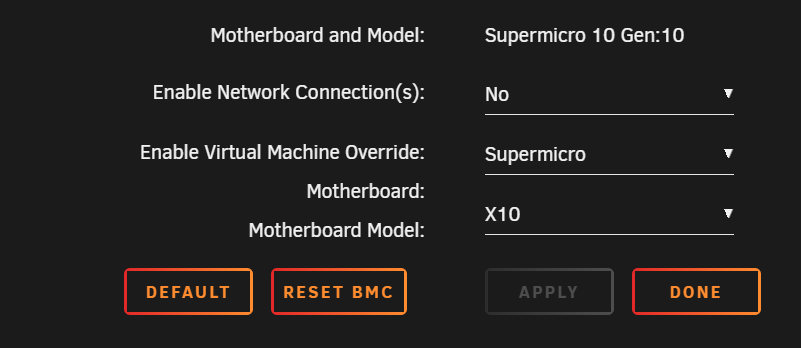
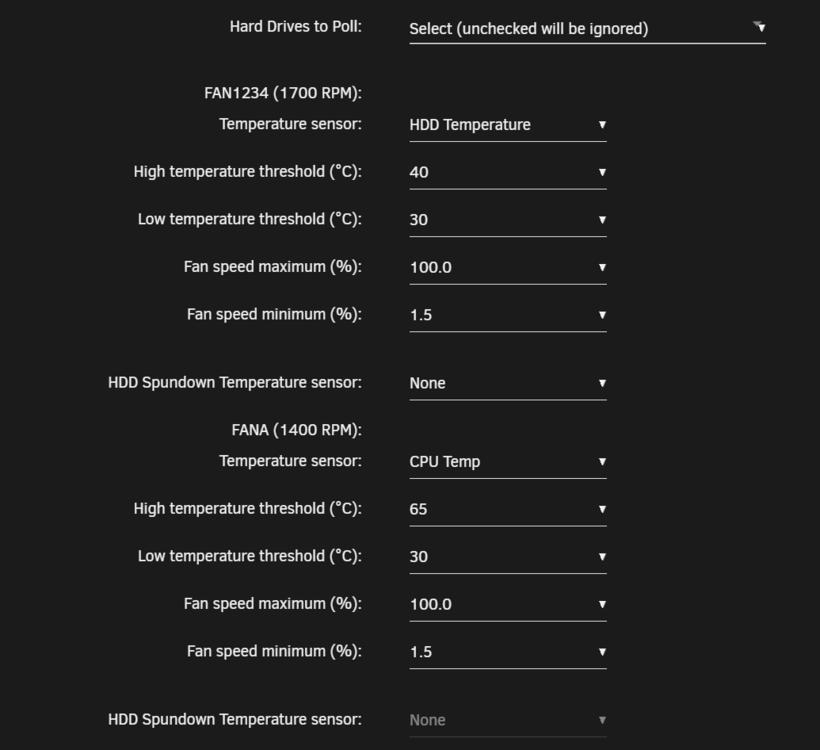
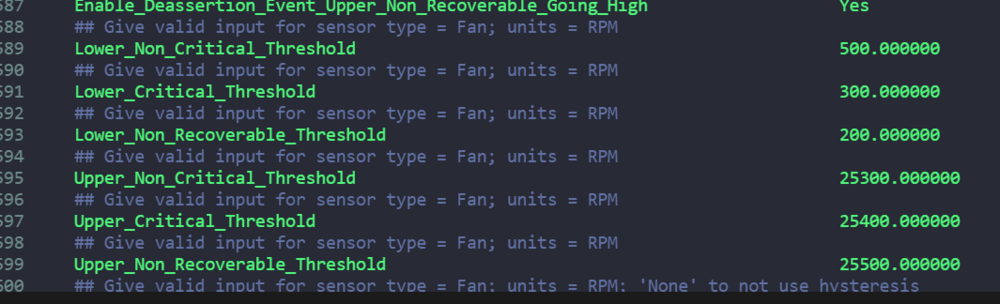
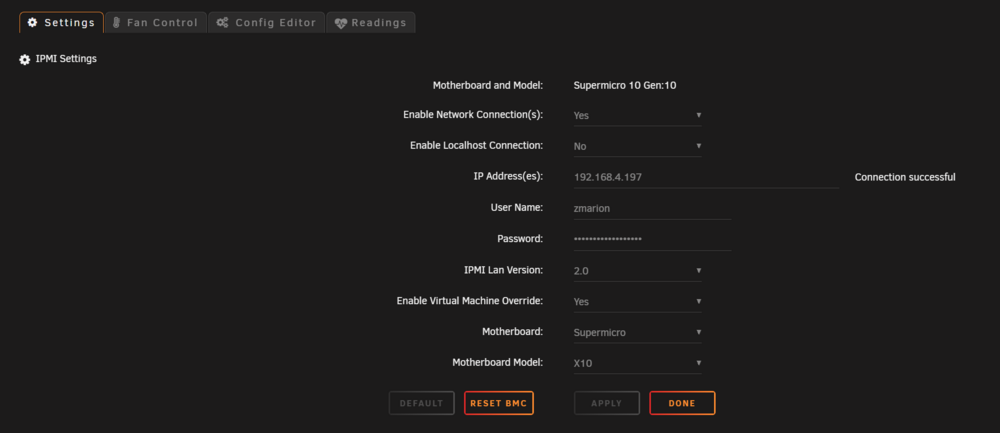
After removing the network connection, the Fan Settings section under Fan Control returned. However, I am not able (or cannot figure out) how to disable the Virtual Machine Override. For now, I have it set to Supermicro X10 as my board is an X10SRI-F. As I'm sure you're aware, I had to set Fan Control to No to be able to remove the network connection. Before I set Fan Control back to Yes, All of the fans would spin down and then up continuously. This behavior stopped after I set Fan Control to Yes. With Fan Control set to Yes, all of the fans' speeds seem to be pinned. FANA cools my CPU and FAN1-5 cool my HDD array drives. Here's what that looks like on the Sensors page. Here are my Fan Settings. Here are the sensor settings for all my fans. Section 1009_FAN1 ## Possible values: Yes/No Enable_All_Event_Messages Yes ## Possible values: Yes/No Enable_Scanning_On_This_Sensor Yes ## Possible values: Yes/No Enable_Assertion_Event_Lower_Critical_Going_Low Yes ## Possible values: Yes/No Enable_Assertion_Event_Lower_Non_Recoverable_Going_Low Yes ## Possible values: Yes/No Enable_Assertion_Event_Upper_Critical_Going_High Yes ## Possible values: Yes/No Enable_Assertion_Event_Upper_Non_Recoverable_Going_High Yes ## Possible values: Yes/No Enable_Deassertion_Event_Lower_Critical_Going_Low Yes ## Possible values: Yes/No Enable_Deassertion_Event_Lower_Non_Recoverable_Going_Low Yes ## Possible values: Yes/No Enable_Deassertion_Event_Upper_Critical_Going_High Yes ## Possible values: Yes/No Enable_Deassertion_Event_Upper_Non_Recoverable_Going_High Yes ## Give valid input for sensor type = Fan; units = RPM Lower_Non_Critical_Threshold 500.000000 ## Give valid input for sensor type = Fan; units = RPM Lower_Critical_Threshold 300.000000 ## Give valid input for sensor type = Fan; units = RPM Lower_Non_Recoverable_Threshold 200.000000 ## Give valid input for sensor type = Fan; units = RPM Upper_Non_Critical_Threshold 25300.000000 ## Give valid input for sensor type = Fan; units = RPM Upper_Critical_Threshold 25400.000000 ## Give valid input for sensor type = Fan; units = RPM Upper_Non_Recoverable_Threshold 25500.000000 ## Give valid input for sensor type = Fan; units = RPM; 'None' to not use hysteresis Positive_Going_Threshold_Hysteresis None ## Give valid input for sensor type = Fan; units = RPM; 'None' to not use hysteresis Negative_Going_Threshold_Hysteresis None EndSection Ideally, I'd like the fans cooling my hard drives to turn off when the drives are spun down or below 30 degrees.

-
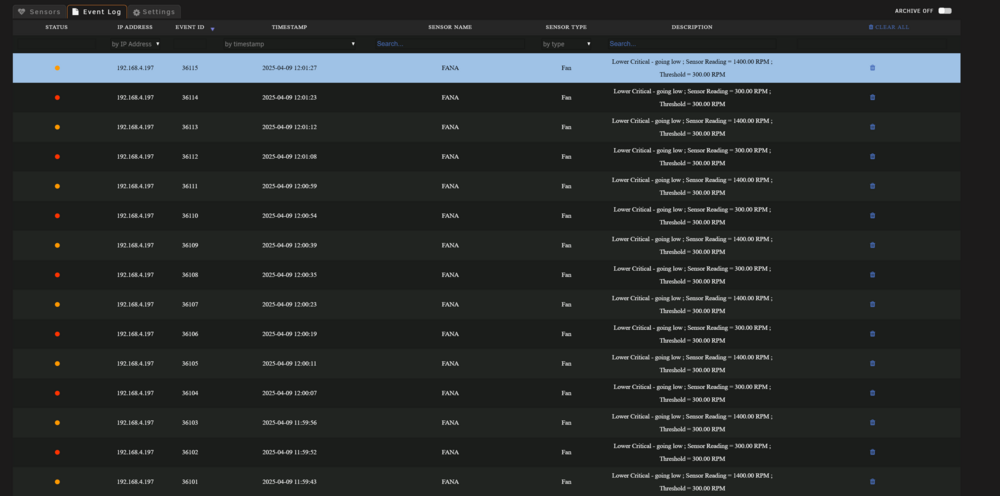
Not to pile on... but this is also happening: I know there is much discussion about the Noctua fans. Is the fix to alter these settings?
-
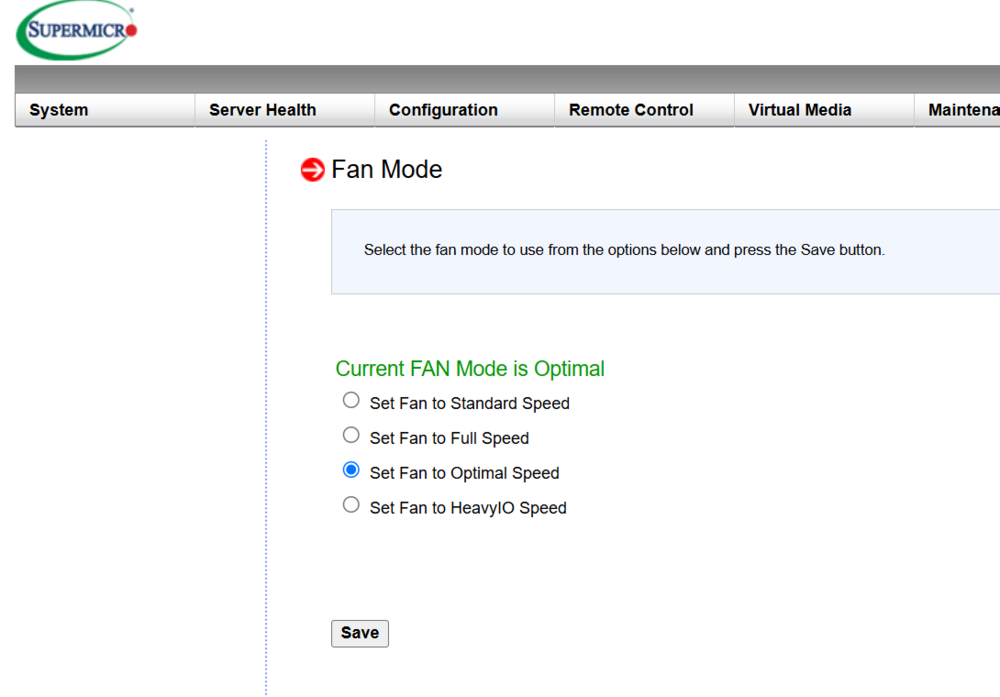
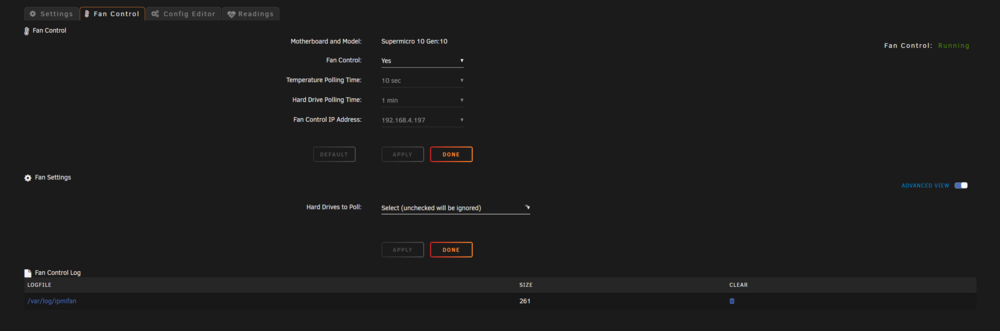
Just the Fan Settings section is blank. Advanced is enabled. IPMI fan mode set to optimal, but I've also tried standard and full.
-
Here you go:
-
First, thank you for supporting this great plugin. I apologize if this question has already been asked and answered. I have a Supermicro X10SRI-F. I have successfully connected the IPMI Tools plugin to the board's IPMI. I have enabled fan control. However, I do not see any fan control settings. I have tried changing the board's fan modes (standard, full, optimal). Do I need to restart my machine for the settings to show back up? My fans are Arctic P12s. My goal is to use the fan control settings to change fan speeds based on sensors temp readings of HDDs and CPU separately. Thanks in advance for your support!
-
When you say "before it's corrected," do you mean before I use rsync to move the data backed up to the array back onto the share, which is now pointing to the new pool with new drives? Thank you!
-
I have a zfs pool consisting of 8x 2TB Fanxiang SSDs that keep getting reallocated sector errors and failing. To replace all of the drives, I have purchased 8 new Crucial MX500s. Originally, I was going to exchange and resilver each drive one-by-one. However, I discovered that the drives differ in capacity slightly (2.05TB vs 2TB) when trying to do the first swap. Every night, I make sure the pool is backed up to the main array via a cron job. There are several pool-only shares. I do not have enough SATA ports to connect all 16 SDDs (8 old and 8 new) at once and just let the mover do its thing. Given these constraints, what is the best process to swap out the old drives with the new ones while maintaining my shares? I was thinking I would... Unplug all of the old drives and leave the old pool alone (now with 8 missing drives). Plug in all the new drives and create a new pool. Point shares that were pointing to the old pool to the new pool. Use rsync to move the backup up pool data on the array to the new pool. My hesitation is about step 3. What happens when you change a share that is pointing to an offline pool to an online pool? Thanks in advance for any guidance on how to accomplish this drive swap!
-
When I went to reseat the HBA, I noticed it was touching the CPU heatsink. I also flashed the HBA's firmware about a week ago. I'm hoping the former is the issue and not the latter. On reboot, the array returned to normal. As always, THANK YOU!
-
I have an array disk with read errors. What should I do? pterodactyl-diagnostics-20250218-0514.zip
-
That did it. Thank you!
-
pool: cache id: 3975473903692486089 state: ONLINE status: Some supported features are not enabled on the pool. (Note that they may be intentionally disabled if the 'compatibility' property is set.) action: The pool can be imported using its name or numeric identifier, though some features will not be available without an explicit 'zpool upgrade'. config: cache ONLINE raidz1-0 ONLINE sdv1 ONLINE sdu1 ONLINE sdt1 ONLINE sds1 ONLINE sdo1 ONLINE sdr1 ONLINE sdq1 ONLINE sdp1 ONLINE
-
I flashed my two HBAs (LSI2008s) successfully (or so I think). I have 8 array HDDs attached to one of the HBAs and 8 SSDs as part of a raid-z1 pool attached to the other. When I brought my server back online, all of the array HDD drives were there, but the 8 SSDs were listed as unassigned and my z-pool ("Cache") is waiting to be assigned drives. I didn't want to do anything before checking in here. Both HBAs and all the drives are recognized on boot. diags.zip
-
Are you talking about replacing the backup server with a disk shelf? If so, the backup server will be placed at my friend's home. What does this mean? What does this mean? Thanks!
-
I plan to upgrade my main Unraid box and repurpose the old parts into a remote backup server. I would appreciate a sanity check on my upgrade plan before pulling the trigger to buy new parts. My budget max is around $800. I use my server to store video editing projects/media and run Plex, Immich, and Paperless. Soon, I would like to use it as a security camera NVR and an alarm system through Home Assistant. Home Assistant will also be driving all of the smart devices in my home. This is my current build: Case: Fractal Design Define 7 XL Motherboard: Supermicro X9SCM-F CPU: Intel Xeon E3-1230 v2 Heatsink: Artic Freezer 12 RAM: 4x Micron DDR3 1600 ECC 8GB (32GB total) Main Array: 13 HDDs with dual parity - 2x12TB, 7x6TB, 4x4TB (58TB total) Cache: 8x2TB SSDs in RAID-Z2 (12TB total) HBA: 2x LSI 9201-8i 10Gbe NIC: AQC107S GPU: GeForce GTX 980 (doesn't do H265 transcodes) Power Supply: Corsair RM850x First, I will move the motherboard, CPU, RAM, and one of the HBAs into a remote backup box with this build: Additional lifetime Unraid license [$250] Case: Saggitarius 8-bay case [~$165 new] Motherboard: Supermicro X9SCM-F [already own] CPU: Intel Xeon E3-1230 v2 [already own] Heatsink: Artic Freezer 12 [already own] RAM: 4x Micron DDR3 1600 ECC 8GB (32GB total) [already own] Main array: 8 HDDs with single parity - 8x4TB (28TB total) [already own] Cache: Samsung 850 EVO SSD 500GB [already own] HBA: LSI 9201-8i [already own] GPU: None 10Gbe NIC: None Power Supply: Corsair RM650 [already own] Finally, the main machine upgrade. I'm torn between building around an Intel Xeon E5-2600 v1, v2, v3, or v4 with a preference for v2. I have been avoiding the AM4 socket because I can't find a cheap motherboard with ECC, IPMI, and at least 3 PCIe slots. I am struggling with which CPU to choose. Here's a comparison chart for the v2s and one for the v4s. This is what I'm leaning towards: Case: Fractal Design Define 7 XL (fits up to EATX) [already own] Motherboard: Supermicro X9SRL-F [~$100 used] CPU: Intel Xeon e5-2680 v2 [~$10 used] Heatsink: Noctua ND-D15 [~$50 used] RAM: 2x Samsung DDR3 1600 ECC 32GB (64GB total) [~$24 used] Main Array: 13 HDDs with dual parity - 2x12TB, 7x6TB, 4x4TB (58TB total) [already own] Cache: 8x2TB SSDs in RAID-Z2 (12TB total) [already own] HBA: LSI 9201-16i [~$100 used] The case supports 18 HDDs, which I plan to eventually fill. With those 18 drives and my cache (8 drives), I need to support 26 SATA3 drives in total. With the motherboard's 10 onboard SATA3 ports + this HBA, I'll have exactly 26. 10Gbe NIC: AQC107S [already own] GPU: Nvidia Quadro P400 [~$30 used] Power Supply: Corsair RM850x [already own] Total cost (including backup server expenses): $734 Given the above, I'm wondering how much RAM I really need, so I just assumed 2 sticks of 32GB for a total of 64GB. I also don't know if I'm short-changing myself on the GPU and should upgrade to a P2000. My Plex library consists mainly of H264 1080p files, but I'd like to watch certain content in 4K in the future. Here's an alternate build that is $100 more and has higher power usage but better performance. Case: Fractal Design Define 7 XL (fits up to EATX) [already own] Motherboard: Supermicro X10SRi-F [~$100 used] CPU: Intel Xeon E5-2660 v4 [~$20 used] Heatsink: Noctua ND-D15 [~$50 used] RAM: 2x Crucial DDR4 2400 ECC 32GB (64GB total) [~$60 used] Main Array: 13 HDDs with dual parity - 2x12TB, 7x6TB, 4x4TB (58TB total) [already own] Cache: 8x2TB SSDs in RAID-Z2 (12TB total) [already own] HBA: LSI 9201-16i [~$100 used] 10Gbe NIC: AQC107S [already own] GPU: Nvidia Quadro P2000 [~$50 used] Power Supply: Corsair RM850x [already own] Total cost (including backup server expenses): $830 Now that I'm writing this all out, it seems like I shouldn't cheap out and just build around the v4 CPU. But my questions remain: Which CPU should I choose given my use case with video editing and a handful of dockers? How much RAM do I realistically need? Should I buy a different configuration instead of just 2 sticks? It seems silly not to spend $20 more for the Quadro P2000, right? Thank you for any input!


