marionza
Members
-
Joined
-
Last visited
Everything posted by marionza
-
I will replace the power and SATA on only the two parity drives, correct? Also, in what log file did you see the ATA errors? Thank you!
-
I noticed that while the diags were downloading, it held for a beat on the parity logs. pterodactyl-diagnostics-20240731-1200.zip
-
Should I stop the sync or download diags while the sync is running slow?
-
After this suggestion, I realized I recently added 16GB of RAM to my system, but I ran a few parity 0 error syncs since. My main array is connected via an HBA with 8 SAS cables and 6 SATA cables to ports on the mobo. I tried to ensure these were all connected properly, as I read that this could be the culprit. I then started a parity sync without corrections, beginning with 0 errors. Then, I ran a memtest, which passed. When I booted back up and ran another parity sync without corrections, it started with 1 error. Also, the estimated speed is very slow, around 800K/sec. What do you think I should try next? Should I consider swapping out all of my SAS and SATA cables? Any advice is greatly appreciated!
-
I replaced my two 6TB parity disks with two 12TB disks in preparation for growing my array. One of the 6TB former parity disks replaced a disk with errors, and the other expanded the array as a new disk. Then, I ran a parity sync with 0 errors. A few weeks later, I ran another parity sync with 370 errors. Parity sync finished today with 2608 errors. For all 3 syncs, Write Corrections was checked. I started a sync with Write Corrections unchecked, and it began with 10 errors. This is my first time dealing with parity sync errors. Can I get some advice on how best to proceed with troubleshooting? Thank you! pterodactyl-diagnostics-20240729-1641.zip
-
I have been trying for the past 3 days with no luck. See my post on r/Unraid: https://www.reddit.com/r/unRAID/s/0YZxsjX71B
-
I am on a Windows machine and my wife is on a Mac. Using the GUI, I have created 2 users (one for her and one for me) that both have access to a number of the same shares. However, we have had a variety of issues concerning her computer not being able to read or write to files that I added to shares. I noticed in SMB Extras that only my username is listed in the "valid users" and the "write list." My question is... are the user permissions set in the GUI at all affected by the SMB Extras settings if both computers are using the SMB protocol to access the server via the OS' built in file browser: Finder (Mac) / File Explorer (Win). Is there any benefit to adding her name to the "valid users" and "write list." Or, should I remove my username so none are on the list? Thanks!
-
Fantastic! Thank you for setting this up. I am having an issue, and I was wondering if had a thought. The container will not start, and the following error is listed in the logs. Config directory is not writable: /opt/youtrack/conf There is a proposed solution here that requires changing permissions. These are my installation settings: -d --name='YouTrack' --net='bridge' -e TZ="America/Los_Angeles" -e HOST_OS="Unraid" -e HOST_HOSTNAME="Pterodactyl" -e HOST_CONTAINERNAME="YouTrack" -e 'PUID'='99' -e 'PGID'='100' -l net.unraid.docker.managed=dockerman -l net.unraid.docker.webui='http://[IP]:[PORT:8080]' -l net.unraid.docker.icon='https://raw.githubusercontent.com/Balya/unraid-templates/main/YouTrack/icon-200.png' -p '8765:8080/tcp' -v '/mnt/user/appdata/YouTrack/data/':'/opt/youtrack/data/':'rw' -v '/mnt/user/appdata/YouTrack/logs/':'/opt/youtrack/logs/':'rw' -v '/mnt/user/appdata/YouTrack/backups/':'/opt/youtrack/backups/':'rw' -v '/mnt/user/appdata/YouTrack/conf/':'/opt/youtrack/conf/':'rw' 'jetbrains/youtrack:2022.3.62571' Is this the correct fix? Update: The solution I linked above fixed my issue, but I had to change the permissions recursively on the entire YouTrack directory.
-
That solved it!
-
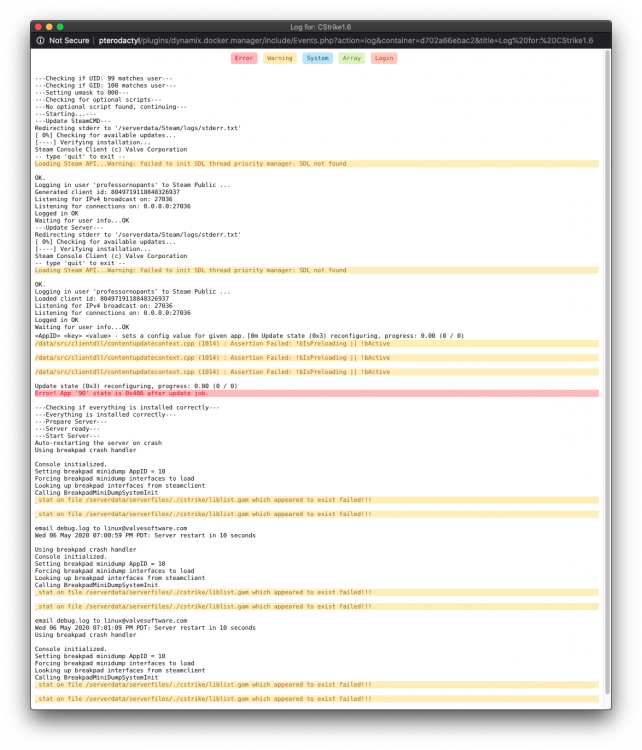
Trying to install CS 1.6. Any thoughts on this?