






DeadDevil6210
Members
-
Joined
-
Last visited
Everything posted by DeadDevil6210
-
Hi Everyone, I'm on unraid 7.0.0 Beta 3 and have the same issues as some people described with dropped packages, Reverting back to the unraid default doesn't help either it could be even worse, I Have two rtl8125 controllers on a B550 and Z690 mobo, The B550 is stable and has been running for days although dropped packages appaer alot. The z690 version isn't stable when tdarr node from B550 mobo runs the z690 crashes (only nic because I see the node on my pc (second node) work fine witch seems strange (the z690 is the tdarr server as well) Is there a known issue with RTL8125 cards on unraid 7?
-
Did you ever get this script to work on user shares? i have succesfully converted my cache to zfs and used the script to convert all docker folders to datasets but my media and isos share for example won't convert propperly,
-
Thor2002: https://github.com/thor2002ro/unraid_kernel/releases Thor has some custom kernels that work with ARC. I use his kernel and my A380 is fully functional in Plex. I didn't get the card to work with unmanic or tdarr but I use the UHD770 for that.
-
Sorry for the confusion, My power measurements come from an eve energy wall plug. And the gpu statistics plugin was set to a quick refresh to at least see some performance metrics. But i've already set it back to the default 1000 ms because I now know it works.
-
I Installed the 6.5rc2 kernel today and my goodness my A380 finally comes to use after so long :). I had to set the gpu statistics plugin to refres every 500ms instead of 1000ms to see some info on the dashboard. But both my A380 and UHD770 now are useable for plex and are being utilized when needed. (so i left the --devices=/dev/dri inplace without calling a specific card) Power consumption so far: gpu IDLE: 25W (I have to check the bios settings again for the arc card to go low power mode) GPU in use (50% load) 49W
-
Thnx alot and now I have another problem, By following the guide, I'm at the last step of preparing went through everything flawless after your tip. But now the make oldconfig doesn't work. I was hoping the guido would give some more troubleshooting tips. for newby's like me.
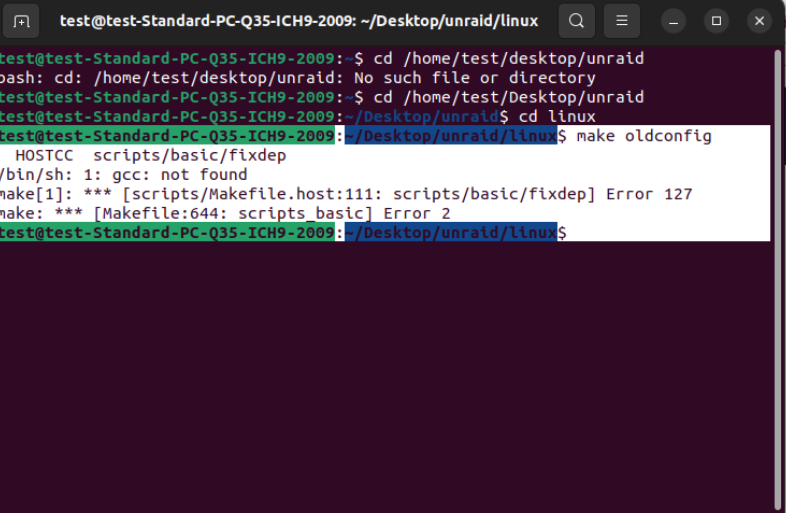
-
At this moment I have that kernel installed but since it is an RC it's a bit buggy, yesterday my server randomly full crashed and it had no real reason it was idle. I use plex and also am trying to get the A380 to work with plex but plex just crashes if I prefer the arc a380 above the uhd770. I'm gonna try to compile the kernell as described in de custom kernel 6.12.x link
-
I attached a screenshot of terminal, What ever I do the Unsquashfs doesn't do anything?

-
I'm trying out the linked guido to make my own custom kernel, I'm just using 6.12.16 like the guide says but at the point where I have to do the following commands (Using terminal on the server) wget https://unraid-dl.sfo2.cdn.digitaloceanspaces.com/stable/unRAIDServer-6.12.2-x86_64.zip unzip unRAIDServer-6.12.2-x86_64.zip -d unRAIDServer cd unRAIDServer unsquashfs -d patches bzfirmware src cd .. cp -r unRAIDServer/patches/src/linux-*-Unraid/. linux/ I strand on the "unsquashfs -d patches bzfirmware src" step it says command not found what am I doing wrong? Error message: bash: unsquashfs: command not found cp: cannot stat 'unRAIDServer/patches/src/linux-*-Unraid/.': No such file or directory
-
Oke so this weekend i had some free time to spend and checked out support on unraid 6.12 rc2. I started of fresh by reinstalling my flash drive and putting back a copy of the config folder on to it. First some information for those reading my post for the first time: General Hardware: i5 12600K 64GB 3600Mhz ram Storage config: 5x 16TB array 3x pci-e 4.0 nvme 1tb cache Power usage: With a GTX 1070 my pwoer consumption on transcoding was: 214W With the ARC A380 and UHD 770 working it's 110W Transcode software used: tdarr + node At this moment i'm very limited on speed by the hdd's that have all the media and I'm not using any forms of ram transcoding at this moment. But the power efficiency of the arc card starts to show. When tdarr is finished on the current queue I will add some new media on the cache and see how far I can strecht the arc card on performance. Performance Numbers with media on HDD: UHD 770 = around 300 FPS total ARC A380 = around 200 - 220 FPS total Performance Numbers with media on SSD: UHD 770 = T.B.A. ARC A380 = T.B.A. Now let's move on to what I did: So i have a fresh unraid 6.12 RC2 install (copied back the config folder on the flash drive) While I was installing the fresh flash drive I added the line to the i915.conf file inside the modprobe.d folder "options i915 force_probe=56a5" (be aware that the value 56a5 = intel arc a380 i have the asrock challenger itx brand) After that I booted up the server and under tools --> system devices I checked if the driver was loaded for the arc card. Then I went on to check ls /dev/dri in terminal and It shows card0 card1 renderD128 renderD129 (card0 + 128 = udh 770 and card1 + 129 is intel arc in my case. I checked this by opening intel_gpu_top in terminal. In tdarr docker server + node I changed the extra parameter to dev/dri/cardX (where X is the number corresponding to the card you want to use) so in my case i added to tidarr /dev/dri/card0 and to tidarr_node /dev/dri/card1. In side tidarr I use the qsv plugin from boosh and the arc a380 options are set to qsv as well and it just works. I will keep you guys posted on some performance numbers when i have something loaded onto the cache This is al H265 btw no AV1 as I see no advantage on power consumption (most clients i have don't support av1 at this time) and the boost in hdd space is not needed at this moment so I hope that in the future when av1 is more mainstream I will move to it.
-
For anybody upgraded to 6.12 RC1: make sure that if you want to use the arc card in unraid it self to do the probe i915 other wise the driver won't be loaded. If you want to passthrough to a vm this isn't needed as unraid won't load anything for the arc card. (linux kernel 6.2 makes the probe rule unneeded as arc is stable in this kernel. I have downgrade from the thor custom kernel to 6.12 RC1 to see how it goes I will update her in the coming weekend on my experience Also some had success in vm by turning of the hyper-v setting and other like me didn't even need to vfio-bind the card to get it working. My only problem so far is that with a w11 vm the card still doesn't get rebar so the performance is awefull in tdarr compared to what the card should be capable of. I'm gonna try ubuntu 22.04 this weekend to see how that goes. (i'm also hoping thor will release a linux 6.3 rc kernel voor unriad 6.12 but this is a waiting procedure)
-
It's not a support issue, Thor2002 didn't remove anything, It was just my network.cfg file on the flash drive that got messed up (removing it and setting up new one with fresh static ip solvbed the issue). (So if it works with official 6.11.5 build it wil work with his kernel) DHCP was broken on 6.2 RC5/6 don't know if you now start using the final build if that's the same. And be sure to backup the files you are going to overwrite, If something els messes up you can just put back the original files and your back to where you left before.
-
@Skitalscould you maybe apply the patch to thor2002 unraid kernel with linux 6.2 rc8 kernel? It would be awesome for those who have an Intel arc dgpu since those cards need linux 6.1 at least for propper support. https://github.com/thor2002ro/unraid_kernel/releases
-
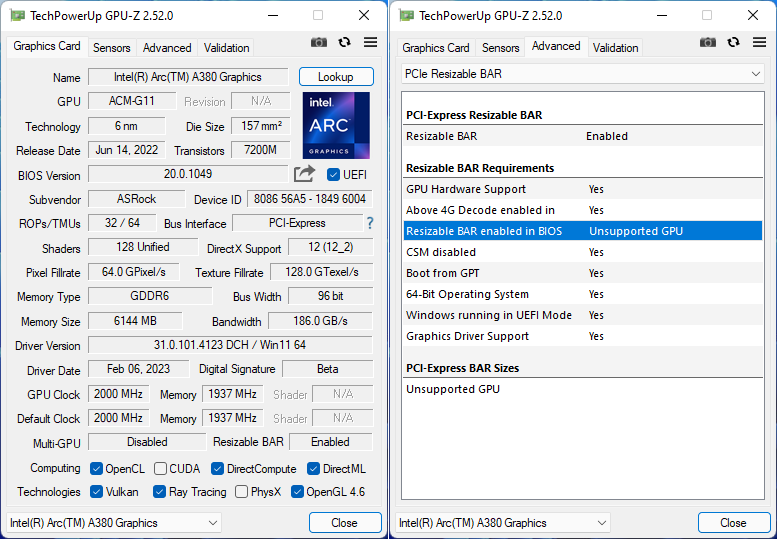
I'm running the intel arc card on thor2002 unraid build with linux kernel 6.2 rc8 and in docker I'm still having issues in combination with the intel alder lake igpu it has to be turned off in bios to let de arc gpu take over. But in W11 vm it's now completly good working. with both the gpu and audio part passed through to a vm. Unraid OS doesn't freeze/completly crash anymore and releases gpu correctly I can also then start it up. The problem I now experience is that I can't get resizable bar enabled in the vm. Has anyone got any luck with that? the performance of the arc gpu is even worse than IGPU in docker (unmanic/tdarr) My vm XML (Everything underlined is added by me): <?xml version='1.0' encoding='UTF-8'?> <domain type='kvm' xmlns:qemu='http://libvirt.org/schemas/domain/qemu/1.0'> <name>Windows 11</name> <uuid>d1c530e9-4a0e-61ee-23f8-1fe867967361</uuid> <description>ARC TEST</description> <metadata> <vmtemplate xmlns="unraid" name="Windows 11" icon="windows11.png" os="windowstpm"/> </metadata> <memory unit='KiB'>16777216</memory> <currentMemory unit='KiB'>16777216</currentMemory> <memoryBacking> <nosharepages/> </memoryBacking> <vcpu placement='static'>8</vcpu> <cputune> <vcpupin vcpu='0' cpuset='4'/> <vcpupin vcpu='1' cpuset='5'/> <vcpupin vcpu='2' cpuset='6'/> <vcpupin vcpu='3' cpuset='7'/> <vcpupin vcpu='4' cpuset='8'/> <vcpupin vcpu='5' cpuset='9'/> <vcpupin vcpu='6' cpuset='10'/> <vcpupin vcpu='7' cpuset='11'/> </cputune> <os> <type arch='x86_64' machine='pc-i440fx-7.1'>hvm</type> <loader readonly='yes' type='pflash'>/usr/share/qemu/ovmf-x64/OVMF_CODE-pure-efi-tpm.fd</loader> <nvram>/etc/libvirt/qemu/nvram/d1c530e9-4a0e-61ee-23f8-1fe867967361_VARS-pure-efi-tpm.fd</nvram> </os> <features> <acpi/> <apic/> <hyperv mode='custom'> <relaxed state='on'/> <vapic state='on'/> <spinlocks state='on' retries='8191'/> <vendor_id state='on' value='none'/> </hyperv> </features> <cpu mode='host-passthrough' check='none' migratable='on'> <topology sockets='1' dies='1' cores='4' threads='2'/> <cache mode='passthrough'/> </cpu> <clock offset='localtime'> <timer name='hypervclock' present='yes'/> <timer name='hpet' present='no'/> </clock> <on_poweroff>destroy</on_poweroff> <on_reboot>restart</on_reboot> <on_crash>restart</on_crash> <devices> <emulator>/usr/local/sbin/qemu</emulator> <disk type='file' device='disk'> <driver name='qemu' type='raw' cache='writeback'/> <source file='/mnt/user/domains/Windows 11/vdisk1.img'/> <target dev='hdc' bus='virtio'/> <boot order='1'/> <address type='pci' domain='0x0000' bus='0x00' slot='0x04' function='0x0'/> </disk> <controller type='usb' index='0' model='ich9-ehci1'> <address type='pci' domain='0x0000' bus='0x00' slot='0x07' function='0x7'/> </controller> <controller type='usb' index='0' model='ich9-uhci1'> <master startport='0'/> <address type='pci' domain='0x0000' bus='0x00' slot='0x07' function='0x0' multifunction='on'/> </controller> <controller type='usb' index='0' model='ich9-uhci2'> <master startport='2'/> <address type='pci' domain='0x0000' bus='0x00' slot='0x07' function='0x1'/> </controller> <controller type='usb' index='0' model='ich9-uhci3'> <master startport='4'/> <address type='pci' domain='0x0000' bus='0x00' slot='0x07' function='0x2'/> </controller> <controller type='pci' index='0' model='pci-root'/> <controller type='virtio-serial' index='0'> <address type='pci' domain='0x0000' bus='0x00' slot='0x03' function='0x0'/> </controller> <interface type='bridge'> <mac address='52:54:00:43:48:33'/> <source bridge='br0'/> <model type='virtio-net'/> <address type='pci' domain='0x0000' bus='0x00' slot='0x02' function='0x0'/> </interface> <serial type='pty'> <target type='isa-serial' port='0'> <model name='isa-serial'/> </target> </serial> <console type='pty'> <target type='serial' port='0'/> </console> <channel type='unix'> <target type='virtio' name='org.qemu.guest_agent.0'/> <address type='virtio-serial' controller='0' bus='0' port='1'/> </channel> <input type='tablet' bus='usb'> <address type='usb' bus='0' port='1'/> </input> <input type='mouse' bus='ps2'/> <input type='keyboard' bus='ps2'/> <tpm model='tpm-tis'> <backend type='emulator' version='2.0' persistent_state='yes'/> </tpm> <audio id='1' type='none'/> <hostdev mode='subsystem' type='pci' managed='yes'> <driver name='vfio'/> <source> <address domain='0x0000' bus='0x03' slot='0x00' function='0x0'/> </source> <address type='pci' domain='0x0000' bus='0x00' slot='0x05' function='0x0'/> </hostdev> <hostdev mode='subsystem' type='pci' managed='yes'> <driver name='vfio'/> <source> <address domain='0x0000' bus='0x04' slot='0x00' function='0x0'/> </source> <address type='pci' domain='0x0000' bus='0x00' slot='0x06' function='0x0'/> </hostdev> <hostdev mode='subsystem' type='usb' managed='no'> <source> <vendor id='0x1532'/> <product id='0x0043'/> </source> <address type='usb' bus='0' port='2'/> </hostdev> <hostdev mode='subsystem' type='usb' managed='no'> <source> <vendor id='0x1532'/> <product id='0x022a'/> </source> <address type='usb' bus='0' port='3'/> </hostdev> <memballoon model='none'/> </devices> <qemu:commandline> <qemu:arg value='-fw_cfg'/> <qemu:arg value='opt/ovmf/X-PciMmio64Mb,string=65536'/> </qemu:commandline> </domain> Edit: Fixed bios to Q35-7.1 stil no resizable bar according to ARC control but gpu-z in the vm says Resizable Bar is Enabled but if you click on that for detailed view it says Unsupported GPU
-
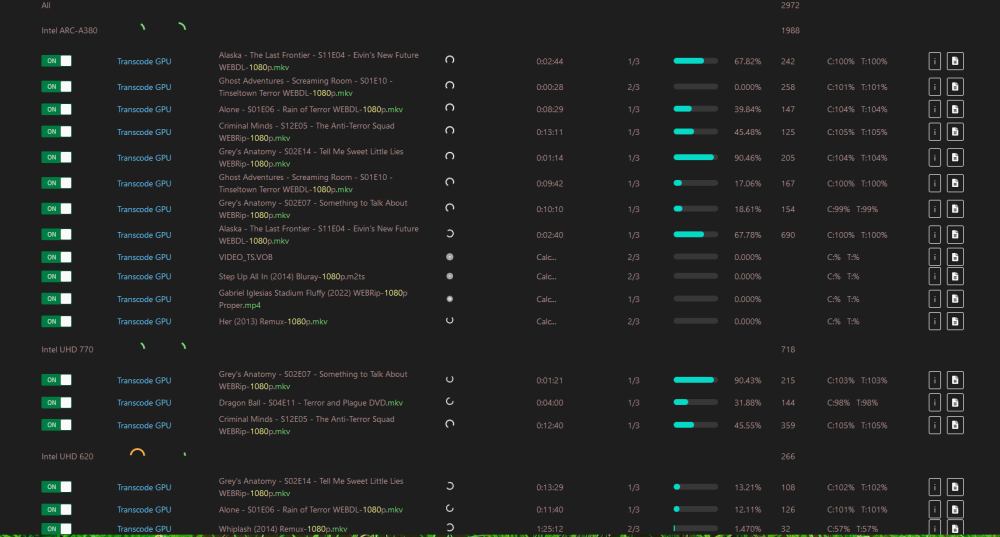
the arc gpu as far as I get it can do 6 transcodes h264 to h265 with out a problem, 6 movies of a lengt of 3 hours are transcoded within 30 minutes, My UHD770 can do 3 and then the time on transcoding increases compared to 2 streams but I find the 10+ mins on that one not so bad.
-
So i wrote down a little tutorial it's in the attachments, For those needing gvt-g I have not tested the need of this but the arc gpu doesn;t work with intel gvt-g installed thnx to the blacklist.i915 line in modeprobe.d/i915.conf My platform also is not supported so i didn't test this part maybe someone can do it and help at that end. And if you follow my tutorial and come across problems feel free to ask for help by dm or on the forum, If you want a deeper dive on my problems with getting this to work feel free to ask. I did not mention a lot of them only the one that kept me busy for two days. And last I'm still testing to the arc gpu is only working in tdarr at this point. And only HEVC no AV1 tested yet, In the coming days I will start testing other dockers and find differences to get good support. And a question to you guys, What driver does the arc gpu need? If i apt-list --installed on the tdarr container I see theese installed: mesa-va-drivers intel-media-va-driver-non-free/focal,now 22.2.2+i699.3~u20.04 (i thought this is the one arc needs) Cutom Kernel tutorial.docx
-
The software used is Tdarr, it's one of the only if not the only docker that supports the ARC gpu, Unmanic, and Plex are not working at this moment and I think that is because the intel-media-va-driver-non-free is missing from those dockers.
-
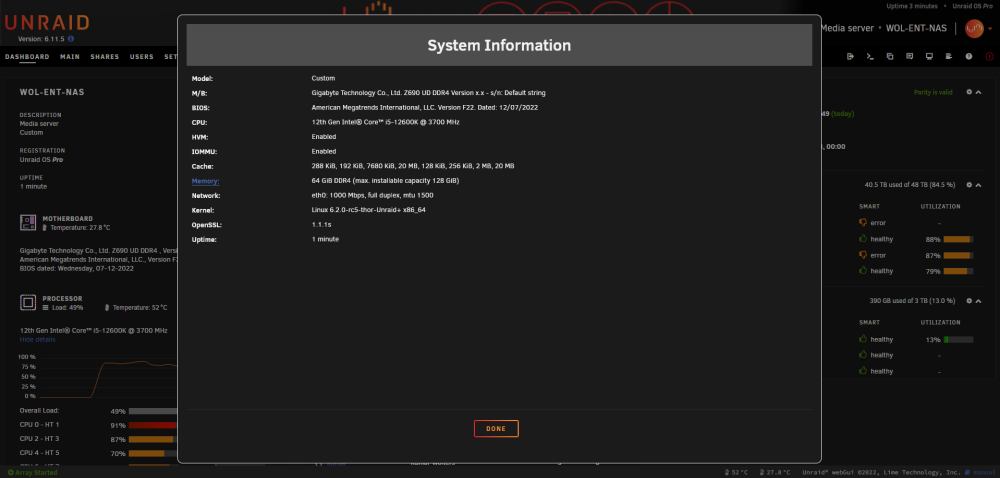
Hi Guys, I don't know if this can help us but thor2002 has some unraid kernels ready on variouse 6.x.x linux kernels, My problem is that my servers RTL8125 (Realtek 2.5GBe nic) stops working, I also will receive my A380 tomorrow and was looking in to the arc support. Hope some have succes with the 6.x.x kernels from thor. I will also start testing again tomorrow with a different machine that has the RTL8125 and an intel nic for backup (not the machine that will get the A380) https://github.com/thor2002ro/unraid_kernel/releases I also used thor's kernels when Alder lake iGPU was still not officialy supported and that worked great! but now My nic is not supported with his kernels so I hope others with other nics have more luck. Edit 26-01: I tested some more with another Intel based dual gb nic card and the custom kernels from thor also don't work with that, I will check on a different machine with a clean unraid stick to see what whil happen Edit 27-01: I finally got the kernel to work, See print screen below, Also The DG2 card shows up in terminal: ls /dev/dri. Now let's see how far we can get this to work. I also dit de syslinux edit for i915 to force probe the dg2 card. The main problem was my netowrk.cfg file, for some reason the official unraid 6.11.5 worked normal but replaceing the files from thor2002's kernels broke everything. I took a plain version of the network.cfg file from the manual install zip and changed all neccessary netowrk info accordingly and now I have hopefully a working kernel with the A380 GPU EDIT 28-01 I got everything to work, The ARC A380 is converting H264 to h265 files at this moment. After the changes of yesterday I didn't change to much I'm checking my notes and will make a good Short tutorial for those wanting to get on some support in docker

-
The ICR component is part of the plex container, I'm running the linuxserver.io version with plex 1.27.2.5929. If you open console of your plex container and enter the following: apt-get install intel-opencl-icd It will check if the ICR is up to date or not in my case it is but be aware that updating packages of dockers this way may break your container so be aware of that and be sure to have a backup.
-
No I did not need to load any firmware. I'm using 5.18rc5 kernel.
-
I'm not running anny of the plugins mentioned by SimonF and everything works great Took the gues on this custom kernel yesterday, It is still working grreat here (Plex Transcoding) server is up for more then 12 hours without one crash and multiple streams on plex done with and without transcoding: For those needing a bit of a direction with the parameter overwrite mentioned on the github page: Go to your flash drive --> syslinux configuration section and under Unraid OS (green bar) You will see: kernel /bzimage append isolcpus=15 initrd=/bzroot Modify to: kernel /bzimage append isolcpus=15 initrd=/bzroot md_mod.unraid_patch=22 (number according to post number --> unraid version translation) It seems to work great gonna experiment with Unmanic today
-
Update 2: for some reason my syslinux line: "i915.force_probe=4680" was gone after putting it back and reboting the server it is now stable for the last 12 hours. I will keep monitoring.
-
Update: My server is stable so far but plex transcoding is still broken on H265/HEVC files but works flawless with H264. turned of plex transcoding until found a proper fix of kernel 5.16 comes to unraid and hopefully have full igpu support
-
Server specs i5 12600K gigabyte z690 UD DDR4 64GB 3600MHZ mem General: I also upgradded tot RC3 yesterday, First thing I saw is that my server is realy slow in starting up the array, dockers, vms (takes multiple minutes). IGPU It seems that the graphics on my system are now stable BUT this happend after I upgraded the bios from F5 to F6. Plex uses the igpu for transcoding but Tdarr is not able to use is (not a big problem since there is a second server working on Tdarr). I will keep you guys posted on stability of my server on RC2 plex hw transcoding would immediatly freeze my server. ( I reinstalled intel gpu top and intel gvt-g (i know not supported yet) But without gvt-g my system was crashing on RC3 when plex transcode was started. I didn't add any force probes to my syslinux for the igpu. 2.5GBE (Realtek) This worked for me from the start (1GBE speed connected) don't have a 2.5GBE capable system but in system profiler under netwerk --> supported link modes it says 2500baseT/Full (not able to test this) I hope this information is usefull for some of you
-
I did add the following line to my go file: i915.force_probe=4680 (i have the 12600K igpu don't know if the other 12 series have a different gpu so be aware that 4680 can be different if I look to the rocket lake gpu's) That's the only thing I think you didn't do if I see all your roll back actions. BUT: My server crashed everytime somebody hit a hevc file on plex that needed transcoding. So something makes the whole server freeze. I now deleted the /dev//dri entry from plex and everything is fine again server survived the night without hanging. Will wait for kernel 5.15 or 5.16 in unraid. Update: Syslog Dec 4 08:39:24 Wol-Ent-NAS ntpd[1295]: kernel reports TIME_ERROR: 0x41: Clock Unsynchronized Dec 4 08:40:45 Wol-Ent-NAS kernel: i915 0000:00:02.0: [drm] Resetting vcs0 for preemption time out Dec 4 08:40:45 Wol-Ent-NAS kernel: i915 0000:00:02.0: [drm] GPU HANG: ecode 12:4:28fffffd, in Plex Transcoder [23848] Dec 4 08:40:54 Wol-Ent-NAS kernel: i915 0000:00:02.0: [drm] GPU HANG: ecode 12:4:28fffffd, in Plex Transcoder [23848] Dec 4 08:40:54 Wol-Ent-NAS kernel: i915 0000:00:02.0: [drm] Resetting vcs0 for stopped heartbeat on vcs0 Dec 4 08:40:54 Wol-Ent-NAS kernel: i915 0000:00:02.0: [drm] Resetting chip for stopped heartbeat on vcs0 Dec 4 08:40:54 Wol-Ent-NAS kernel: [drm:__uc_sanitize [i915]] *ERROR* Failed to reset GuC, ret = -110 Dec 4 08:40:54 Wol-Ent-NAS kernel: i915 0000:00:02.0: [drm] *ERROR* Failed to reset chip Dec 4 08:40:54 Wol-Ent-NAS kernel: i915 0000:00:02.0: [drm:add_taint_for_CI [i915]] CI tainted:0x9 by intel_gt_reset+0x26d/0x292 [i915] Dec 4 08:40:54 Wol-Ent-NAS kernel: i915 0000:00:02.0: [drm] Plex Transcoder[23848] context reset due to GPU hang Dec 4 08:40:59 Wol-Ent-NAS kernel: Fence expiration time out i915-0000:00:02.0:Plex Transcoder[23848]:23f4! Somebody how has a good understanding?




