





Masterwishx
Members
-
Joined
-
Last visited
Everything posted by Masterwishx
-
So maybe related to high load of system then it's smb or same is hanging ?
-
I wrote what's happening after this message in code but maybe some other issue happened like hard links or so... Was no users complaining for hang up befor
-
Yep this fix was to add start parameter for mover that emhhtp run it without in Unraid 6.12
-
Calculate sync date if sync option enabled, restore turbo write mode to unraid settings
-
For everyone! Please read help description of options, I really worked to update it for it will be easy to understand the settings.
-
You have force move on shedule enabled but no cron setting for it was set
-
Check if you have this file and post your full config setting
-
What mover version?
-
How you run the mover and what configuration? What unraid version?
-
/tmp/ca.mover.tuning
-
If you press download debug.zip it will download zip file with configs and Logan and debug of today. Disable file validation option if you want to move file with $.
-
Just download: https://github.com/masterwishx/ca.mover.tuning/blob/dev-new-fixes-9/source/ca.mover.tuning/usr/local/emhttp/plugins/ca.mover.tuning/mover.php File and copy to /usr/local/emhttp/plugins/ca.mover.tuning and give it execute permission (chmod -x mover.php)
-
Did you tryed to press button again?
-
I made a fix for this version can you check it befor release?
-
In plugin help menu
-
Check what the log says. Or download debug.zip and send to me
-
Becouse as i told befor you need to read the help description of options : where said : `Only modified files since last sync are synchronized.` So if was no changes was no sync at all
-
Yep, can you modify file on cache that need to be sync and run mover again?
-
Check config file last sync date should be saved there.
-
Did you modified files on cache ?
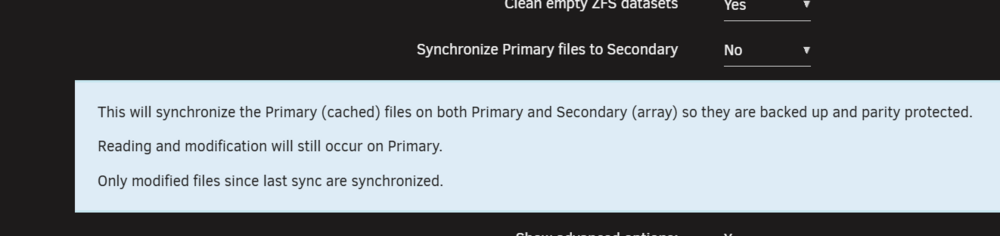
-
you need to check the logs if actual synchronization was runned ,if it was then the date of last sync needs to be saved in config file
-
is someone checked beta ?
-
Test mode can't turn on by self, just disable it, and set scheduling of mover or run 'mover start' in cmd or by move button
-
It's for the first time only
-
I will try to add languages in some new version


