





Masterwishx
Members
-
Joined
-
Last visited
Everything posted by Masterwishx
-
Also had this issue and after/still have some packets lost every second, but 7.0.1 really fine.
-
Sure I can add default values and warning if they are sameFor this I added help description in thresholds but very sad users don't read itWill try to check but will be better if you open issue for itNo need to post syslog. You need to post files from /tmp/ca.mover.tuning. + config will try to add debug zip for diagnostic in next versionI will add in next version : warning about test mode. In global setting section after setting or better to add at the end where analyzing moving data?Please set test mode to "no"Unraid mover just move all files. Please read help description of options.Is it worked befor? As I remember I didn't changed this part only added atime.As @ronia said you have below threshold of moving files. If you need more info check /tmp/ca.mover.tuning/* filesWas no changes in last version for thouse, only calculation for cache:prefer fixed that couse to negative valuesNote: In new version cli fully working now. You can run "mover start|stop|reset etc.. " it will run age_mover or unraid mover depending on options enabled. Run `mover --help` for more options. Also `mover start -e diskX` was added. Also default button in Gui will reset options to defaults and delete overrides.Yep if you Want to clean empty folders of moved filesSorry i cant reproduce it , all working fine if validation of files is disabled :
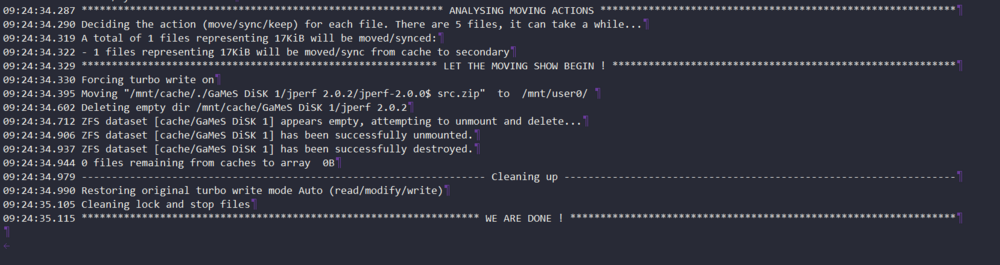 If you disabled files validation they should be moved, you can set both thresholds to 0%. I can see they should be moving by mover action. And by mover log they are moving!? I will try to reproduce it.No I meaned moving thresholds to 10% Fillup it's for array to cache it's should be by default 95%. I added `mover reset` command (default button) for next version that will reset options. It's seems you have wrong setting for cache prefer (moving, freeing instead of free up) so check if you have override dir in config of pluginDo you see some warning from rsync about them ?by logs i see its moving files, also you have wrong thresholds for cache prefer, delete overrides for these if you have and try set moving threshold for some % like 10% and check with real files not 0 bytes. Also missing some list files . i wll try to make debug function to auto get all files in next versionTest mode set to no?Please post your logs, list files, debugSet lower freeing threshold, will be added in help text in new versionDisable file validation option I will put this message in next versionMaybe you are right but you should look to the left on the option name, from the right just a little helping tip. Or you can read option description also





