Espressomatic
Members
-
Joined
-
Last visited
Everything posted by Espressomatic
-
Most containers, and certainly all containers that offer a dedicated front end, should run on their own IP and not share one with Unraid. IMO, it's bad practice to share IP in general for anything but background services. It's also so much easier to track (and control) traffic and access this way.
-
Windows development is "special" and on the other side of the same coin, Windows developers are "special" 🤪
-
Something's wrong with your system and/or test, as the above is statistically improbable (IMO, I'll go as far as saying "impossible") Non-scientific, but empirical example: I've never owned nor bought (seemingly at random) any USB drive that does not work with Unraid - dozens of drives, almost as many variations of brand, model, capacity. USB 2 or 3 drives, USB 2 or 3 ports - doesn't matter. I'm currently running 4 Unraid installations 24/7, each on completely different hardware. And all 4 USB thumb drives bought in the past 12 months (to replace physically larger ones that also worked without issue) I think there's something to be said about the very small number of people expressing this sentiment among the many thousands of Unraid installations in use.
-
Run Immich on its own IP, IMO. Network type: Custom br0
-
That'll do it. Here's my take on it, based on how I've seen it working and how I'm using Tailscale. Use Tailscale DNS: You can/should use this *IF* your "always-works" DNS server is specified in your Tailscale Admin settings. Example: the inclusion of your own DNS server or forwarder in the Tailscale Global DNS setting. I put my AdGuard Home IP in there - the same DNS handed out by my DHCP server. I keep this option enabled to make sure that when Tailscale is ON on any particular system, that the DNS used is exactly the same as when it's OFF (ADG's IP) Subnets / Advertise Subnets: You should advertise your LAN (or other required) subnet(s) *IF* you have other systems that are not part of this subnet using Tailscale and they will need access to other systems on this subnet. I advertise my LAN range, 10.8.0.0/23 - otherwise don't include anything and don't advertise from any system. Use Tailscale Subnets: You should NOT have this enabled for any system that already lives on or has access to the subnet(s) being advertised (systems on your LAN) - so this needs to be OFF for every Unraid server or other machine on your premises. I turn this ON for systems such as VPS that live on the Internet that I want to have access to my other LAN systems. One would think that using an advertised subnet (in the case of your PC) that matches your LAN's existing subnet should "just work" - but obviously it's causing issues. Just follow the suggestions above - OFF for all systems on LAN. * * This is why this setting is #1 in the FAQ linked at the top of every page of this thread:
-
I'm not sure why you're messing around with routing nor why any of the private IPs are being redacted. If you have to change any routing options, then there's a failure somewhere (else) and you need to start over. None of that is necessary to look at or change.
-
Don't even consider installing something like HaCasa if you're not already familiar with the ins and outs of Home Assistant and where all the files live in HAOS. Wait for it to someday be available as a HACS installation (plus manual configuration) - there's no technical limitation preventing that from happening right now (or last year).
-
Worth a try: Disable all VPN/tunnels on your PC. There should then be no reason you can't connect to your Unraid system. If your PC is still using some tunnel to some server or control plane - how is it going to connect to anything on the rest of your LAN that isn't also set up for that?
-
I might as well mention what I find odd: any mention of 10.*.*.* IP ranges, including DNS of 10.128.0.1 for your ethernet adapter. Your wireguard interface is also on a different 10.185.*.* subnet If that's what your Windows machine is using all the time, you won't be able to reach anything on 192.168.2.* right? All my systems are on a consistent subnet whether Tailscale is or isn't being used, including the same DNS. So systems can always resolve IPs and connect to each other by name or direct IP.
-
I see a few things which stick out to me as "odd" in what you posted in the reply, but I'm going to let EDA look over it as my knowledge is like a grain of sand compared to his beach. But, this part that I quoted here confirms that you can continue to access your Unraid system from your phone, right? That ties into the oddities I mentioned - the issue looks like it's specifically with the settings on your Windows machine, not Tailscale on Unraid.
-
Edit your Jellyfin Docker Container settings Set its Network Type to: Custom br0 Give it a non-conflicting IP address within your usable range (make sure it's outside the DHCP range) DISABLE Use Tailscale You should be good to go now. Do the above for any/all containers you want anyone to access from outside your LAN - they'll need Tailscale on their device(s) and need to be part of your Tailnet. IMO, never use the Tailscale option in a container's docker settings for any container or for any reason.
-
This thread is about the plugin and the sticky says specifically that docker integration issues need to be posted elsewhere. That said, try disabling the docker integration. IMO, it's not needed. I also wouldn't consider any form of outside access, even with Tailscale without also running my own DNS resolver and reverse proxy, which makes it much simpler to access everything by FQDN. Any container I access from outside (and everything with a WebUI in general) also runs on a custom br0 network with its own IP address inside my /23 LAN range.
-
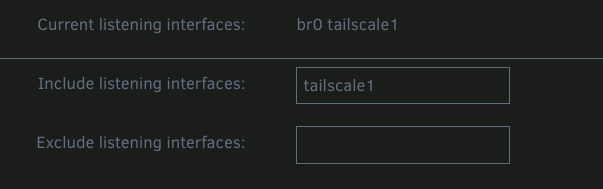
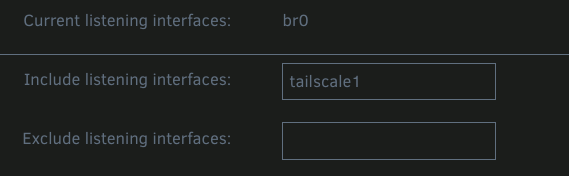
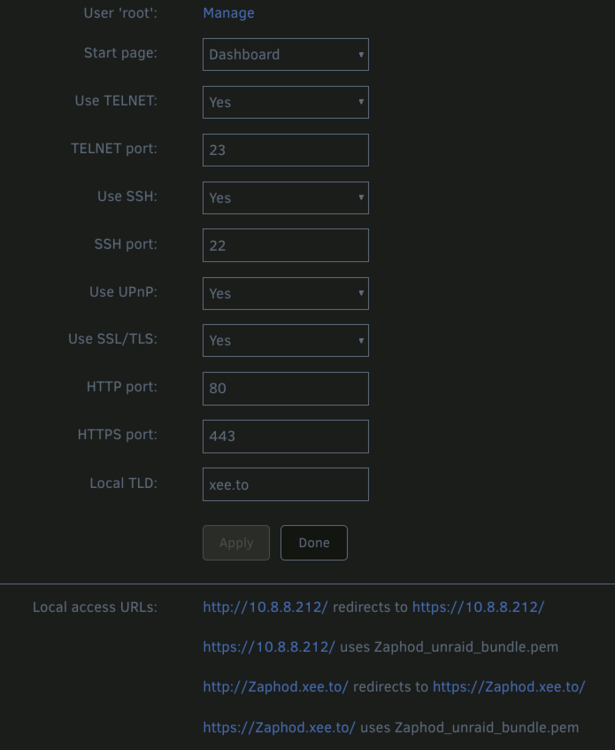
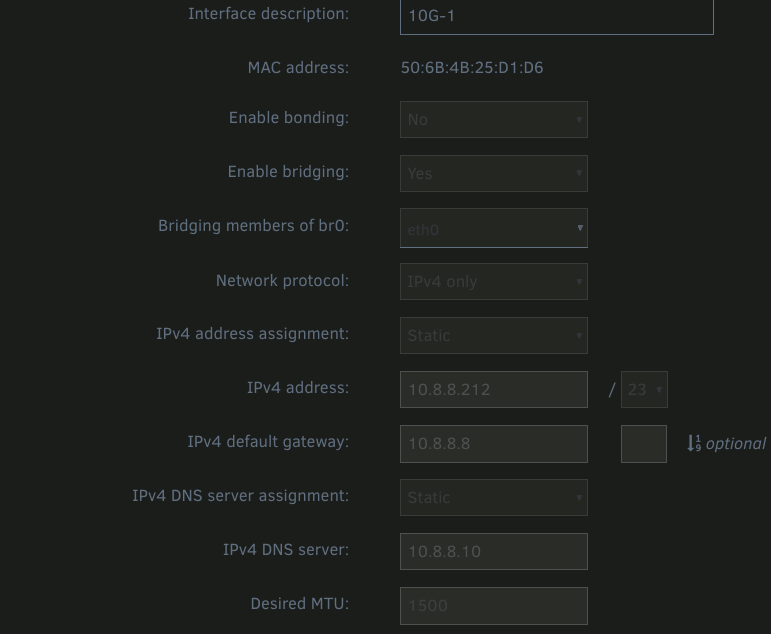
Looks good to me. As expected, yup. Doing this has no effect on my ability to connect to my Unraid machine(s) - that includes having Tailscale ON or OFF on the PC (Mac in my case) as well. The only slight difference is that my systems always end up promoting the connection to https: Clearly this was all working before you installed the Tailscale plugin right? By disabling TS, I can't see how this is related to Tailscale. It's OFF when set to OFF. What happens when after turning it OFF you also uninstall the plugin? Can you open a terminal/control panel on each machine and check this out specifically? Check current IP, gateway/router and DNS (even though DNS isn't required for IP or mDNS connections) Also using static reservations here and if anything that just makes things easier and more repeatable to follow/track/diagnose. Can't think of any reason this would cause a problem. On the Unraid system, in Settings -> Management Access, are all the expected URLs included in the "Local access URLs" section? Something like this And for one last sanity check, in Network Settings, something like this (with Bridging enabled and the primary interface bridged to Br0)
-
Up above, ChatGPT is providing information that I consider 100% completely useless. ChatGPT doesn't know anything about anything. It knows how to bring up results from what it finds on the web but has no way of knowing that anything it surfaces is correct or whether it's combining multiple incongruent sources of information to produce a hallucinogenic pile of garbage. It's not AI and it's never going to be AI (or AGI) so I'd never use it for any kind of problem solving like this. You still never mentioned how you're trying to connect to your system, so given all the info, I still don't quite understand the question. If you're trying to resolve your Unraid system by name, your issue is 100% DNS. If you're going by IP then like EDA mentioned, probably subnet routing. What network segments are your machines attached to when you take Tailscale down? Both the Unraid system and your PC. If your PC is still connected to the Tailnet and TS is providing DNS and that DNS isn't your local, you won't be able to resolve your Unraid system by fqdn. If anything it would likely try using a TS 100 IP and that's not going to work. There are multiple things that can go wrong here but it all depends on how all the systems you're looking at are set up, not just the Unraid system. All this is why I have my set up such that Tailscale can't/won't alter how any system on the LAN resolves or routes. So whether TS is up or down on one, multiple or all machines, they all continue communicating with each other as normal/expected. While on the LAN. If I take my mobile somewhere else, obviously it and at least one more system back at home on the LAN have to be connected to the Tailnet.
-
OK, these two are the kind of info that can benefit my setup. The Magic DNS not so much since I already use a public and registered FQDN along with regularly generated LE certs via Certbot and Nginx Proxy Manager. In the case of a single point of failure, if the machine I mentioned before goes down, my whole LAN goes down anyway, as it's the machine (N100) acting as router, firewall, DNS and reverse proxy too. Is there any configuration needed for the distribution duty you mentioned, or is simply having the nodes on the tailnet enough?
-
DNS issue. How have you configured DNS for your network? Every machine on my network uses the same local DNS address with and without Tailscale, so it doesn't matter if I take one machine off the Tailnet or all of them - everything continues to work locally without interruption and every machine can still be accessed from any other, by full domain name, machine name or of course IP.
-
Sure, you can tailscale down and later tailscale up
-
Seconded the 9300 recommendation. I'd opt for more than 16GB. Likely 32GB if there are any plans to move to ZRAID in the future as it uses a lot of memory for optional caching, which I also highly recommend for a file server. You can't underestimate the performance increase when moving to this type of Pool storage. The downside is all drives need to spin up at the same time, but if data access speeds are important to you, this is a small price to pay. The classic Array is acceptable for long-term backup targets as it's much slower.
-
Are you writing to a single drive at a time like with a traditional Unraid Array? If so, you'll be limited. But instead if you're using a Pool and you're using ZRAID or some other RAID implementation, you can go much faster than your 1Gbit link can handle. All my servers that deal with downloads and file transfers have 10Gbit links and connected to 10Gbit switches. Other devices on the network are a mix of 100mbit, 1Gbit and 2.5Gbit. The catalyst that started my journey upgrading all the network equipment was getting 1.5Gbit fiber ISP connection and wanting to make sure I was able to saturate it with as little as one machine. And of course knowing that I can upgrade to 3, 5 or 10Gbit any time with my current (or a future) ISP.
-
Derek, can you speak to the benefit(s) of installing the plugin (or tailscale in general) on multiple/all systems on one's LAN, instead of for example, just one? Not including devices that can/will leave the premises to which there's obviously a benefit/requirement to be able to connect back home securely. As an example, I have 4 Unraid systems and a couple of other systems that never leave the LAN. On every Unraid system I have Tailscale running. I also use Tailscale to distribute my DNS upstream address on any machine that leaves the LAN, so that I can continue to use my private IP addresses and reverse proxy with FQDN regardless of how or from where I connect to the internet. All the systems/resources, including SMB shares, on my LAN can be accessed by their local IP and FQDN plus the ones running Tailscale also by their Tailscale 100* IP. The same is true, except for the 100 addresses, if I disable Tailscale on all but one system. Besides using TS IPs and my tailnet name (though I'm not using MagicDNS) to access specific systems, are there any other benefits that I might find useful but am not aware of?
-
Completely down this morning, can't connect to the system at all, including any containers. I'll be trying to replicate the issue on one of the other systems doing local downloads, but I'm lacking some storage to flip the rolls of the machines around and use this crashing system as network storage for the other. I'll also try using something other than JD to do download and SMB simultaneous testing and then try to figure out how to do network-only testing on SMB without WAN traffic. syslog-Zaphod(3).log
-
I did the above a few days ago and testing since has been with those changes in place. Issue finally replicated sometime this afternoon. I can hear the fans on the Zaphod system are running faster, webUI won't load, JDownloader docker UI very slow (mostly unusable), download speed cut down to 10MB/s. Destination server (Ford) is 100% up and running fine, despite errors showing up in Zaphod's syslog saying it's timing out. I can SSH into the system as well as access it with a keyboard on HDMI output (had to replug the keyboard cable a couple of times to get it to respond and it was VERY slow to log in) From the JDownloader UI I managed to "exit" the running docker app and very quickly the fans on the system died down and I'm able to now open the Unraid WebUI. Sounds like the container may be eating up a lot of CPU - but is it the root cause of the issue or might this be an issue with dockerman triggered by this particular container?. Diagnostics captured while system was running in the degraded state. zaphod-diagnostics-20250408-1758.zip syslog-Zaphod(2).log
-
Container yes, with Unraid-specific templates available for everything, no - and certainly not with the the seamless zero configuration of rolling out many add-ons within HAOS. The folks having trouble in here setting up HA with this easy-to-use docker launchpad will be in a world of hurt trying to get support. HA on external docker engine on top of another distro is just a juggling act for zero gain. How fast you can spin up HA docker for the first time is irrelevant. Once it's up, it's up. Backups are integrated into HAOS and support external targets. VM backups are trivial with Unraid 7.x. I've never been wanting for more backup options, nor to roll my own. You can take/steal my HA physical system and restoring from a backup isn't much of a bother - temporarily onto any other server or even onto new hardware installed from scratch. If you want to advocate HA in a docker, that's fine somewhere else, everyone's entitled to run it how they wish. This isn't the thread for that. This exactly. You've admitted to not understanding, so given that fact, why do you think it's a good idea to make the suggestion in the first place? I've been with HA for about 8 years, and to this day have yet to see anyone, anywhere, offer a single universal and concrete suggestion as to why HA on a separate docker host is better than running HAOS (bare metal or VM). Plenty of negatives however, especially for anyone who might already have issues installing a pre-packaged VM image.
-
Running HA OS is much more useful than running HA in docker. Supervisor, ability to install add-ons, HACS, etc. In summary, HA in docker is a neutered solution that I don't recommend anyone ever use. I've long suggested they stop supporting it, honestly.
-
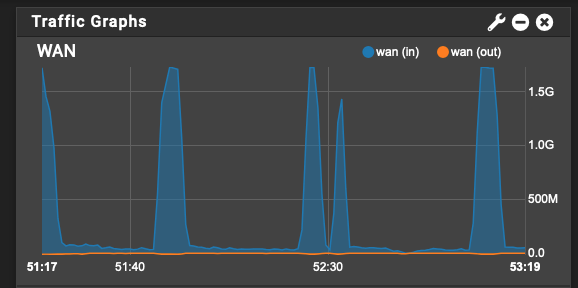
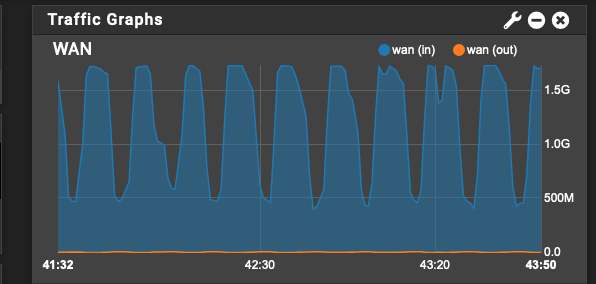
It's been over 24 hours and the system is still up, system running normally and downloading steadily, albeit much more slowly overall. The big difference between downloading to RAIDZ2 and Array-based XFS volumes is sustained throughput on the network (high saturation vs. low saturation with sporadic bursts) Same group of files, anywhere from 2-10GB each - 4 concurrent downloads with up to 3 connections per DL Downloading to RAIDZ2 share over SMB (Unraid to Unraid server) JD finishes a file and starts another very quickly and can sustain a high rate on any/all files, so network traffic between the systems is always high. Downloading to Array-based share over SMB (Unraid to Unraid server) JD sits on a file long after its finished, before starting a new file - pretty sure this is the time it's taking to close out the file. Download rate per file is much more erratic than in other example, so sustained network traffic is low. It's expected that writing to an Array share is slower, as it's only writing to a single disk at a time. Now I just need to figure out why the sustained high throughput of the first example is eventually causing the system running JDownloader to hang.