





Espressomatic
Members
-
Joined
-
Last visited
Everything posted by Espressomatic
-
It's a different forum software. Invision. I used to hold a license to this software and ran it for over a decade. Huge mistake.
-
Oh no..... Not Invision. Ugh.
-
This is the additional script to copy and install the certificate for ONE specific server from the shared folder specified above. Install this script onto each Unraid server where you want an updated TLS certificate. #!/bin/bash ##================================================================================================ ## ## Unraid WebUI TLS/SSL Certificate Installer - Espressomatic @UnraidForums - 19 May 2025 ## ## version 1.5 ## ## Copy certs from central Certificate Share to this Unraid Server's Certificate Path ## ##================================================================================================ # # # Info # ---- # # Tested on Unraid versions 6.12 - 7.1.2 # # Required Installation and Setup # ------------------------------- # # - "Make Unraid NPM Certificates" script must be run on server hosting NPM LXC & certificates must be in common share folder # # - Click the Schedule button for the script and select a weekly schedule # NPM renews certificates 4 weeks before they expire and this makes sure the installed copy # is always up-to-date and valid # # - Click the Apply button at the bottom # ##================================================================================================ ##------------------------------------------------------------------------------------------------ ## REQUIRED SETTINGS ##------------------------------------------------------------------------------------------------ ## The name (without domain) of THIS Unraid server (where you're installing this script) # this_server_name="Zaphod" ## Share folder where the Make Certs script has previously stored the certificates # certShare_Folder="/mnt/remotes/TRILLIAN_Clutch/Certificates/" ##================================================================================================ ##------------------------------------------------------------------------------------------------ ## The Business - you shouldn't need to make edits below for typical use ##------------------------------------------------------------------------------------------------ ##================================================================================================ ## Unraid Default Directories: unraid_certdir="/boot/config/ssl/certs/" ## Unraid certificate filename suffix - as of Unraid 6.12 # unraid_certsuffix="_unraid_bundle.pem" unraid_certsuffix="_unraid_bundle.pem" unraid_cert_file="${this_server_name}${unraid_certsuffix}" ## Go to the shared certificate folder and copy this server's cert to the Unraid cert path # cd ${certShare_Folder} if [ ! -f ${unraid_cert_file} ]; then printf "\n❗❗ Can't find the server's Certificate Bundle - please contact the script developer\n\n" exit 1 else cp ${unraid_cert_file} ${unraid_certdir} fi ## Adjust file permissions to creator-only read-write # chmod 600 ${unraid_certdir}${unraid_cert_file} #rm -r $tmp_originals printf "Success!\n" printf "\nYour ${unraid_cert_file} certificate has been copied to ${unraid_certdir}\n" ## Restart the Unraid WebUI # printf "\nThe Unraid WebUI is reloading its configuration with your new certificate.\n\n\n" /etc/rc.d/rc.nginx reload
-
This script is run on an Unraid system hosting Nginx Proxy Manager (docker, lxc, etc) and copies specified certs in the format required by Unraid to ONE specified shared folder. This works for any number of Unraid servers - edit variables as needed. The folder location in the script is for an NPM installation within a Debian LXC container - edit as necessary for your own NPM storage location. These scripts require that you have NPM (or Certbot standalone, etc.) already set up and working, pulling updated Let's Encrypt certificates and that you have a TLS entry for each server you configure. Related: My Nginx Proxy Manager LXC setup guide: #!/bin/bash ##================================================================================================ ## ## Unraid+NPM TLS Cert Builder - Espressomatic @UnraidForums - 19 May 2025 ## ## HARDCODED version 1.5 ## ## Build Unraid TLS cert bundle from Nginx Proxy Manager's Certbot Provisions ## ##================================================================================================ # # ##================================================================================================ ##================================================================================================ ##================================================================================================ # This script is run on the NPM host and copies specified certs in Unraid's format to a shared folder # # Certificate files parent folder (LXC) - get cert parts from here and reference path below to get server name # /mnt/user/lxc/NginxReverseProxy/rootfs/etc/letsencrypt/archive/ # # Files with names of NPM hosts that use certs - get server names from here # /mnt/user/lxc/NginxReverseProxy/rootfs/data/nginx/proxy_host # # Additional Script requirement: # Put the "Install Local Certificate" script on each Unraid machine to copy its cert to its local cert folder # ##================================================================================================ ##================================================================================================ ##================================================================================================ # # Info # ---- # # Tested on Unraid versions 6.12 - 7.1.2 # # This script makes the assumption that the source is a certificate chain of 4 files # These 4 files will be concatenated together to make a certificate bundle for Unraid # # # Required Installation and Setup # ------------------------------- # # - LXC Plugin with NPM installed in Debian # # - NPM set up to generate certificate(s) for your servers with Let's Encrypt # # - In User Scripts, click the Schedule button for the script and select a weekly schedule # NPM renews certificates a 4 weeks before they expire and this makes sure the installed copy # is always up-to-date and valid # ##================================================================================================ ##------------------------------------------------------------------------------------------------ ## REQUIRED SETTINGS ##------------------------------------------------------------------------------------------------ ## Edit the following variables for the specific servers ## ------------------------------------------------------------------------------------------ myServerNames=("Trillian" "Arthur" "Ford" "Zaphod" "Marvin") myServerFileIndex=("11" "7" "8" "6" "10") certShare_Folder="/mnt/user/Clutch/Certificates/" ##================================================================================================ ##================================================================================================ ##------------------------------------------------------------------------------------------------ ## The Business - you shouldn't need to make edits below for typical use ##------------------------------------------------------------------------------------------------ ##================================================================================================ ## (4) Certificate-specific source directory # - inside NPMPlus appdata hierarchy, certs are created in numerical order # cert_dir_base="npm-" ## Unraid certificate filename suffix - as of Unraid 6.12 # unraid_certsuffix="_unraid_bundle.pem" unraid_certsuffix="_unraid_bundle.pem" ## Certificate parent directory based on NPM installation type # LXC: "/mnt/user/lxc/NginxReverseProxy/rootfs/etc/letsencrypt/live/" cert_parent_dir="/mnt/user/lxc/NginxReverseProxy/rootfs/etc/letsencrypt/live/" ## Certificate filename(s) # NPM certificate chain consists of 4 files inside a specific folder (see REQUIRED SETTINGS up above) # # cert_file1="fullchain.pem" cert_file2="chain.pem" cert_file3="cert.pem" cert_file4="privkey.pem" # # Symbolic links to the most recently renewed cert files inside the "../letsencrypt/archive/" path cert_file1="fullchain.pem" cert_file2="chain.pem" cert_file3="cert.pem" cert_file4="privkey.pem" ##================================================================================================ # Copy the files and display confirmation messages # server_cert_file="MAKE THIS" # Start Server Array Loop printf "We're Starting\n\n" for i in "${!myServerNames[@]}"; do cert_dir=${cert_dir_base}${myServerFileIndex[$i]} unraid_server=${myServerNames[$i]} unraid_cert_file="${unraid_server}${unraid_certsuffix}" printf "${unraid_server} (${cert_dir}) ... " ## Build the path variables full_cert_path=${cert_parent_dir}${cert_dir} ## Validate names, source path and certificate files # if [ ! -d "${full_cert_path}" ]; then printf "\n❗❗ The source certificates directory can't be found. Make sure the script variables have been edited correctly\n" printf "\nDirectory: \"${full_cert_path}\"\n" error=1 else cd ${full_cert_path} fi if [ ! -f "$cert_file1" ] || [ ! -f "$cert_file2" ] || [ ! -f "$cert_file3" ] || [ ! -f "$cert_file4" ]; then printf "\n❗❗ One or more of the original certificate files can't be found. Check your edits in the script.\n\n" printf "\nLooking in directory: \"${full_cert_path}\"\n" error=1 fi if [ $error ]; then exit 1 fi ## copy the original certificate files to a temporary working path # tmp_originals="/tmp/original_certs" mkdir -p $tmp_originals cp * ${tmp_originals} cd ${tmp_originals} ## Concatenate the original cert files into an Unraid certificate bundle # if [ ! -f "$cert_file1" ] || [ ! -f "$cert_file2" ] || [ ! -f "$cert_file3" ] || [ ! -f "$cert_file4" ]; then printf "\n❗❗ There was a problem copying the certificate files - please contact the script developer\n\n" exit 1 else cat $cert_file1 $cert_file2 $cert_file3 $cert_file4 > ${unraid_cert_file} fi ## Copy the bundles to defined ${certShare_Folder} # if [ ! -f ${unraid_cert_file} ]; then printf "\n❗❗ There was a problem creating the Unraid Certificate Bundle - please contact the script developer\n\n" exit 1 else cp ${unraid_cert_file} ${certShare_Folder} fi rm -r $tmp_originals printf "Success! ${unraid_cert_file} created\n\n" done #Server Array Loop End printf "\nYour TLS/SSL Certificates have been stored in ${certShare_Folder} \n"
-
Didn't see this until today. Let me take a look at this and replicate it here to see how best to handle it.
-
It's rare that someone want to access only the Unraid WebUI, and when there's a need to access even just one more app/resource/page/site/app, along with maintaining an updated certificate (or multiple), it's just easier to maintain this on a purpose-built platform. Especially one that isn't in a state of flux or active change with said features still advertised as in beta. So that said, something like Nginx Proxy Manager offers a really simple UI for both maintaining one or more certificates as well as any number of hosts. You can also use any other reverse proxy, such as Caddy, Traefik, HAProxy, etc. NPM, IMO, is just a lot more straight forward for anyone not intending to roll up their sleeves and do this on the daily as part of their job. With respect to ONLY the Unraid WebUI, I use NPM only to manage the certificates - I don't use it to do HTTPS proxy. I made a script that copies the certificates from NPM to each of my Unraid servers on an ongoing basis. There's no custom configuration or settings to be applied in Tailscale for this to work. If you really wanted only Unraid WebUI and nothing else, you could use Certbot to do the certificates from Unraid in the same way (it's what NPM uses) and not use a reverse proxy or any custom settings in Tailscale at all. For more information on how I have NPM deployed, I have a small tutorial here: I've deployed it using LXC, running in Debian along side a Tailscale installation. I then also use Tailscale Unraid Plugin on all my Unraid servers. I don't use Tailscale Docker integration. There have been some hiccups over the past 10 months here and there, but everything has no been running solidly for some time, with access working well from mobile and captive-portal connections on multiple continents. Additionally, here are the scripts I use to maintain (copy) the certificates to each Unraid server:
-
I kicked off an update to 7.1.0 on one system while sitting waiting to take off at an airport boarding gate - while away I didn't have the time to dive deep, but everything I needed while away seemed to be working so....
-
Oh yeah... That's what was causing my own inability to shut down HA's VM last summer (thanks again to SimonF for immediately suggesting I look there). Sneaky. It'd be nice if it didn't do this when manually shutting down the VM, but I have no idea i\f it's possible for that plugin to know that.
-
The best advice I can possibly give: Use a reverse proxy or don't bother using domain names and certificates at all on your servers. Once the above is in place, turn off the HTTPS option in Tailscale.
-
IMO, add-on and integration issues need searching in the official Home Assistant community forum, where most HA discussion happens. I've never heard of this add-on, but installation issues are usually add-on specific and not HA-specific. Likely a change in a recent HA update that removed some deprecated code and the add-on hasn't been updated. One of a number of threads about this add-on and installation errors. This one started in 2024. https://community.home-assistant.io/t/predbat-add-on-error/770835
-
Yes, exactly. This is what I was implying when I originally mentioned it. KNOCK ON WOOD - Everything's working smoothly now with all my machines, including all Unraid servers and external VPS, on my Tailnet. iOS mobile and Macbook both working as expected connecting to anything on my home LAN, including SMB when outside the network. Fingers crossed, I leave for UK and Europe tomorrow with iPhone and Macbook. If anything goes wrong here at home, I'm still the one expected to fix it remotely while I'm away, including all manner of smart home devices via Home Assistant.
-
I wish I had more advice but I can't think of anything else to look at. One thing to note is that while I can use different subnets, I don't have any VLANs set up anywhere at the moment. Coincidentally, I thought I'd come across some failure of my NPM install earlier, but it turns out it's some oddity with pfSense/Unbound. I made a new override to resolve deemix.xee.to to my NPM host, the same way I have for so many other subdomains on the same FQDN, and it refused to work. Making one for "dmix" instead of "deemix" works fine. No idea why, but still the case if I do it all over again. *shrug*
-
WOW. I spent a couple of days looking at this and eventually tapped out. This gives me incentive to try again. How many days has this been running for you and how long do you expect it to run without having to perform some kind of manual intervention/fix/update/re-deploy? In the meantime I've got an iOS YT-capable client that works well enough on its own, called Viddle. iOS/mobile was my main sticking point with accessing YT.
-
Different subnet shouldn't make a difference for the ability to connect/proxy. NPM on 10.8.8.2, container on 192.168.0.50 for example. 502 can happen with a misconfiguration of the proxy or container networking/webui even on the same subnet. Including forwarding to HTTP when the container is expecting HTTPS I'm using custom bridged network type, br0 and macvlan in case it makes any difference.
-
Did you mean that you don't see any Tailscale UI at all, that you don't see a Tailscale icon in Settings or just that the first Tailscale tab (where you log in) looks different from the old one? With default theme the Tailscale icon in Settings looks like this in the second row, Network Services Clicking it brings up a tabbed Tailscale UI with the first tab selected. The old WebUI showed a white rectangle in the middle of the display on the first tab that didn't match the rest of the Unraid UI. The current UI now matches the rest of the Unraid UI. The current UI looks like this along the top: If you haven't enabled Tailscale (on the second tab - it would make more sense on the first) and haven't logged in (first tab), then the tab will be empty except for a message telling you to enable and possibly log in. There's one aspect of this UI that is incorrect - it's always a tabbed interface, even when Unraid's page view (in Display Settings) isn't set to Tabbed. I just found this today as I normally only use a tabbed UI so would have never otherwise noticed.

-
Nothing announced/implemented yet. It would be very cool to have this ability from the integrated File Browser. For that matter, it'd be nice to have it on any file-sharing platform too, such as Owncloud, Nextcloud, etc.
-
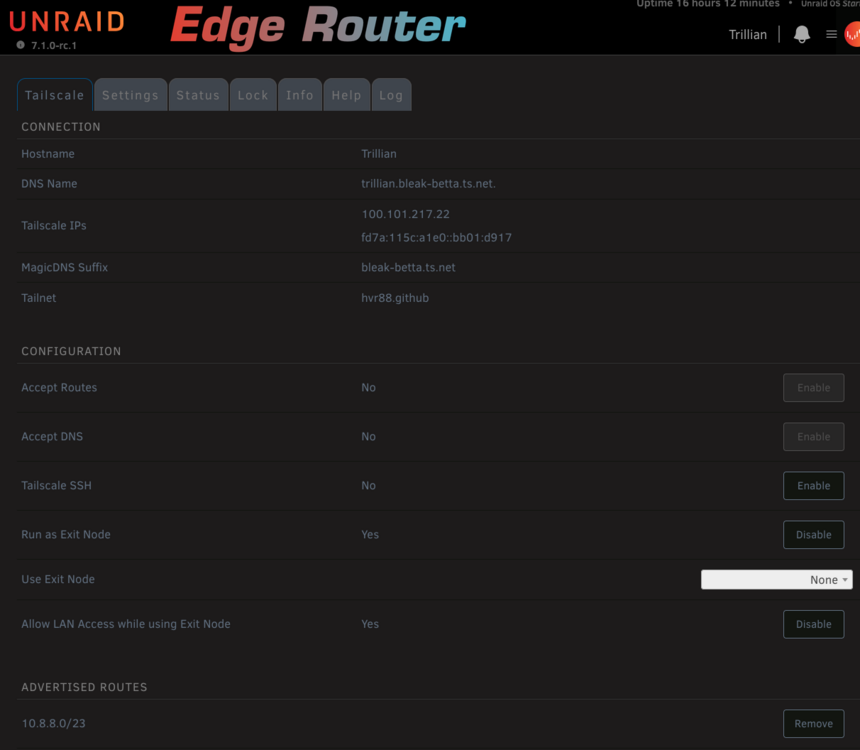
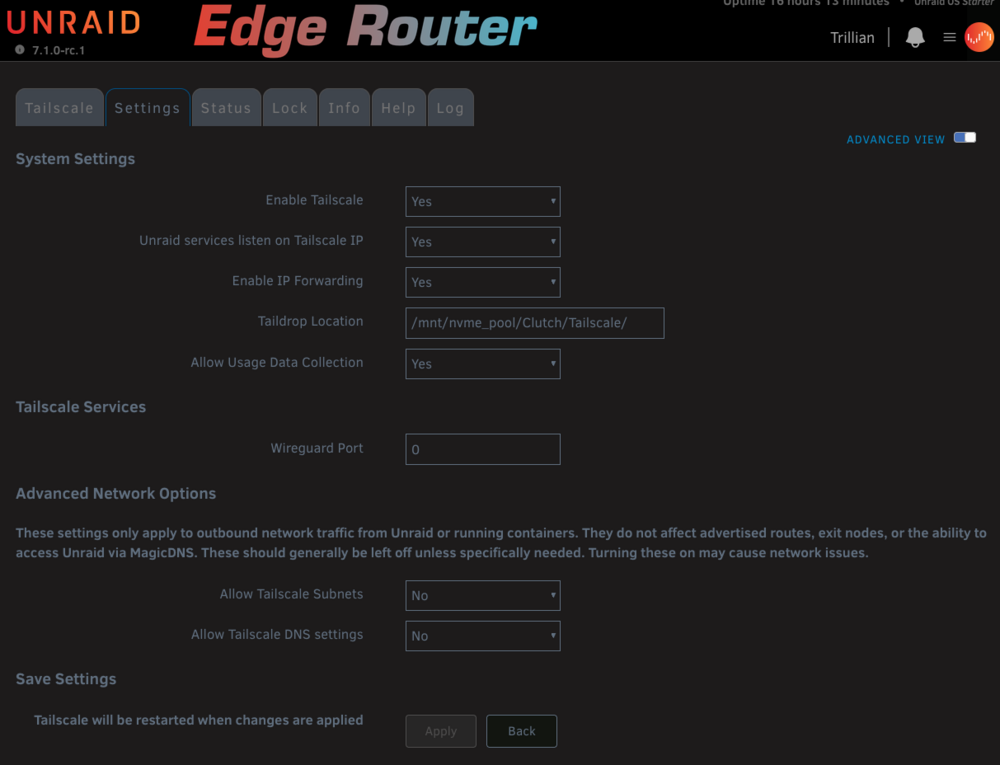
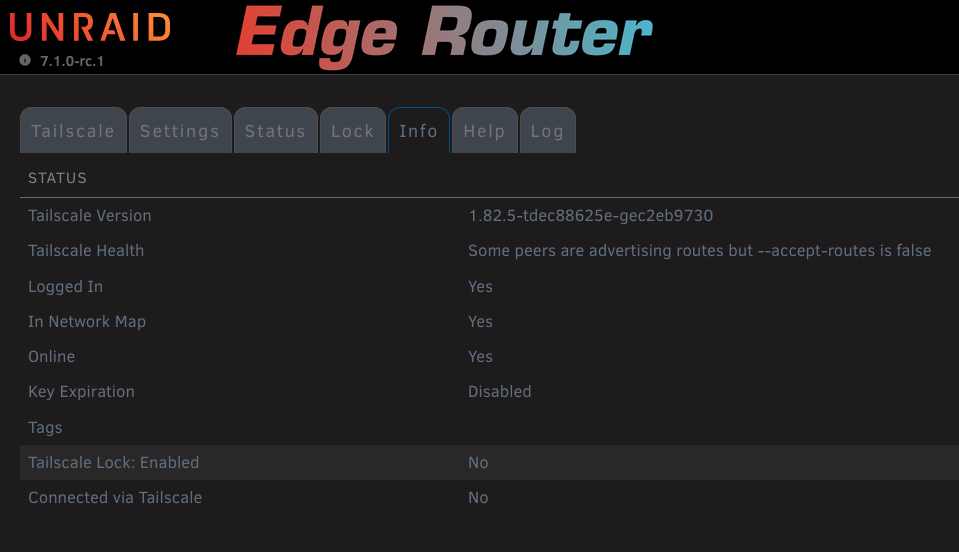
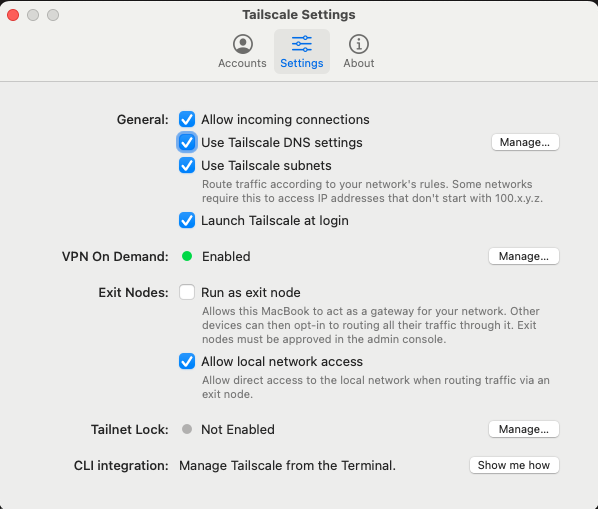
This is doing my head in. I got it working again after a lot of trial and error. This isn't related only to the Plugin, but this is the only Tailscale discussion I've participated in, so leaving some info for future reference (again) Testing mobile/cell isn't a huge pain, but testing with the Macbook means I have to run down the street to a neighbor's place (more thorough than just setting up a second LAN here). The caveat that seems present on both iPhone and MacOS when I'm outside my LAN (cellular or someone else's private network): 1. When I FIRST try to connect to or resolve anything while TS is enabled, it won't work. 2. If I ENABLE the use of an Exit Node (specifically the Debian LXC mentioned below), then connections work as expected (domain resolution, IP, etc.) 3. If I then DISABLE Exit Node, connections remain working On the Mac this requires "Use Tailscale Subnets" enabled - whereas I'm fairly certain this was not required before, as I wasn't using it in the past. Minimal systems installed with Tailscale 1. iPhone 2. MacBook 3. Unraid System 1 with Tailscale Plugin 4. Debian LXC running NPM and Tailscale If I use #3 as an exit node, I can connect to the Unraid WebUI and containers on that system, but I can't connect to other (Unraid) machines on the network (not running Tailscale) Essentially the same settings on the Debian Tailscale installation: 1. IP forwarding set up on the system 2. TS Advertising Exit Node 3. TS Advertising Routes - LAN's entire IP range 4. TS set to accept DNS from the coordinator (IP of resolver running on my LAN) - this way I don't do any other DNS setup on Debian And setup on my Mac: Now I'll install the plugin (again) on my other Unraid systems minus the Exit Node and Advertised Route settings from above.
-
Right, this isn't the topic for this thread, but using an MDM solution in a corporate environment seems to be the only way to maintain a Tailnet that has any chance of maintaining reliability. There's no MDM suitable for home use, and there's no ability in the iOS or Android app stores to download anything but the latest release. Also no roll-back or version selection ability in Unraid's App Store for the plugin. It's exceedingly difficult to keep all platforms on the same or older release, and without some serious hoop jumping and time investment, very difficult to roll back some systems. At the moment, a group of local machines, a couple of mobiles and a remote VPS that worked perfectly when running either Headscale or Tailscale's server, now don't work outside my LAN. The remote VPS not at all, mobiles or notebooks can't connect direct to each other, can't do DNS queries, etc. It's generally a complete breakdown of everything that worked before. I can't even directly connect to my LAN IP addresses from outside/cellular like I used to: 10.8.8.212 for example - doesn't work, but should bring up an Unraid machine. I haven't tried going back to Headscale yet, but rolling back MacOS version didn't help. Last tested working from outside about 3 weeks ago. Issue might very well be TS's coordinator. Don't get me wrong, this is a Tailscale issue, not a plugin-specific issue.
-
I'll take your word on the use, but the github is really active with show-stopper issues. The platform, as per their own site, has a lot of features that are in beta - and rolled into the shipping software. Many of the issues reported are regressions and I can't see any strategy for maintaining a stable release branch. When I see their long list of brands that have used their SW, I immediately think, "someone in IT is playing around with it," not that any of those firms have deployed company-wide. No idea if that's the case, but I couldn't afford to deploy this to an org. Makes a good solution for home use when it's working. But again, going from working fine to not working at all from one week to the next can cause some headaches for anyone.
-
I just wanted to follow up with a stronger recommendation to do file sharing on an external file-sharing host. IMO, Tailscale cannot be relied upon for business use - there are too many issues from release to release that take down functionality, which can leave you high and dry when you need to use it most. Example of above: Tailscale 1.8.2 on iPhone is not working at all to access the local network when running on Cellular. Can't access LAN IPs, including any local DNS resolver you may be running - and if you're running a local resolver that means you also can't access outside FQDN. This used to work. For a long while it hasn't. It's possible to turn off the use TS DNS on the iPhone client, or specify a public DNS in TS's Global DNS setting, but that means you can never resolve your own FQDN via a reverse proxy and the only way to access any resources on your LAN is by using Tailscale's 100 series IPs.
-
One more thing to try... In your test (with your PC) can you make sure to upload data/files from the Unraid SMB? Or test using the Unraid system after disabling Tailscale. You have a lot of variables in play: Unraid Array with Fuse FS, SMB, Starlink, Tailscale. To eliminate SMB you can also set up a hosted file server in a container - there are a number of them in the App Store. You should make sure you're not using Tailscale's subnet feature as well. Not advertising subnets from any system and not using from any other.
-
Have you tested your actual upload speed without Tailscale in the mix? "Between 10 and 30Mbit" theoretical is a wide margin. Given that entire margin is also exceptionally slow, I'd suggest secure hosting outside your LAN for reasonable collaborative speeds.
-
I don't transcode anything with Plex, ever. Transcoding means that any of a few things are happening: 1. Bad media file in a bad format 2. Poor/slow connection 3. Unsuitable playback device If you make sure none of those 3 deficiencies are present, there's no need to transcode. Jellyfin and Emby before it have nothing over Plex when it comes to media file support. Their claim to fame is that they're "free." And there's nothing wrong with free, but like I might take (and pay for) Ibuprofen for a certain headache, I see paying for a Plex Pass in the same light. My LAN and every machine on it is "100% closed" to the internet. There are no open ports on my router. I put that in quotes because there are some applications that use UPNP, like QBittorrent to open ports as needed. With Tailscale and encryption it's about requiring that authenticated access to connect, not simply "finding" (which would only be security through obscurity).
-
Yes, because while you can use a legitimate and registered domain name, all IP resolution will be done internally by your DNS resolver or forwarder. No DNS server on the internet will ever know anything about your subdomains - and you don't have to point the secondary domain to your public IP address either. This obviously requires that you're running a local resolver or forwarder and that it's the only DNS defined for your devices (and those of your family members) - this can be accomplished by Tailscale when it's ON if you make sure to use its DNS option. Devices hit the provided DNS address and resolve local/private addresses before queries are sent out to upstream/public DNS. So you're looking at Unbound, maybe PiHole or AdGuard Home for black-hole filtering and then optionally a reverse proxy like Nginx Proxy Manager or Traefik (which will make managing a lot of subdomains easier along with automatically redirecting to HTTPS and obtaining/renewing/managing certificates). Or like mentioned in my earlier reply, Pangolin offers all this - except black-hole filtering. In your shoes, since there's no requirement to share anything else with anyone, I'd REALLY skip all this for others, get rid of Jellyfin, buy Plex Pass Lifetime, and use Plex instead. Make an account for each person you want to use your Plex library and then give access on an account-by-account bases. MUCH easier to set up, SO much easier to manage, not ever going to have any hiccups that prevents access to your family members. I'd do this even if Plex Pass cost US$500 - it's simply so much less of a headache. Run Tailscale for yourself only. I haven't looked into it in detail, but how does this omit the requirement to restrict access to only the newly made machine using Tailscale ACL? Author's description for TSDProxy: "Simple and easy" (always debatable) access to services via unique and secure URLs can be handled by any reverse proxy without having any Tailscale machines representing services, nor using any Tailscale-specific domain names or IPs. So while I get what TSDProxy does and offers, I can't come up with a reason to use it over NPM (for example). Maybe if someone's only alternative were Traefik (ugh). And I really (REALLY) don't want Tailscale doing anything with certificates or Let's Encrypt.
-
You may be better served by not using only Tailscale on Unraid and instead using Pangolin which combines a number of services. You can use both if you want. https://github.com/fosrl/pangolin This is especially true if you're not already using a reverse proxy (which you absolutely should) and an auth server which I'm about to suggest in 3....2.... Authentication server - but I'd not bother if Jellyfin is the only thing you're planning to expose. I'd only bother if I had at least a half dozen services I wanted to share and ALSO wanted my members to be able to sign on to any/all of them with ONE login. As far as hardening against outside attack, don't open any ports and continue to use Tailscale. No one can gain access to your network under any circumstances from the outside without your permission. Tailnet access control lists I'd think: https://tailscale.com/kb/1018/acls But the above aside... Are you worried about family members brute-force attacking IP addresses on your network? If so, then I'd never consider giving any of them access to anything, including Jellyfin with or without Tailscale. If not, then what are you worried about? Don't give out IP addresses at all to anyone. Give them a domain name for any web services you want them to access: jellyfin.mycoolserver.com And for anything you don't give them that you think one of them might one day stumble upon, enable authentication on it - most things that need auth already have it. If you have far more services that don't have their own or you want single sign-on, then back to my previous suggestion (Authelia, Authentik, Pangolin). I however don't even bother with Tailscale ACL for personal and family use. IMO, it'd be a giant waste of time to manage. Services that I share (or don't) have their own authentication and user spaces, like VaultWarden, Immich, Unraid, etc. Even things like QBittorrent, JDownloader, pyLoad. I don't keep any auth on Krusader and that has access to all my NAS file systems - do I worry about that? no. I get frustrated with the way the team at Plex completely reinvents the wheel every year, but no matter what they've done, I still can't bring myself to using Jellyfin. You don't need any self-managed tunnels to have family use Plex.





