





Espressomatic
Members
-
Joined
-
Last visited
Everything posted by Espressomatic
-
How long do you think it takes to recover from a corrupted HDD compared to USB stick?
-
You can very easily roll back to the version you had prior to an update using a backup. A catastrophic failure wouldn't take very long to notice. Though I've yet to hear of such a failure during an update.
-
Sure enough.... I downgraded Tailscale versions from 1.84.x on my Mac to 1.82.5, Debian VPS to 1.82.5, pfSense (FreeBSD) to 1.80 and I can now use the VPS and pfSense systems as exit nodes again. My iPhone is now also able to use the Tailnet again from mobile connection - still on version 1.84 - with or without exit node. I still can't use my Unraid 7.1.3, 7.1.2 or 7.0.1 systems as exit nodes after downgrading Unraid & the plugin to a version from April 17 with TS 1.82.5
-
Tailscale stopped working over here at some point in the past few weeks. No settings changes have been made. Only updates to TS releases that take place automatically. Specifically: 1. using an exit node won't work, whether the exit node is on my LAN or a VPS - DNS works, but nothing can connect/communicate Example: from a terminal ON a Debian or Unraid exit node, I can ping apple.com - from my Mac connecting through either exit node, I get no response to the same ping using Tailscale outside my LAN from my mobile - zero connectivity I can't see this being plugin-specific as I run also Mac OS, iPhone and multiple Debian systems, local and remote. But with the Plugin following closely Tailscale updates, no doubt it also breaks at the same time as everything else. If I had to support anyone else other than myself with this type of solution... shudder.
-
I just dug up all my old Quantum SCSI drives and a couple of Rodime MFM drives. I think 24 drives total, so I have a ton of storage now. Like 1.75 gigs.
-
The world is on fire - but my Unraid systems are all working fine* * One system stalled on installation after the reboot. Required me to force shutdown. After reboot seems to be running 7.1.3 without issue.
-
I'm glad I've done all my updating before reading about the problem people have been commenting on in here. That's enabled me to have problem free roll-outs on all 4 of my current systems through the entire 7.0 beta cycle and through to 7.1.2. If you don't know what you don't know, no problems. ;)
-
If he gives this up and instead uses only the plugin and Tailscale client software for non-unraid systems, along with any reverse proxy that sits inside/on ones of these systems, local IP addresses work as expected in addition to FQDN to hosts serviced by the reverse proxy. Along with TS 100* series IPs and MagicDNS if that's turned on. Basically connect "any which way" :)
-
At the moment, my biggest annoyance is another change. Almost every time I visit the forum, I get the Cloudflare captcha check-box before the forum comes up. It happened only infrequently in the past.

-
Also, if you have that OFF, you won't be able to access devices on your LAN by FQDN when you're outside as your device won't be able to resolve their addresses on a public DNS
-
Here it is. "1" just like you got for the first, then... zpool get all | grep feature@block_cloning nvme_pool feature@block_cloning disabled local
-
Stop VM, edit, change memory allocation, apply, start VM.
-
It's good to hear. Since 7.0 beta and rolling out all new hardware over here, I've moved all primary stores to ZFS. One system is using spinners and all new drives going into it are the same size. Other systems are using exclusively NVME and don't require nearly as much storage, so I've felt pretty comfortable giving up Unraid's namesake feature, the array. The spinning rust system has a lot of available bays, so I'll keep one array volume for the largest of left-over drives, since they can spin up/down one at a time and I won't need to use them for primary access and therefore unlikely to access them directly from my Macs - but I'm super curious to validate passthrough when it's implemented.
-
Does Unraid's kernel have FUSE passthrough support? Is it enabled by default? I'd been reading about it most of last year and while it was merged in spring 2024 to the linux kernel, Unraid didn't have support for it through the v7 beta cycle.
-
Wait, I thought one of the core principles of ZFS was that it is inherently a copy-on-write FS.
-
ZFS Settings within my VM depend on MAC address(es) of the interfaces - changing requires new settings to be made within the VM which is kind of no longer a clone Would like to see it. Currently can a single Snapshot of a VM be cloned to create a new VM without snapshots? Some VMs may be part of critical infrastructure on the network. For example, my pfSense VM which is my firewall/router. I can take it down, and continue to access the Unraid UI and make a clone, but while it's down, I can't connect to anything else or with any other machines/systems on my LAN.
-
Issue: A locally stored PNG file set as an icon for any docker container is deleted after some (undetermined) amount of time (1+ weeks). Example: Set a custom icon for a container, such as AdGuard Home by first turning on the Advanced View while Editing the container In the container settings, specify a local path and PNG file (seen below) Save the container settings The icon will appear on the container something like this After an undetermined amount of time, such as a few weeks, have passed, the icon will stop showing up and the container will display like this If the path to the icon PNG files is checked, you will notice the file is no longer present in the path The filename of the PNG file makes no difference to this issue. The docker container selected seems to make no difference: Have been testing with AdGuard Home and Vaultwarden The PNG files in my testing are stored on a shared volume named "VM_ISOS" as above The path entered in the docker settings is the full path from root /mnt/nvme_pool/vm_isos/vm_icons/my_icon_file.png
-
This fails on every VM on every one of my systems, 100% of the time. How can this be fixed/addressed? Did I miss a thread where this is discussed in more detail? RSYNC (maybe unexpectedly) takes an excruciatingly long time even for a modest 30GB image. Also of note, is that the MAC addresses for defined interfaces are always different on the "clone" than on the original. That's kind of a big deal to my pfSense image. 5-year old kid mode: why? As an aside, will it be possible after some future update to clone a running VM?
-
I found that even with Windows clients, that the throughput varies wildly and isn't consistent. When I'm checking that kind of thing, which admittedly was last sometime in 2024, I try to keep it to large files only - movies, isos, etc. I was using 1GbE hardware when last testing from Windows. From a Mac it's of course abysmal and the Finder can lock up just opening a directory with 1000 files in it. Here it doesn't matter what networking gear is being used, IME. But since switching exclusively to ZFS for the shares I connect over SMB, it's been phenomenal. And directory listings are near-instant at all times, with large files sustaining speeds over 200MB/s on 2.5GbE USB-C adapter.
-
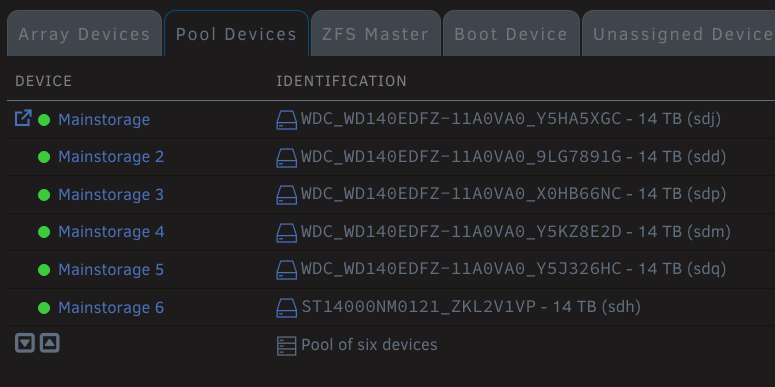
Stop using the Array. Simple as that. The problem is FUSE. You can jump through unlimited hoops for an unlimited amount of time plus perform whatever incantations you want, but you will never achieve 100MB/s average/sustained using the Array/FUSE layer with consistency. I can achieve higher than 100MB/s consistently to/from any other machine using a single drive connected to the server on USB3 when it's added as a pool - NO ARRAY. It's impossible with the array if you're running MacOS to connect to Unraid. I'm assuming other platforms will run into similar problems at some point or with some configurations. Hardly. I can easily get upwards of 200MB/s sustained all day every day over SMB on 2.5gbit LAN from my Macbook Air - reading and writing to spinning disks no less. ZFS ZRAID2 volume with 6 disks. You need to make sure that your share has EXCLUSIVE ACCESS enabled - and that of course PERMIT EXCLUSIVE SHARES is enabled in the general share settings.


-
You need to buy a Mac. Not a joke, I'm dead serious. Get a Mac mini if you want a desktop or a Macbook Air if you want something portable with a screen. Unraid is not for you unless you're looking to set up a server. It sounds however like you want to set up a desktop. That's not what Unraid is for - at all. It's not a general purpose Linux OS and the fact it runs Linux at all isn't very relevant to using it, as Unraid is 100% web-browser based, like using a Web App, not an OS desktop.
-
Can you post that compose inside a CODE block instead of an upload? I can't seem to download it as the forum produces an error. Translated (badly?) Können Sie die in einem Codeblock anstelle eines Uploads in einem Codeblock komponieren? Ich kann es nicht herunterladen, da das Forum einen Fehler erzeugt.
-
I still have no idea how you guys are finding/buying drives without GUID as I've yet to find any with such a fault and have yet to ever come across a fake drive. This thread is surely a place for the outliers. I'm also wondering if I should start selling certified Unraid-stable drives myself. Every drive with a 2x money-back guarantee. Only $150 per 16GB drive - after all, a small price to pay.
-
Maybe? ;) I use https for everything, but don't rely on any settings in Tailscale to make it happen. I figure it's doing more than enough, and since troubleshooting can be complicated, I leave that elsewhere that can easily be turned on/off and swapped out outside of Tailscale. Everything else in my stack seems to be in a more stable and long-term state, whereas Tailscale gets frequent updates. I really can't afford to deal with any more downtime - not because I can't easily work around it for personal use, but my family seems to want to blame me for anything connectivity related, even if it's a downed power line or demolished trunk 250 km away.
-
The changes between versions of Invision are like different forum software in all but branding. They at some point did a major rewrite and lost a lot of functionality. Then over the course of years seem to have brought a lot back. To the seasoned and novice user alike, it's all irrelevant because the UI/UX changes are glaring and v5 is only as smilar to v4 as any other brand of forum software. I stopped using my own perpetual license a long time ago and seemingly, so did every forum I frequent as a member. Unraid is the only forum I recall visiting in the past 10 years still running Invision software.



