





Espressomatic
Members
-
Joined
-
Last visited
Everything posted by Espressomatic
-
I'm running 1.82.5 on MacOS and have no plans to update in the near-term. I had issues with 1.84 and see the latest available version from self-update is 1.84.1 Undocumented breaking changes and regressions are too common on this platform to allow auto-updating. Further, on MacOS and mobile, I keep Tailscale set to auto-start only when outside my LAN. I may manually turn it on for a special purpose, like to use my USA or EU-based exit nodes, but otherwise it's off on those machines when I'm home. At this time I'm not actively running the plugin on Unraid either. I've uninstalled all instances the last time I was repairing an issue and haven't yet reinstalled. So TS is currently running on only VMs and LXC in Unraid: pfSense VM, LXC with Nginx Reverse Proxy, LXC with AdGuard Home. I'll look at putting the plugin back in server in September.
-
Have you made sure everything works without Tailscale first?
-
IMO, wait until SSO is supported fully in the main fork. The better idea is to use VPN back to your server. I can't really find evidence of anyone using third-party SSO successfully long term with VW - as I'm sure you also must have realized while searching.
-
You should include some text on your main site and additional text on github to explain why someone would run Gameyfin. At the moment, I can guarantee that anyone coming across those pages isn't going to appreciate what GF might be able to do for them versus any other solution, web-based or otherwise. They won't know if it's a launcher, a manager, local-only, server-based, etc. Working only for Windows games, whether it's suitable for emulation platforms, etc. Compare to the main site for Gamevault where with a single sentence they lay out the core purpose of that platform.
-
Thanks for the links. If you want a solution right now, you can edit the repository field in the Vaultwarden container and add ":testing" after "server" and re-pull. After restarting the desktop app, the trash can will reappear. For the Firefox browser plugin, I had to delete the plugin and reinstall it.
-
I'd love to find where on Github this is discussed, as was previously mentioned
-
I happily skipped all these headache auth providers entirely. No one can access my containers nor systems as I don't open any to the public internet. Tailscale is the only way in.
-
no one?
-
I can't find any discussion of this on Reddit, nor have I been able to find the report on Github. The only other cases of not being able to delete started a few months ago and only applied to users who were part of an organization. The issue was caused by a change to the database schema which wiped out user permissions to their own vaults ("can manage") I did additional testing and this issue isn't affecting the iOS client (which is def. up to date)
-
I can confirm this. There are no Delete options/buttons/links in the plugin or desktop app. I don't see how this can be a bug in Vaultwarden. Especially since it hasn't been updated since May. It's either a HUGE oversight in the client apps or something they did on purpose. Seems strange to screw with people self-hosting, but I also can't imagine how anyone would create such a bug.
-
A Reverse Proxy with automated cert renewal would make a great feature for an official Unraid Plugin. Setting up a TLD and subdomains for all your services (made easy) would really lower the barrier to entry for many new customers. Especially if coupled with automatic broadcast over Bonjour/mDNS, so those customers would be able to take advantage of local name resolution without setting up a forwarder or resolver.
-
I'd never run Immich or anything else that needs to be accessed like it (webUI / web app), including sharing with others, on a shared IP. So for Immich and so many other containers, sorry, but br0 is an absolute must. The visual parts of the web, presented in a browser run on ports 80 and 443 by default, having to specify an alternate port just doesn't fly. IMO, it's best used for most things along with a reverse proxy (a must), whether or not one is using piHole or AdGuard Home - but do run some DNS resolver like Unbound.
-
I'm only running three LXC at the moment, 2 on one system and 1 on another. I love the simplicity of spinning them up and the easy access to so many relatively full distributions, unlike the pre-baked restrictions of (someone else's) docker container.
-
This is all network-related settings I use in my containers. Been working great since last year with Nginx Proxy Manager and more recently a container just for AdGuard Home. LXC Config entries # Network Config lxc.net.0.type = veth lxc.net.0.flags = up lxc.net.0.link = br0 lxc.net.0.name = eth0 lxc.net.0.hwaddr=YOUR:MAC:ADDRESS:HERE # Allow TUN access for Tailscale use lxc.cgroup2.devices.allow = c 10:200 rwm lxc.mount.entry = /dev/net/tun dev/net/tun none bind,create=file
-
I gave up on Ente after more research and coming to the conclusion that while its source is open, it is not following typical "open source" distribution nor documentation. It does not appear that the author is interested whatsoever in having Ente flourish as a self-hosted platform and therefore there are no pre-made docker images on external repositories, clear/easy dockerfiles, simple compose file, etc. The self-hosting documentation is minimal and doesn't look to be updated. I don't believe that the difficulties in self-hosting are going to get any easier going forward and instead may only become more difficult as the platform matures. It's clear the authors are concentrating on a paid subscription model for their development and trying to maintain a self-hosted installation will become untenable even if it can initially be made to work. And despite many hours and many attempts I have never once been able to get it to work.
-
Use USB Manager plugin instead
-
Exactly how are you testing and monitoring this? I'd like to replicate your tests here to see if I can offer a suggestion
-
The Plugin serves a different purpose than the built-in docker support. Instead of using the built-in support with a docker container, I just spin up LXC container and install Tailscale into them on the command-line. IMO, this is much more stable, as is the case with my Nginx Proxy Manager and AdGuard Home LXC.
-
-
I'm confident this isn't the correct thread for your issue. You might be looking for the thread about Unraid Tailscale docker integration. This plugin isn't responsible for that.
-
-
IMO, the USB key has little to no bearing on startup speed. I have 4 systems with drastically different startup speeds - and different still compared to three other systems I've had in the past.
-
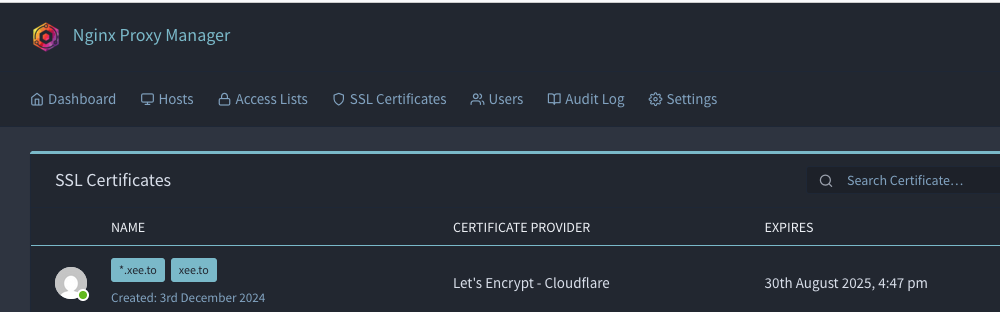
You can definitely get wildcard certs with LE as I have a couple for two domains, in addition to also managing unique ones for some services/machines. NGINX Proxy Manager provides a suitable UI for managing this, and scripts on Unraid via User Scripts plugin handles copying/installing certs onto machines where I don't want to rely only on NPM's reverse proxy and automatic HTTPS. Like installing certs onto my Unraid machines themselves.
-
I broke out the magnifying glass but couldn't find that pesky decimal place between the 1 and 2 in "12" 🧐 🤣 Kernel 6.1.9 (not subject to the CVE) was released back in 2022 BTW.
-
Great idea, just wait for that.





