





IaMs12
Members
-
Joined
-
Last visited
-
I am having issues with Palworld as well. Started a fresh docker this morning, and when connecting directly via LAN IP im stuck at a black screen. Any recommendations? EDIT: I got it working. in the PalWorldSettings.ini the bIsMultiplay was set to false. Needed to change to true (bIsMultiplay=True).
-
Awesome thank you! Seeing the changes im going to update as well, appreciate the link too now i see where to find it.
-
I saw an update for the container, but not seeing any change logs from the Vikunja website. Does anyone know what was updated? Just like to understand before i hit blindly update as i've been bitten in the butt before on that recently haha.
-
Heck yeah this is exciting! I've been loving Gameyfin for a while now, and I've had my eye on v2. Figured it be much longer till release. Nice! This might be the excuse i need to learn to compose it myself haha.
-
For anyone who stumbles upon this later in the future. After upgrading my Unraid to 7.1.4 that fixed my issue. I was previously on 7.1.2 i believe.
-
If you are still having issues, the docker was updated to say DB_USERNAME and DB_PASSWORD instead. I also had issues is if you change the password you might have to rebuild MARIADB to get it work as it just saves it the once and then doesn't update afterwards. Also i am trying to get the Email/Google login allowance to work so that my users can create their own accounts. I notice i need to add to the .env file, however when i go to that file in appdata its everything to default meaning it does not match my Docker compose settings. Do i need to add a new variable one by one in Unraid docker to get it work? Or can i edit the .env and add what i need? any help would be appreciated!
-
Ive tried doing the side car but once i change the network type on my "Gameyfin" docker to Tailscale-Docker i can't access. WebUI option for "Gameyfin" Docker goes away, and i cannot access at. Any tips to check?
-
I am interested what you did. I am getting a similar error with docker "Gameyfin". I've tried the integrated method, and receive the same error. Tried using the fixes as described above just to see if it will get to work but didnt either. Then tried the sidecar docker, and after i map it to Tailscale docker under the network i can't access it at all. I get Tailscale to see and authenticate the new Tailscale docker, but its like its not passing access through to the Gameyfin docker.
-
I couldn't find any info in the search, and google is confusing me. Anyone know how i can go about adding bots into GoldenEye Source docker? i have tried adding ge_bot_threshold -1 and ge_bot when im a spectator, but not working. Tried modifying the server.cfg and no go I know that the devils in the details when it comes to these things haha, so figured id ask just in case!
-
I am having issues with getting it to stay started, and can't find the log file to post it here to see whats going on. When i try to view the log while its running the window closes out. I've follow the Youtube video, and the directions setting up Mariadb, and RomM but just can't get it to work. I get the error connection has timed out when going to WebUI, which is where i find that the docker stopped itself. Any insight would greatly appreciated! EDIT: Figured it out. Was an issue with the MariaDB. I had to completely delete old versions of the MariaDB from appdata and start fresh. Fortunately i did not use Mariadb for any other containers at this time so was easy. Then it started to work.
-
Good to know for next time, and will stop the Array for pre-clearing. I went ahead and hit pre-clear again to redo it, but it found previous files and was able to start off where it left!
-
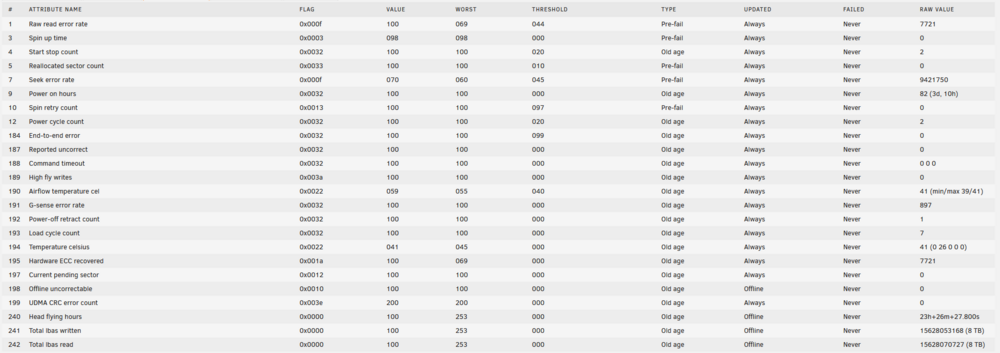
Started a pre-clear on Monday, and was expecting to come back with it complete last night. I found that it was stuck at 99% zeroing and paused. Tried to resume but did not work. I started to notice that a CPU 0 core was pegged to 100%, and some portions of unraid were unresponsive and not loading. I could start/stop dockers and access SMB, but that was it. Could not get logs to download, etc. So i did a hard reboot. Everything came back up fine and now its all normal. However unfortunately still could not unpause the Pre-clear so i stopped it. I am curious, should i re-run the pre-clear? If so would it be faster since 99% of the drive was zeroed or would it be going through the entire process again? Below is the current SMART of that drive. This drive will be added to the array as a brand new drive just recently purchased.
-
Roger that, makes sense! I am also in a normal tower as well. I noticed my HDD that i am pre-clearing was getting toasty so airflow was already on my mind i need to address for my server haha.
-
Thanks appreciate the sanity check.
-
The first link one! I didnt realize there were two that seem to be the same. I do remember when i was looking initially i couldnt confirm if it was ASM1166, then i saw the one that did say it and went with that one. Do you think the ASM1166 needs a fan to cool as well?

