





JustinAiken
Members
-
Joined
-
Last visited
-
Oh lol it was a flash drive issue - 2GB used of 2GB does not leave much room 🤣
-
plugin: updating: dynamix.unraid.net.plg Executing hook script: pre_plugin_checks plugin: downloading: dynamix.unraid.net-4.15.1-x86_64-1.txz ... 28% plugin: dynamix.unraid.net-4.15.1-x86_64-1.txz download failure: File I/O error Executing hook script: post_plugin_checks Trying to go from 2025.07.10.1432 to 2025.08.20.2129
-
How do you get this to work for Palworld (Steam), for players on a local network instead of a community server? Trying to connect directly to the docker ip/port gives a "No password entered" even after stripping it out of the .ini
-
Right now on the current docker image, I'm seeing this error on startup: /usr/lib/python3.8/site-packages/sickchill/locale /usr/lib/python3.8/site-packages/sickchill/locale Traceback (most recent call last): File "/usr/bin/SickChill.py", line 14, in <module> import sickchill.start File "/usr/lib/python3.8/site-packages/sickchill/__init__.py", line 1, in <module> from .show.indexers import indexer, ShowIndexer File "/usr/lib/python3.8/site-packages/sickchill/show/indexers/__init__.py", line 1, in <module> from .handler import ShowIndexer File "/usr/lib/python3.8/site-packages/sickchill/show/indexers/handler.py", line 5, in <module> from sickchill.tv import Show, TVEpisode File "/usr/lib/python3.8/site-packages/sickchill/tv.py", line 15, in <module> import imdb ModuleNotFoundError: No module named 'imdb' EDIT: Opened issue on github at https://github.com/linuxserver/docker-sickchill/issues/25
-
..you got me interested in a dark theme, I just gave it a try. ``` # Run this while Node Red is up and running: $ docker exec -it NodeRed-OfficialDocker /bin/bash # Then you'll be inside the running container # Now run: $ npm install node-red-contrib-theme-midnight-red # And exit the container: $ exit # Now from unraid, edit settings.js: $ vim /path/to/nodered/settings.js ``` You'll want it to look like: ``` .... editorTheme: { page: { css: "/usr/src/node-red/node_modules/node-red-contrib-theme-midnight-red/midnight.css" } } ``` Then restart nodered docker from the unraid docker GUI.
-
NOT the toplevel appdata folder !- the path to your nodered appdata folder. Something like `/mnt/user/appdata/nodered` https://github.com/bonanitech/node-red-contrib-theme-midnight-red#install Looks like you have to manually do some `npm`'ing
-
Just tested, and at least as `root` it worked
-
To update to v1.0 that came out today: - Edit your docker template's repository field from `nodered/node-red-docker` to just `nodered/node-red` - I needed to `chown -R 1000 /path/to/appdir` to update it to the new uid used by the container
-
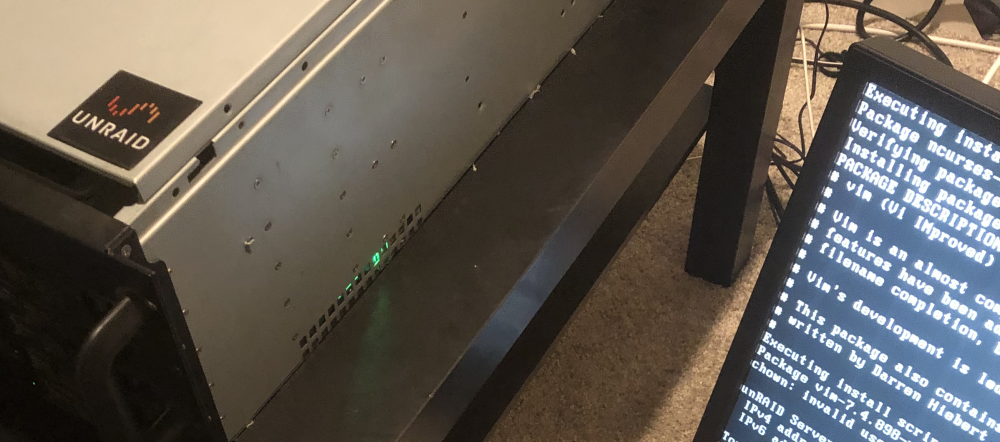
I almost feel bad about getting one of these and putting it on my ancient beat up Norco 4220! (Cover doesn't fit since I jammed in the 120mm fanplate :p )
-
Love unRaid... started as a way to just hold lots of movies for XMBC to play, now it's an automated downloading behemoth that's also running backups and home automation.
-
I'd love RSS for both blog posts, and new unRaid stable/beta releases
-
-
I've seen this on 6.7.0, at least both rc5 and rc6, and I believe one of the earlier rc's, but 5 and 6 for sure. If I go to the docker page, and hover over the icon that shows state, instead of popping up the menu of options, it shows the "rearrange tool" - Tried with white theme, black theme, and azure theme - Tried with Chrome, Safari, and Firefox - Tried in both basic and advanced view
-
Just had the same problem, and deleting the server.key/server.cert in `appdata/sabnzbd/admin` worked for me too 👍
-
@TexasAg - if you do that, then does the query log show the host instead of the IP under "Client"? Or is that just to make local DNS queries resolve?

