





TexasUnraid
Members
-
Joined
-
Last visited
Everything posted by TexasUnraid
-
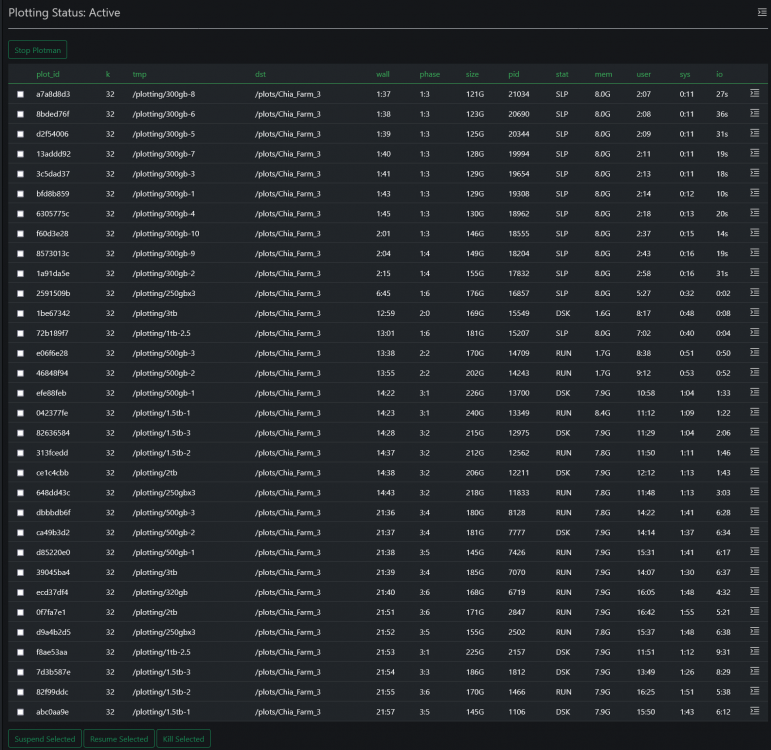
Yeah, I noticed the price has been on the downturn, as more people win and sell off I kinda expect that to continue TBH. Which is why I think people spending thousands on hardware for this are crazy lol. Heck I feel bad about the ~$70 or so I have spent on hardware basically just for chia but I should be able to get that back or worst case more spare hardware for the closet. Plotman is working beautifully. I think I will need to dial in the settings but boy does it make things easier and more efficient. With proper tweaking looks like I can keep 2x plots under 400gb, possibly 3x plots for 600gb so I could raid 2x 300gb drives together to get an extra plot. It is also super nice to hit go and it automatically starts new plots at the optimal timing. I am CPU limited 100%, drives are NOT the limiting factor for me lol. I need to move some to my other system to spread the load out although I will have to start using these drives for farming before long as I fill them up. With a basic phase 2 stagger setup memory usage has peaked so far around 140gb, 2x plots just under 400gb on a drive. A few drives have a 3rd plot starting now so going to see what the space gets up to on those. Looks like I am at the 32 plot limit I setup right now, so it won't start anymore until some finish. Over provisioned in a massive way but at least I know I am getting all the performance it has to give. Makes it easier on the drives since they have time to catch up and still got plenty of ram available.
-
OT, is there any way to see the smart data for SAS drives like SATA drives? Was curious to see the history of these drives but all I can see is the hours run on the 15k drives and only temp on the 10k.
-
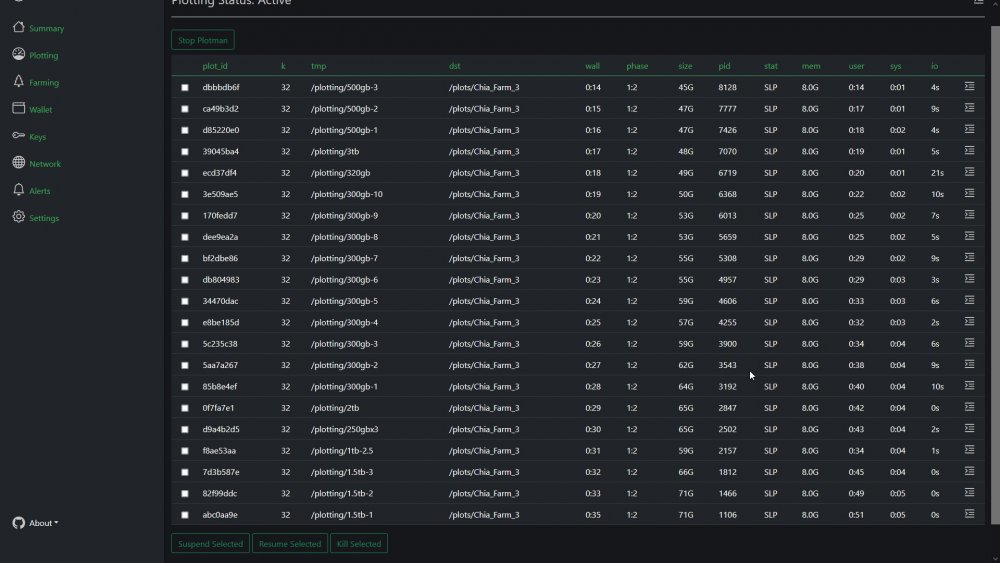
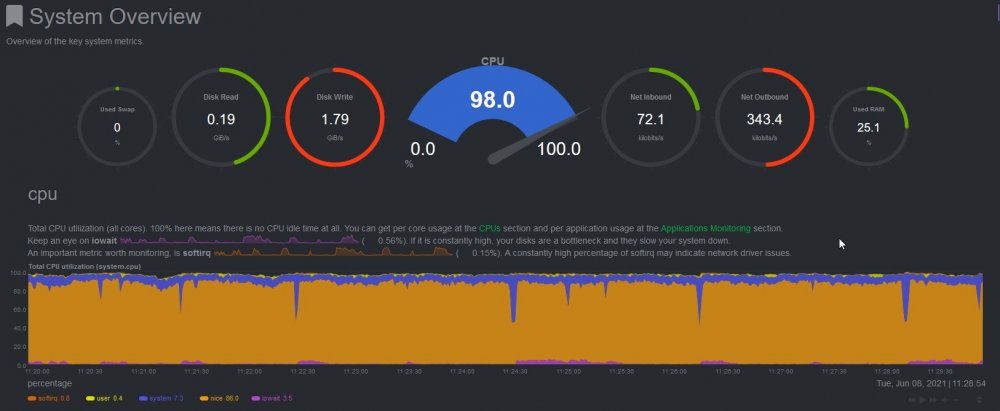
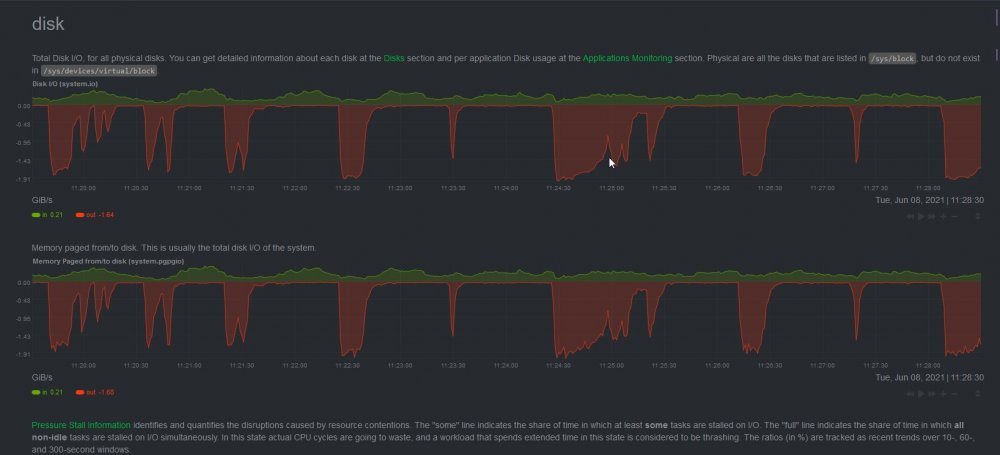
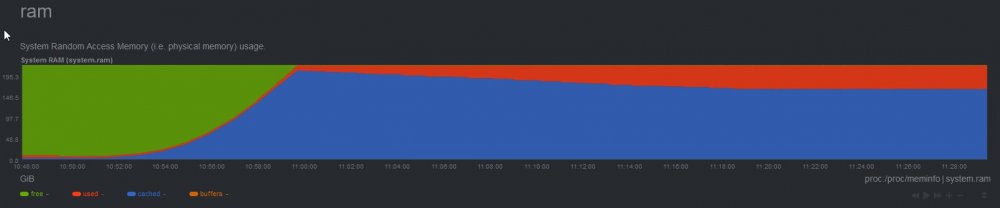
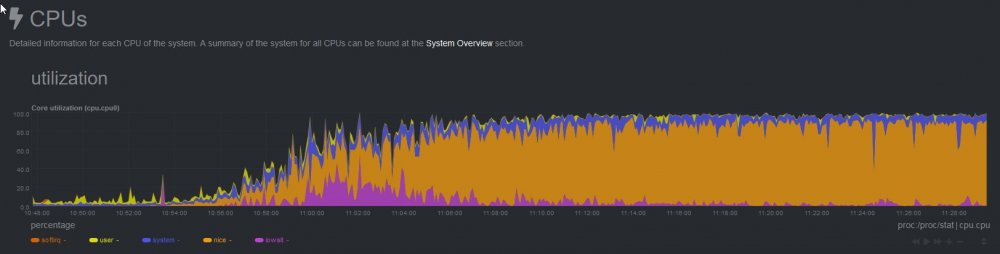
Kinda fun watching all the plots get started, 1 plot per drive all in phase 1 now, have to wait awhile for phase 2 for the next batch to start: Here I can watch each disks space usage over time to see what the peak usage is and dial in the most plots per disk without over-filling: Can do the same for memory: CPU is just pegged lol:

-
Are you planning on just solo mining for now or going to give hpool a try? I just got plotman setup with some baseline settings to try out and kicked off a run. I have each disk setup individually (except for those under 300gb which I raided together). It is set to run either 3 plots per disk or the max the disk can hold space wise, whichever is smaller. It will wait until phase 2 to start a second plot on each disk, I might need to tweak this setting once I see the outcome. Netdata is a miracle for this, I can go back and see every conceivable metric for the system for the entire plotting process. Making it easy to see where the bottlenecks are. Kinda sad the 300gb 10k drives are too small for more plots, plenty of wasted bandwidth there. I did manage to get some 600gb 15k drives for $13 each so grabbed 3 of them for my inside server, figure I can use them as a cache if chia doesn't work out, always hated burning SSD's for caching mundane items. Although I should of ordered 4 in retrospect as it would fill the slots that I can't really use for 3.5 drives anyways.
-
Ok, so looks like I got all the drives added to plotman properly and it saved but now running into a strange issue where if I uncomment the farmer or pool keys and enter my keys, it gets an error again? plotting: k: 32 e: False # Use -e plotting option n_threads: 6 # Threads per job n_buckets: 64 # Number of buckets to split data into job_buffer: 7000 # Per job memory - Chia default # If specified, pass through to the -f and -p options. See CLI reference. farmer_pk: a14---redacted pool_pk: 939-----redacted I then get this error while parsing a block mapping in "<unicode string>", line 209, column 9: k: 32 ^ expected <block end>, but found '<block mapping start>' in "<unicode string>", line 215, column 10: farmer_pk: a14 Comment out the keys, saves fine. The error means nothing to me, anyway to understand what it is trying to tell me?
-
Ok, that actually solved it. It id not make it clear anywhere that the "tmp_overrides:" line was a command and not a comment so I was not aware I needed to uncomment that one lol. Removed the comment from that line and it saved, now to go and re-add all my drives.
-
In unraid you simply check the auto start checkbox in the docker tab.
-
I have read through that, it is not very easy to understand but figured out what I needed with extra research elsewhere. Except for this error above, it will simply not go away or allow me to save the config file if I have the "tmpdir_max_jobs:" enabled. I must setup individual limits though or it will only run a single plot on drives that can handle 3+.
-
I have 60 dockers currently, I would say I have embraced docker lol. The drive mapping is ok, I simply mapped the /mnt/disks folder to /plotting so I can access all my drives without having to map them individually (I have 26 of them at the moment, that would be a real pain). The drives are available inside the container, no spaces are used, so all that is fine. The issue is the config file will not accept the "tmpdir_max_jobs:" option. If I uncomment that it gives this error: while parsing a block collection in "<unicode string>", line 29, column 17: - /plotting/1.5tb-1 ^ expected <block end>, but found '?' in "<unicode string>", line 41, column 17: "/plotting/1.5tb-1": ^ Comment it, everything saves properly. I need to setup individual limits for each drive though as they range from 250gb to 6TB and can handle different numbers of plots. It must be a syntax issue but I am doing it exactly like the example it had. So I am at a loss.
-
I have not used Machinaris yet, up to this point I was just testing plotting setups using the stock GUI. I have things somewhat dialed in now so ready to move to Machinaris to start "real" plotting. So all the settings are new and there is surprisingly little documentation that I can find on the subjects as well.
-
Cool, that helped a lot. I will just swap it into plotting mode then and work from there. I guess I need to input the farmer and pool keys when in plotting mode as the wallet it not synced for it to pull from? I am getting a strange error when trying to update the plotman config though: while parsing a block collection in "<unicode string>", line 29, column 17: - /plotting/1.5tb-1 ^ expected <block end>, but found '?' in "<unicode string>", line 45, column 17: "/plotting/1.5tb-1": ^ It seems to be complaining about my temp drive settings, I have a bunch of drives setup individually with different max job limits to correspond with their sizes and speeds but took out the extras to test. tmp: - /plotting/1.5tb-1 # Optional: Allows overriding some characteristics of certain tmp # directories. This contains a map of tmp directory names to # attributes. If a tmp directory and attribute is not listed here, # it uses the default attribute setting from the main configuration. # # Currently support override parameters: # - tmpdir_max_jobs #tmp_overrides: # In this example, /mnt/tmp/00 is larger than the other tmp # dirs and it can hold more plots than the default. #"/mnt/tmp/00": #tmpdir_max_jobs: 5 "/plotting/1.5tb-1": tmpdir_max_jobs: 3 Do I ignore the error?
-
This is true, at the slowest speeds of the drives I would only be gaining a little bit from a faster backplane. I split the drives up to individuals today and going to run another test with plotman to see what the results from there are.
-
In the process of setting up my system in a more long term arrangement. I was looking at the docker I will be using and noticed that they added this Curious to see what effect that has on plot speed, think I am going to switch over to that docker for plotting now. Also thinking I will go ahead and start plotting and fill up some of my spare drives and then either setup a separate machine or a VM to farm them on hpool. Figure I might as well get something for my efforts before the netspace gets so big you earn nothing at all.
-
I was thinking about how to use hpool for now and then easily swap over to real pools when they come online. I am thinking that setting up my server to do plotting like it will down the road is the best option and then simply move the plots to either another system or a VM with windows to farm them since I don't trust hpool on a real computer. Is there a writeup explaining how to setup this container as a plotter/full node/farmer? I would want to switch it to a plotter for now and then back to a full node / farmer later.
-
In other news, let the plots keep running and learned some things. With proper staggering it looks like you can keep the max disk space used down to 400-420gb for 2 plots. I think with a proper plot manager 400gb should be doable meaning I just might be able to have 3 plots in parallel with 600gb. Worth a shot anyways. A single plot does max out just under the 239gb they advertise but after formatting a 250gb drive only has like 234gb free, so not quite enough for a single plot. I will raid those drives together and try multiple plots to see what happens.
-
2TB per day is not bad at all. Not sure how much space you have to farm from. I have around 30-40TB of old drives I don't care about to toss at it at last count. I have an order for some new 14tb drives I will be using for backups, I am backing up 12TB drives, so I could combine things to free up a few 14tb for extra space if it is worth it. hpool freaks me out but if real pools are delayed awhile it might be the only choice.
-
All of the plot managers stagger based on phases instead of time like the stock gui. They will start a new parallel plot when the first one reaches the 2nd phase and another plot when the first reaches phase 4 for example or however you set it up. I just have not taken the time to settled on formats and names for all my drives so easier to test with the GUI for the moment.
-
I will be using plotman once I get it all setup which handles staggering automatically, you just have to select the stagger you want.
-
those outliers are interesting. Well looks like I went a little overboard, learned that a 250gb drive is not enough after formatting to hold a single plot. A 500gb drive is not enough for 2 plots IF started at the same time. If staggered then 2 plots can be run on a single 500gb (at least so far, will see if it grows anymore, sitting around 400gb of usage right now). Once phase 1 is finished ~30 plots actually seems to be working out the hardware pretty good. CPU is sitting between 85%-100% most of the time. Memory usage seems to of peaked at around 165gb and settled down to between 120-160gb for the last several hours. Drive usage is healthy, I am bandwidth limited as expected but not as much as I expected. Gonna juggle some drives around and might be able to make it work with the sas1 backplane by moving my slower drives to it (it is setup as a jbod) and moving the 10k drives to the native backplane. It is also looking like using each 10k drive individually will be faster then raiding them even though I will have to run less plots in parallel and it will have a lot of idle time. It is possible I could run 3x plots on 600gb with the right stagger, if so then raiding 2x drives together might work out.
-
Sadly it does not appear to even be on the radar for official support. A plugin is the best we can hope for at this point.
-
I can tell I will need to change the timing around to maximize things for sure. Looks like around 16 plots maxes out the CPU, so if I staggered them to start more after the first ones passed phase one I am sure that would help a fair amount.
-
Well the replacement 300gb 10k drives showed up today so decided to make my server cry, hard lol. It is loaded up with 25 drives right now, 10x 300gb sas running in a raid1 with 12 plots total as a stating test, going to be bandwidth limited on the backplane for those (sas 1 backplane). The rest of the drives are a mix of old drives I had laying around. Running 2x plots on all drives 500gb and larger, single plot for smaller drives. All plots started with 4 threads, 7gb memory, 64 buckets, 4 or 6 threads (switched at some point lol). All told there are 34 plots running or set to queue in over the next few hours. CPU is maxed during phase 1, drive IO is limited by the backplane for sure for the 10k drives, I have another backplane, might swap them in as that would net me an extra ~600-700mb/s bandwidth. Memory should be fine with 224gb cutting it close but highly unlikely they will all need peak memory usage at the same time. Putting a hurting on the system that is for sure, fans are screaming for mercy lol. I know I could optimize this but honestly just want to get a baseline at this point with some "basic settings" My main sever is a bit more powerful, I can move drives around and spread the load to optimize speed once I settle on a setup. My limit will be plotting drives though, just not enough of them,
-
I can understand that as well and from a professional data center point of view I have no issues with HP or Dell for that matter. My use cases are basically always home lab/cheapest poop I can find that will do the task. I always seemed to regret buying dell and HP years ago as using them with other old/cheap gear I came across always seemed to cause something to complain. Supermicro on the other hand just seems to work with whatever I throw at it. So it kinda won out by default. I don't have time to research every cheap/old item I purchase to make sure it will work lol. I will say that the H240 and HP expanders I have work fine, HP makes good stuff.
-
lol, interesting ideal though. Good price for what it is. They are actually not too far from me, I considered taking a road trip and picking up one of their supermicro systems at one point but decided to hold out for the larger 4u system. I have always avoided HP/Dell etc servers, too propriety for me. I like supermicro simply because they are pretty universal in my experience. They do cost a bit more though due to that, feature for feature.
-
Not bad at all, most people are happy with 6-10 plots a day while burning SSD's. With pools apparently being delayed I am debating joining hpool even as much as I hate the idea of joining a china pool. I found another set of SAS HDD's, a lot more expensive but should arrive Tuesday, gonna wait for that to do much more. unixsurplus on ebay Is screwing me, they clearly have the drives in stock and listed for sale at higher prices but are refusing to ship my order. They also screwed me on shipping for some cables I ordered, $30 shipping for what cost maybe $6 to ship and I messaged them to let them correct it but just got "that is our shipping price" as a reply each time.


