





TexasUnraid
Members
-
Joined
-
Last visited
Everything posted by TexasUnraid
-
You don't need the cache drive in unraid, in fact for a large transfer like this you would be better off without the cache drive installed as it will not help and will just wear it out. Just boot up ubuntu, use SMB to connect to the unraid share and then transfer everything over (using another computer of course). Worst case you can use an ubuntu usb stick and a USB adapter for the hard drive. Although to use exfat you need to also install the unassigned devices plus plugin. That might fix your issue as well.
-
I was messing with adding in a new drive I will be using for parity and it had write cache disabled, I decided to try a fix I found after finishing the last drives by using a more advanced smartctl command and what do you know, it worked! Much easier then using windows, don't even have to reboot. smartctl -s wcache-sct,on,p /dev/sdX I edited the OP with this command.
-
Worst case just plug those drives back into the ubuntu computer and copy the data over the network, it will be slow but it should work.
-
That explains it
-
I had this happen a few times when it was duplicating names, there might of been another way around the issue but restarting fixed it for me. I just updated this morning and have not had any issues thus far but have also not really used UD much, that is mostly when I do backups.
-
Try restarting the server, sometimes a mount name will get "stuck" and restarting will sort it out.
-
great, I figured that would fix it, just been too busy to do it lol.
-
Been getting a strange issue with UD that I have not had time to dig into. When I connect a new drive to the system it has been duplicating it "on top of" another drive until I rescan, then it detects them properly sometimes. Others it will will be convinced that I have 2 of the same drive and will not let me mount or unmount as it tries to use the same share / drive names. No idea why or what is going on, not sure if I have the latest version of UD, updated last week. I will check for an update tomorrow and see if the problem continues. Just figured I would see if anyone else has noticed this.
-
Power usage on this card is around ~15w according to my watt meter (not exact as I made some other changed to the hardware at the same time). Considering this is pcie gen3 with 16 ports, that is a bit better then average from my research. Naturally the 8 port pcie gen 2 cards will use less, think they were generally closer to 8-10w.
-
Ok, so I was looking into LSI HBA cards and they all seemed overpriced / over-hyped compared to other options. After looking around a lot I was debating between the HP240 and Adaptec as they both offered more features for less money. I ended up going with the adaptec 71605 as I got a really good deal on it and it checked all the boxes except trim support for consumer SSD's like basically all other HBA's. 16 sata ports PCIE Gen3 x8 No need to flash the card for HBA funcality, just simply switch to HBA mode in the cards bios Built in driver support in unraid and every other OS I have tried it with Can be found for less then $50 fairly easily on ebay (I got mine for a bit over half that during a sale) So I have been using it for a bit over a month now and have to say, I am quite happy with my choice. I can hit over 2GB/sec speeds on my 5x 128gb cache pool but I am CPU bottlenecked at that point (all cores pegged to 100%). Others have reported 4500MB/s combined speeds and still not reaching a bottleneck. The heatsink does need some airflow like all HBA cards. I built a funnel out of poster board that covers half a 120mm side panel fan and it keeps it nice and cool with the fan at the lowest speed ~500rpm. The bios is also pretty simple to figure out as well, reset all settings to default and don't setup any raid settings and it will work. Although switching it to HBA mode and enabling drive listing on boot is better for our use case IMHO. Overall I am very happy with this card and recommend it. The only issue I have had is that the default write-cache setting is "Drive dependent". Sounds fine on paper but I had several drives just suddenly stop supporting write caching after a reboot and hdparm could no re-enable it nor would it work on another computer. This setting should always be set to "enabled always" and never changed. EDIT: I figured out how to fix this from within unraid after some more playing around, I will leave the old windows fix in a zip archive below in case some of that helped get this working. hdparm does not work to fix this, nor does the normal smartctl command. There is a more advanced smartctl command that does work though! smartctl -s wcache-sct,on,p /dev/sdX This got it working on a drive I added to the server after fixing the others without having to revert to windows. No need to reboot or anything, takes effect immediately. The ",p" is supposed to make the command persistent. I archived the rest of this thread for future reference in case someone needs it in the attached zip file, including the dskcache windows program. dskcache - Tool for fixing write cache on hard drives.zip Archived instructions for fixing write-cache disabled on Adaptec HBA card.zip
-
I like to add these tracker lists to the "Automatically add these trackers to new downloads:" section. https://github.com/ngosang/trackerslist It is reset on every reboot though? Any way to make it persist?
-
I think you have done a fantastic job with UD. It has expanded to be a very powerful addition to unraid and I can firmly say that I would not of been able to move to unraid without it. The ability to use my old drives with UD while setting up unraid was a make or break point for me. The new cache pools features should really expand the capabilities of unraid, I am really looking forward to them. If they add ZFS as well that should really blur the lines between freeNAS / unraid and make unraid the de-facto option IMHO.
-
Now all of that aside, back to your specific questions. 1: You can setup a wifi network in your house without any internet, pretty sure most phones will connect to it but use data for internet connection. Or better yet, use a LAN based device to host the FTP server. There are a lot of android media boxes out there for cheap that should be able to do it, simply plug it in as a P2P network if needed. Although wifi is better if the device will be left home when you are not there since that allows you to hide it. Old routers can be had for like $10. 2: If for some reason the server would need to be started when you are not home you can either use the LAN option above or have a secondary phone in the house that also has the FTP server. If you were going out of town, turn the phone off and hide it somewhere. Should the need arise that someone else needs to reboot the server, simply tell them where the phone is and have them turn it on. Then they can reboot the server and it should work. You could even setup a script on the phone to SSH into the server and reboot it with the press of a button. This is the simplest option IMO. You can easily set the server to check multiple FTP servers for the file, so that it will work with anyone's phone that is home for example. 3: Like I mentioned above with the encrypted keyfile I am using now, it becomes quite difficult for someone to get the keyfile as they would have to compromise both the ftp server and the unraid server. 4: A VPN to allow you to log into the server directly is the best option if you see this need coming about regularly or have other needs that could make a VPN worth it. A router with VPN capabilities would seem to solve a lot of your issues lol. I have PFsense setup on an old laptop someone gave me. It makes for a fantastic router with more features and power then I need and it has a builtin battery backup. Only things I did hardware wise was buy a $8 PCexpress gigabit card and rig up a 120mm fan to blow threw the cooling vents so the internal fan does not need to turn on and it keeps it cooler.
-
You have some good points, the end result with any kind of security is how much hassle you are willing to put up with. The more hassle and effort you are willing to put up with on a regular basis, the more secure it will be and vice versa. The trick is finding the right balance for your situation. Automatically entering the password/keyfile is going to be insecure no matter what you do, you can only reduce the risks. The best security is to manually enter an 80 character long password everytime you start the server while covering the keyboard and watching over your shoulder. Personally I find that outside my hassle threshold lol. The setup Spaceinveader / I came up with is a pretty good balance IMHO but it does make some assumptions. 1: That you have a local wifi network 2: That you, or someone you trust / family member will be present anytime the server needs to boot 3: That you are not being actively targeted by someone trying to get your data. Given these parameters I feel that the setup I am using is about the best tradeoff I can do. Someone attacking remotely would get nothing from my phone as it is now encrypted. They would have to break into unraid to get the keyfile or password for the archive, so I am already screwed if they get that far. A local attack is also outside most capability's with the encrypted keyfile I am using now. They would have to really know what they are doing to get the password from the go file, hack into the sftp server, get the keyfile and then get into unraid. Possible if you are not there to stop it but once again you would have to be targeted and at that point you are screwed regardless pretty much. Your basic smash and grab would end up with no usable data. Someone stealing the server would put them out of luck if you use a phone / LAN based FTP option. Since remotely they would not have access to the FTP server and if they try to do it while you are home, well I am going to guess you would notice lol. Basically the only real weakness is someone that is targeting you, knows exactly how you have everything setup and somehow manages to keep it powered on after stealing it and letting it download the keyfile from your phone all while you are somehow not aware? Not perfect of course, everything can be hacked but good enough to stop 95% of potential attackers. If you have someone capable of getting around all of that, then I think you are screwed no matter what TBH. The best security is to not have anything of value, my data is worthless to anyone but myself but I still don't want all our family pictures falling into someone else's hands lol. In this case the encryption in my case is more about future proofing, it is a pain to encrypt later. Also if I needed to RMA a drive for example I don't have to wipe it first. Also peace of mind if it was stolen to basically know the data is safe etc.
-
Well, I was working on my phone and saw the keyfile sitting there for this in plain text and it annoyed me enough to fix it lol. So here is a simple addition to the above that will keep the keyfile encrypted on the FTP server / phone preventing anyone from getting your password should they access the ftp server. 1: Install p7zip from the nerdtools plugin 2: Open terminal after the keyfile exists in root (of if doing this from the start, do this step just after creating the keyfile) 3: Run this command substituting a password of your choosing, do not use your array password as this password will be stored in plain text on the USB drive. 7z a -p'Password here no space between the p' -mx=9 -mhe -t7z key.7z keyfile 4: Add this command after the SFTP command in the go file 7z x -p'Password here no space between the p' /root/key.7z -o/root/ So someone would need both the FTP file and the go file from the USB in order to get your array password, not perfect but much better since the password used for the zip file is a throwaway that doesn't matter. This could also be used with a proper keyfile (aka, a picture etc) as well if that is how you encrypted your array. Simply encrypt the keyfile and it will be protected from prying eyes. I will insert these instructions into the above post.
-
I was getting really strange issues in several html5 pages with firefox until the other day when I wiped firefox completely and started over from scratch (only importing bookmarks). All the sudden everything started working just fine. The strange part is I reinstalled my computer just a few months ago but I did restore a few settings from the old firefox install and I guess one of those was corrupted.
-
While working on a new version anyways, would it be possible to make file copy progress windows always stay on top by default? It appears it is using openbox window manager and I found this thread that gives details on how to do it: https://unix.stackexchange.com/questions/345763/make-window-always-on-top-on-boot It can manually be changed in the top left corner if someone wants to put it behind the main window but seems that having it front and center would be a good default so that we don't forget something is still copying and possibly do something we should not. If you don't want to make it the default, what is the SU password for the image so I can try to do it myself?
-
Sounds like a permissions issue. Normally the fix permissions docker safe option in tools will fix these kind of things I have found but in this case it would not help since it is a docker lol. Doing it from the command line should work or use the command line to change the permissions. I ended up just setting up krusader as root for this reason and setting a vnc password for it. I have run into several issues where it would of been nice to have root in krusader.
-
Updated to the test version, looks good. The space savings is nice as well. Only thing I noticed is that after I restarted the docker after setting up the bookmarks, the text below the bookmarks on the toolbar disappeared and I had to re-enable them. Is it possible to add rar archive support easily? I noticed it seems to support it on startup but was not enabled. I use rar for most of my archive needs and I can see the possibility of using krusader to work with a rar archive being useful.
-
Got another question. I am wanting to make copy windows always be on top so they are not forgotten. Already almost forgot one of them when I was about to unmount a drive. It appears it is using openbox window manager and I found this thread that gives details on how to do it: https://unix.stackexchange.com/questions/345763/make-window-always-on-top-on-boot The issue is that I am trying to install xprop as per the thread to find the name of the window and it needs the SU password, I tried root, admin etc but they did not work.
-
I have two 2 bay sata USB drive docks, both work fine with unraid and present each disc individually.
-
Ah, got it. Thanks!
-
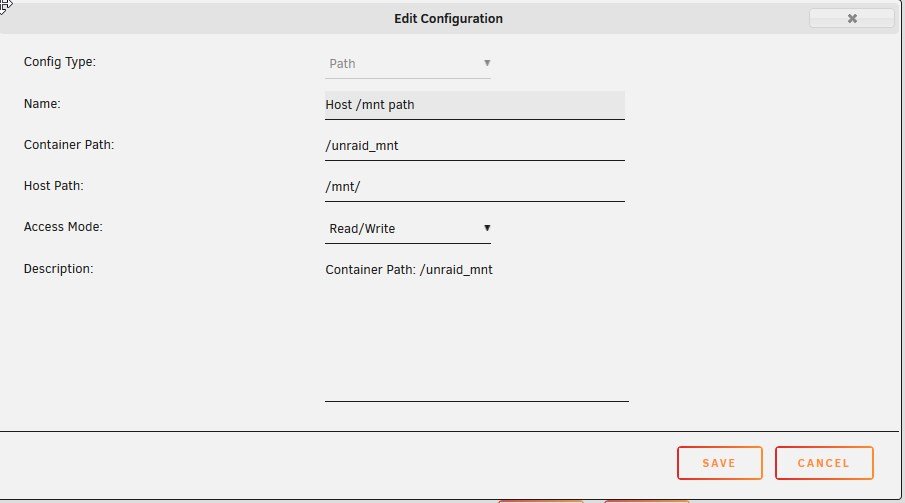
lol, I think ya'll are misunderstanding my question. I have krusader working just fine, I have all the paths mapped as I want them just fine. The only question I have is the minor annoyance that when I start krusader it by default opens to the in-docker /home/nobody folder. Thus requiring me to back down 2 folder trees to root before I can start climbing the unraid file system tree in /media (I renamed it but same thing). I would simply like krusader to default to starting in the /media folder so I do not have to back out of the home folder evrey time I start the docker. It is a very minor thing but it annoys me and seems like there should be a way to change the defualt folder it opens to.
-
Thanks, I actually setup paths much like this already from that video actually. What does the default value do? I never really understood it, it never seems to be set in dockers? I am not sure what in the settings you have there would cause krusader to open by default to a folder of my choosing? Right now it opens to the in docker home folder every time I start it. So I have to back out to get to the unraid folders. EDIT: I do not see the default path option? That was the only real difference from your settings?
-
lol, I must of passed over the general tab assuming it would be buried deeper then that. Thanks!


