





TexasUnraid
Members
-
Joined
-
Last visited
Everything posted by TexasUnraid
-
ouch, you are in a touch spot. I have had pretty good luck with USB to 3.5" docks but I only use them for backups, never had an issue with them but then I also generally only use them for short periods for backups. One thing I know is that unless you have a fan blowing on the external drives, they can easily get very hot and that could lead to issues. I have a 120mm fan connected to a USB port with an adapter off ebay that works great at keeping temps under control and it is quite due to only being run at 5v.
-
First step is to try another USB port and cable if possible. If that is not possible and you plan to shuck that drive anyways, might as well shuck it now and run the pre-clear on a sata port. You can shuck those drives pretty easy without damaging them, allowing you to put it back together if you need to return it. The trick is to slide the outside case off the cage and not pry it off. Look up some videos on youtube if needed.
-
I am on the beta now, might try reinstalling the turbo write plugin and see if it works now.
-
USB is known for being flaky and randomly disconnecting. Normally it is not an issue since it just reconnects it almost instantly with normal USB devices. Bit different with things like hard drives and such. My guess is that the USB is just disconnecting and that is causing your trouble. To fix it, first thing I would do is a new cable and try a different USB port. This will sort it out most of the time if it is not a hardware issue.
-
Interesting, sad that was a nice feature on the surface since I have my drives split up in such a way that most of them should not even need to be spun up on a normal day (part of why I am not just letting unraid handle the folder splitting).
-
Good idea, didn't know you could do that. Although it seemed to fix itself when I tried to open a jpg in the text viewer? No idea why but I will take it and keep this fix in mind if it happens again.
-
Somehow the text viewer in krusader got moved off the screen so that the top bar is outside my view. I can't figure out how to grap it and move it back into the center of the screen? Is there a way to move it or reset the position?
-
Did some more testing and over SMB to the /user file system or direct disk share, turbo write is still being disabled and nothing else is accessing the drives, verified by file activity plugin. EDIT: Hmm, made a change mid-transfer by disabling the turbo write plugin and manually enabling reconstruct write and suddenly turbo write started working over smb. So maybe this is the turbo write plugin that is at fault? Does it still work? The strange part then was I started getting seconds at a time where the transfer would just lock up and nothing would happen. Although I think this falls back to the SMB issues I was investigating before.
-
I noticed that Max Watches 'fs.inotify.max_user_watches': does not seem to apply on boot. If I manually change it and update it the setting gets applied but after rebooting it will revert back to the default value? Been trying to track file usage using the file activity plugin while troubleshooting turbo write and it needed more ionotify apparently. Not a massive deal since now that I know I can manually change it but figured I would report it.
-
Interesting, I have never had an issue editing between linux and windows systems with any linux tool or a windows program like notepad++ or atom. Now normal notepad in windows can cause issues.
-
Interesting, is that the only option, no way to associate it with a normal double click?
-
Nothing accesses these disks unless I tell it to really, outside of someone on the network browsing or accessing something. Testing now, if I use krusader and do not use the /user folder turbo write seems to work as expected from the cache to a particular disk. Once this transfer completes I will try it over SMB again and via the /user folder to see if it replicates the results from yesterday. I did restart this morning, so maybe it cleared something out of it's system.
-
Yeah, it does the same thing with txt, log etc files. I would love to associate the built in text editor with them but I can't located it in the dialog. Would also be really cool to be able to control 7zip from within krusader. I have to use a VM to compress things right now as I refuse to use a CLI for this
-
There should not be anything else happening although I didn't take steps to ensure there was not a few kb blib during this test. That is bound to happen though, if that prevents a 100GB transfer from going into turbo write mode, whats the point of turbo write? In the test transfer turbo write didn't come on at all that I noticed, the whole thing was done with normal writes. To be honest I don't know that turbo write has worked for more then a few seconds at a time no matter what I have tried. I will try some more isolated tests today to see if I can get it working at all. Maybe disable the plugin and set it manually in the disk settings?
-
Click the orange mount button, it should mount it. If not then it should give an error in the log that can help.
-
I was just experimenting with using the cache and moving files from there to a particular disk in the array but turbo write also seems to be disabled when doing this? The turbo write plugin specifically has the option to enable turbo write during mover? That seems like it would be the primary use of turbo write? This puts a massive damper on unraid, getting ~1/3 the speed it should for no reason plus thrashing the hard drives for no reason. In fact the thrashing of the drives I would say bothers me as much or more then the speed.
-
So a tiny amount of activity to the array will switch it out of turbo write mode? It seemed to go in a pattern, which is really strange since there was no other major activity at that time. Just a few little blips you can see in the graph. I am guessing there is a time delay from when it switches modes? If it was only during the active steam that would not be so bad to drop speed for a second at a time. I see it used to allow turbo write in 6.7 when copying disk to disk. I am happy to add my voice to this, I am really liking how I am setting things up right now but it only works if I am able to easily transfer files between disks manually. Too much of a organization freak to let unraid randomly put data wherever it wants lol. Is that old bug thread the best place to voice it?
-
Ok, I see now, I was thinking about everything from a turbo write standpoint where it would not need to know what the old parity was.
-
I am also curious why the parity drive is being read? Seems like it would only ever be written to unless it was rebuilding something? I can't think of a reason to read the parity besides a parity check or rebuild? Does it constantly check parity when other drives are writing? Seems inefficient?
-
Thats what it seemed like was happening, good to know I was not crazy. Why would that be the only option? Seems like transferring between disks is one of the times that turbo write would have the most benefit? Is there no way to force turbo write on? Why does turbo write seem to be working at points during the copy and disabled at others? Nothing else was happening during the copy.
-
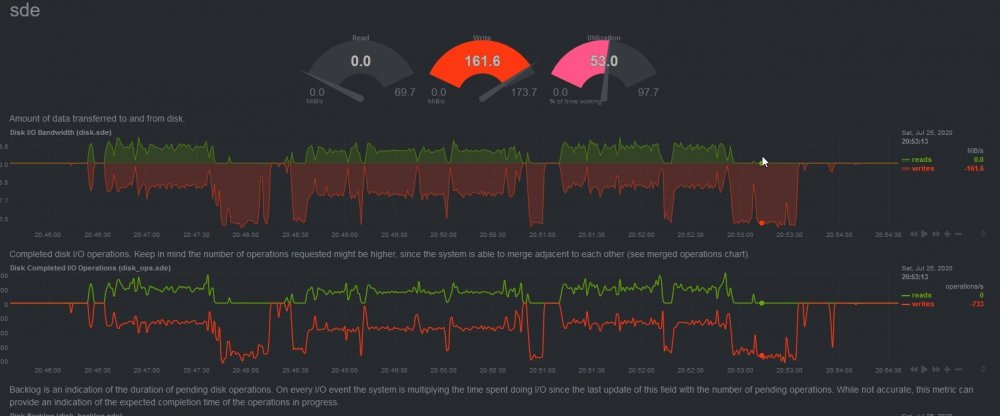
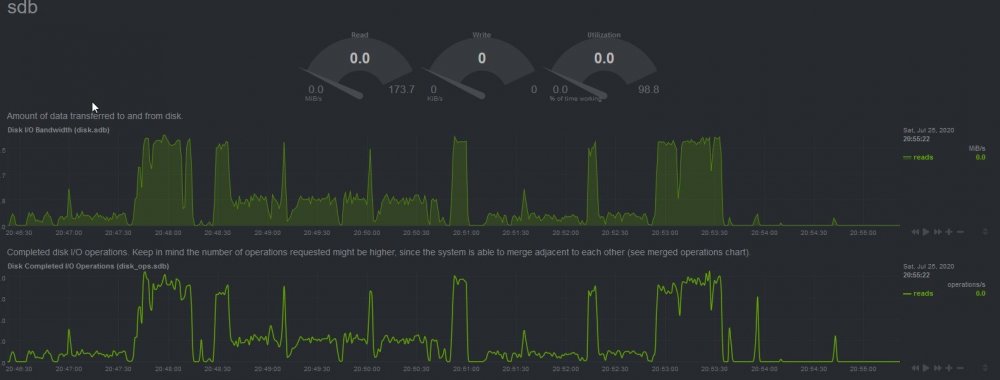
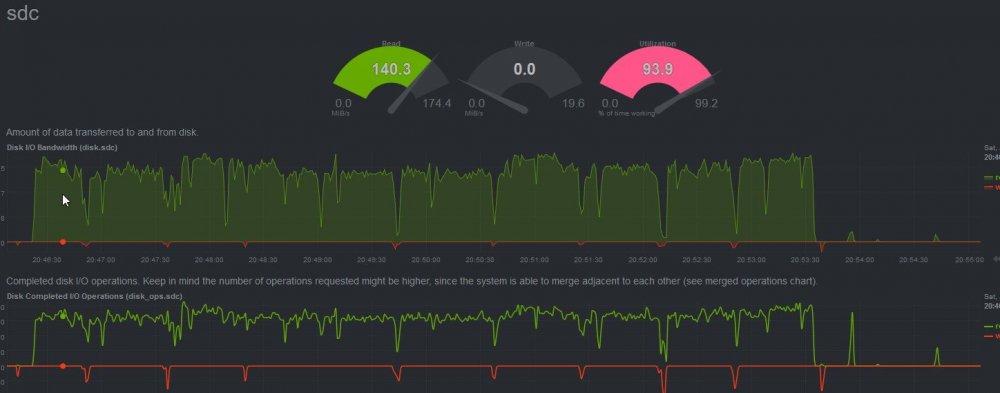
Ok, I just got finished building parity and have been cleaning up some things, still figuring out how I am going to setup the drives with unraid. I do have a question though. I will be needing to move things from hard disk to hard disk during this sorting out phase (many TB's worth). I enabled turbo write and did my first move between drives with parity enabled and am getting strange results. I was under the impression that with turbo write, I would basically get full performance of the drives, they would all just need to be spun up and the parity would mirror any writes. I expected this to happen in the case of copying between disks by all drives except the destination drive, reading the same bits to calculate parity and of course destination drive and parity writing at full speed. I never expected any drives to both read and write at the same time. This is what I am seeing on both the drive I am writing to and the parity, they are exactly the same: Notice that they go in spurts exactly as expected, full speed with writes only but then they will have equal parts read and write for long periods between?? This is another drive in the array: As you can see it matches the parity/destination drive reads with no writes, as expected. Here is another strange thing, the source drive is reading at full speed (~160mb/s) the whole time? Anyone know what is going on? Why is anything being read on the parity or destination drive? Any way to speed this process up? Before adding the parity I was able to copy files full speed between drives no problem.
-
Glad I could help, Been stressing it the last few days doing a parity build and other IO intensive things at the same time (basically constant 1 - 1.5GB/s+ IO non-stop) and it has held up great. Although I do wounder if any of the linux software packages they offer for this card would work with unraid's slackware? https://storage.microsemi.com/en-us/support/raid/sas_raid/sas-71605/ It would be kind of nice to be able to see the cards temp and it offers some other functionality like the write cache settings. Would be cool if it could be in a docker or something but no idea if that is possible.
-
Go for it, I was actually going to suggest it when I found that it worked but was not sure where to do that. There is also another command you could add there as well, it didn't work for me but might work for others: smartctl -s wcache,on /dev/sdX This is the more advanced command and was needed in my case: smartctl -s wcache-sct,on,p /dev/sdX
-
Fantastic! I wish I had found this command sooner, would of saved me a lot of time lol.
-
Correct, that is run from the terminal just like the hdparm command. Just copy/paste it and make sure to update the X at the end to the correct drive. Worst case you could use user scripts to run the hdparm command at first array start if this doesn't work.



