





TexasUnraid
Members
-
Joined
-
Last visited
Everything posted by TexasUnraid
-
I was inspired by this script so I started out trying to adapt it to work for my UD backup drive but didn't understand how parts of it worked (still new to linux, the exclude and BTRFS check sections made no sense to me). Like normal, it is at your own risk and make sure you have a backup. So I ended up basically re-writing those sections but thus far it seems to work. You will enter the path to the drive(s) you want to snapshot in the UDDRIVE= variables. It will then scan the paths to make sure they are valid and that they are BTRFS drives. It then scans the folders to make sure they are subvolumes and not just normal folders. If the folders are not subvolumes it will let you know that it needs to be put into conversion mode before it can make snapshots. I decided to make this separate as I was not sure of any downsides to automatically doing this and better to error on the safe side. To use conversion mode simply enter "convert" in the argument box and it will convert the folders to subvolumes, it can take some time if you have a lot of files or slow drives. Once the conversion is finished it will exit and you can restart it in normal mode to take a snapshot. The argument is used for the number of snapshot history to keep, 0 will erase all snapshots, good for clearing out space if you deleted a lot of files. My plan is to use it on my weekly and monthly cold backups to give me the ability to get old version of files if it were needed. #!/bin/bash #description=This script will create a snapshot on unassigned device, perfect for use with a backup drive for example. Simply enter the path drives you wish to snapsshot in the DRIVEX variables. Example: /mnt/disks/backup. Do not include a tailing /. only enter drives that are connected, it will not run if the drive is entered but not detected. The argument is normally used for the number of snapshot history you want to keep. It also includes the ability to convert folders to subvolumes which is needed for snapshots to work. To convert your exsisting folders first make sure you have a backup of your data and then run the script with "convert" in the argument. #backgroundOnly= #arrayStarted= #noParity= #argumentDescription= Number of snapshots to keep, set to 0 to remove all snapshots (allows you to free up space if you deleted a lot of things). Or put script into Subvolume conversion mode by entering "convert". #argumentDefault= 12 UDDRIVE1=/mnt/disks/Personal_Data_Backup UDDRIVE2= UDDRIVE3= UDDRIVE4= DATE=$(TZ=America/Chicago date +@CST-%m.%d.%Y-%H.%M.%S) #standardized datestamp CONVERSIONPATH=$(echo "$1" | sed -e "s/^convert//") #check to make sure drive is connected and all folders are converted to subvolumes for DRIVE in $UDDRIVE1 $UDDRIVE2 $UDDRIVE3 $UDDRIVE4 ; do echo Checking that $DRIVE is connected... if [ -d "$DRIVE" ] ; then echo "Drive $DRIVE exists" echo "Checking that $DRIVE is a BTRFS volume" btrfs subvolume show "$DRIVE" if [ $? -eq 0 ] ; then echo echo "Drive $DRIVE is a BTRFS volume" echo echo ----------------------------------------------------------------------------------------- echo "Now checking that each subfolder is valid BTRFS subvolume" echo echo #check that each folder is a BTRFS subvolume, if not warn and suggest convert mode for BTRFSCHECK in $DRIVE/* ; do btrfs subvolume show "$BTRFSCHECK" if [ $? -eq 0 ] ; then echo echo "Folder $BTRFSCHECK is BTRFS subvolume, ready for snapshots" echo echo ----------------------------------------------------------------------------------------- else echo "Folder $BTRFSCHECK is NOT a subvolume, can not create snapshot, use convert mode to convert it to subvolume" if [ "$1" = "convert" ] ; then echo "-----------------Folder to subvolume conversion mode is Active, DO NOT interrupt, it might take a few minutes-------------------" echo mv -v "$BTRFSCHECK" "${BTRFSCHECK}_TEMP" btrfs subvolume create "$BTRFSCHECK" cp -avT --reflink=always "${BTRFSCHECK}_TEMP" "$BTRFSCHECK" rm -vrf "${BTRFSCHECK}_TEMP" btrfs subvolume show "$BTRFSCHECK" if [ $? -eq 0 ] ; then echo echo "Subvolume conversion complete for $BTRFSCHECK. Remove convert from argument now and restart script to take snapshot." echo else echo Something went wrong with subvolume conversion, see logs. Exiting. exit 99 fi else echo "Folder to subvolume conversion mode not active, Not all folders are subvolumes, can not continue..." echo echo "Enter '"convert"' without quotesin the argument to enable conversion mode" echo "DO NOT interrupt folder to subvolume conversion once started, it can take several minutes if you have a lot of files" echo "Don't run convert mode unless you are sure the drive is a BTRFS drive" exit 99 fi fi done else echo "Folder $BTRFSCHECK is NOT a subvolume, can not create snapshot, use convert mode to convert it to subvolume" exit 99 fi else echo "$DRIVE does not exists. Exiting" ; exit 99 fi done #if convert mode active, stop script so that max snaps history can be entered in argument if [ "$1" = "convert" ] ; then echo Conversion mode ended, Exiting. If successful Restart script without convert mode to take snapshot exit else MAX_SNAPS=$(("$1"+1)) fi echo Starting Snapshots for all folders on drive, echo if you get errors make sure that all of the folders have been converted to subvolumes by entering '"convert"' in the argument echo for BTRFSDRIVE in $UDDRIVE1 $UDDRIVE2 $UDDRIVE3 $UDDRIVE4 ; do if [ -d "$BTRFSDRIVE" ]; then if [ ! -d "$BTRFSDRIVE/.snapshots/" ] ; then mkdir -v "$BTRFSDRIVE/.snapshots" fi if [ ! -d "$BTRFSDRIVE/.snapshots/$DATE/" ] ; then mkdir -v "$BTRFSDRIVE/.snapshots/$DATE" fi fi for SHARE in $BTRFSDRIVE/* ; do #make new snapshot btrfs subvolume snap -r "${SHARE}" "/mnt/disks/$(basename "$BTRFSDRIVE")/.snapshots/${DATE}/$(basename "$SHARE")" echo done #Cleanup old snapshots echo "Found $(find ${BTRFSDRIVE}/.snapshots/ -maxdepth 1 -mindepth 1 | sort -nr | tail -n +$MAX_SNAPS | wc -l) old snaps" for SNAP in $(find "${BTRFSDRIVE}/.snapshots/" -maxdepth 1 -mindepth 1 | sort -nr | tail -n +$MAX_SNAPS); do for SHARE_SNAP in ${SNAP}/*; do btrfs subvolume delete "$SHARE_SNAP" done rm -rfv "$SNAP" done done echo echo Finished taking snapshots and cleaning up old snapshots.
-
It will void the warranty for sure. It also stands to reason that if WD has this limit in place, then excessive use of the drive will cause it to fail quicker. Seeing as I am still using drives from 15 years ago, how long the drive lasts is really important to me. I don't have the money to replace drives willy nilly every few years.
-
WD red's have a rated 180TB/year workload (as do most other modern HDD's). This includes both reading and writing. https://media.flixcar.com/f360cdn/Western_Digital-3805661149-eng_spec_data_sheet_2879-800002.pdf
-
Good to know, I never saw this mentioned and in fact saw people recommending to pre-clear drives before shucking. I didn't format it, that one I figured would screw it up. Just sucks to use 50tb of the 180tb yearly usage before even using the drive. Add in a few parity checks and before I even use the drive I could get close to the limit.
-
Ok, strange issue here. I spent some time pre-clearing a drive a few weeks ago in preparation for installing it in the array. Today I added it to the array but it is running a clear on it? I didn't connect the drive to anything after finishing the pre-clear. The only change is the pre-clear was done via USB in the enclosure. It is now installed via sata naturally. Is there a way to let unraid to know it was already cleared?
-
Opps, must of clicked the wrong link. My bad.
-
I have noticed that the turbo write plugin is not working with WD white label red drives it seems. Checking the logs it shows smartctl drives as being active even when they are spun down. Seems to be a bug with the smartctl, it seems like it can't read the data since the drive is spun down as it hangs for a second and then uses the last known values? Not sure if there is a fix for this or if it is a known issue. How does the unraid UI figure out if a drive is spinning?
-
I have noticed that netdata is not saving all the logs / graphs. It will save the last few hours but if I keep zooming out it will have large gaps where all the graphs are blank but then possibly days before the graphs will pop back into existence, then disappear again etc. The server has been on the whole time and the docker running non-stop with no issues I am aware of. Any ideas on how to get it to keep all the graphs/logs?
-
Very nice, not having a clue how anything but ubuntu works (and just basic understanding there) I have no idea how to do things like that. Is it possible to install 7zip this same way and enable that inside krusader?
-
First off, no arguments at all that linux and the community in general is very hard to get into, everyone just assumes you know how to do "basic tasks" and never explains it meaning you never learn to do said basic tasks. Also agreed it is a throwback to DOS in a big way, I left those days behind me and do not like being forced to go back. I have said for years that linux will never be able to go mainstream until you can do 95% of tasks with the GUI. All of that said, these are also the reason I chose unraid over other options, it allows you to do far far more then other options via a GUI. I fully admit I have to search positivity everything I need to do with linux to figure it out. I just never limited myself to searching unraid solutions to a problem and that helped a lot. All of that said, to turn your krusader into a root user, change the PUID and PGID both to 0. I have no idea what the difference is between them, I just know after googling, 0 was root. Then click the "privileged user" box. This will turn krusader into a root user and you should not be hounded by any permissions issues again. It is a good idea to enable the password option if you do this. Also, there is a "fix permissions tool" under the tools menu in unraid (a better version called docker safe permissions is added once you install fix common problems plugin). This tool is a life saver, anytime I have a permissions issue, run that and it is generally sorted out except inside appdata. It is very common for folders inside appdata to have strange permissions and those permissions to be needed by the dockers.
-
When you look up issues, don;t limit yourself to looking up unraid, look up general linux issues / commands. I had only basic linux understanding 2 months ago and have taught myself how to work with linux pretty well since starting to work with unraid. Lots of googling to figure out issues but with some effort and google foo, I was able to figure out most of them. Of course I have been working with computers and in IT since the 90's, so while linux is still new to me, computers in general are not. Your deleting issue is most likely a permissions issue. I ended up just making krusader a root user so I can do whatever the heck I want. I then used the password option to log into krusader to give some level of security.
-
yeah, that is pretty normal, you generally need a "dummy monitor" to boot headless, sometimes a keyboard too, I just have a wireless dongle plugged in and a dummy VGA dongle plugged into the video card. You can get the dummy VGA / HDMI / Display port plugs on ebay or amazon for a few bucks.
-
As a rule, when troubleshooting something out of the ordinary, you are almost always best off starting fresh and not even trying to import and restore any prior settings. Just rebuild them from scratch if possible. In the case of krusader there are not that many settings to setup, I would recommend backing up and then deleting the krusader appdata, removing the krusader docker and then starting over from scratch. All that said, I wish that 7zip could be integrated with krusader as well, have a bunch of rar files I am having to extract using my main system right now actually.
-
If I have anymore issues I will try that then, although in V3 most of those options have been removed, you only have the file chmod option now.
-
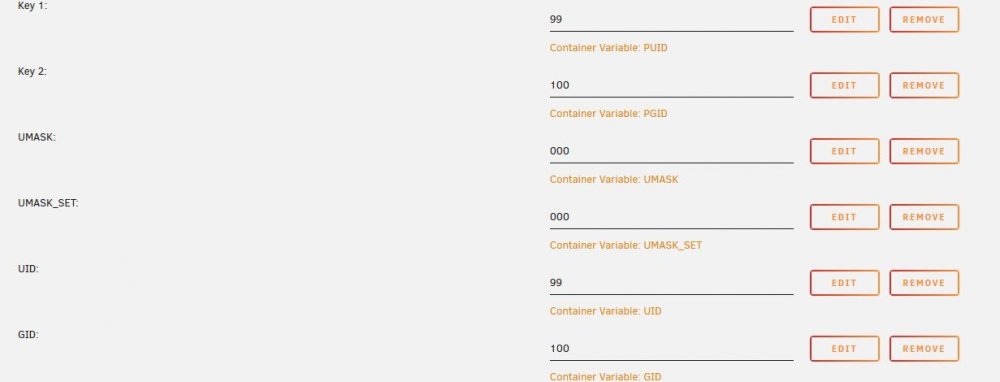
I just took the brute force approach and added every permissions variable to the docker I could find and so far it seems to be working
-
I saw those options but no explanation of how they work so I didn't mess with them. Still pretty new to linux and don't fully understand the permissions. From what I know 777 is full permissions and what I would want on the files, so why does that show 0644 and 0755? Wouldn't that limit permissions in some way? Also, seems there are 2 ways to adjust permissions in linux, one allows you to set permissions and the other only allows you to subtract permissions? I was not sure which one this used.
-
I am having the same issues with sonarr permissions. Everything seems to have the wrong permissions. I did a clean install of the preview branch. At this point I have to run the permission fix tool every time I want to mess with the files.
-
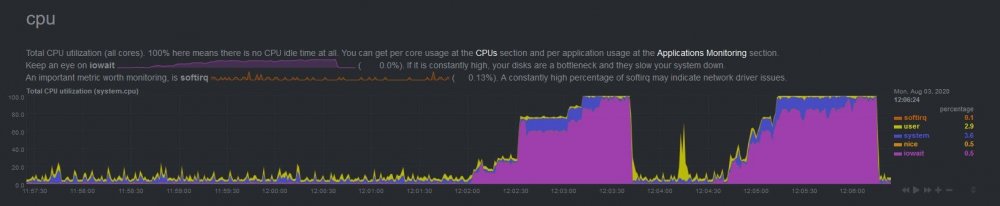
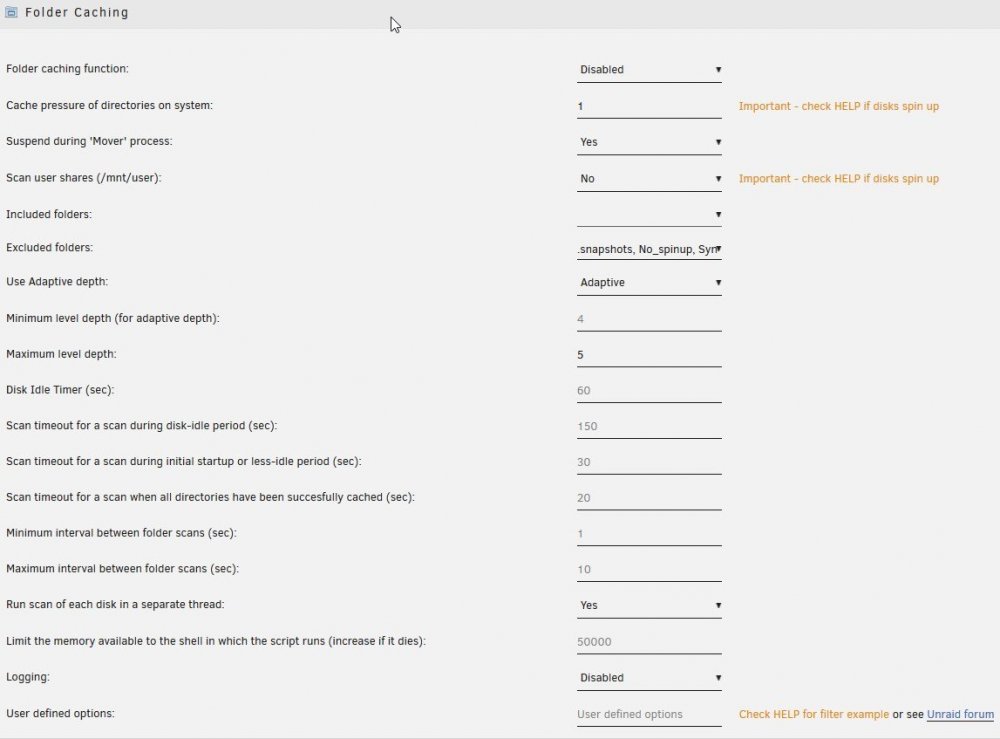
No worries. Thanks, That fixed the excluded folders. Although I just noticed a new issue, I think I might of had this issue the other day but could not figure it out and it was fixed with a restart so I left it alone. I just spundown the array manually and noticed that unraid became very unresponsive. This time my dockers were working, last time even they would not load but it allowed me to see this: The high iowait starts when I spin down the array. I then spun it back up and it went away. Spun it down again and it came back. On a hunch I disabled folder cache at the end there and as you can see, even with the drives spun down CPU dropped back to what it should be. No idea what would cause this, my settings are pretty much defaults with some exclusions and a limit of 5 levels deep (still experimenting with the ideal depth, which is why I spun down the array, wanted to see if and what would spin back up over the day).
-
Just made some changes to my shares and rebooted the server to take advantage of the multiple pools more effectivly, I now have some of the shares only sitting on a secondary cache pool (before they were cached versions of shares on the main cache or array) and cache dir's is not finding the directories to exclude again. In this case they are on a pool called xfs-cache, it seems to detect all the folders on the normal cache and array. although I think it might only be excluding the folders on the main cache and array and not the copies of them on other pools as my cpu usage is higher then normal
-
Interestingly, I recently stopped and started the array and when it restarted the write cache was disabled on a few drives again. I know this was not the cards fault since the computer was not restarted and it happened with the array restart. So it must be something about how unraid interacts with the card that is causing the write cache to be disabled. Luckily it is not an issue, performance is only minorly effected in some quick tests I did with the write cache off and fixing it is very simple with the above smartctl command. I went ahead and made up this script that runs hourly to ensure I don't have to mess with this again, I will leave it here in case someone else wants to use it. It prints the starting status of the drive, it then enables the cache and then prints the status of the write cache again to make sure it changed. It is perfectly fine to run it on all the drives. #!/bin/bash #description=This script will enable write cache for all drives with /dev/sd* names. #backgroundOnly= #arrayStarted= #noParity= #argumentDescription= #argumentDefault= for DRIVE in /dev/sd*[a-z] ; do echo Below here ------------------------------------------------------------Drive = $DRIVE echo echo Write cache status before making changes to $DRIVE: hdparm -ACW $DRIVE echo smartctl -s wcache-sct,on,p $DRIVE echo echo Write cache status after making changes to $DRIVE: hdparm -ACW $DRIVE echo done
-
Ok, cool, removed and sure enough, not getting the massive cpu spikes and network usage I was seeing before. 👍
-
Just tested it, yep, seems to of fixed the multiple cache pools. Although I had a manual exclusion -e My_Share in the User defined options. This was to exclude a UD mounted network share. This now gives an error.
-
Will cache Dir's be updated to work with 6.9? It does not detect folders to exclude when they are on one of the new cache pools with 6.9 it seems, these are on a secondary cache pool: Jul 31 08:50:39 NAS cache_dirs: ERROR: excluded directory 'appdata' does not exist. Jul 31 08:50:39 NAS cache_dirs: ERROR: excluded directory 'domains' does not exist. Jul 31 08:50:39 NAS cache_dirs: ERROR: excluded directory 'isos' does not exist. Jul 31 08:50:39 NAS cache_dirs: ERROR: excluded directory 'lancache' does not exist. Jul 31 08:50:39 NAS cache_dirs: ERROR: excluded directory 'system' does not exist.
-
Does turbo write work with 6.9? I had some issues after updating where turbo write was not being enabled even with all the drives spun up but it worked fine after uninstalling the plugin and manually changing to reconstruct write. I also perpetually get this notice on the plugin "An update to this plugin is available" but when I check for an update nothing is shown?
-
Will unbalance be updated to work with the new multiple cache pools option in 6.9? It does not detect any of the other cache pools right now.


